Manage account settings
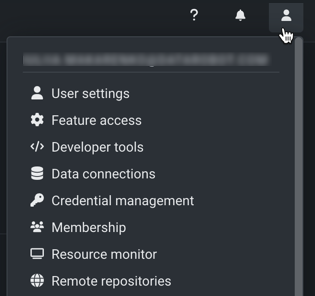
To access profile information, two-factor authentication, developer tools, data sources, and membership assignments, click your profile icon (or the default avatar ) in the upper-right corner of DataRobot.
Note
The options available in the dropdown are dependent on your DataRobot permissions.
The following table summarizes the options:
| Topic | Description |
|---|---|
| User settings | |
| Account | Update your account information and avatar. |
| Authentication | Change your password and configure two-factor authentication. |
| System | Update your display language, color theme, default DataRobot experience, and CSV export settings. |
| Notifications | Mute email notifications and update Autopilot completion notifications. |
| Feature access | |
| Feature toggles | Enable or disable features for tenants. |
| Admin controls | Assign a default role and limits for users in your tenant. |
| API keys and tools | |
| API keys | Create and manage the keys necessary to connect to the DataRobot API. |
| Management and monitoring agents | Download the agents to deploy and monitor remote models in production. |
| Portable Prediction Server | Deploy models on your organization’s infrastructure with DataRobot’s Portable Prediction Server. |
| Data Connections | |
| Data Connections | Add, delete, modify, and test data connections. |
| Credential Management | |
| Credential Management | Add and manage securely stored credentials to reuse when accessing secure data sources. |
| Membership | |
| Membership | View the organizations and groups you belong to and join groups. |
| App administrators | |
| Settings | Enable and disable product features and permissions. (Requires "Can manage own settings" permission.) |
| User Activity Monitor | Access and analyze usage data and prediction statistics. |
| Maintenance Notifications | Integrate flexible and centralized notifications into an organization's processes around change and incident management. |
| Groups | Create and delete groups, and configure organization membership. |
| Users | Create and deactivate users, and configure their permissions. Requires "Can manage users" permission. |
| Topic | Description |
|---|---|
| User settings | |
| Account | Update your account information and avatar. |
| Authentication | Change your password and configure two-factor authentication. |
| System | Update your display language, color theme, default DataRobot experience, and CSV export settings. |
| Notifications | Mute email notifications and update Autopilot completion notifications. |
| Feature access | |
| Feature toggles | Enable or disable features for tenants. |
| Admin controls | Assign a default role and limits for users in your tenant. |
| API keys and tools | |
| API keys | Create and manage the keys necessary to connect to the DataRobot API. |
| Management and monitoring agents | Download the agents to deploy and monitor remote models in production. |
| Portable Prediction Server | Deploy models on your organization’s infrastructure with DataRobot’s Portable Prediction Server. |
| Data Connections | |
| Data Connections | Add, delete, modify, and test data connections. |
| Credential Management | |
| Credential Management | Add and manage securely stored credentials to reuse when accessing secure data sources. |
| Membership | |
| Membership | View the organizations and groups you belong to and join groups. |
| App administrators | |
| Settings | Enable and disable product features and permissions. (Requires "Can manage own settings" permission.) |
| Resource Monitor | Examine DataRobot's active modeling workers across the installation—view general information about the current state of the application and specific information about the status of components. |
| User Activity Monitor | Access and analyze usage data and prediction statistics. |
| Organizations | Create and delete organizations. |
| Maintenance Notifications | Integrate flexible and centralized notifications into an organization's processes around change and incident management. |
| Groups | Create and delete groups, and configure organization membership. |
| Users | Create and deactivate users, and configure their permissions. (Requires "Can manage users" permission.) |