DataRobot Agent Workforce Platform overview
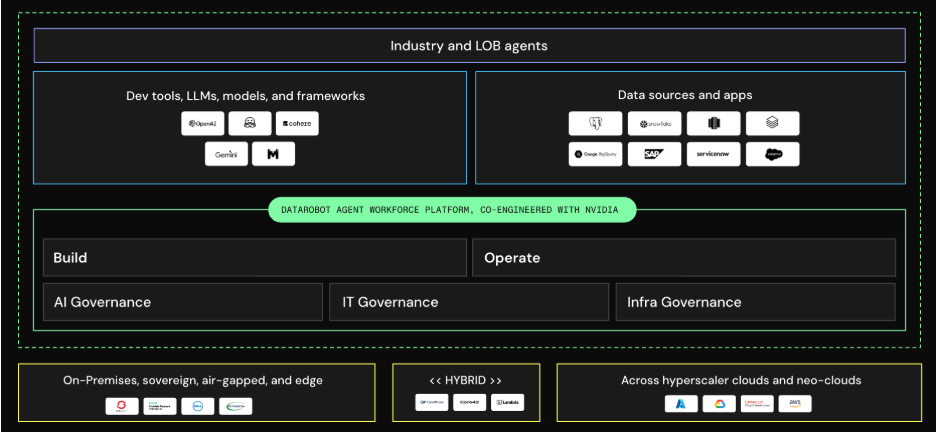
The DataRobot Agent Workforce Platform seamlessly orchestrates the full lifecycle of AI agents across a wide range of deployment environments. It is available on managed SaaS, virtual private cloud, or self-managed infrastructure—including on-prem and private GPU clouds, sovereign GPU clouds, air-gapped environments, and major public cloud platforms. It is co-engineered with NVIDIA and validated across infrastructure from Dell and Nebius. DataRobot enables faster, more secure deployment of AI solutions that drive real business impact.
Platform concepts
The following describes how the Agent Workforce Platform is built, including its architecture, governance layers, and deployment flexibility. In other words, it provides the principles behind where and how it runs.
Where the platform fits
Enterprise AI agents generally fall into three tiers:
- Copilots—Assistants layered onto existing productivity tools.
- Line-of-business agents—Agents embedded inside a single application.
- Agent workforce agents—Agents that operate across an organization's data, systems, and processes, independent of any one cloud or application.
The Agent Workforce Platform is purpose-built for the third tier, with particular depth in environments where data residency, air-gapping, or infrastructure ownership rule out a single-cloud approach.
Platform architecture
The platform is organized into three layers:
- The Build layer is where agents are developed, evaluated, and prepared for deployment.
- The Operate (or Run) layer is where agents run, are monitored, and are orchestrated in production.
- The Govern layer spans both, applying AI, IT, and infrastructure governance from the first agent.
Governance
Governance in DataRobot operates at three layers:
-
AI and agentic governance—Approval workflows and versioning before an agent ships, plus real-time moderation that catches bias, hallucinations, prompt injection, and PII leakage in production. Production monitoring also tracks drift, correctness, and tool-calling accuracy.
-
IT governance—Agent-specific identity, permissioning, and entitlements, with consistent lineage and state auditing across agents, tools, and applications. Agent identity integrates with existing enterprise identity infrastructure rather than replacing it.
-
Infrastructure governance—Gateways, fair-use policies, and cost controls that track GPU cost and utilization and keep spend predictable at scale.
The same governance, monitoring, and control apply wherever the platform runs.
Deployment flexibility
A core design principle of the Agent Workforce Platform is avoiding lock-in at the model, cloud, or orchestration layer. The same build, operate, and govern capabilities work consistently across managed SaaS, private cloud, self-managed, and fully air-gapped environments, so agents can be built once and deployed into whichever environment an organization's data and compliance requirements call for.
Inference and infrastructure
Run self-hosted inference on GPUs you already own, and choose the model for each task. The LLM Gateway gives you access to 70+ generative AI and embedding models without managing API keys, and NVIDIA NIM and NeMo microservices are built into the platform.
Delivery model
Production deployments are typically built with DataRobot's Center of Excellence—forward-deployed engineers who work alongside a customer's own team to build the first mission-critical agents, rather than relying solely on self-serve tooling. This is by design for the platform's target use cases: high-complexity, high-value agents in regulated or infrastructure-constrained environments, where getting from pilot to production has historically stalled.
Platform tools
The following sections describe the places and tooling in the DataRobot platform where you build, run, and govern generative and agentic AI.
Workbench
Building great AI solutions—generative AI, predictive models, and agentic workflows—requires a lot of experimentation. If you're in the UI, use Workbench to quickly experiment, easily compare across experiments, and organize all your experiment assets in an intuitive Use Case container. It enables users to group and share everything they need to solve a specific problem from a single location. Workbench is organized by Use Case, and each Use Case contains zero or more datasets, vector databases, playgrounds, models, notebooks, and applications.
Registry
Use Registry to create deployment-ready model and agent packages and generate compliance documentation for enterprise governance.
Registry ensures that all your AI assets are documented and under version control. With test results and metadata stored alongside each AI asset, you can deploy to production with confidence, regardless of whether the asset originated with DataRobot, was user-defined, was brought in from an external framework, or is an agent built with a third-party tool such as CrewAI, LangGraph, or LlamaIndex.
Console
Use Console to view the operating status of every deployed agent and model.
As your organization becomes more AI-driven, you'll have tens or even hundreds of task-specific models and agents running at once. Console provides a centralized hub for observing their performance, tracing agent decisions and tool calls back to their inputs, and configuring automated intervention and notification options to keep everything running smoothly and within policy. Its dashboard provides access to deployed models for further monitoring and mitigation. It also provides access to prediction activities and allows you to view, create, edit, delete, or share serverless and external prediction environments.
One-click deployments
But where do deployments fit into the structure above? The deployment process is your model's or agent's seamless transition from Registry to Console. Once it's registered and tested in Registry, you'll have the option to deploy it with a single click.
Once you click to deploy, DataRobot's automation creates an API endpoint in your selected prediction or runtime environment and configures all the observability, monitoring, and governance controls for it.
All four of these deployment options are supported:
- A DataRobot model to a DataRobot serverless or dedicated prediction server.
- A DataRobot model to an external prediction server.
- A custom model to a DataRobot serverless or dedicated prediction server.
- A custom model to an external prediction server.
Agentic AI deployments follow the same registered, governed path into production.
Generative AI and agentic AI
DataRobot's generative AI capabilities build on its predictive AI experience, and its agentic AI capabilities build on both. Bring your favorite libraries and frameworks (CrewAI, LangGraph, LlamaIndex, or a generic template of your own), choose your LLMs and vector databases, and integrate third-party tools—then embed or deploy the result wherever it drives value for your business, with governance built in at every layer.
What differentiates generative and agentic AI?
Generative AI answers a question. Agentic AI decides what to do, using generative AI to do it, inside a deterministic governance framework that makes the decisions traceable even though the outputs aren't identical run to run.
Example: A GenAI blueprint takes an insurance claim document and drafts a one-paragraph summary. One call, one output, no decisions made about what to do next.
An Agent Workforce Platform agent handling that same claim calls a lookup tool to verify policy details, calls a second tool to check for duplicate submissions, reasons over both results, and then either drafts an approval or escalates to a human reviewer. The reasoning at each step is non-deterministic; the guardrails—which tools it's allowed to call, under what constraints, and with what approval gates—are deterministic and auditable.
Inside DataRobot there is very little distinction between predictive, generative, and agentic AI. The same underlying platform (Workbench, Registry, Console) supports building, operating, and governing all three. But you'll find that tutorials and examples are still organized along these lines, since the workflows differ:
-
Agentic AI orchestrates LLMs, tools, and predictive models into multi-step workflows: an agent plans, calls tools (including your deployed predictive models), and acts on connected systems, with tracing and governance applied at each step.
-
Generative AI (GenAI) includes text and image generation using foundation models, typically as a single LLM call or RAG pipeline.
-
Predictive AI includes time series, classification, regression, and unsupervised machine learning such as anomaly detection and clustering.
Applications
DataRobot offers various approaches for building applications that allow you to share machine learning projects, generative AI workflows, and agents: custom applications, application templates, and no-code applications.
- Custom applications are a simple method for building and running custom code.
- Customizable application templates assist you by programmatically generating DataRobot resources that support your use case.
- No-code applications enable core DataRobot services without having to build and evaluate models.
Experiment with the Talk to my Data Agent application template
Which experience should you choose?
When working in DataRobot, you have two interface choices:
- Log in to the platform via web browser and work with the graphical user interface (UI).
- Access the platform programmatically with the REST API or Python client packages, or build agents with the DataRobot CLI in your own development environment (IDE, notebook, or coding agent of choice).
If you're leaning toward using DataRobot programmatically, explore the workflows in the UI first. DataRobot is committed to full accessibility in both interfaces, so you are not locked into a single choice. You can:
- Flexibly switch between code and UI at any time.
- Seamlessly collaborate with other users who are working with a different option.
- When in code, use any development environment of your choice, and bring agents built elsewhere in for governance and deployment.
Try the UI
An intuitive UI-based product comprised of Workbench for experiment-based iterative workflows, Registry for model evolution tracking and the centralized management of versioned models, and Console for monitoring and managing deployed models. The UI provides a complete AI lifecycle platform, with broad interoperability and end-to-end capabilities for ML experimentation and production. It is also the gateway for creating GenAI experiments, Notebooks, and applications.
Try a basic predictive walkthrough
Code
Code offers a programmatic alternative for accessing DataRobot using the REST API or Python client packages, or the DataRobot CLI for agent development. You can also install DataRobot agentic skills in Cursor, Claude Code, Gemini CLI, and other coding agents to bring platform workflows into your IDE.
Where to get help
Help is everywhere you look:
Onboarding resources provided in Get started are a small subset of all the available content. Try exploring the introductory tutorials and labs in this section before moving into the general reference sections.
Email DataRobot support to ask a question or report a problem. Existing customers can also visit the Customer Support Portal.
Your designated Customer Success Manager and/or Applied AI Expert are available to offer consultative advice, share best practices, and get you on the path to AI value with DataRobot.
Next steps
Visit the How-tos for walkthroughs of a variety of project types: