Invoke a Workload
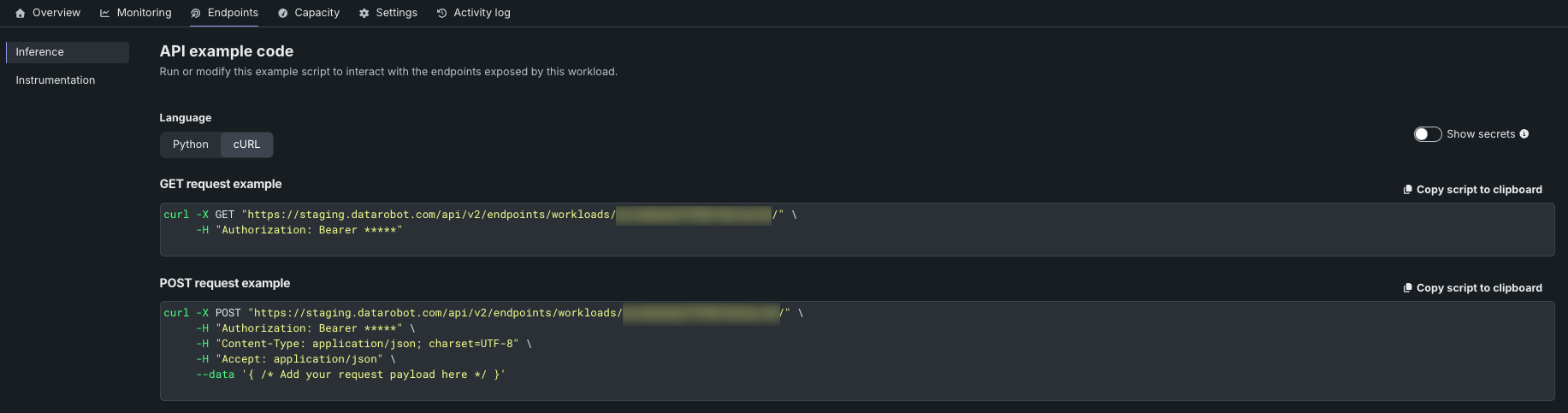
The Endpoints > Inference sub-tab generates copy-ready API example code for invoking the Workload. Use it to start a quick test from your terminal or to bootstrap a client integration.
To open the Inference sub-tab, on the deployed Workload, click the Endpoints tab, then click Inference in the left navigation bar.
Invoke URL pattern
Each Workload exposes a stable invoke URL keyed by Workload ID:
{base_url}/api/v2/endpoints/workloads/{workloadId}/
The URL is a base prefix. Append your application's path to reach specific endpoints (for example, /chat/completions or /health); requests are forwarded to the container with the same path and method.
The base URL also lives on the Workload payload (the endpoint field) and can be fetched programmatically with GET /workloads/{workload_id}.
Choose Python or cURL
Toggle Language between Python and cURL to switch between example formats. Each generates a complete request snippet for the Workload's invoke URL.
GET request example
The GET example shows the minimum request shape—the Workload's invoke URL plus a Bearer-token authorization header:
curl -X GET "{base_url}/api/v2/endpoints/workloads/{workloadId}/" \
    -H "Authorization: Bearer *****"
By default the bearer token is masked. To reveal the actual value before copying, toggle Show secrets in the upper-right corner.
POST request example
The POST example adds the standard JSON content-type and accept headers, plus a placeholder for the request payload:
curl -X POST "{base_url}/api/v2/endpoints/workloads/{workloadId}/" \
    -H "Authorization: Bearer *****" \
    -H "Content-Type: application/json; charset=UTF-8" \
    -H "Accept: application/json" \
    --data '{ /* Add your request payload here */ }'
Replace the payload placeholder with the JSON body your application expects.
Copy the example script
Click the Copy script to clipboard button in the top right corner of the panel to copy the full example.
Invocation during replacements
The Workload's invoke URL is stable across artifact replacements. During a replacement, the platform routes traffic between the active and candidate protons according to the configured rollout strategy without changing the URL. Callers don't need to know which proton serves their request. For the underlying strategies and timing controls, see Replace and roll out.