Usage explorer
The Usage explorer provides users visibility into graphics processing unit (GPU), central processing unit (CPU), large language model (LLM) API usage, agentic spans, and storage usage across the platform, providing general usage information broken down by service. There are two categories for LLM usage: LLM-DR hosted and LLM-BYOK (bring your own key).
This section describes the Usage explorer in Account settings—for documentation specific to the Tenant usage explorer in Admin settings, see Tenant usage explorer.
Usage explorer services
The following services are tracked in the Usage explorer, although displayed services vary depending on the type of usage being viewed.
- Agentic Observability
- Custom Inference Model
- Custom Job
- Custom Model NIM
- Custom Models
- Custom Task Fit
- Data Management
- GenAI Playground
- Memory Service
- Model Management
- Modeling
- Moderations
- NVIDIA AI Enterprise
- Notebook
- OCR
- Prediction
- Predictive Observability
- Segmentation
- Spark Data Prep
- Vector Database Creation
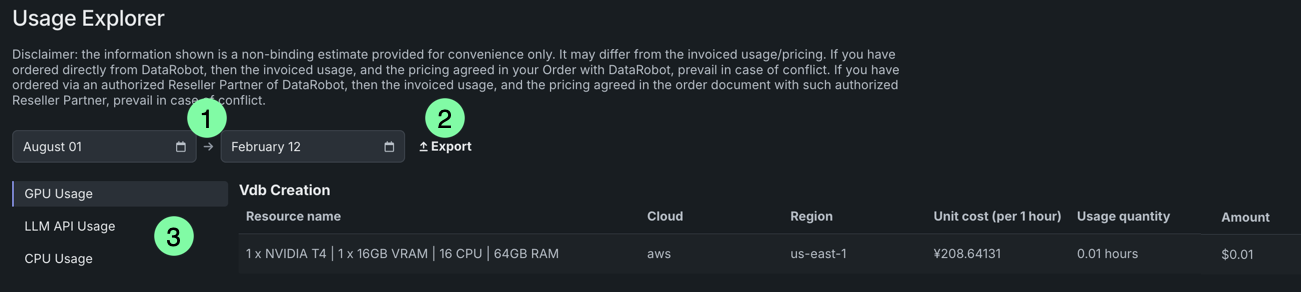
To access the Usage explorer, open Account settings > Usage explorer. From here, you can view resource consumption by service for a given date range, as well as export the report as a .csv file.
| Element | Description | |
|---|---|---|
| 1 | Date range selector | Use the two fields to display usage information for a specific date range. |
| 2 | Export | Download the report as a .csv file. |
| 3 | Usage options | Select the usage information to view—GPU, LLM, CPU, agentic spans, or storage. |
GPU usage
The GPU Usage page reports data on GPU usage, providing general usage information broken down by service. GenAI features, for example, rely on GPU hardware for a range of workloads related to training, hosting, and running inference on LLMs.
Click GPU Usage in the Usage explorer to view a table that displays the name of the service using the resources, as well as the following details about each task under that service:
| Field | Summary |
|---|---|
| Service | The service that used the GPU (e.g., Notebooks, Modeling, Vector Database Creation, etc.). |
| Resource name | The number of GPUs, as well as the number of CPUs and amount of RAM/VRAM, used by the task. |
| Cloud | The cloud provider executing the resource. |
| Region | The region where costs are computed. |
| Unit cost (per 1 hour) | The total cost of the resource each hour. |
| Usage quantity | The amount of time each task used the resources within the specified time period. |
| Amount | The current cost of the task. |
LLM API usage
The LLM API Usage page reports data on which LLM models are being used by which services, as well as how much each model is using. This page breaks down usage information by service, tracking token consumption for each task. This detailed monitoring helps identify which services are consuming the most LLM resources across various services.
Single-tenant SaaS users
For increased transparency, the LLM API Usage page has been broken out into two separate pages: LLM DR-hosted and LLM-BYOK (bring your own model).
Click LLM API Usage in the Usage explorer to view a table that displays the name of the service using the resources, as well as the following details about each task under that service:
| Field | Summary |
|---|---|
| Service | The service that used the LLM API (e.g., Custom Models, GenAI Playground, etc.). |
| Resource name | The name of the LLM model called via the API. |
| Cloud | The cloud provider executing the resource. |
| Region | The region where costs are computed. |
| Unit cost (per 1 hour) | The total cost of the resource each hour. |
| Usage quantity | The number of tokens used by the task. |
| Amount | The current cost of the task. |
DataRobot hosted LLMs
Availability information
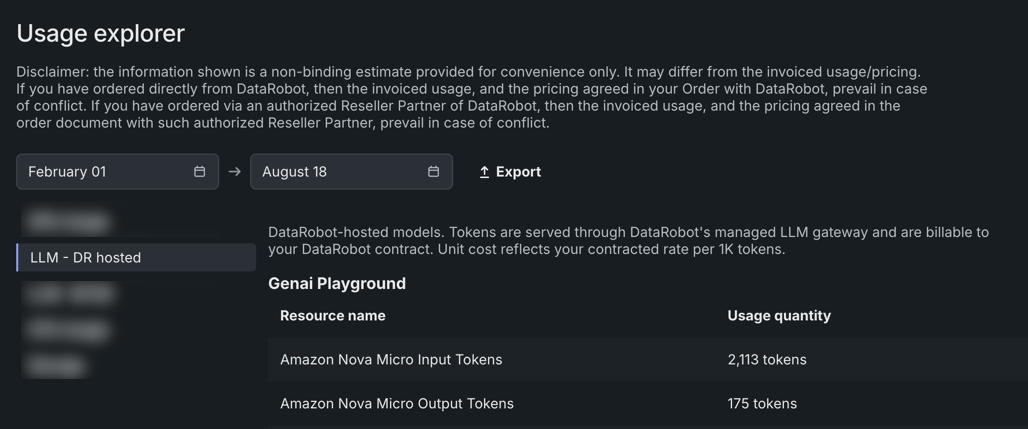
The DataRobot-hosted LLMs usage report (LLM - DR) is only available for Single-tenant SaaS deployments.
The LLM - DR hosted page reports usage on those LLMs DataRobot hosts; these are the LLMs that DataRobot's own provider access is applied.
LLM BYOK (bring-your-own-key)
Availability information
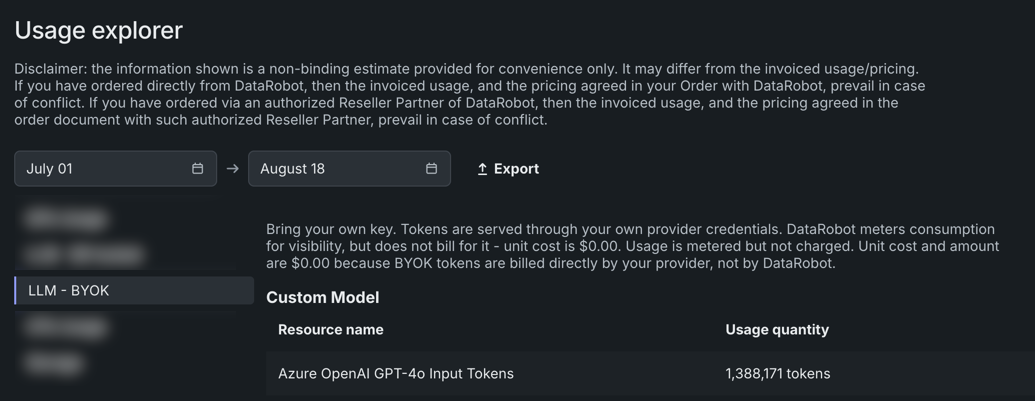
The LLM bring-your-own-key usage report (LLM - BYOK) is only available for Single-tenant SaaS deployments.
The LLM-BYOK hosted (bring your own key) page reports usage where you supply your own LLM provider key/credentials (e.g., through an OpenAI/Azure/Anthropic account) rather than using hosted access provided by DataRobot.
CPU usage
The CPU Usage page provides an overview of CPU use, broken down by service. This allows for easy monitoring of exactly which users and services are consuming the most CPU resources, potentially helping to identify areas for optimization or budgetary concerns.
Click CPU Usage in the Usage explorer to view a table that displays the name of the service using the resources, as well as the following details about each task under that service:
| Field | Summary |
|---|---|
| Service | The service that used the CPU (e.g., Custom Inference Model, Data Management, etc.) |
| Resource name | The number of processors and amount of RAM used by the task. |
| Cloud | The cloud provider executing the resource. |
| Region | The region where costs are computed. |
| Unit cost (per 1 hour) | The total cost of the resource each hour. |
| Usage quantity | The amount of time each task used the CPU. |
| Amount | The current cost of the task. |
Agentic spans usage
The Agentic Spans page provides an overview of agentic spans usage across the platform.
Click Agentic Spans in the Usage explorer to view a table that displays the name of the agentic span, as well as the following details about each span:
| Field | Summary |
|---|---|
| Service | The service that used the spans (e.g., Agentic Observability). |
| Resource name | The name of the agentic span used. |
| Cloud | The cloud provider executing the resource. |
| Region | The region where costs are computed. |
| Unit cost (per 1000 spans) | The total cost of the resource for each 1000 spans. |
| Usage quantity | The total number of spans used. |
| Amount | The current cost of the usage. |
Storage usage
The Storage page provides an overview of storage usage across the platform.
Click Storage in the Usage explorer to view a table that displays the name of the storage, as well as the following details about each storage:
| Field | Summary |
|---|---|
| Service | The service that used the storage resource (e.g., Predictive Observability). |
| Resource name | The name of the storage resource used. |
| Cloud | The cloud provider executing the resource. |
| Region | The region where costs are computed. |
| Unit cost (per gigabyte) | The total cost of the resource for each gigabyte. |
| Usage quantity | The total amount of storage used in gigabytes. |
| Amount | The current cost of the usage. |