LLM Gatewayモデルの設定
備考
LLM GatewayへのLLMの追加は、システム管理者によって制御される機能です。 マルチテナントSaaSユーザーの方は、DataRobotサポートにお問い合わせいただくか、サポートサイトにアクセスしてサポートをリクエストしてください。
セルフマネージドまたはシングルテナントSaaSの組織管理者は、自社環境のLLM GatewayにLLMを追加して、ユーザーが利用できるように設定できます。 これにより、たとえば会社のポリシーによって従業員が利用できるLLMが制限されている場合でも、エージェント機能を利用できるようになります。
DataRobotのGenAIサービスは、さまざまなプロバイダーのマネージドLLMをサポートしています。 これらのモデルを有効化するには、LLMリソースをプロビジョニングするためのLLMプロバイダーのドキュメントを参照してください。
- Azure OpenAI
- Amazon Bedrock
- Google Gemini Enterprise Agent Platform (formerly Vertex AI)
- Anthropic
- Cerebras
- TogetherAI
LLM資格情報の設定
プロバイダー側でLLMを設定したら、さまざまなLLMにアクセスするために、DataRobot GenAIサービスでプロバイダーの資格情報を設定します。 ユーザー管理の資格情報(セルフマネージド、および多くの場合シングルテナントSaaSのインストールで常に使用されます)については、柔軟性とセキュリティを最大限に高めるために、DataRobotの セキュアな構成を使用することがベストプラクティスです。 DataRobot管理の資格情報を使用するシングルテナントSaaS環境などの特定のケースでは、管理者はvalues.yamlで 直接資格情報を設定できます。
セキュアな構成経由
DataRobotをインストールする前に、buzok-llm-gatewayサブチャート内のllmGateway設定セクションで、各プロバイダーが有効になっていることを確認してください。例:
buzok-llm-gateway:
  enabled: true
  llmGateway:
    providers:
      <supported-provider>:
        enabled: true
        credentialsSecureConfigName: genai-<provider>-llm-credentials
設定時には、以下のサポート対象プロバイダーおよび対応するLLM資格情報の「SecureConfig」表示名のリストを使用してください。
anthropic:
  credentialsSecureConfigName: genai-anthropic-llm-credentials
aws:
  credentialsSecureConfigName: genai-aws-llm-credentials
azure:
  credentialsSecureConfigName: genai-azure-llm-credentials
cerebras:
  credentialsSecureConfigName: genai-cerebras-llm-credentials
google:
  credentialsSecureConfigName: genai-gcp-llm-credentials
togetherai:
  credentialsSecureConfigName: genai-togetherai-llm-credentials
備考
以下のプロバイダーのセキュアな構成を含めることができますが、DataRobotではまだサポートされていません。
- cohere (
genai-cohere-llm-credentials) - openai (
genai-openai-llm-credentials) - groq (
genai-groq-llm-credentials)
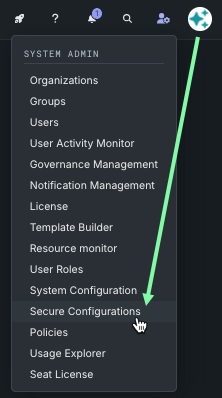
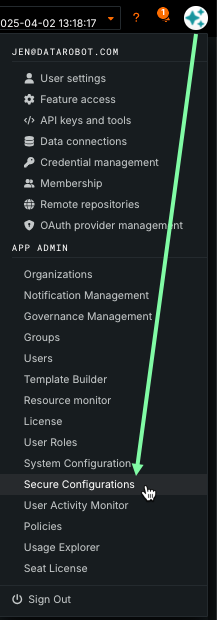
インストール完了後、セキュアな構成ページからモデルの資格情報をDataRobotに提供します。
プロフィールアイコンの左側にあるシステム管理者アイコンから、以下を実行します。
ユーザープロフィールアイコンの、APP ADMINセクションから、以下を実行します。
-
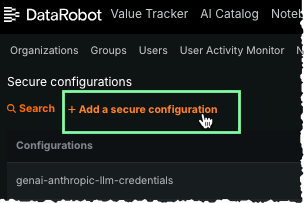
+ セキュアな構成を追加をクリックします。
-
フィールドに入力して、構成を作成します。
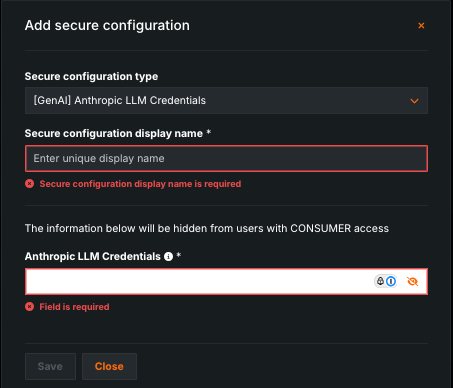
フィールド 説明 セキュアな構成タイプ ドロップダウンから、資格情報プロバイダーを選択します。 プロバイダーのオプションを簡単に見つけるには、検索フィールドに「 GenAI」と入力します。 例:[GenAI] Anthropic LLM Credentialsセキュアな構成の表示名 以下の各 プロバイダーセクションに記載されている表示名を入力します。 例: genai-anthropic-llm-credentialsLLMの資格情報 以下のプロバイダー固有の設定セクションからJSON( {から}まで)をコピーして貼り付け、JSON形式で資格情報を追加します。 必ず実際の資格情報で更新してください。 -
保存をクリックします。 資格情報を含む新しいセキュアな構成が、セキュアな構成のリストに追加されます。
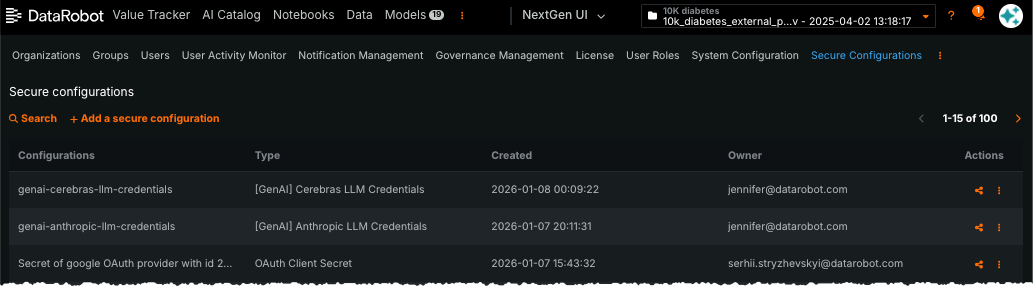
-
設定テーブルのアクションの下にある共有アイコンをクリックして、新しく作成した設定をGenAI管理者システムユーザー(
genai-admin@datarobot.com)と共有します。 このユーザーはインストール中に自動的に作成されます。 管理者にオーナーまたはエディターのいずれかのロールを割り当てる必要があります。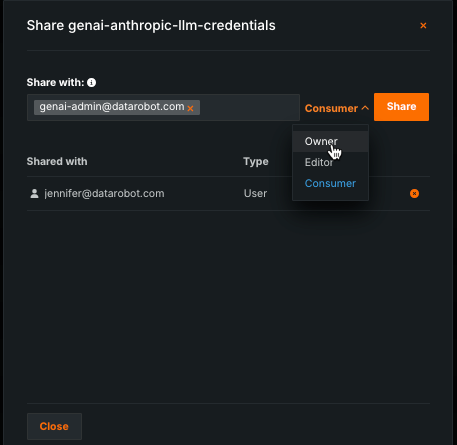
備考
生成AIサービスは、セキュアな構成から取得した資格情報を短期間キャッシュします。 資格情報をローテーション(更新)する場合、新しい資格情報が適用されるまでに数分かかることがあります。
インストール中に直接
備考
この方法を使用する場合、資格情報を更新するにはDataRobotの再インストールまたはアップデートが必要になります。 インストールを実行する人が資格情報を確認できるため、これはサービス用の資格情報を設定する方法としては、安全性と柔軟性に欠けると見なされます。
資格情報は、buzok-llm-gateway設定セクションで直接指定できます。 この場合、セキュアな構成は使用されません。 以下の例はAWS認証情報の構成方法です。正確なキーはプロバイダーによって異なります。認証情報の構造の詳細については、プロバイダー固有の設定セクションを参照してください。
buzok-llm-gateway:
  enabled: true
  llmGateway:
    providers:
      aws:
        enabled: true
        credentialsSecureConfigName: ""
        credentials:
          endpoints:
          - region: "<aws_region>"
            access_key_id: "<aws_access_key_id>"
            secret_access_key: "<aws_secret_access_key>"
プロバイダー固有の設定
以下のセクションでは、サポートされているプロバイダーの設定について説明します。
- Azure OpenAI
- Amazon Bedrock
- Google Gemini Enterprise Agent Platform(以前のVertex AI)
- Anthropic
- Cerebras
- TogetherAI
Azure OpenAI
Azure OpenAIモデルは特定のデプロイ名で設定する必要があります。デプロイ名には以下を使用できます。
- モデル名と同じ(例:
gpt-35-turbo-16kモデルのデプロイにgpt-35-turbo-16kという名前を付けることができます)。 - モデル名とは異なる(例:モデル
gpt-4oに対してgpt-4o-2024-11-20という名前のデプロイを作成する場合など)。
デプロイ名のリストについては、Azure OpenAI LLMの可用性ページのチャットモデルIDを参照してください。
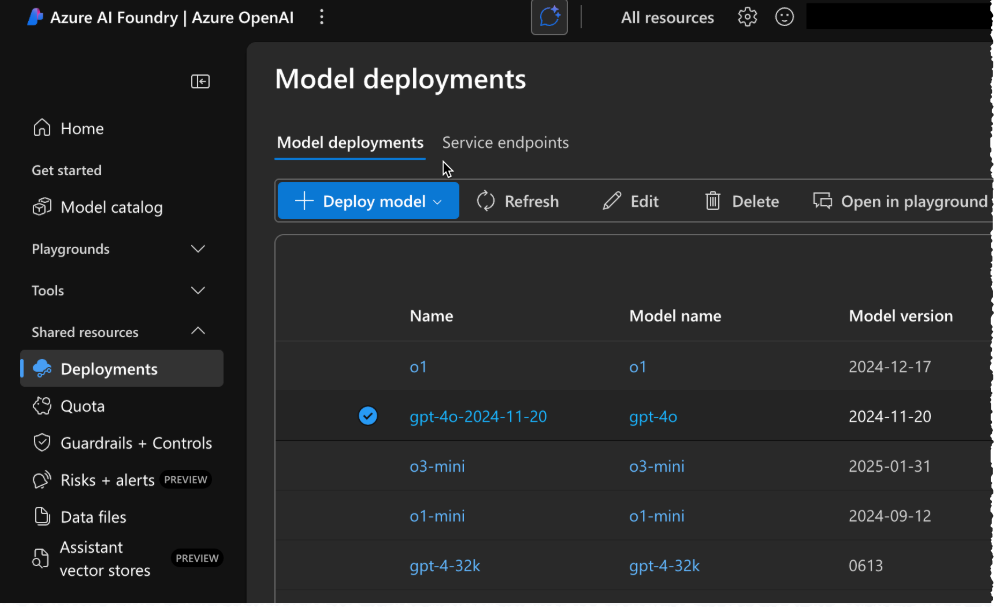
Azure OpenAI LLMデプロイを設定した後、次のJSON構造を使用して資格情報をフォーマットします。
API key authentication
| フィールド | 説明 |
|---|---|
region |
Azure region code for the deployment. |
api_type |
Must be azure. |
api_base |
Base URL for the Azure OpenAI resource (for example, https://<your-llm-deployment-endpoint>.openai.azure.com/). |
api_version |
Azure OpenAI REST API version. |
api_key |
API key for the Azure OpenAI resource. |
{
    "endpoints": [
        {
            "region": "<region-code>",
            "api_type": "azure",
            "api_base": "https://<your-llm-deployment-endpoint>.openai.azure.com/",
            "api_version": "2024-10-21",
            "api_key": "<your-api-key>"
        }
    ]
}
Service principal and managed identity
In addition to API keys, the LLM gateway can authenticate to Azure OpenAI with a Microsoft Entra ID service principal or with managed identity (including Kubernetes workload identity). These approaches let you use Entra-based access and reduce reliance on long-lived API keys stored in DataRobot.
Assign the Cognitive Services OpenAI User role to the service principal or managed identity on the Azure AI Foundry resource (or equivalent Cognitive Services resource) where model deployments are hosted. See Azure OpenAI role-based access control.
Service principal: include the fields below on each endpoint (omit api_key if you authenticate only with the service principal).
| フィールド | 説明 |
|---|---|
region |
Azure region code for the deployment. |
api_type |
Must be azure. |
api_base |
Base URL for the Azure OpenAI resource. |
api_version |
Azure OpenAI REST API version. |
tenant_id |
Microsoft Entra tenant (directory) ID. |
client_id |
Application (client) ID of the Entra app registration. |
client_secret |
Client secret for the app registration. |
azure_scope |
オプションです。 OAuth2 scope for token requests; omit to use gateway defaults. Example: https://cognitiveservices.azure.com/.default |
api_key |
オプションです。 If present with service principal fields, the gateway uses the API key first (see credential precedence below). |
{
    "endpoints": [
        {
            "region": "<region-code>",
            "api_type": "azure",
            "api_base": "https://<your-llm-deployment-endpoint>.openai.azure.com/",
            "api_version": "2024-10-21",
            "tenant_id": "<entra-tenant-id>",
            "client_id": "<app-client-id>",
            "client_secret": "<client-secret>",
            "azure_scope": "https://cognitiveservices.azure.com/.default"
        }
    ]
}
Managed identity: each endpoint still supplies region, api_type, api_base, and api_version in JSON. For managed identity only, omit api_key and service principal fields; the gateway reads tokens from the pod environment.
| フィールド | 説明 |
|---|---|
region |
Azure region code for the deployment. |
api_type |
Must be azure. |
api_base |
Base URL for the Azure OpenAI resource. |
api_version |
Azure OpenAI REST API version. |
| 環境変数 | 説明 |
|---|---|
AZURE_TENANT_ID |
Microsoft Entra tenant ID (injected on LLM gateway pods). |
AZURE_CLIENT_ID |
Client ID of the user-assigned managed identity (or application used with federated credentials). |
AZURE_FEDERATED_TOKEN_FILE |
Path to the projected OIDC token file (workload identity). |
If an endpoint object includes more than one authentication method, the gateway selects credentials in this order: API key, then service principal fields (tenant_id, client_id, client_secret), then managed identity using the environment variables above.
これらの資格情報を使用してセキュアな構成を作成する場合は、以下を使用します。
| フィールド | 値 |
|---|---|
| セキュアな構成タイプ | [GenAI] Azure OpenAI LLM Credentials |
| セキュアな構成の表示名 | genai-azure-llm-credentials |
備考
現在、Azure APIの最新の安定バージョンは「2024-10-21」です。 最新のモデルを使用するには、APIのプレビューバージョンを使用する必要がある場合があります。 Azure推論APIバージョンの詳細については、公式のAzure APIドキュメントを参照してください。
Azureのセキュアな構成セクションは、以下に示すYAML構造に従う必要があります。
buzok-llm-gateway:
  enabled: true
  llmGateway:
    providers:
      azure:
        enabled: true
        credentialsSecureConfigName: genai-azure-llm-credentials
Amazon Bedrock
生成AIサービスは、Amazon Bedrockのさまざまなファーストパーティ(例:Amazon Nova)およびサードパーティ(例:Anthropic Claude、Meta Llama、Mistral)モデルをサポートしています。
Amazon Bedrockモデルをセットアップするには、2つのオプションがあります。
- IAMロール
- 静的AWS認証情報
より安全なオプションであるため、IAMロール(IRSA)の使用が推奨されます。 これは、動的な短寿命のAWS認証情報を使用するためです。 ただし、KubernetesクラスターがAWSクラウド内にない場合、この認証メカニズムをセットアップするには、Workload Identity Federationをセットアップする必要があります。 このため、生成AIサービスは静的AWS認証情報もサポートしています。 セキュリティ上の理由から、静的資格情報を使用する場合は、AWS Bedrockへのアクセス権限のみを持つ個別のAWSユーザーを作成することをお勧めします。
AWS Bedrockでモデルアクセスを有効にした後、静的資格情報を使用するために、次のJSON構造を使用して資格情報をフォーマットします。
{
    "endpoints": [
        {
            "region": "<your-aws-region, e.g. us-east-1>",
            "access_key_id": "<your-aws-key-id>",
            "secret_access_key": "<your-aws-secret-access-key>",
            "session_token": null,
        }
    ]
}
IRSAとは異なるロールを使用する場合は、次のJSON構造を使用します(IRSAがこのロールを引き受けることを許可するポリシーがあることを確認してください)。
{
    "endpoints": [
        {
            "region": "<your-aws-region, e.g. us-east-1>",
            "role_arn": "<your-aws-role-arn>"
        }
    ]
}
BedrockへのアクセスにIRSAを使用する機能は、11.1.2以降で利用可能です。 ポッドのサービスアカウントトークンからAssumeRoleWithWebIdentityを使用するには、"use_web_identity": trueを設定します。
{
    "endpoints": [
        {
            "region": "<your-aws-region, e.g. us-east-1>",
            "role_arn": "<your-aws-role-arn>",
            "use_web_identity": true
        }
    ]
}
FIPS対応エンドポイントの使用は、11.1.2以降で利用可能です。 それを行うには、"use_fips_endpoint": trueを設定します。 FIPS対応エンドポイントと通常のエンドポイントでは、利用可能なモデルが異なる場合があることに注意してください。
{
    "endpoints": [
        {
            "region": "<your-aws-region, e.g., us-east-1>",
            "role_arn": "<your-aws-role-arn>",
            "use_fips_endpoint": true
        }
    ]
}
シングルテナントSaaS(STS)の設定
For single-tenant SaaS (STS) installations, the Bedrock credential configuration differs from the standard IRSA setup. Use the following JSON structure:
{
    "endpoints": [
        {
            "region": "<your-aws-region, e.g. us-east-1>",
            "role_arn": "<customer-aws-role-arn>"
        }
    ]
}
Note the following differences from the standard IRSA configuration:
- The
role_arnvalue must be the IAM role on the customer's AWS account—not the IAM role currently used by the STS cluster. - Do not include
use_web_identityin the configuration. The STS cluster handles authentication through its own role assumption mechanism rather than web identity federation.
これらの資格情報を使用してセキュアな構成を作成する場合は、以下を使用します。
| フィールド | 値 |
|---|---|
| セキュアな構成タイプ | [GenAI] AWS Bedrock LLM Credentials |
| セキュアな構成の表示名 | genai-aws-llm-credentials |
Amazon Bedrockのセキュアな構成セクションは、以下に示すYAML構造に従う必要があります。
buzok-llm-gateway:
  enabled: true
  llmGateway:
    providers:
      aws:
        enabled: true
        credentialsSecureConfigName: genai-aws-llm-credentials
Google Gemini Enterprise Agent Platform(以前のVertex AI)
The Generative AI Service supports multiple models from Google Gemini Enterprise Agent Platform (formerly Vertex AI), including first-party Gemini models and third-party Claude/Llama/Mistral models.
モデルのプロビジョニング後、アクセス資格情報を含むJSONファイルを受け取るはずです。 DataRobot生成AIに資格情報を提供するには、次のJSON構造を使用して内容をフォーマットします。
{
    "endpoints": [
        {
            "region": "us-central1",
            "service_account_info": {
                "type": "service_account",
                "project_id": "<your-project-id>",
                "private_key_id": "<your-private-key>",
                "private_key": "----- <your-private-key>-----\n",
                "client_email": "<your-email>.iam.gserviceaccount.com",
                "client_id": "<your-client-id>",
                "auth_uri": "https://accounts.google.com/o/oauth2/auth",
                "token_uri": "https://oauth2.googleapis.com/token",
                "auth_provider_x509_cert_url": "https://www.googleapis.com/oauth2/v1/certs",
                "client_x509_cert_url": "https://<your-cert-url>.iam.gserviceaccount.com",
                "universe_domain": "googleapis.com"
            }
        }
    ]
}
これらの資格情報を使用してセキュアな構成を作成する場合は、以下を使用します。
| フィールド | 値 |
|---|---|
| セキュアな構成タイプ | [GenAI] Google VertexAI LLM Credentials |
| セキュアな構成の表示名 | genai-gcp-llm-credentials |
Google Gemini Enterprise Agent Platform(以前のVertex AI)のセキュアな構成セクションは、以下に示すYAML構造に従う必要があります。
buzok-llm-gateway:
  enabled: true
  llmGateway:
    providers:
      google:
        enabled: true
        credentialsSecureConfigName: genai-gcp-llm-credentials
Anthropic
The Generative AI Service provides first-party integration with Anthropic, giving access to various Claude models.
Anthropicへのアクセスを設定するには、次のJSON構造を使用してAPIキーを指定します。
{
    "endpoints": [
        {
            "region": "us",
            "api_key": "<your-anthropic-api-key>"
        }
    ]
}
これらの資格情報を使用してセキュアな構成を作成する場合は、以下を使用します。
| フィールド | 値 |
|---|---|
| セキュアな構成タイプ | [GenAI] Anthropic LLM Credentials |
| セキュアな構成の表示名 | genai-anthropic-llm-credentials |
Anthropicのセキュアな構成セクションは、以下に示すYAML構造に従う必要があります。
buzok-llm-gateway:
  enabled: true
  llmGateway:
    providers:
      anthropic:
        enabled: true
        credentialsSecureConfigName: genai-anthropic-llm-credentials
Cerebras
生成AIサービスはCerebrasとの連携を提供し、高性能な推論モデルへのアクセスを可能にします。
Cerebrasへのアクセスを設定するには、Cerebrasプラットフォームにサインインして、新しいAPIキーを作成します。 次のJSON構造を使用して資格情報をフォーマットします。
{
    "endpoints": [
        {
            "region": "global",
            "api_key": "<your-cerebras-api-key>"
        }
    ]
}
これらの資格情報を使用してセキュアな構成を作成する場合は、以下を使用します。
| フィールド | 値 |
|---|---|
| セキュアな構成タイプ | [GenAI] Cerebras LLM Credentials |
| セキュアな構成の表示名 | genai-cerebras-llm-credentials |
Cerebrasのセキュアな構成セクションは、以下に示すYAML構造に従う必要があります。
buzok-llm-gateway:
  enabled: true
  llmGateway:
    providers:
      cerebras:
        enabled: true
        credentialsSecureConfigName: genai-cerebras-llm-credentials
TogetherAI
生成AIサービスはTogetherAIとの連携を提供し、幅広いオープンソース言語モデルへのアクセスを可能にします。
TogetherAIへのアクセスを設定するには、TogetherAIコンソールにサインインして、新しいAPIキーを作成します。 次のJSON構造を使用して資格情報をフォーマットします。
{
    "endpoints": [
        {
            "region": "global",
            "api_key": "<your-togetherai-api-key>"
        }
    ]
}
これらの資格情報を使用してセキュアな構成を作成する場合は、以下を使用します。
| フィールド | 値 |
|---|---|
| セキュアな構成タイプ | [GenAI] TogetherAI LLM Credentials |
| セキュアな構成の表示名 | genai-togetherai-llm-credentials |
TogetherAIのセキュアな構成セクションは、以下に示すYAML構造に従う必要があります。
buzok-llm-gateway:
  enabled: true
  llmGateway:
    providers:
      togetherai:
        enabled: true
        credentialsSecureConfigName: genai-togetherai-llm-credentials