共有
DataRobotでは、ユースケース、データセット、アプリケーション、モデルなどのアセットを、ユーザー、グループ、および組織と共有できます。 アセットを共有することで、モデル開発の共同作業を行ったり、同僚に予測結果へのアクセス権を付与したりすることができます。
アセットを共有すると、選択された各ターゲットにデフォルトのロールとしてユーザーまたはエディターが割り当てられます。 なお、DataRobotではアセット間で一貫したアクセスレベルが採用されていますが、ロール名や使用可能なオプションはアセットによって異なる場合があります。 ロール定義の詳細については、ロールの定義を参照してください。
次の表は、一般的なアクセスレベルと、よく使われるUIラベルとの対応関係を示しています。
| アクセスレベル | よく使われるUIラベル | 通常の使用方法 |
|---|---|---|
| 読み取り/書き込み/管理 | オーナー | ほとんどのアセット |
| 読み取り/書き込み | エディターまたはユーザー | データセットやプロジェクトではエディターを使用し、デプロイや登録済みのモデルではユーザーを使用します。 |
| 読み取り専用 | コンシューマーまたはオブザーバー | デプロイやプロジェクトではコンシューマーを使用し、ワークロードではオブザーバーを使用します。 |
DataRobotの共有機能に関する重要な情報については、機能に関する注意事項を参照してください。 エラーが発生した場合は、データアセットのロールまたはトラブルシューティングを確認してください。
共有モーダル
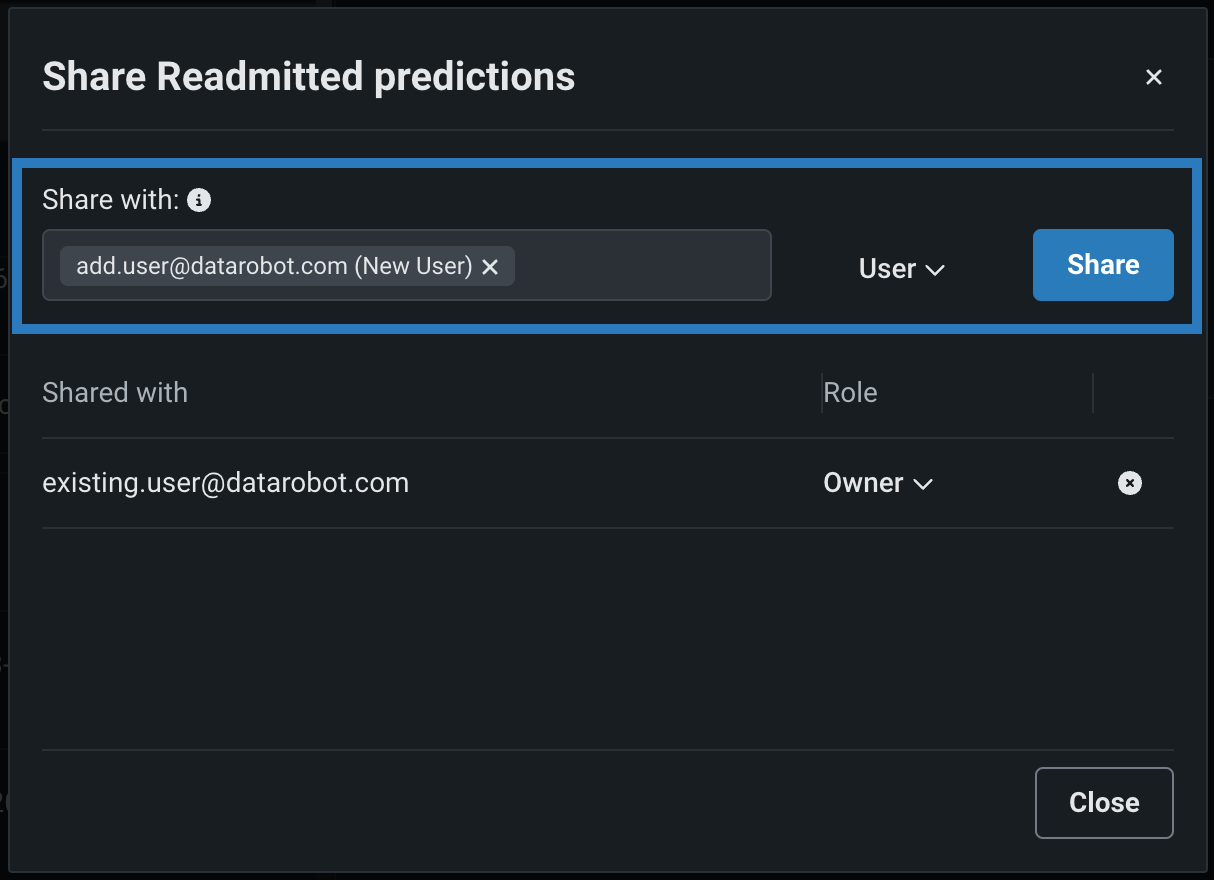
共有モーダルは、DataRobot全体でほぼ同じように機能しますが、フィールドやロールはアセットのタイプによって異なる場合があります。 違いとしては、外部共有リンク、任意のメモや通知、およびアセット固有のロールなどが挙げられます。 例:
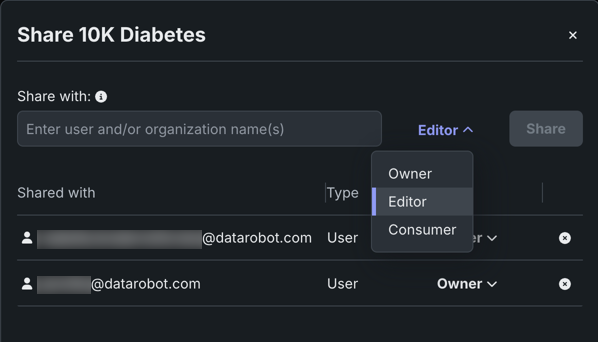
ユースケースにチームメンバーを追加する際、ユーザー、グループ、組織を追加できます。 共有先は、ユースケース内のすべてのアセットにアクセスできるようになります。
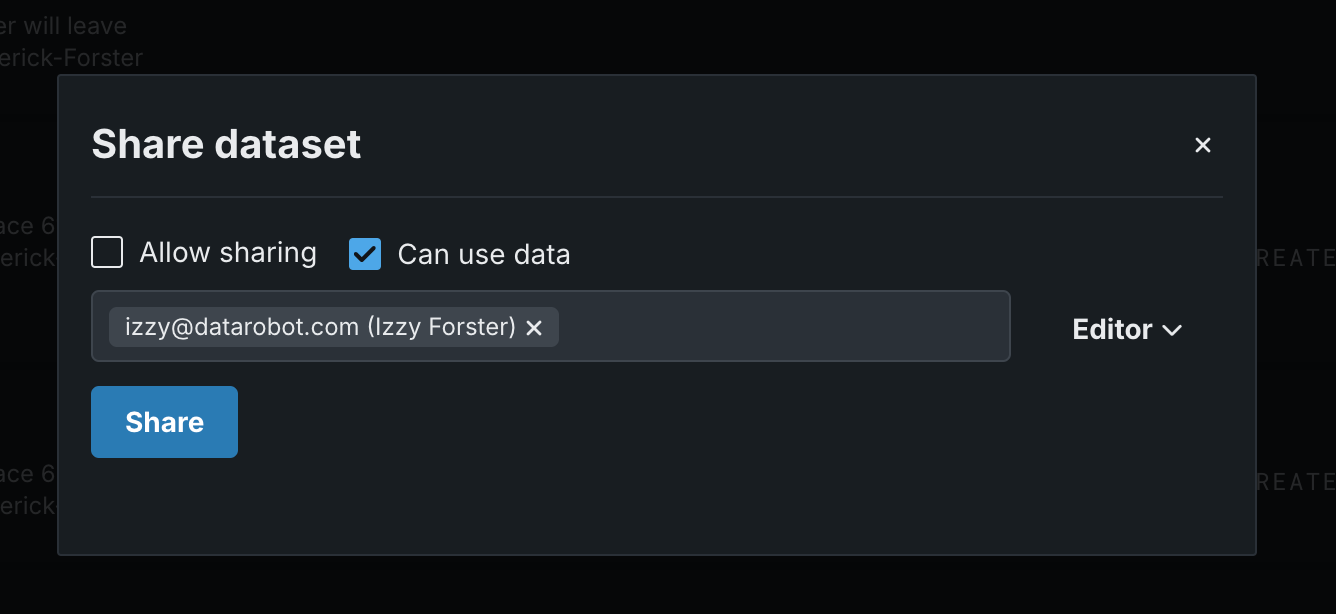
データレジストリからデータセットを共有する場合、必要に応じて共有を許可とデータを使用できるを選択してから、オーナー、エディター、またはコンシューマーのロールを割り当てます。
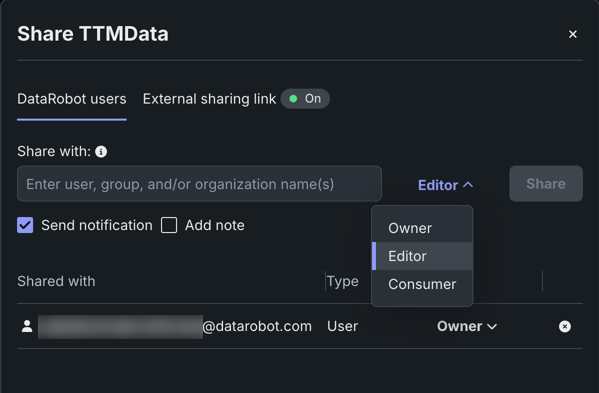
カスタムアプリケーションを共有する場合、外部共有リンクを有効にし、必要に応じて通知を送信したり、メモを追加したりすることができます。
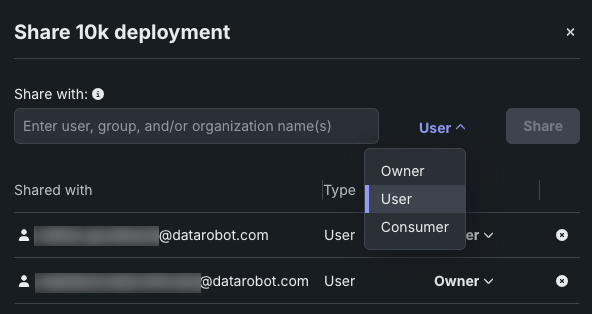
コンソールからデプロイを共有する場合、オーナー、ユーザー、コンシューマーからロールを選択できます。 ユーザーロールは、従来よく見られたエディターロールに代わるものです。 オーナーとユーザーは、グループや組織と共有できます。
登録済みのモデルを共有する場合、個々のモデルパッケージではなく、登録済みのモデルとその中に含まれるすべてのモデルパッケージが共有されます。
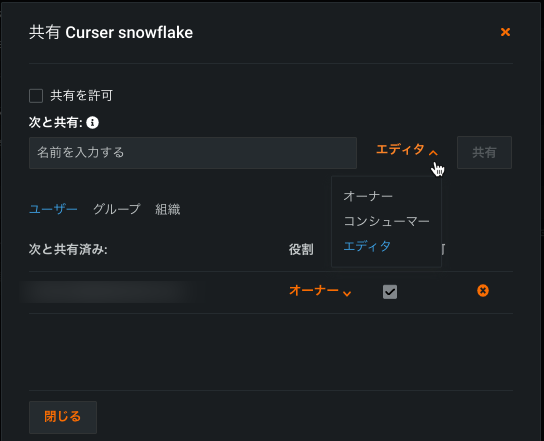
データ接続を共有する場合、アカウントメニューからデータ接続を開き、接続を選択して、共有をクリックします。 DataRobotでは、デフォルトのロールとしてエディターが割り当てられますが、ドロップダウンから変更できます。
エラーが発生した場合は、データアセットのロールまたはトラブルシューティングのセクションを確認してください。
共有フィールド
共有先モーダル内のフィールドは、アセットのタイプによって若干異なりますが、一般的には以下のものが含まれます。
| フィールド | 説明 |
|---|---|
| 共有先 | 受信者を識別します。 これは、ユーザーのメール、グループ、または組織(サポートされている場合)で任意の組み合わせにすることができます。 |
| 役割 | アセットへの受信者のアクセスレベルを指定します。 自分のアクセスと同じレベルまたはそれより低いレベルでアクセスを許可できます。 |
| 共有先 | 共有先と、その共有先に割り当てられたロール(データセットの場合は、追加の権限も含みます)を一覧表示します。 ロールを変更するにはドロップダウンを使用し、受信者を削除するにはxをクリックします。 |
| 共有の許可 | アセットを他のユーザーと(共有レベルまで)再共有する権限を受信者に付与します。 |
| データを使用できる | 受信者が特定の操作(データのダウンロード、データセットからのプロジェクトの作成など)にデータセットを使用できるようにします。 |
| 備考を追加 | 共有先に送信される通知に含めるメモを追加することができます。 |
受信者
共有先フィールドでは、以下の共有先を選択できます。
- ユーザー:組織内の個人。
- グループ:権限が一括で適用される、管理者によって割り当てられた一連のユーザー。
- 組織:管理者によって設定された、より大規模なユーザーのコレクション。
すべてのアセットタイプが、すべての共有先タイプに対応しているわけではありません。 たとえば、一部のアセットはユーザーや組織には対応していますが、グループには対応していません。 これらの共有先が各アセットにどのように割り当てられているかについては、指定可能な共有先を参照してください。
役割
ロールの選択はアセットタイプによって異なり、次のものが含まれます。
- オーナー(読み取り/書き込み/管理)
- エディターまたはユーザー(読み取り/書き込み)
- オブザーバーまたはコンシューマー(読み取りのみ)
これらのラベルがアセット間でどのように対応しているかについては、アセットタイプ別のロールラベルを参照してください。
通知
共有が成功すると、DataRobotは共有アセットへのリンクを含む通知メールを受信者に送信します。 クリックすると、アセット(またはログインプロンプト)がDataRobotで開きます。
さらに、DataRobotは受信者の通知センターにアラートを送信します。

共有可能なアセット
次の表は、UIで一般的なアセットタイプの共有方法をまとめたもので、各アセットで使用できるロールのより包括的な一覧を示しています。 詳細については、各アセットのリンク先ドキュメントを参照してください。
| アセット | 共有方法 | 役割 | ドキュメンテーション |
|---|---|---|---|
| ユースケース | ユースケースの情報タブのメンバーを管理。 | オーナー、ユーザー、コンシューマー | ユースケースにチームメンバーを追加する |
| データセット | データレジストリページの共有ボタン。 | オーナー、エディター、コンシューマー | データセットの共有 |
| デプロイ | コンソールのアクションメニュー。 | オーナー、ユーザー、コンシューマー | デプロイのアクション |
| カスタムアプリケーション | アプリケーションのアクションメニュー。 | オーナー、エディター、コンシューマー | アプリケーションの共有 |
| 登録済みのモデル | モデルディレクトリのアクションメニュー。 | オーナー、ユーザー、コンシューマー | 登録済みモデルの共有 |
| カスタムモデル | モデルワークショップのアクションメニュー。 | オーナー、エディター、コンシューマー | カスタムモデルの共有 |
| 実行環境 | 環境のアクションメニュー。 | オーナー、コンシューマー | 環境の管理 |
| データ接続 | データ接続ページの共有ボタン。 | オーナー、エディター、コンシューマー | データ接続の共有 |
| ワークロード | コンソールのアクションメニュー。 | オーナー、エディター、オブザーバー | Share a Workload |
アセットタイプ別に指定可能な共有先
すべてのアセットで同じ共有オプションを使用できるわけではありません。 以下の表は、各アセットがどの共有先タイプに対応しているかをまとめたものです。 ✔はその共有先タイプが対応していることを示し、—は対応していないことを示します。
| アセット | ユーザー | グループ | 組織 | 外部 |
|---|---|---|---|---|
| ワークベンチ | ||||
| ユースケース (ベクターデータベース、エクスペリメント、プレイグラウンド、ノートブック、アプリケーション、カスタムアプリケーション、登録済みのモデル、デプロイが含まれます) |
✔ | ✔(機能フラグ) | ✔ | — |
| レジストリ | ||||
| カスタムモデル(ワークショップ) | ✔ | — | — | — |
| エージェントワークフロー(ワークショップ) | ✔ | — | — | — |
| ツール(ワークショップ) | ✔ | ✔ | ✔ | — |
| サービス | ✔ | ✔ | ✔ | ✔ |
| エージェントワークフロー(モデルディレクトリ) | ✔ | — | — | — |
| 登録済みのモデル(モデルディレクトリ) | ✔ | — | — | — |
| ツール(モデルディレクトリ) | ✔ | ✔ | ✔ | — |
| データセット | ✔ | ✔ | ✔ | — |
| ファイル | ✔ | ✔ | ✔ | — |
| ジョブ(汎用) | ✔ | ✔ | ✔ | — |
| ジョブ(指標) | ✔ | ✔ | ✔ | — |
| ジョブ(通知) | ✔ | ✔ | ✔ | — |
| ジョブ(再トレーニング) | ✔ | ✔ | ✔ | — |
| アプリケーションのソース | ✔ | — | — | — |
| 実行環境 | ✔ | — | — | — |
| プロンプト | ✔ | — | ✔ | — |
| データ接続 | ||||
| データ接続 | ✔ | ✔ | ✔ | — |
| コンソール | ||||
| デプロイされたワークロード(エージェントワークフロー) | ✔ | ✔ | ✔ | — |
| デプロイされたワークロード(ツール) | ✔ | ✔ | ✔ | — |
| デプロイされたワークロード(サービス) | ✔ | ✔ | ✔ | — |
| 予測環境 | ✔ | ✔ | ✔ | — |
| 通知テンプレート(デプロイポリシー) | ✔ | ✔ | ✔ | — |
| 通知テンプレート(チャネル) | ✔ | ✔ | ✔ | — |
| 通知テンプレート(カスタムジョブポリシー) | ✔ | ✔ | ✔ | — |
| Airflowのパイプライン | — | — | — | — |
| アプリケーション | ✔ | ✔ | ✔ | ✔ |
*グループでユースケースを共有するには、機能フラグが必要です。 ユースケースを共有すると、共有先は含まれているアセット(ベクターデータベース、エクスペリメント、プレイグラウンド、ノートブック、アプリケーション、カスタムアプリケーション、登録済みのモデル、デプロイなど)にもアクセスできるようになります。
ユーザーのみによる共有
カスタムモデル、エージェントワークフロー、アプリケーションソース、および実行環境は、個々のユーザーとのみ共有でき、グループや組織とは共有できません。
ユースケースを通じた共有
ワークベンチのアセットの多く(エクスペリメント、Codespace、ラングリングレシピなど)は、個別の共有ができません。 その代わりに、親のユースケースを共有してください。これにより、共有先はそのユースケースに含まれるすべてのアセット(他のメンバーが追加したアセットも含む)にアクセスできるようになります。 ユースケースにチームメンバーを追加するを参照してください。
また、データセットやデプロイをユースケースにリンクさせることで、それらのアセットを個別に共有することなく、アクセス権を既存のユースケースメンバーに拡大することができます。 ユースケースへのデータのリンクおよびユースケースへのリンクを参照してください。
トラブルシューティング
共有時にエラーが発生した場合は、次の理由が考えられます。
- 受信者はDataRobotユーザーではないか、DataRobot組織の外部にいるユーザーです。
- 役割や権限に問題があります。 自分の役割とアクセスレベル、および受信者の役割の両方が、そのユーザーまたはユーザーのグループとアセットを共有できるかどうか、および共有方法に影響します。
役割とアクセスレベルの影響
役割を割り当てるときは、自分と同じアクセスレベルかそれより低いアクセスレベルを割り当てることができます。 たとえば、プロジェクトへのユーザー(読み取り/書き込み)アクセス権がある場合、別のユーザーにユーザーまたはコンシューマー(読み取り専用)アクセス権を付与できますが、オーナー(読み取り/書き込み/管理)アクセス権を付与することはできません。
受信者の役割とアクセスレベルの影響
受信者のDataRobotアセットへの共有アクセスは、組織のDataRobot管理者によって割り当てられたロールベースのアクセス制御(RBAC)でのロールによって制御されます。 これらの指定された特権は割り当てられた権限を上書きします。 ユーザーがRBAC特権を超える役割でアセットを共有しようとすると、共有が阻止されます。 より制限的な役割を割り当ててみてください。 詳細についてはロールの優先順位と共有を参照してください。
機能に関する注意事項
アクセスを共有または削除する場合は、次の点に注意してください。
- すべてのエンティティが特定のユーザー数を超えて共有を許可するものはありません。
- 共有する場合、ユーザーとグループは同じ組織に属している必要があります(詳細については、テナントの分離とコラボレーションを参照してください)。
- アクセスはアクティブなアカウントとのみ共有できます。
- 共有できるのは自分のアクセスレベルまでです(コンシューマーはエディターの役割を付与できません)。自分よりも高いアクセスレベルを持つコラボレーターのアクセスをダウングレードすることはできません。
- すべてのエンティティには少なくとも1人のオーナー(デフォルトではエンティティの作成者)が必要です。 作成者を削除するには、そのユーザーは1人以上の別の共同編集者にオーナーの役割を割り当ててから、自分自身を削除する必要があります。
- データ接続エンティティとデータアセットエンティティには、(「共有を許可する」設定に基づいて)共有できるユーザーが少なくとも1人必要です。
詳しい情報
以下のドキュメントでは、上記で説明されていない関連トピックを取り扱っています。
- GenAIの共有:共有と権限
- アクセス制御:ロールの優先順位と共有
- 通知:通知センター
- API:共有(Python API)、共有とアクセス制御(Workload API)