Inactive account policy
The inactive account policy manages the lifecycle of inactive user accounts in an organization. A background job reviews last activity for each user and, when an account exceeds the periods you configure, disables the account or marks it for deletion. System administrators set separate periods for regular users and for organization and system administrators, plus a grace period that applies after an administrator re-enables a disabled account.
The policy reduces standing access from unused accounts and supports inactivity requirements in environments such as FedRAMP. Permanent deletion of a marked account is always a manual action; DataRobot does not delete accounts automatically.
Availability information
The inactive account policy is available when DataRobot enables it for your cluster. Contact your DataRobot representative if the Inactive account policy section is not visible on the organization profile.
Required permission: System Administrator (configure the lifecycle). System or Organization Administrator (permanently delete an account that is marked for deletion).
Availability information
The inactive account policy is off unless you enable it for the cluster. See Enable the inactive account policy.
Required permission: System Administrator (configure the lifecycle). System or Organization Administrator (permanently delete an account that is marked for deletion).
Required cluster configuration: ENABLE_AUTO_ACCOUNT_INACTIVITY_LIFECYCLE = True
The disabling period must be longer than the web UI session lifetime.
Lifecycle stages
Each organization can define two inactivity windows for regular users and two for administrators, plus a reactivation grace period.
The following table describes each stage.
| Stage | What happens |
|---|---|
| Active | The user authenticates to DataRobot. Last activity is stored as a calendar date. |
| Disabled | When inactivity reaches the disabling period, the background job disables the account and the user cannot sign in. An administrator can re-enable the account. The disabling period should be longer than the web UI session lifetime for a better user experience. |
| Grace period | After an administrator re-enables a disabled account, the user must authenticate before the grace period ends. If they do, the account stays active. If they do not, the job disables the account again. |
| Marked for deletion | When inactivity reaches the marked-for-deletion period, the job locks the account. Administrators cannot re-enable the account, change the password, or edit other profile actions. The only remaining action is permanent deletion. The marked-for-deletion period must be longer than the disabling period for the same account type (regular user or administrator). |
| Permanently deleted | A system or organization administrator deletes the account manually. You cannot reverse this action in the DataRobot UI or API. |
%%{init: {"flowchart": {"curve": "linear"}}}%%
flowchart TB
    A["Active account"] -->|"Inactivity reaches<br/>disabling period"| B["Disabled"]
    B -->|"Administrator re-enables account"| C["Grace period"]
    B -->|"Inactivity reaches<br/>marked-for-deletion period"| D["Marked for deletion"]
    D -->|"Administrator deletes account"| E["Permanently deleted"]
Warning
Disabling an account does not stop the deployments, applications, jobs, or workloads that the user owns. Audit ownership of production resources before an account is disabled or marked for deletion, and reassign them to a service account.
Measures of activity
DataRobot records last activity at the authentication layer for UI and API requests, including requests that authenticate with an API key. Activity is stored as a date, not a timestamp, and is updated at most once per calendar day per user.
When you enable the policy for an organization, DataRobot first reconciles last activity for every user in that organization, then continues to record activity going forward. A background job then reviews those dates against the organization's periods and disables accounts or marks them for deletion.
Configure the inactive account policy
System administrators configure the lifecycle on the organization profile. Each organization has its own settings.
Warning
Enabling the policy can disable accounts that already exceed the disabling period as soon as the background job runs. A reconciliation process runs during the first job execution after the policy is enabled (or re-enabled), which sets the user activity date to the current date for every account in the organization. This helps to avoid unexpected changes for user statuses at the beginining of policy application. Review the periods, identify service accounts and other accounts that must remain active, and reassign production resources before you turn the setting on.
To configure the inactive account policy:
-
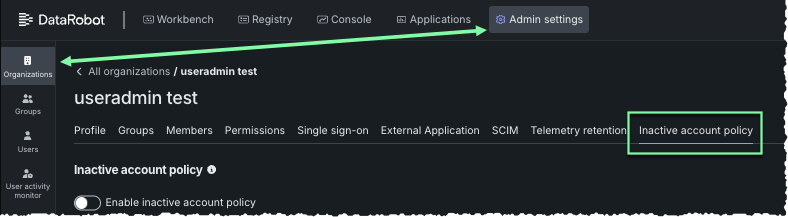
Click Admin settings > Organizations.
-
Select the organization and then click the Inactive account policy tab.
-
Turn on the toggle to enable configuring the inactive account policy for the organization. When you enable it, DataRobot reconciles last activity for every member of the organization.
-
Set the inactivity periods and the reactivation grace period described in the following table. Note that if you set both disabling and marking for deletion for an account type, the marked-for-deletion period must be greater than the disabling period.
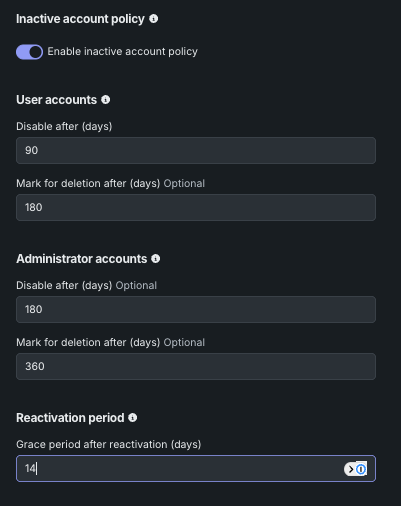
Setting Account type Description Disable after User The number of days of inactivity after which DataRobot disables a user account. This value must be greater than the web UI session lifetime, converted to days. Mark for deletion after User The number of days of inactivity after which DataRobot marks a user account for deletion. This value must be greater than the Disable after value for user accounts. Disable after Administrator The number of days of inactivity after which DataRobot disables an organization or system administrator account. This value must be greater than the Disable after value for user accounts, so that administrator accounts remain active longer. Mark for deletion after Administrator The number of days of inactivity after which DataRobot marks an organization or system administrator account for deletion. This value must be greater than the Disable after value for administrator accounts. Reactivation period User and Administrator The number of days a re-enabled account has to sign in before DataRobot disables it again. The default is seven days.
The example above shows a configuration that disables regular users after 90 days and marks them for deletion after 180 days, with longer windows for administrators:
| Account type | Disable after | Mark for deletion after |
|---|---|---|
| Regular users | 90 days | 180 days |
| Administrators | 180 days | 360 days |
With a 14-day grace period, a user whose administrator re-enables a disabled account must authenticate within 14 days or the account is disabled again.
View account status
Open Admin settings > Users to see each account's status in the users table. The same status appears on the user profile.
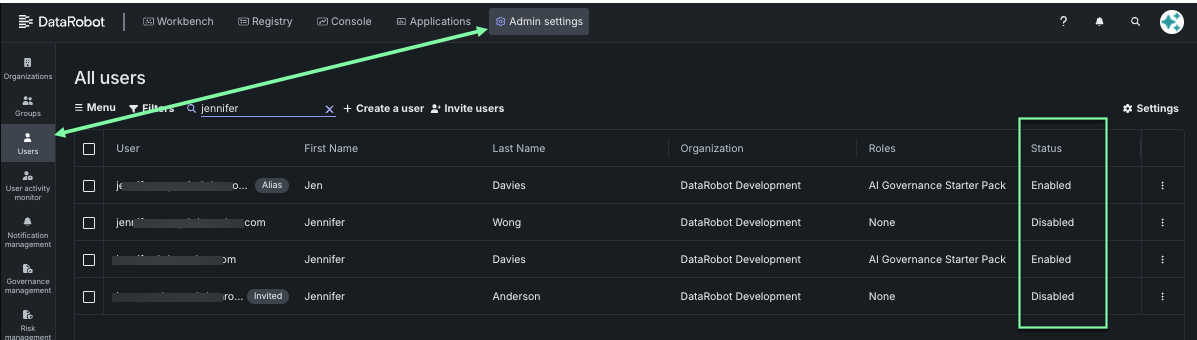
Possible statuses are described in the following table:
| Status | Meaning | Available actions |
|---|---|---|
| Active | The account can sign in. Last activity is within the disabling period. | Disable the account manually, edit profile settings, and change the password as usual. See Deactivate user accounts. |
| Disabled | The account cannot sign in. DataRobot reached the disabling period, or an administrator disabled the account. | Re-enable the account to start the grace period, or wait until inactivity reaches the marked-for-deletion period. |
| Marked for deletion | The account is locked for inactivity beyond the marked-for-deletion period. | Permanently delete the account. You cannot re-enable the account, change the password, or edit other profile actions. |
Note
You cannot reverse a marked-for-deletion status in the DataRobot UI or API. Contact DataRobot Support if you need to restore an account in this state.
Re-enable a disabled account
To restore access for a disabled account that is not marked for deletion:
- Click Admin settings in the top navigation bar and select Users.
- Open the user profile.
- Click Enable User.
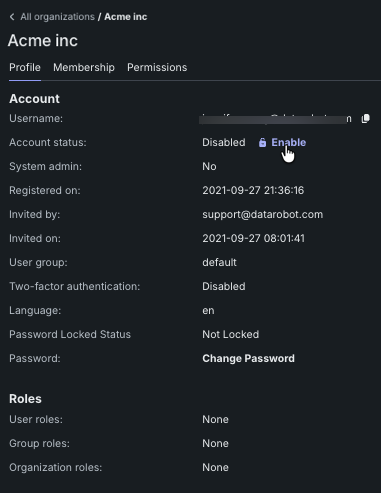
The reactivation grace period starts when you re-enable the account. The user must sign in or authenticate to the API before that period ends. If they do, last activity updates and the account remains active. If they do not, the background job disables the account again.
Re-enabling an account does not reset the marked-for-deletion clock by itself. If inactivity continues and reaches the marked-for-deletion period, the job marks the account for deletion.
Permanently delete an account
You can permanently delete an account after it is marked for deletion or if the account has a disabled status. DataRobot does not permanently delete accounts as part of the policy.
- Click Admin settings in the top navigation bar and select Users.
- Open the profile of the user that shows Marked for deletion or a disabled status.
- Delete the account, then confirm the deletion.
Permanent deletion cannot be undone in the DataRobot UI or API. Reassign deployments, applications, jobs, and workloads to a service account before you delete the user.
Service accounts
Authenticated API requests count as activity, so a service account that is used within the disabling period stays active. An unused service account is disabled and, if inactivity continues, marked for deletion like any other user.
Before you enable the policy, identify service accounts in the organization, confirm they authenticate often enough to stay under the disabling period, and keep them out of manual offboarding. After an account is marked for deletion, you cannot re-enable it from the UI.
Next steps
To learn more about user accounts, visit the following pages.