Compliance documentation
DataRobot automates many critical compliance tasks associated with developing a model and, by doing so, decreases time-to-deployment in highly regulated industries. From this tab, you can generate individualized documentation for each model, providing comprehensive guidance on what constitutes effective model risk management. Then, you can download the report as an editable Microsoft Word document (.docx). The generated report includes the appropriate level of information and transparency necessitated by regulatory compliance demands.
See the Compliance section for a links to other DataRobot compliance tools.
Model compliance report
The model compliance report is not prescriptive in format and content, but rather serves as a template in creating sufficiently rigorous model development, implementation, and use documentation. The documentation provides evidence to show that the components of the model work as intended, the model is appropriate for its intended business purpose, and it is conceptually sound. As such, the report can help with completing the Federal Reserve System's SR 11-7: Guidance on Model Risk Management.
To generate a compliance report:
-
Select a model from the Model Leaderboard.
-
From the Model actions dropdown, select Generate compliance report.
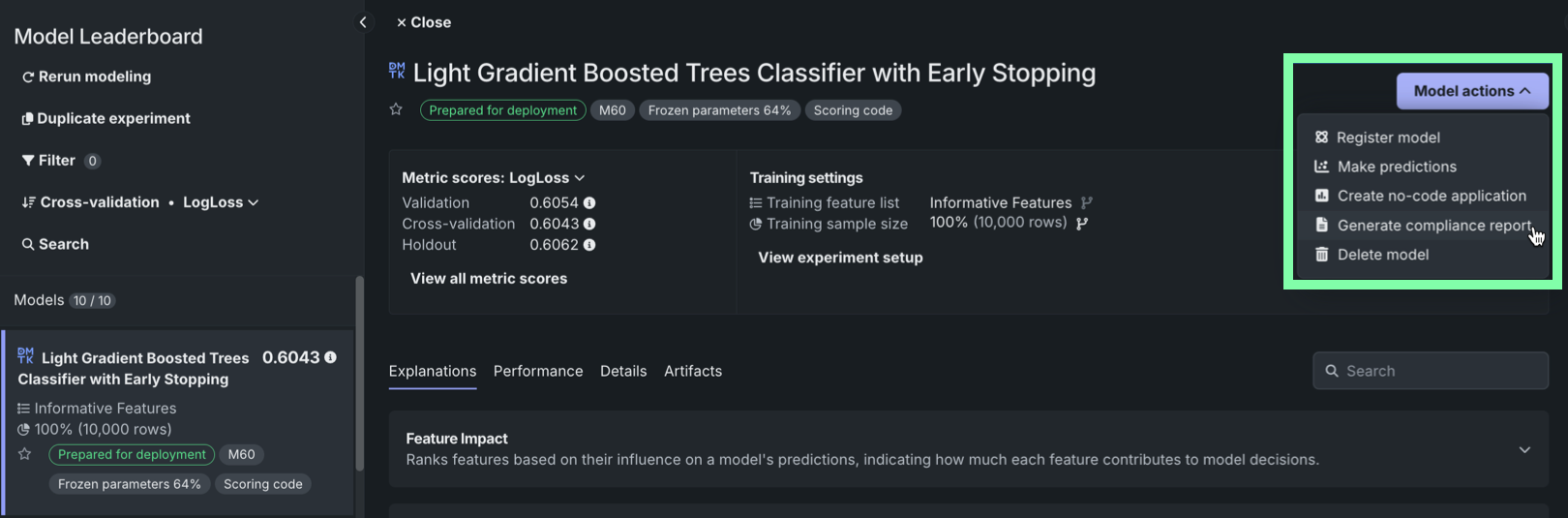
-
Workbench prompts for a download location and, once selected, generates the report in the background as you continue experimenting.
Next steps
After generating your compliance report, gather the other assets and information needed to support model governance.
- Downloads: Download model artifacts, charts, and data in a single ZIP file to accompany your compliance documentation.
- Related Assets: Review the applications, registered models, and deployments associated with the model for full traceability.
- Model Info: Check the general model and performance information referenced throughout the compliance report.