Log
| Tab | Description |
|---|---|
| Details | Displays the status of successful (green INFO tags) and errored (red ERROR tags) individual tasks that make up a modeling job. |
To display the model log, click a model on the Leaderboard list, then click Log.
Note
If you receive text-based insight model errors, see this note for a description of how DataRobot handles single-character "words."
The following example shows a simple (and fast) blueprint consisting of two tasks being trained—Missing Values Imputation and Decision Tree:
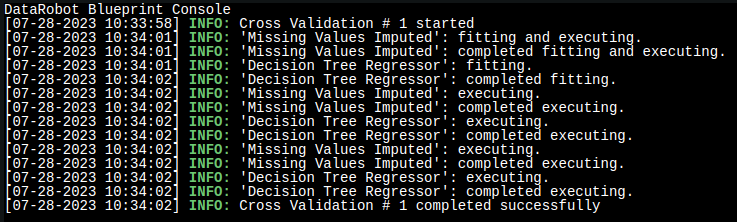
The first part of the log shows the initial training:
[07-28-2023 10:34:01] 'Missing Values Imputed': fitting and executing.
[07-28-2023 10:34:01] 'Missing Values Imputed': completed fitting and executing.
[07-28-2023 10:34:01] 'Decision Tree Regressor': fitting.
[07-28-2023 10:34:02] 'Decision Tree Regressor': completed fitting.
The second part shows the calculation of validation metrics and insights:
[07-28-2023 10:34:02] 'Missing Values Imputed': executing.
[07-28-2023 10:34:02] 'Missing Values Imputed': completed executing.
[07-28-2023 10:34:02] 'Decision Tree Regressor': executing.
[07-28-2023 10:34:02] 'Decision Tree Regressor': completed executing.
In the image above, you can see that the last two tasks were executed for holdout as well.
Next steps
Use the log alongside other model detail tabs to diagnose or document how a model was built.
- Model Info: Review general model and performance information reported for the same model.
- Blueprint: See the preprocessing steps and algorithms that correspond to the tasks recorded in the log.
- Downloads: Export model artifacts and charts for the model you just reviewed.