Blueprint
| Tab | Description |
|---|---|
| Details | Provides a graphical representation of the preprocessing steps (tasks), modeling algorithms, and post-processing steps that go into building a model. |
During the course of building predictive models, DataRobot runs several different versions of each algorithm and tests thousands of possible combinations of data preprocessing and parameter settings. (Many of the models use DataRobot proprietary approaches to data preprocessing.) The result of this testing is provided in the Blueprints tab.
Blueprints are ML pipelines containing preprocessing steps, modeling algorithms, and post-processing steps. They can be generated either automatically as part of Autopilot or manually/programmatically from the model repository.
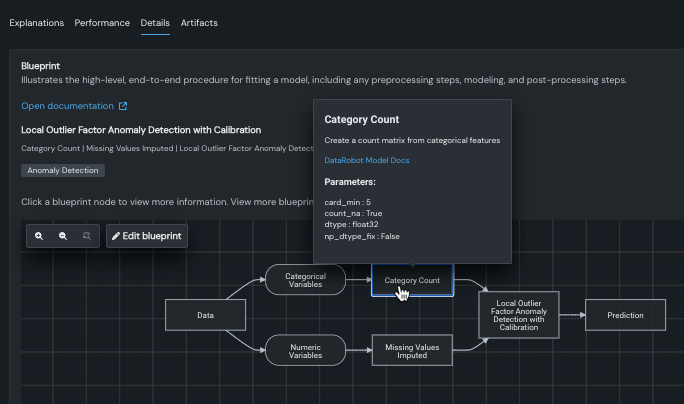
Click on any task in the blueprint to see more detail, including more complete model documentation (by clicking DataRobot Model Docs from inside the blueprint’s task).
Additionally, from the Blueprint tab you can:
- Open the blueprint repository to access the library of blueprints that are compatible with the experiment's data and settings.
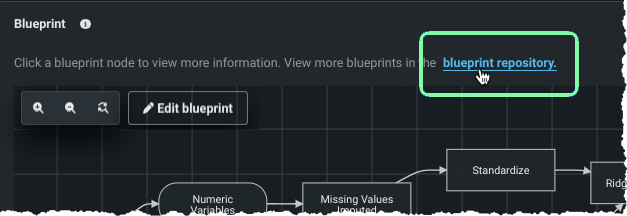
- Edit the blueprint to create new, custom blueprints using built-in tasks and custom Python/R code.
Next steps
After reviewing how the model was built, check its training details or explore alternative approaches.
- Log: View the status of each preprocessing and modeling task shown in the blueprint.
- Model Info: Review general model and performance information for the model.
- Hyperparameter Tuning: Manually adjust hyperparameters for tasks in the blueprint to create a new model.