Get started with Agent Assist
Premium
DataRobot's Agentic AI capabilities are a premium feature; contact your DataRobot representative for enablement information. Try this functionality for yourself in a limited capacity in the DataRobot trial experience.
DataRobot Agent Assist (dr assist) is an interactive AI assistant optimized for developing AI agents. You describe the agent you want, and Agent Assist helps you specify, simulate, implement, and deploy it, building on the Agentic Starter template. To set up the template yourself and work with it directly, see Get started with the Agentic Starter instead. For a full description of Agent Assist capabilities, see the Agent Assist overview.
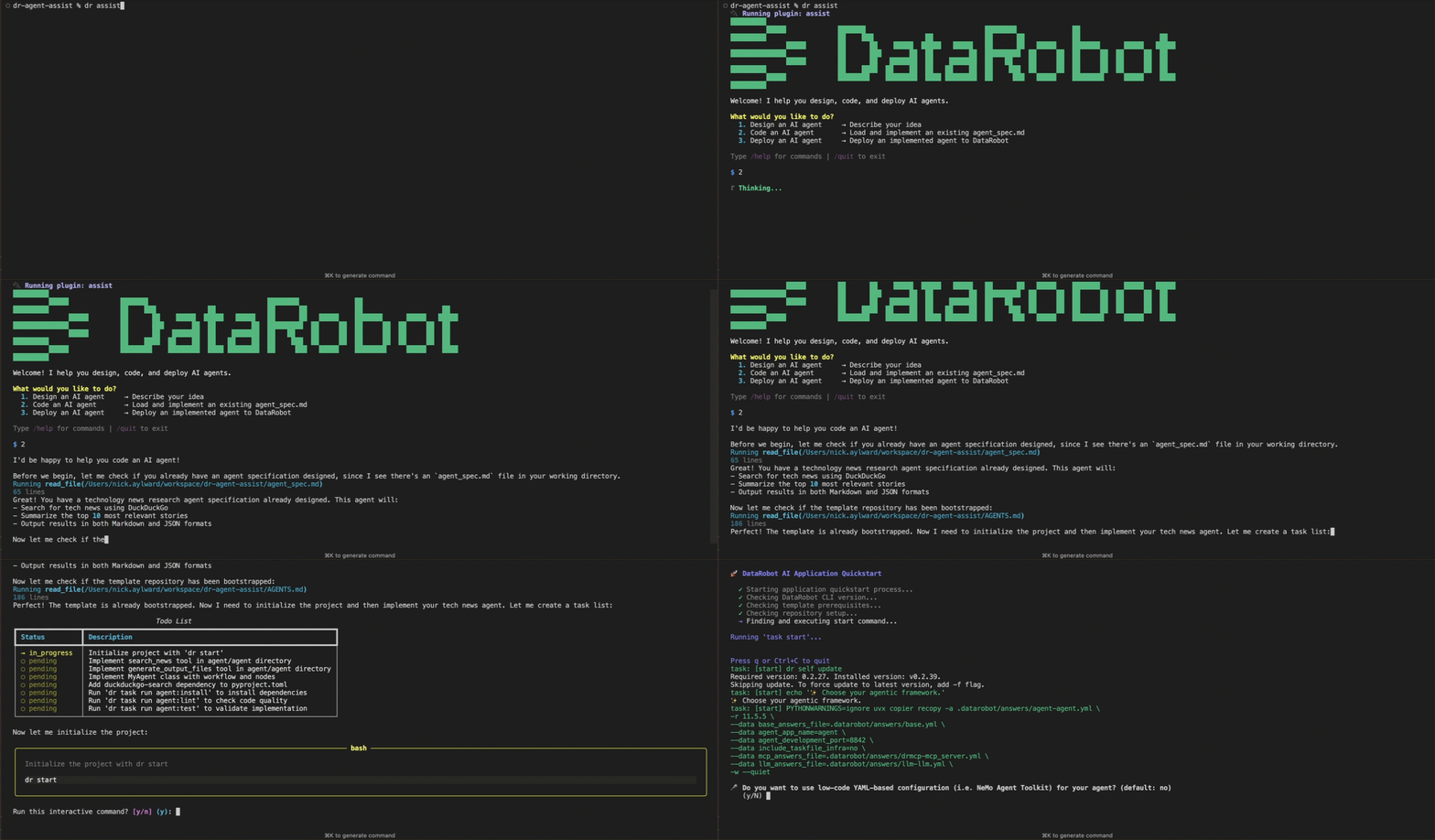
This guide uses Agent Assist from the terminal as a DataRobot CLI plugin. To use the same workflows from Claude Code, Cursor, OpenCode, VS Code Copilot, or another coding agent, install the Agent Assist skill instead.
Prerequisites
Operating system compatibility
Agent Assist runs on macOS and Linux. On Windows, use a DataRobot codespace, Windows Subsystem for Linux (WSL), or a virtual machine running a supported OS. The Agentic Starter template itself supports Windows natively; to work on Windows without these options, see Get started with the Agentic Starter.
Before you begin:
- Install the prerequisite tools at the required versions—see Install prerequisite tools. Agent Assist clones the Agentic Starter template and runs
dr dependencies checkagainst the template's requirements, so the template's minimum versions apply. - Authenticate the DataRobot CLI with
dr auth login. If you skip this step, Agent Assist prompts you to authenticate at startup. -
Install the Agent Assist plugin and verify it—see Install and run DataRobot Agent Assist:
dr plugin install assist
dr plugin list              # Should show "assist"
Prepare a workspace
Run dr assist in an empty directory
Only run dr assist from a dedicated and empty directory. Running this command in a directory containing code or other files is unsafe. When you use the agent assist coding workflow, the assistant clones the DataRobot Agent Application Template repository into the current directory. This action can overwrite or conflict with existing files, damaging the existing project and degrading the accuracy of the assistant's output. Before running dr assist, if you're not in a dedicated directory, create one and open the terminal there (for example, mkdir my-agent && cd my-agent, then run dr assist).
Create a dedicated directory and open a terminal there:
mkdir my-agent && cd my-agent
Start Agent Assist
Run:
dr assist
At startup, Agent Assist checks your tools and authentication. The welcome screen then offers three paths:
- Design an AI agent: Describe your idea and produce an
agent_spec.md. - Code an AI agent: Load an existing
agent_spec.mdand implement the agent. - Deploy an AI agent: Deploy an implemented agent to DataRobot.
Type 1, 2, or 3, or describe your goal in natural language.
Commands
Type /help inside the session for slash commands and /quit to exit. Type list models (no slash) to see the LLM gateway model catalog. See Workflows and prompting and Slash commands for the full reference.
Design your agent
For a new agent, choose Design an AI agent (option 1). Describe:
- What the agent should do.
- Who will use it.
- Which data sources or tools it needs.
Agent Assist asks clarifying questions, suggests tools and models, and writes an agent_spec.md file in your workspace. It also asks whether the template's default chat UI is sufficient or you need a custom frontend. Review the specification before moving to implementation. For field definitions, see the Agent specification reference.
To validate the design before writing code, ask Agent Assist to simulate the agent (for example, "Simulate my agent"). Simulation doesn't execute tool calls or call real deployments; the LLM generates tool results so you can check which tools the agent selects and with what arguments. See Simulate an agent.
Implement your agent
When agent_spec.md is ready, choose Code an AI agent (option 2). With your approval, Agent Assist:
- Clones the Agentic Starter template into your directory.
- Asks which agentic framework to use (LangGraph, CrewAI, LlamaIndex, NeMo Agent Toolkit, or Base).
- Runs
dr startto configure credentials, ports, and LLM settings. - Implements agent code from the specification, editing files and running shell commands.
Test the agent locally in a separate terminal in the project directory, using the commands in the template's AGENTS.md (for example, dr run dev). For details, see Code an AI agent. For customization patterns, see Customize agents.
Deploy your agent
When the agent runs locally, choose Deploy an AI agent (option 3). Agent Assist reads the deployment instructions from the template's AGENTS.md and walks you through the steps. It doesn't run deployment commands itself; it shows what to run in a separate terminal (typically dr task run deploy, which requires a Pulumi login). See Deploy an AI agent.
For deployment details outside of Agent Assist, see Deploy your agent in Get started with the Agentic Starter.
Agent Assist reference
For installation details, slash commands, environment variables, and troubleshooting beyond this walkthrough, see the Agent Assist documentation.
| Topic | Description |
|---|---|
| Prerequisites and installation | System requirements, required tools and versions, and installing the plugin. |
| Workflows and prompting | Welcome screen, Design / Simulate / Code / Deploy workflows, and prompting tips. |
| Environment and commands reference | Environment variables, files and directories, slash commands, and changing the Agent Assist LLM. |
| Agent Assist skill | Use Agent Assist from Claude Code, Cursor, OpenCode, VS Code Copilot, and other coding agents. |
| Troubleshooting | Plugin discovery, dependency checks, authentication, template bootstrap, and related fixes. |
Next steps
- Customize agents: Customize agent code, test locally, and deploy for production use.
- Add tools to agents: Add local, predefined, and DataRobot global tools to your agent.
- Get started with the Agentic Starter: Set up and deploy the Agentic Starter template directly with
dr startanddr task run.