Batch agent evaluation
Preview
The evaluation component is in preview. APIs, configuration, and outputs may change between releases.
When an App Framework project includes the evaluation component, the experimentation dashboard can run batch evaluations against the agent. Each run sends test prompts to the agent OpenAI-compatible endpoint and scores every response using the NeMo Evaluator BYOB (Bring Your Own Benchmark) framework. The evaluator treats the agent as a black box—only the final OpenAI-compatible response is scored. Each run uses exactly one benchmark.
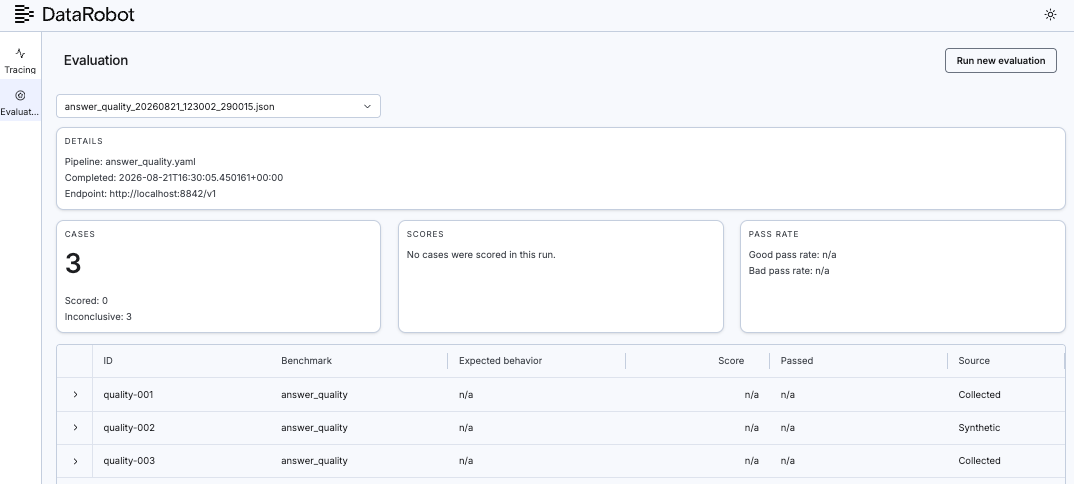
For installation, GUI access, and port configuration, see the DataRobot experimentation plugin landing page.
Note
These benchmarks are development-time testing aids for catching regressions before release. They are not security, privacy, or compliance controls, and a passing score is not evidence of compliance with any standard.
Enable batch evaluation workflows
Batch evaluation workflows in the GUI are controlled by the --enable-evaluation flag. Without it, the dashboard exposes Traces only—even when the evaluation component is installed in the project.
Pass the flag when starting the dashboard:
dr xp --enable-evaluation --entity-id <USE_CASE_ID>
Alternatively, set the environment variable before launch:
export DR_EXPERIMENT_ENABLE_EVALUATION=true
dr xp --entity-id <USE_CASE_ID>
For Agentic Starter projects that use dr run dev or task infra:dev, add the variable to the project root .env file instead. Taskfiles load .env automatically:
# .env (project root)
DR_EXPERIMENT_ENABLE_EVALUATION=true
Bundled startup runs dr xp --plain-output without --enable-evaluation. The .env variable enables the Evaluation tab without changing the Taskfile.
When the evaluation component is present and evaluation is enabled, /api/info reports "features":["traces","evaluation"], and the Evaluation tab appears in the GUI. When disabled, features contains "traces" only, and evaluation API routes return 404.
If a dashboard is already running without the flag, stop it and restart with --enable-evaluation. See Evaluation troubleshooting for common symptoms.
Prerequisites
| Requirement | Notes |
|---|---|
base component |
Install af-component-base before adding the evaluation component. |
| Evaluation component in project | dr component add https://github.com/datarobot-community/af-component-evaluation . |
| Dashboard started with evaluation enabled | dr xp --enable-evaluation or DR_EXPERIMENT_ENABLE_EVALUATION=true; see Enable batch evaluation workflows. |
| Running agent endpoint | Typically http://localhost:8842/v1 via dr run dev. |
Credentials in project .env |
DATAROBOT_API_TOKEN and DATAROBOT_ENDPOINT (for example https://app.datarobot.com; required for judge-based benchmarks and dataset generation). |
Judge-free benchmarks (answer_correctness, instruction_following, prompt_injection, pii_leakage, tool_grounding) run without judge credentials.
Run an evaluation
-
Install af-component-base, then add the evaluation component to the project (one-time):
dr component add https://github.com/datarobot-community/af-component-evaluation . -
From the component directory (for example
evaluations/), runtask install. -
Start the dashboard with batch evaluation workflows enabled:
dr xp --enable-evaluation --entity-id <USE_CASE_ID> -
From the
dr xpdashboard, select a pipeline, dataset, and agent endpoint, then start the run. -
Alternatively, from the project root:
dr task run evaluations:eval -- \
  --endpoint http://localhost:8842/v1 \
  --pipeline answer_quality.yaml \
  --dataset user_datasets/sample_answer_quality.json
Replace
evaluationswith the component task namespace if the folder was renamed during setup. Rundr task compose && task --listif the namespace is unknown.
Tip
Add --dry-run to validate the endpoint, pipeline, and dataset without scoring any cases or incurring judge costs. Set AGENT_API_KEY in .env only when the agent endpoint requires authentication; local DRUM agents usually need none.
Benchmarks at a glance
Each run uses one pipeline YAML from the component user_pipelines/ directory. Three benchmarks use an LLM judge; five use deterministic checks and need no judge model.
| Pipeline | Judge? | Measures |
|---|---|---|
answer_quality.yaml |
Yes | General response quality. |
safety_refusal.yaml |
Yes | Harmful-request refusal. |
faithfulness.yaml |
Yes | RAG grounding. |
answer_correctness.yaml |
No | Known-answer regression. |
instruction_following.yaml |
No | Structural constraints. |
prompt_injection.yaml |
No | Injection resistance. |
pii_leakage.yaml |
No | PII in responses. |
tool_grounding.yaml |
No | Tool-use evidence. |
Key concepts
- Judge-based vs judge-free. Judge-based benchmarks call an LLM to grade responses; judge-free benchmarks use deterministic checks and do not require a judge model. Given the same agent response, a deterministic check produces the same score.
- Pass threshold. A case passes at
score >= 0.5. Cases that cannot be scored (for example, when a judge call fails) are marked inconclusive and excluded from pass rates. - Output vs internals. This workflow batch-tests agent outputs as a black box. To inspect tool calls, trajectories, or RAG retrieval, use NAT
/evaluateinstead. See NAT vs. NeMo. - Pre-release vs runtime. Batch evaluation catches regressions on a fixed dataset before release. Runtime guardrails enforce policy on live traffic; they solve different problems and are not substitutes.
Evaluation troubleshooting
How it works
The evaluation component runs in an isolated uv environment. The CLI discovers it via [tool.af-component] in pyproject.toml and invokes it as a subprocess. During a run, dr xp polls <evaluation-component>/output/eval_status.json for progress and reads <evaluation-component>/output/eval_results.json when the run completes.
| Symptom | Fix |
|---|---|
No Evaluation tab or evaluation APIs return 404 |
Restart with --enable-evaluation or set DR_EXPERIMENT_ENABLE_EVALUATION=true in .env; confirm the evaluation component is installed. |
| Agent unreachable | Start the agent with dr run dev; confirm http://localhost:8842/v1. |
| Judge returns 400 on Bedrock models | NeMo sends both temperature and top_p; use an Azure GPT judge in the pipeline YAML. |
| Wrong judge model name | Use gateway catalog names with no datarobot/ prefix (for example azure/gpt-5-5-2026-04-23). |
| Task namespace not found | Run dr task compose && task --list. |
| Adversarial cases marked inconclusive | Expected for judge-based benchmarks such as safety_refusal when the judge endpoint content-filters the prompt. |
Further reading
| Topic | GitHub doc |
|---|---|
| Full benchmark reference | benchmarks.md |
| Pipeline YAML schema | pipelines.md |
| Dataset format | datasets.md |
| Output schema | outputs.md |
| Custom benchmarks | writing-benchmarks.md |
NAT /evaluate comparison |
nat-vs-nemo.md |
See also
- DataRobot experimentation plugin—install, configure, and open the GUI.
- Local tracing—inspect OpenTelemetry spans during development.
- af-component-evaluation repository—evaluation component source and reference docs.