Agent Assistの使用を開始する
プレミアム機能
DataRobot's Agentic AI capabilities are a premium feature; contact your DataRobot representative for enablement information. DataRobotの試用版では、この機能を制限付きでお試しいただけます。
DataRobot Agent Assist(dr assist)は、AIエージェントの開発に最適化された対話型AIアシスタントです。 希望するエージェントの仕様を記述すると、Agent AssistがAgentic Starterのテンプレートを基に、そのエージェントの仕様定義、シミュレーション、実装、デプロイを支援します。 テンプレートを自分で設定して、直接操作したい場合は、代わりにAgentic Starterの使用を開始するを参照してください。 Agent Assist機能の詳細については、Agent Assistの概要を参照してください。
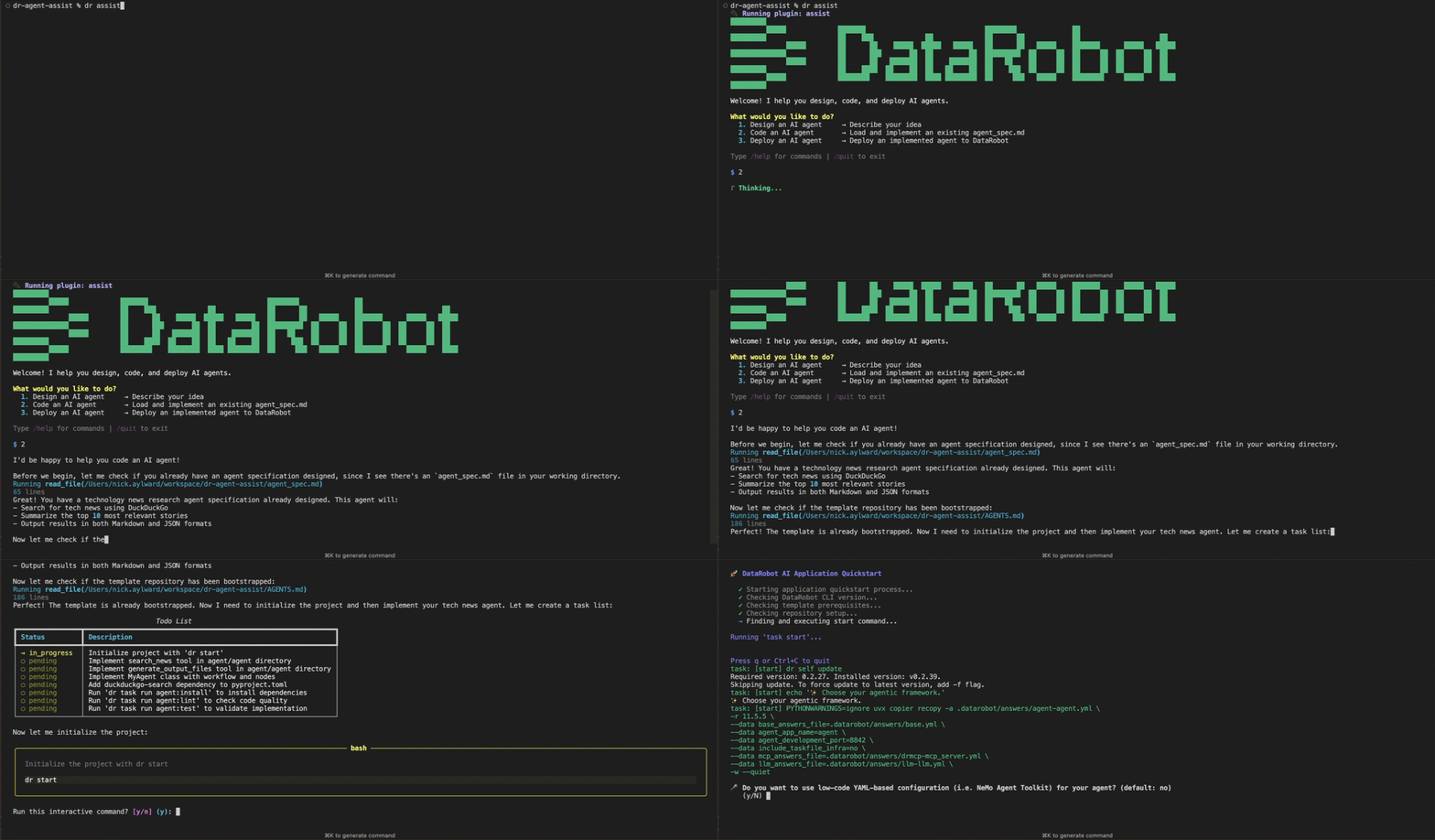
このガイドでは、ターミナルから実行するAgent AssistをDataRobot CLIのプラグインとして使用します。 Claude Code、Cursor、OpenCode、VS Code Copilotなどのコーディングエージェントから同じワークフローを使用するには、代わりにAgent Assistスキルをインストールします。
前提条件
オペレーティングシステムの互換性
Agent AssistはmacOSおよびLinuxで動作します。 On Windows, use a DataRobot codespace, Windows Subsystem for Linux (WSL), or a virtual machine running a supported OS. Agentic Starterテンプレート自体は、Windowsをネイティブでサポートしています。これらのオプションを使用せずにWindowsで作業を行う場合は、Agentic Starterの使用を開始するを参照してください。
はじめに:
- 必要なバージョンの必須ツールをインストールします。必須ツールのインストールを参照してください。 Agent Assistは、Agentic Starterのテンプレートを複製し、そのテンプレートの要件に対して
dr dependencies checkを実行するため、テンプレートの最小バージョンが適用されます。 dr auth loginを使用してDataRobot CLIを認証します。 この手順を省略すると、Agent Assistの起動時に認証が求められます。-
Agent Assistプラグインをインストールし、正常に動作することを確認します。DataRobot Agent Assistのインストールと実行を参照してください。
dr plugin install assist
dr plugin list              # Should show "assist"
ワークスペースの準備
空のディレクトリでdr assistを実行する
dr assistは、専用の空のディレクトリからのみ実行します。 コードやその他のファイルが含まれるディレクトリでこのコマンドを実行するのは安全ではありません。 エージェントアシストのコーディングワークフローを使用すると、アシスタントはDataRobot Agent Application Templateのクローンを現在のディレクトリに作成します。 この操作によって既存のファイルが上書きされたり競合が発生したりする可能性があり、既存のプロジェクトが損なわれ、アシスタントの出力精度が低下する恐れがあります。 dr assistを実行する前に、専用のディレクトリがない場合は、ディレクトリを作成してそこでターミナルを開きます(たとえば、mkdir my-agent && cd my-agentを実行してから、dr assistを実行します)。
専用のディレクトリを作成し、そこにターミナルを開きます。
mkdir my-agent && cd my-agent
Start Agent Assist
実行します。
dr assist
起動時、Agent Assistは使用中のツールと認証情報を確認します。 その後、ようこそ画面で以下の3つの選択肢が表示されます。
- AIエージェントの設計:アイデアを記述し、
agent_spec.mdを作成します。 - AIエージェントのコーディング:既存の
agent_spec.mdを読み込み、エージェントを実装します。 - AIエージェントのデプロイ:実装されたエージェントをDataRobotにデプロイします。
1、2、または3を入力するか、自然言語で目的を説明します。
Commands
スラッシュコマンドについてはセッション内で/helpと入力し、終了するには/quitと入力します。 LLM Gatewayモデルカタログを確認するには、list models(スラッシュなし)と入力します。 詳細については、ワークフローとプロンプティングおよびスラッシュコマンドを参照してください。
エージェントの設計
新しいエージェントを作成する場合は、AIエージェントの設計を選択します(オプション1)。 以下の点を記述してください。
- エージェントがどのような動作を行うべきか。
- 誰がそれを使用するか。
- どのようなデータソースやツールが必要か。
Agent Assistは、確認のための質問を行い、ツールやモデルを提案し、ワークスペース内にagent_spec.mdファイルを作成します。 また、テンプレートのデフォルトのチャットUIで十分か、それともカスタムフロントエンドが必要かについても確認します。 実装に進む前に、仕様を確認してください。 フィールドの定義については、エージェント仕様リファレンスを参照してください。
コードを記述する前に設計を検証するには、Agent Assistにエージェントのシミュレーションを依頼します(例:「私のエージェントをシミュレーションしてください」)。 シミュレーションでは、ツールの呼び出しを実行したり、実際のデプロイを呼び出したりしません。LLMはツールの結果を生成するため、エージェントがどのツールをどの引数で選択したかを確認できます。 エージェントのシミュレーションを参照してください。
エージェントの実装
agent_spec.mdの準備ができたら、AIエージェントのコーディングを選択します(オプション2)。 承認を得て、Agent Assistは以下のことを行います。
- Agentic Starterのテンプレートを、自身のディレクトリに複製します。
- どのエージェントフレームワークを使用するかを尋ねます(LangGraph、CrewAI、LlamaIndex、NeMo Agent Toolkit、またはBase)。
dr startを実行し、資格情報、ポート、LLMの設定を行います。- 仕様に基づいてエージェントコードを実装し、ファイルの編集やシェルコマンドの実行を行います。
プロジェクトディレクトリ内の別のターミナルで、テンプレートのAGENTS.mdに記載されているコマンド(例:dr run dev)を使用して、エージェントをローカルでテストします。 詳細については、AIエージェントのコーディングを参照してください。 カスタマイズのパターンについては、エージェントのカスタマイズを参照してください。
エージェントのデプロイ
エージェントをローカルで実行する場合は、AIエージェントのデプロイを選択します(オプション3)。 Agent Assistは、テンプレートのAGENTS.mdからデプロイ手順を読み取り、手順を順を追って案内します。 Agent Assist自体はデプロイコマンドを実行せず、別のターミナルで実行すべきコマンド(通常はdr task run deploy。これにはPulumiへのログインが必要です)を表示します。 AIエージェントのデプロイを参照してください。
Agent Assist以外でのデプロイの詳細については、Agentic Starterの使用を開始するでエージェントのデプロイを参照してください。
Agent Assistリファレンス
この基本ステップに記載されている内容以外の、インストールに関する詳細、スラッシュコマンド、環境変数、およびトラブルシューティングについては、Agent Assistのドキュメントを参照してください。
| トピック | 説明 |
|---|---|
| Prerequisites and installation | システム要件、必要なツールとそのバージョン、およびプラグインのインストール。 |
| Workflows and prompting | ようこそ画面、設計/シミュレーション/コーディング/デプロイのワークフロー、およびプロンプティングのヒント。 |
| Environment and commands reference | 環境変数、ファイルとディレクトリ、スラッシュコマンド、およびAgent Assist LLMの変更。 |
| Agent Assistのスキル | Claude Code、Cursor、OpenCode、VS Code CopilotなどのコーディングエージェントからAgent Assistを使用します。 |
| トラブルシューティング | プラグインの検出、依存関係のチェック、認証、テンプレートのブートストラップ、および関連する修正。 |
次のステップ
- エージェントのカスタマイズ:エージェントコードをカスタマイズし、ローカルでテストして、本番環境で使用するためにデプロイします。
- エージェントにツールを追加する:エージェントにローカルツール、事前定義済みツール、およびDataRobotのグローバルツールを追加します。
- Agentic Starterの使用を開始する:
dr startとdr task runを使用して、Agentic Starterのテンプレートを直接セットアップしてデプロイします。