デプロイの使用状況
テキスト生成、VDB、およびMCPのカスタムモデルデプロイでは、使用状況タブは使用状況で説明されている標準的な予測処理ビューに従います。 エージェントワークフロー(およびNIM)のデプロイでは、以下のクォータ監視エクスペリエンスが主要な使用状況ビューになります。
Quota usage monitoring
エージェントワークフローおよびNIMのデプロイにおいて、モニタリング > 使用状況タブのクォータ監視ダッシュボードでは、ユーザーまたはエージェントごとにセグメント化された使用履歴が可視化されます。 その他のサーバーレス生成デプロイでも、クォータの監視が適用される場合は、同じコンソールのコントロールを使用します。
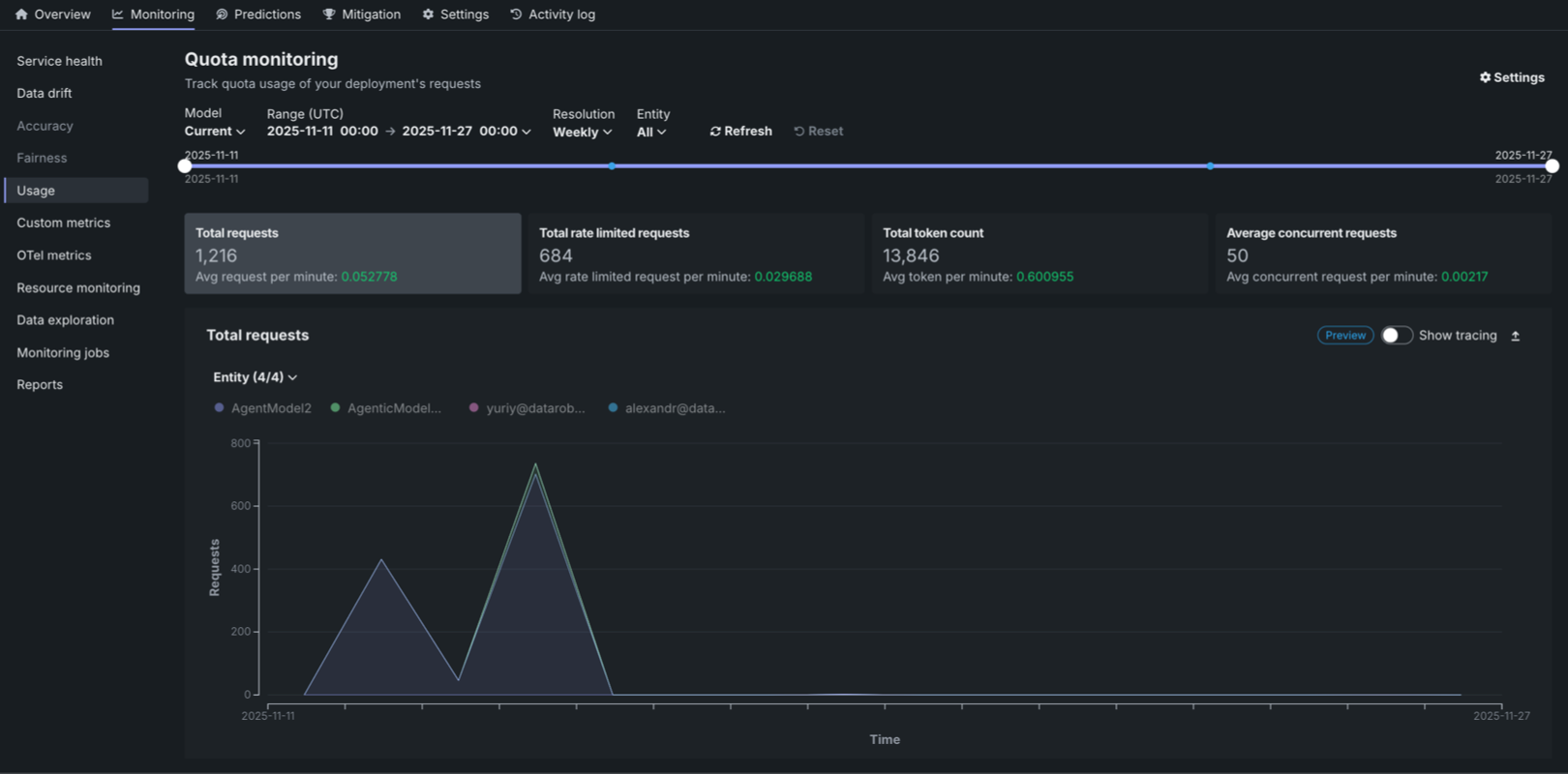
The Quota monitoring dashboard displays three key metric tiles at the top of the page:
| 指標 | 説明 |
|---|---|
| リクエストの合計数 | The total number of requests made during the selected time range, along with the average requests per minute. |
| レート制限されたリクエストの総数 | The total number of requests that were rate limited during the selected time range, along with the average rate limited requests per minute. |
| 総トークン数 | The total number of tokens consumed during the selected time range, along with the average tokens per minute. |
| 平均同時リクエスト数 | The average number of simultaneous API calls processed by the agent service over the defined interval, tracked as a key metric for observability and used to enforce the system's quota limit on simultaneous operations. |
Each metric displays the value for the selected time frame and the average per minute in green. Click the metric tile to review the corresponding chart below:
- リクエストの合計数
- レート制限されたリクエストの総数
- 総トークン数
- 平均同時リクエスト数
You can configure the Quota monitoring dashboard to focus the visualized statistics on specific entities and time frames. 次のコントロールを使用できます。
| フィルター | 説明 |
|---|---|
| モデル | Select the model version to monitor. The Current option displays data for the active model version. |
| 範囲 (UTC) | Select the date and time range for the data displayed. Use the date pickers to set the start and end times in UTC. |
| 単位 | Select the time resolution for aggregating data: Hourly, Daily, or Weekly. |
| エンティティ | Filter by entity type: All, User, or Agent. |
| 表示を更新 | Updates the dashboard with the latest data based on the current filter settings. |
| リセット | Resets all filters to their default values. |
Quota monitoring charts
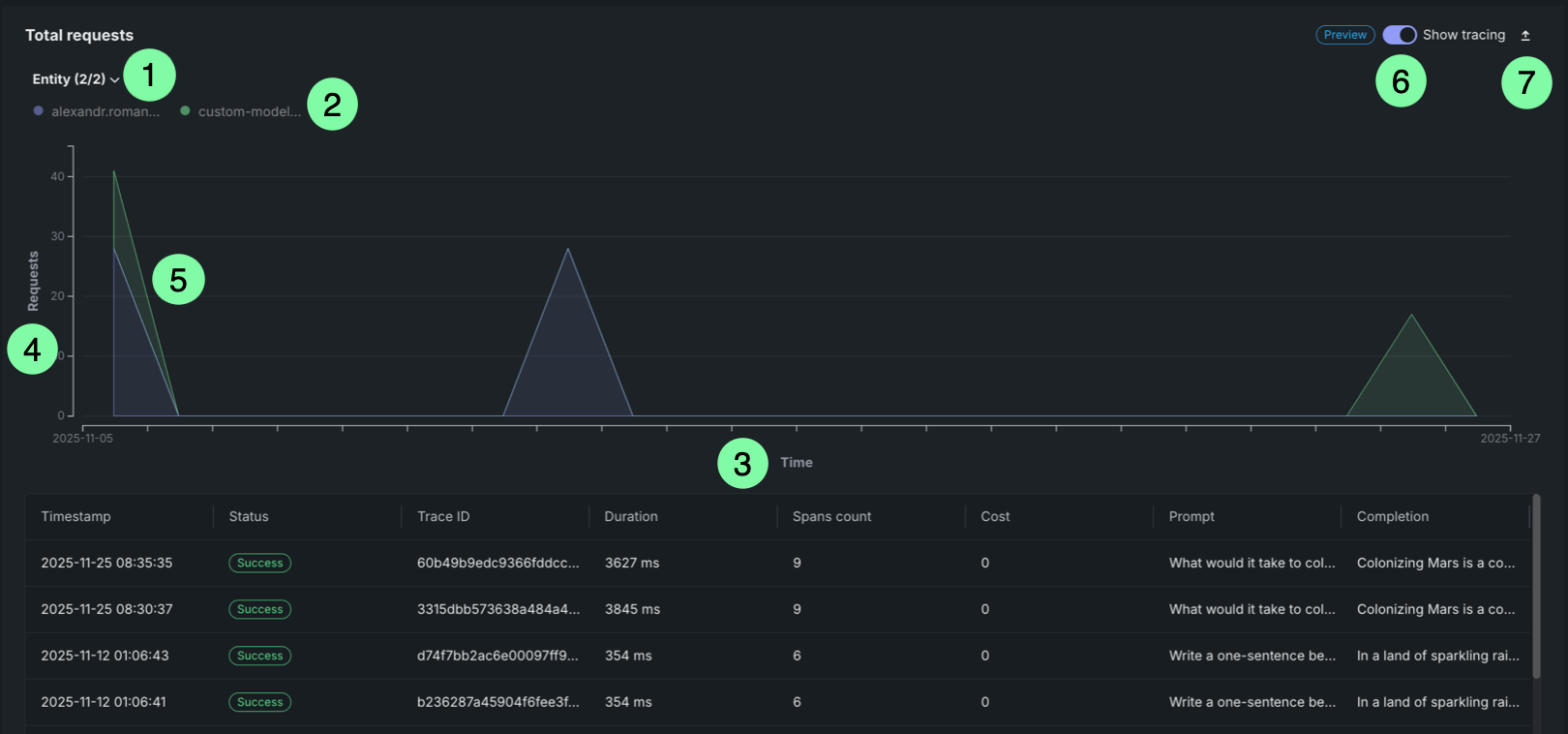
The Quota monitoring charts display an area chart showing the distribution of requests over time, rate limited requests over time, or token count over time. This chart is a stacked chart (or stacked graph), a chart stacking multiple data series on top of each other to visualize how each entity contributes to the total over time and across categories. Each chart is segmented by entity (user or agent). Each entity is represented by a different color in the chart legend.
| チャートの要素 | 説明 | |
|---|---|---|
| 1 | Entity filter | Displays all entities (users or agents) included in the selected time range. Each entity is represented by a dot that matches the area in the chart. |
| 2 | Entity legend | Displays all entities (users or agents) included in the selected time range. Each entity is represented by a dot that matches the area in the chart. |
| 3 | Time range (X-axis) | Displays the time range selected in the filters, showing the date range from start to end. |
| 4 | Metric (Y-axis) | Displays the number of requests, rate limited requests, or tokens on the vertical axis. |
| 5 | Request areas | Overlapping areas show the volume of requests per entity over time. The height of each area at any point represents the number of requests for that entity at that time. This chart is a stacked chart (or stacked graph), a chart stacking multiple data series on top of each other to visualize how each entity contributes to the total over time and across categories. |
| 6 | トレース | Click Show tracing to view tracing data for the requests. |
| 7 | エクスポート | Click Export to download a .csv file. |
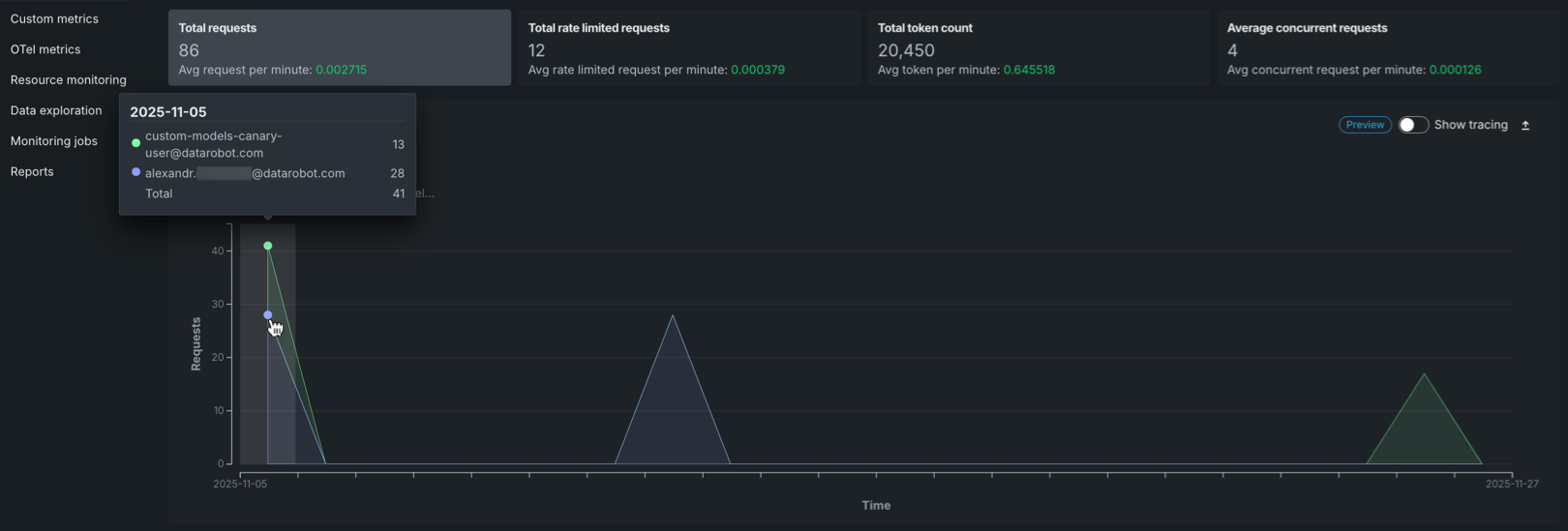
Hover over the chart to view detailed information about the number of requests for each entity at specific time points.
Request tracing table
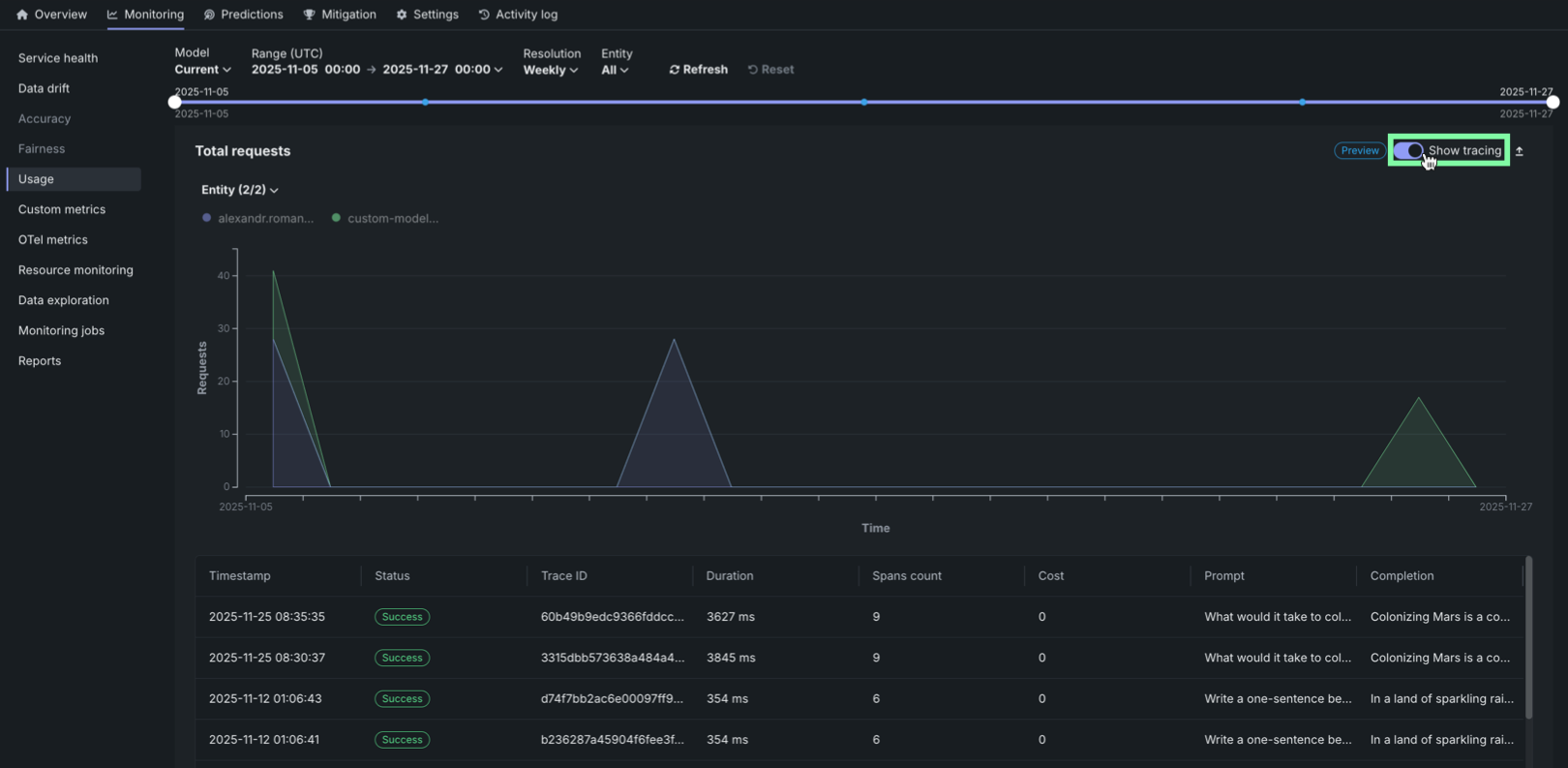
On any Quota monitoring chart, click Show tracing to view tracing data for the deployment. このトレースチャートでは、専用のトレースタブと同じインターフェイスが使用されています。
レート制限されたリクエストテーブル
The Rate limited requests table provides a detailed breakdown of rate limiting by entity:
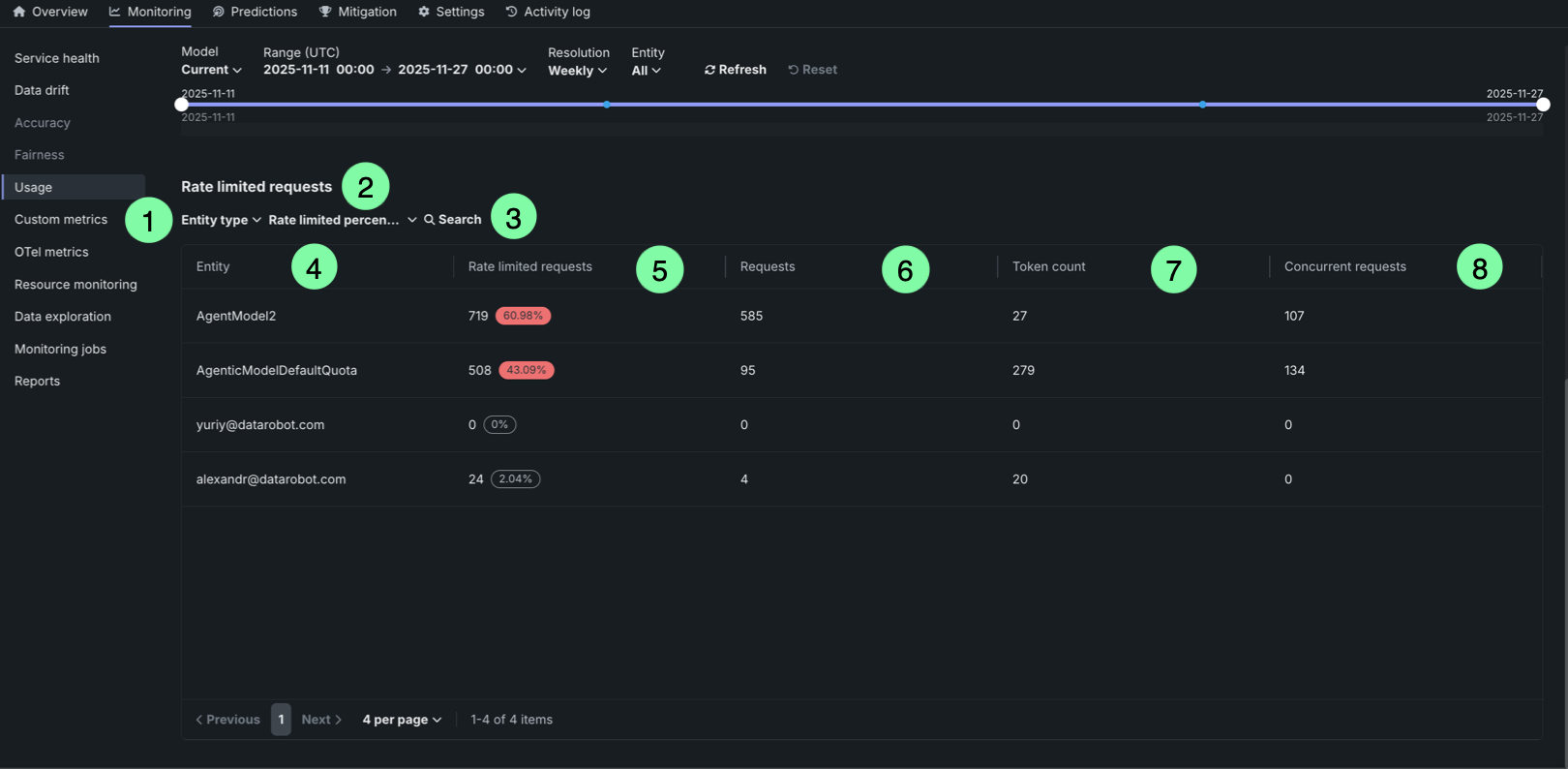
| テーブル要素 | 説明 | |
|---|---|---|
| 1 | Entity type filter | Filter the table by entity type (user or agent). |
| 2 | Rate limited percentage filter | Filter entities by their rate limited percentage threshold (zero, low, medium, or high). |
| 3 | Search box | Search for specific entities by name or identifier. |
| 4 | Entity column | Displays the entity identifier (user email or agent name). |
| 5 | Rate limited requests column | Shows the number of rate limited requests and the percentage of total requests that were rate limited. The percentage is highlighted in red when it exceeds a threshold, or displayed in gray when it is 0%. |
| 6 | Requests column | Displays the number of requests that were rate limited due to exceeding the request quota. |
| 7 | Token count column | Displays the number of requests that were rate limited due to exceeding the token quota. |
| 8 | Concurrent requests column | Displays the number of requests that were rate limited due to exceeding the concurrent requests quota. |
The table helps identify which entities are experiencing rate limiting and to what extent, allowing you to adjust quotas or usage patterns accordingly.