March 2025
March SaaS feature announcements
March 2025
This page provides announcements of newly released features in March 2025, available in DataRobot's SaaS multi-tenant AI Platform, with links to additional resources. From the release center, you can also access past announcements and Self-Managed AI Platform release notes.
In the spotlight
This deployment introduces a variety of user experience and interface improvements across Workbench, including changes to the navigation and applying our new look across the platform. Take a quick tour with the video below:
Video: NextGen UI/UX improvements
Highlights include:
- Across Workbench, second-level navigation is now always available from the left panel.
- You can now pin Use Cases to the top of the Use Case directory for quick access.
- Add tags to a Use Case for easy filtering and organization.
- The Use Case management page lets you add comments and descriptions, manage tags and users, and access Value Tracker and Risk assessment and management tools.
- A new full-width Leaderboard shows more information.
- The app's color palette has changed to reflect the new DataRobot branding and to better follow accessibility best practices.
March features
The following table lists each new feature:
Features grouped by capability
Applications
Cash flow forecasting application template
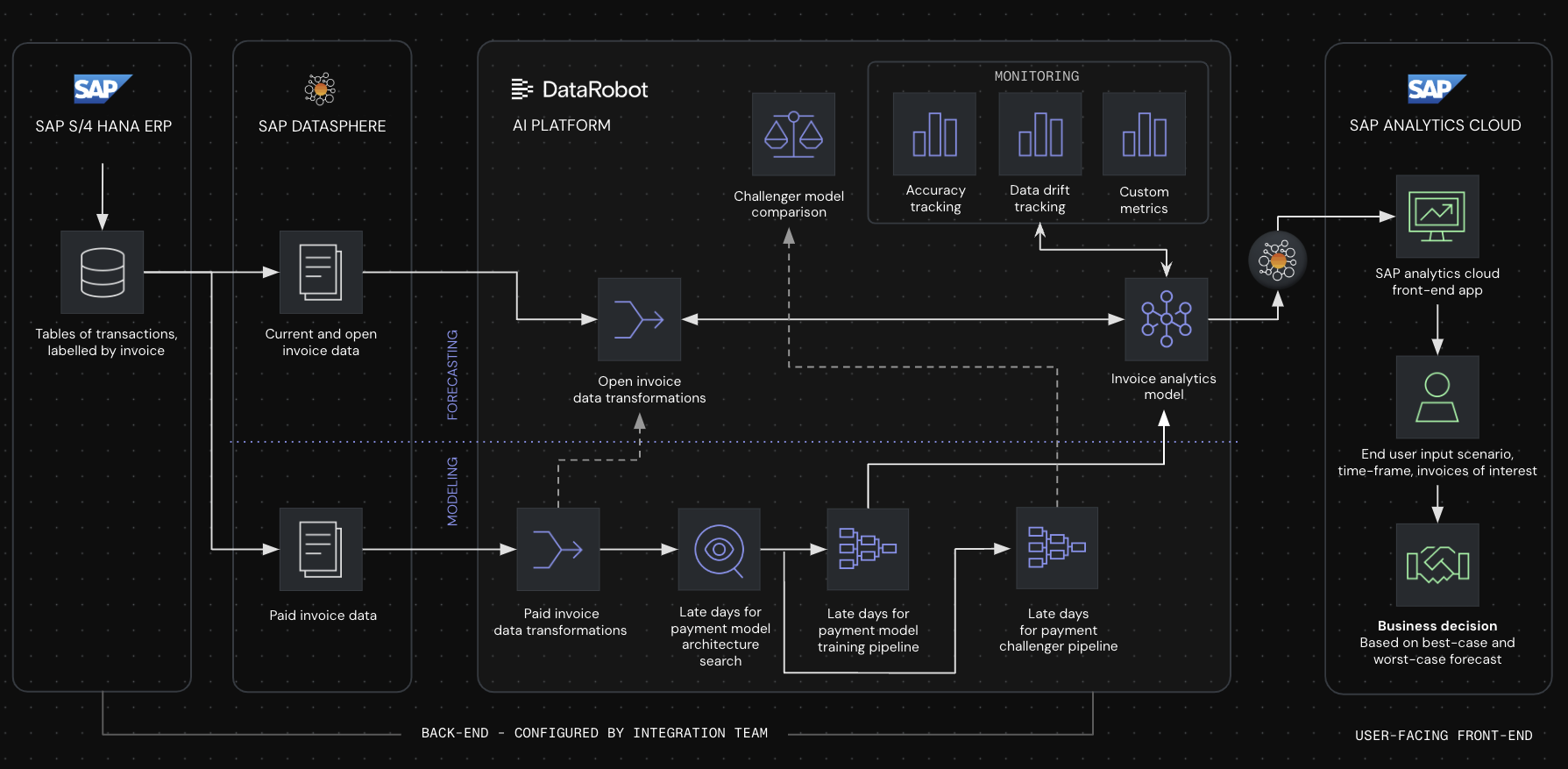
The cash flow forecasting application template, part of the Finance AI App Suite, outlines a basic development and prediction workflow for a late-payment predictive model. It leverages data stored in SAP Datasphere, SAP S4/HANA, and SAP Analytics Cloud to enhance financial planning with AI-driven forecasts and automated insights.
This application is useful for managing cash flows, credit risks, and collections. It targets industries that deal with a large volume of invoices, delayed payments, and extended payment cycles. The application provides real-time insights into cash flow forecasts and payment timing predictions, which improves decisions around optimizing working capital and meeting quarterly financial targets.
Demand planning application template
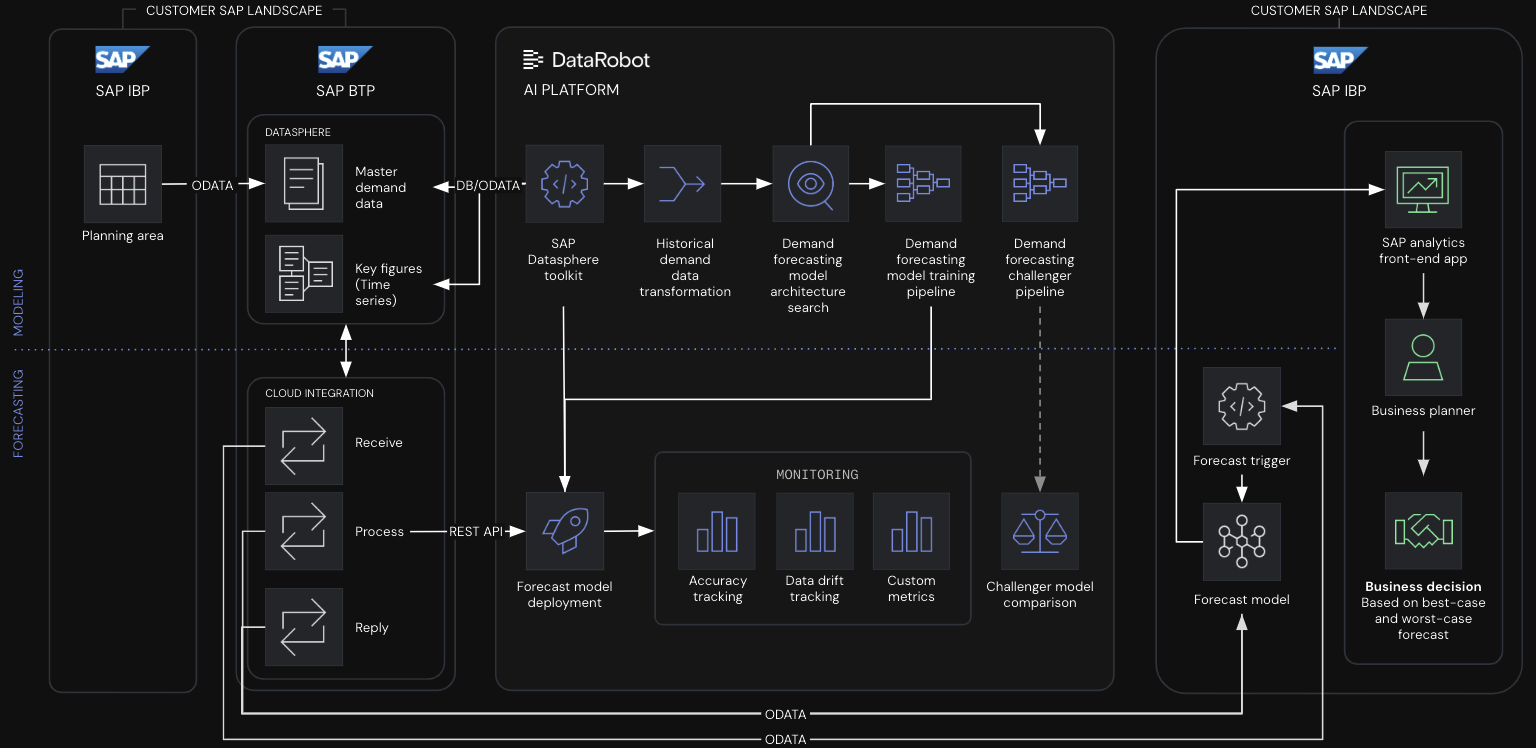
The demand planning business application template, part of the Supply Chain & Ops Suite, provides a demand planning predictive model development and forecasting workflow. It utilizes example data stored in SAP Datasphere and sourced from SAP IBP to enhance demand forecasting. It helps demand planners predict SKU-level demand fluctuations, optimize inventory allocation, and reduce stockouts and markdowns. Augment SAP IBP’s built-in models with DataRobot’s advanced time series forecasting, improving accuracy by factoring in external variables like climate and inflation. Identify SKUs with high-forecast discrepancies, allowing planners to focus on correcting the most impactful errors.
Predictive AI starter application template
Use this starter application template to execute a basic Predictive AI deployment workflow in DataRobot. This template is ideal for kickstarting new recipes, providing a simple "hello world" example that can be easily customized to fit specific use cases.
View access logs for custom applications
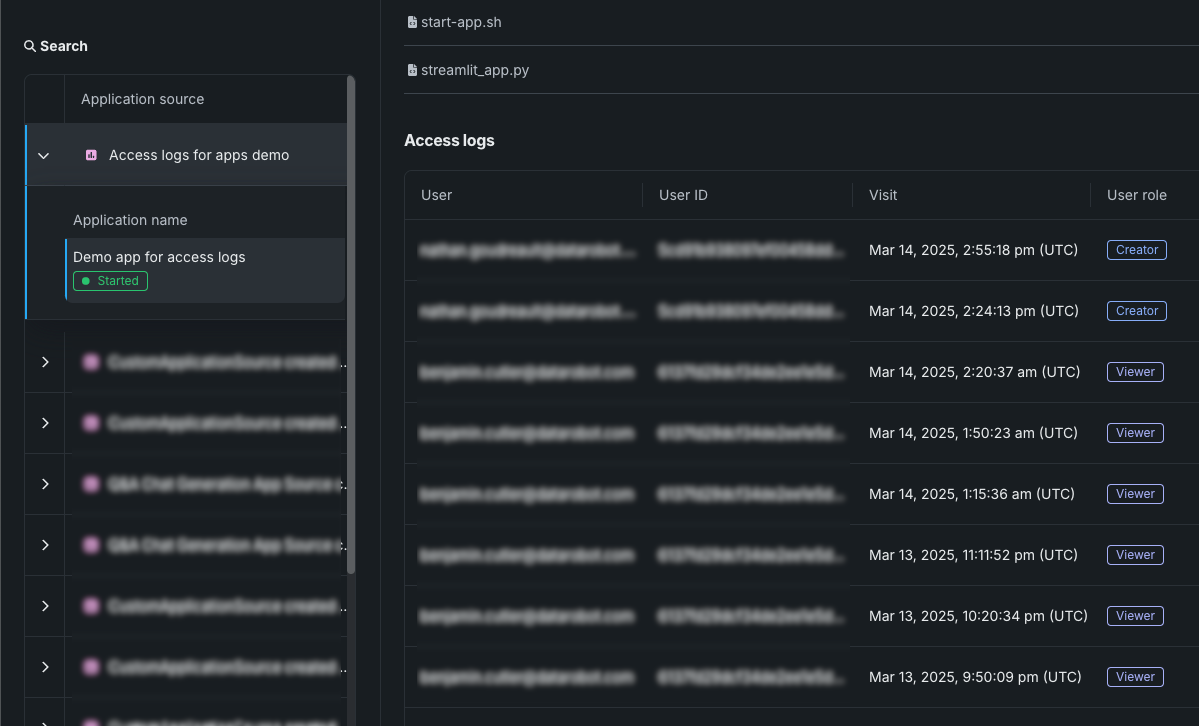
Custom applications now provide access logs. Browse access logs to monitor the history of users who have opened or operated a custom application. You can view access logs from an application or an application source. The access logs detail users' visits to the application, including their email, user ID, time of visit, and their role for the application.
GenAI
New LLMs now available in the playground
DataRobot’s commitment to providing best-in-class and latest GenAI technology is enhanced with a suite of new LLMs, now generally available for all subscribed enterprise users and Trial users. The following newly added LLMs can be used to create LLM blueprints from the playground:
| LLM | Description |
|---|---|
| Anthropic Claude 3.5 Sonnet v2 | The second version of Sonnet, excelling in complex reasoning, coding, visual information, and can generate computer actions (e.g., keystrokes, mouse clicks). Model access is disabled for Cloud users on the EU platform due to regulations. |
| Amazon Nova Lite | A low cost multimodal model that is fast for processing image, video, and text inputs. |
| Amazon Nova Micro | A text-only model that can reason over text, offering low latency and low cost. |
| Amazon Nova Pro | A multimodal understanding foundation model that can reason over text, images, and videos with the best combination of accuracy, speed, and cost. |
See the full list of LLM availability in DataRobot, with links to creator documentation, for assistance in choosing the appropriate model.
New LLM deprecation-to-retirement process protects LLM assets
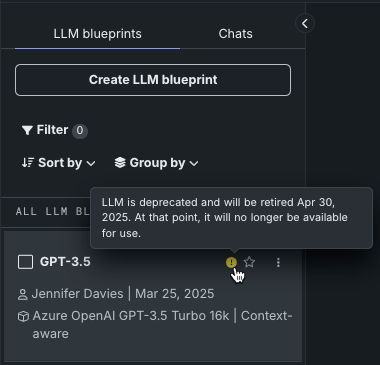
DataRobot now provides badges to alert when an LLM is in the deprecation process—a mechanism to protect experiments and deployments from unexpected removal of vendor support. When an LLM is marked with the deprecation badge, it is an indicator that the model will be retired in two months. When an LLM is deprecated, users are notified, but functionality is not curtailed. For example, you can still submit a chat or comparison prompt, generate metrics for the blueprint, or copy to a new blueprint. When retired, assets created from the retired model are still viewable but creation of new assets is prevented. Hover on the notification icon in the LLM blueprint list to see the final date.
If an LLM has been deployed, because DataRobot does not have control over the credentials used for the underlying LLM, the deployment will fail to return predictions. If this happens, replace the deployed LLM with a new model.
The following LLMs are currently, or will soon be, deprecated:
| LLM | Retirement date |
|---|---|
| Gemini Pro 1.5 | May 24, 2025 |
| Gemini Flash 1.5 | May 24, 2025 |
| Google Bison | April 9, 2025 |
| GPT 3.5 Turbo 16k | April 30, 2025 |
| GPT-4 | June 6, 2025 |
| GPT-4 32k | June 6, 2025 |
Trial users now have access to all location-appropriate LLMs
Previously, trial users had only a subset of LLMs available to them. Now, DataRobot offers trial users access to LLMs supported in their region. See the full list of LLM availability for region-specific information.
Data
Create SQL recipes in Workbench
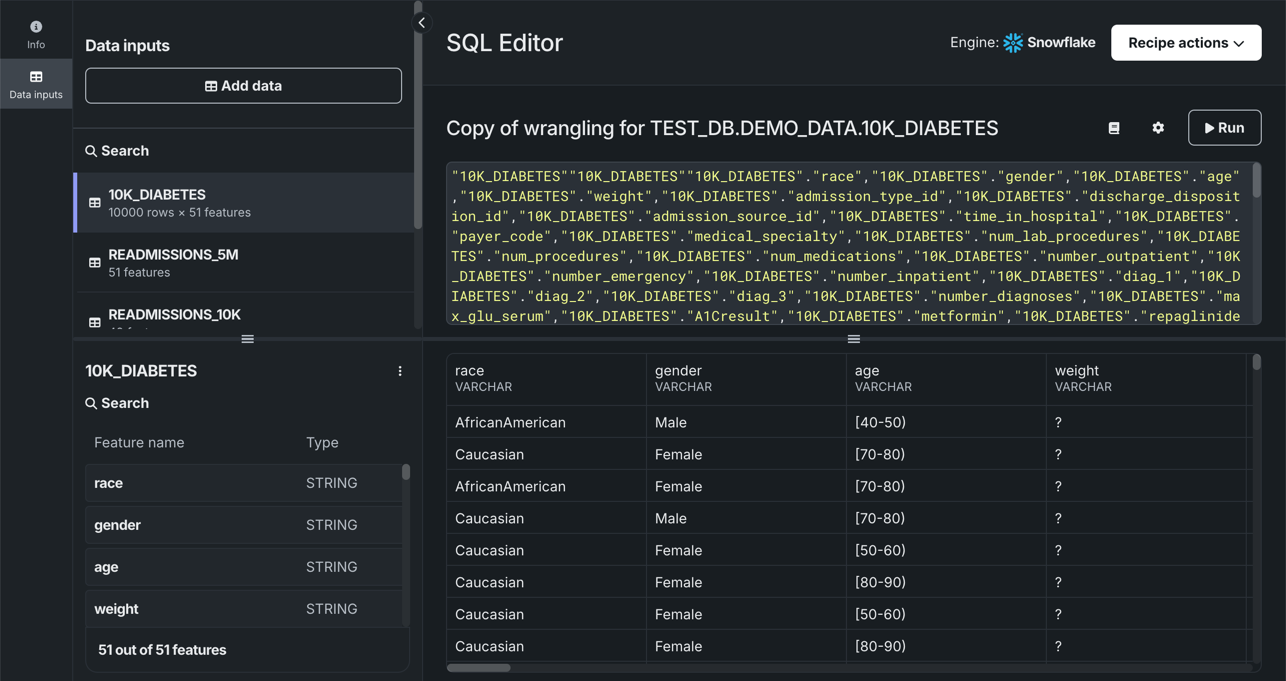
Use the SQL Editor in Workbench to create recipes comprised of SQL queries that enrich, transform, shape, and blend datasets together to create a new output dataset. To open the SQL Editor, in the Data assets tile of your Use Case, open the actions menu next to a dataset and select Open in SQL Editor. To enrich your primary dataset, you can add data inputs from the same data engine as the original dataset, and once you've added data inputs, you can begin adding SQL queries to the editor. When the query is complete, click Run to preview the results.
Supported data engines
The SQL Editor currently supports Snowflake, BigQuery, and Databricks, as well as preview support for the Spark engine.
Distributed mode for Feature Discovery moved to private preview
The current iteration of distributed mode for Feature Discovery projects has been moved to private preview to improve performance and prepare for a new, enhanced version of this feature in an upcoming release. Distributed mode for Feature Discovery projects makes adding and working with secondary datasets more scalable. When enabled for predictions, DataRobot processes batch predictions in distributed mode. Contact your DataRobot representative or administrator for information on enabling the feature.
Ingest datasets of up to 100GB
You can now ingest training datasets of up to 100GB, providing large-scale modeling capabilities. When enabled, the file ingest limit is increased from 10GB to 100GB, and models are trained using incremental learning methods.
Modeling
Visual AI’s image augmentation now available in Workbench
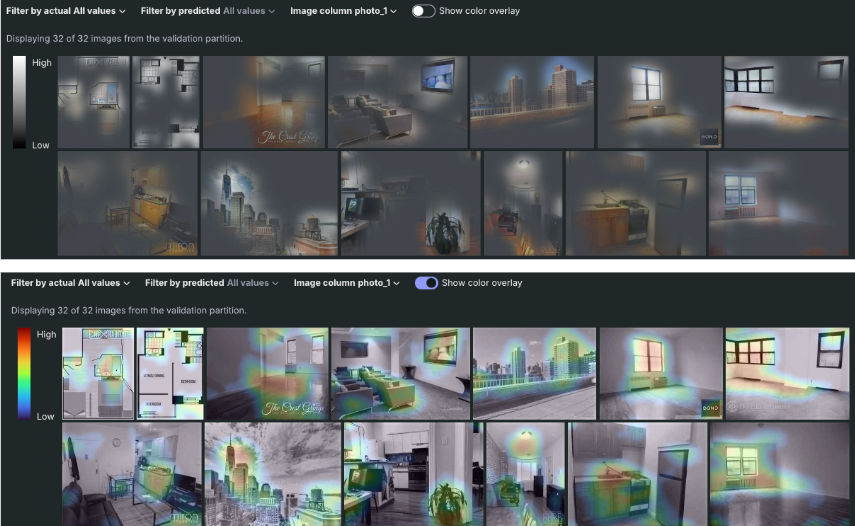
Image augmentation is a mechanism for expanding the modeling dataset by randomly transforming existing images. Once enabled for an experiment, a variety of transformations are available, including shifting, scaling, blurring, and others. Once models build, use the Attention Maps, Image embeddings, and Neural Network Visualizer insights to better understand what drives model decisions. Note that Visual AI is not supported in time series experiments, but is available for time-aware predictive experiments.
Notebooks
Integrate a codespace with a Git provider
You can now integrate a DataRobot codespace with your Git provider so that DataRobot can access your repositories using the OAuth 2.0 standard. Select a Git provider, authenticate its connection to DataRobot, and you can begin using repository assets in a DataRobot codespace.

Predictions and MLOps
Geospatial monitoring for deployments
For deployed binary classification, regression, multiclass, or location models, built with location data in the training dataset, you can leverage DataRobot Location AI to perform geospatial monitoring on the deployment's Data drift and Accuracy tabs. The available visualizations depend on the target type. To enable geospatial analysis for a deployment, enable segmented analysis and define a segment for the location feature generated during location data ingest. The location segment (e.g., geometry or DataRobot-Geo-Target) contains the identifier used to segment the world into a grid of H3 cells. In this release, the following visualizations were added for the Location target type:
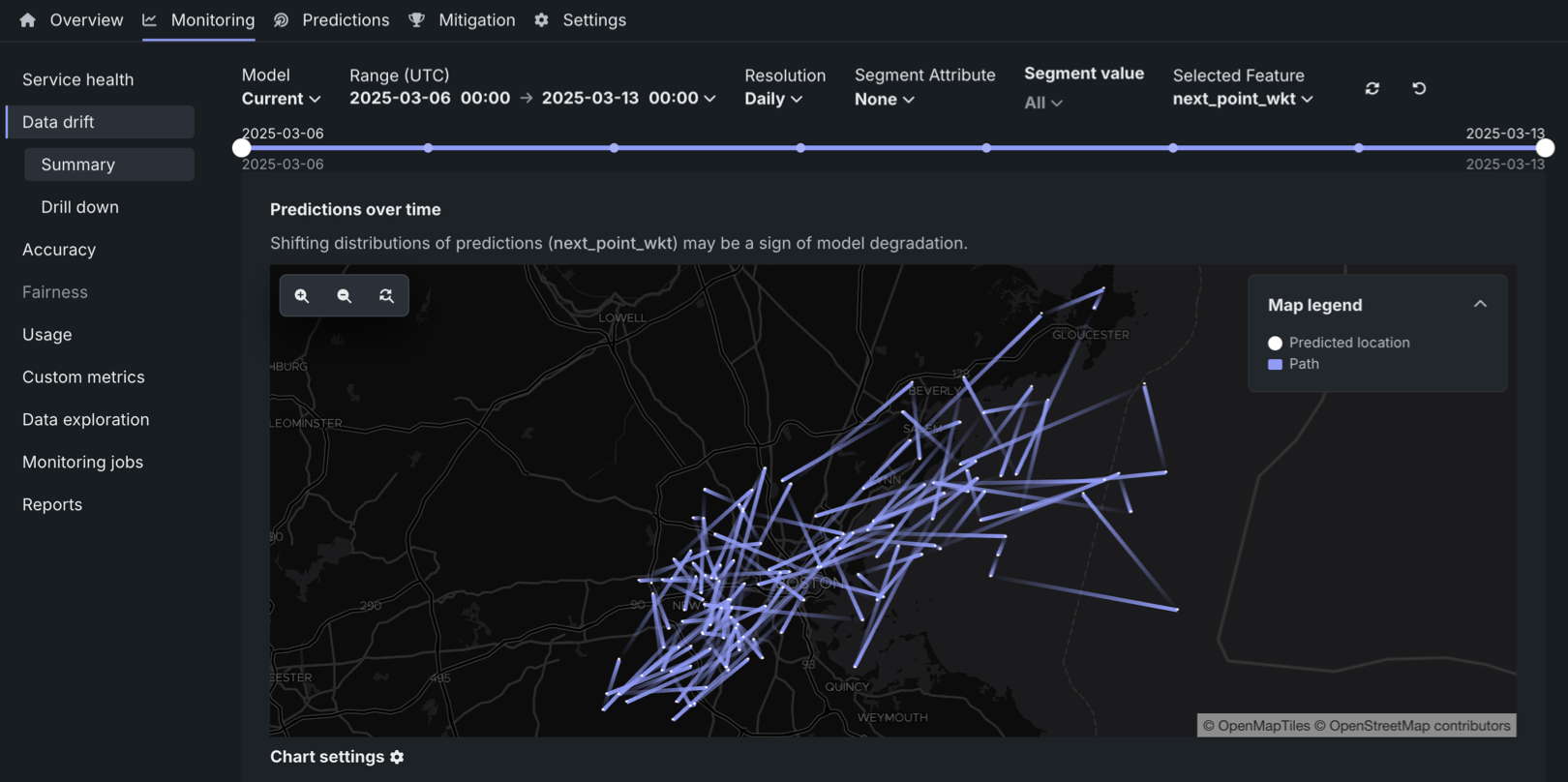
For more information, see the documentation
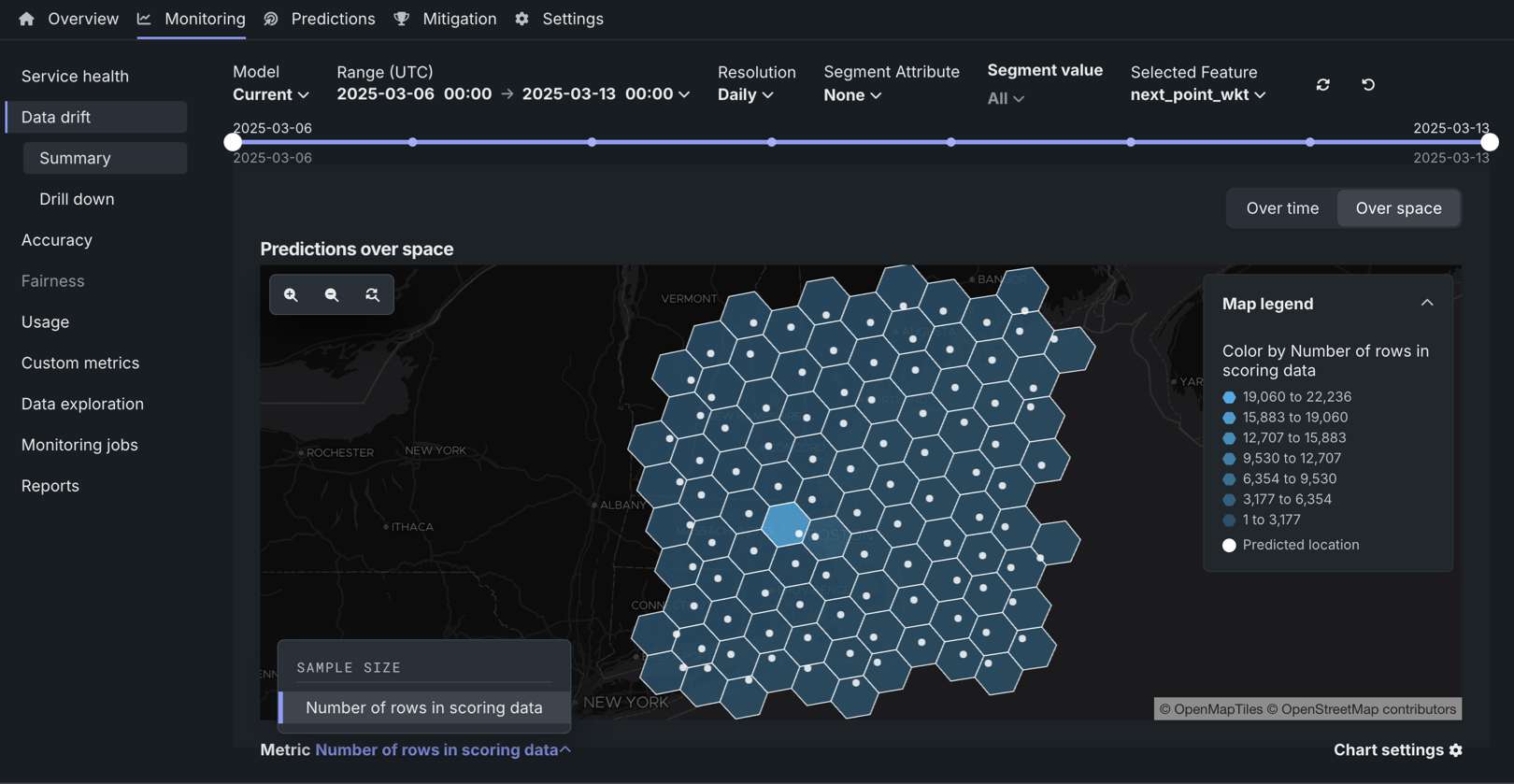
For more information, see the documentation
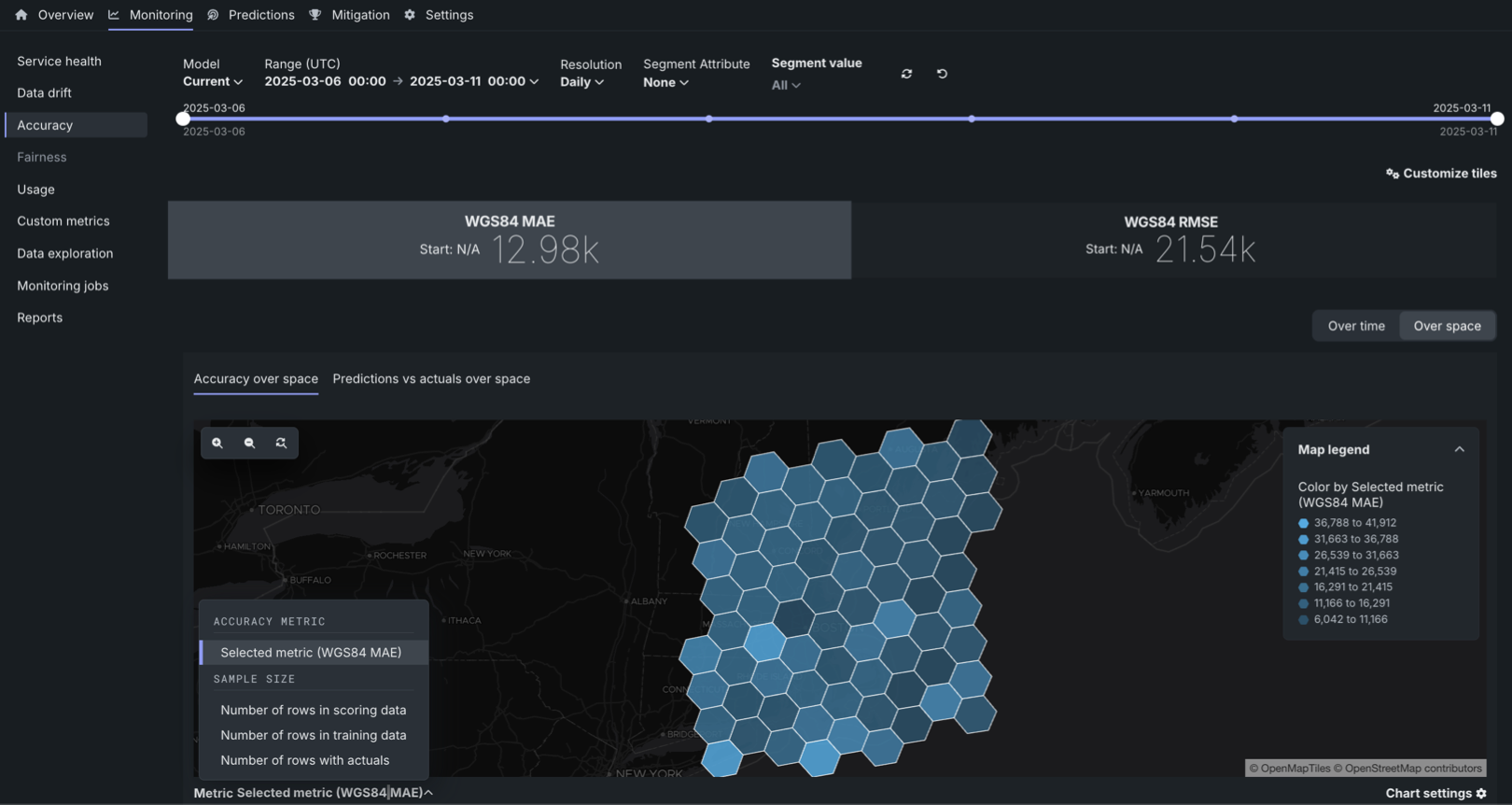
For more information, see the documentation.
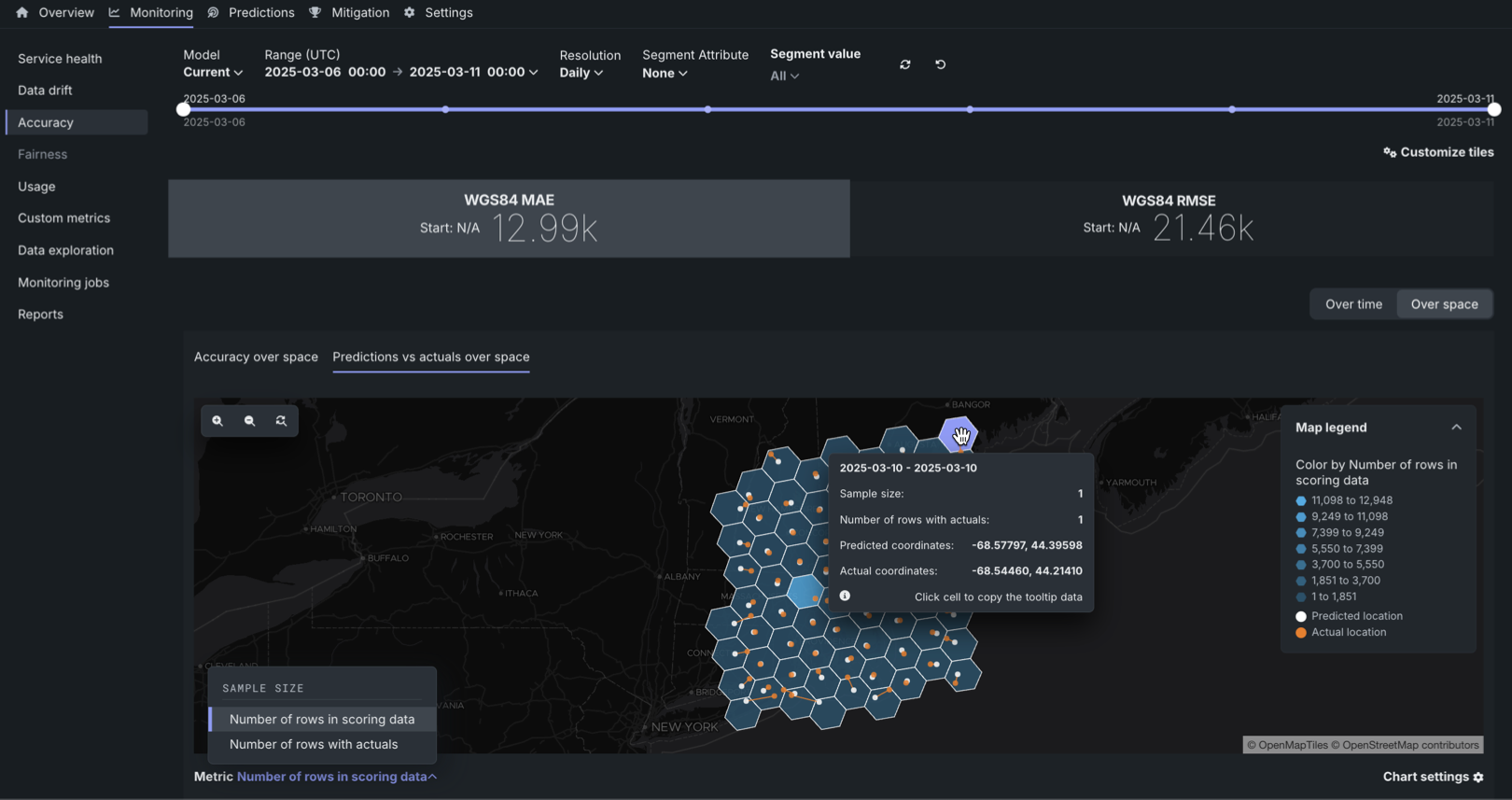
For more information, see the documentation.
Review activity logs in Console
In the NextGen Console, you can review model, deployment, custom model, agent, and moderation events from a central location: the Activity log tab.
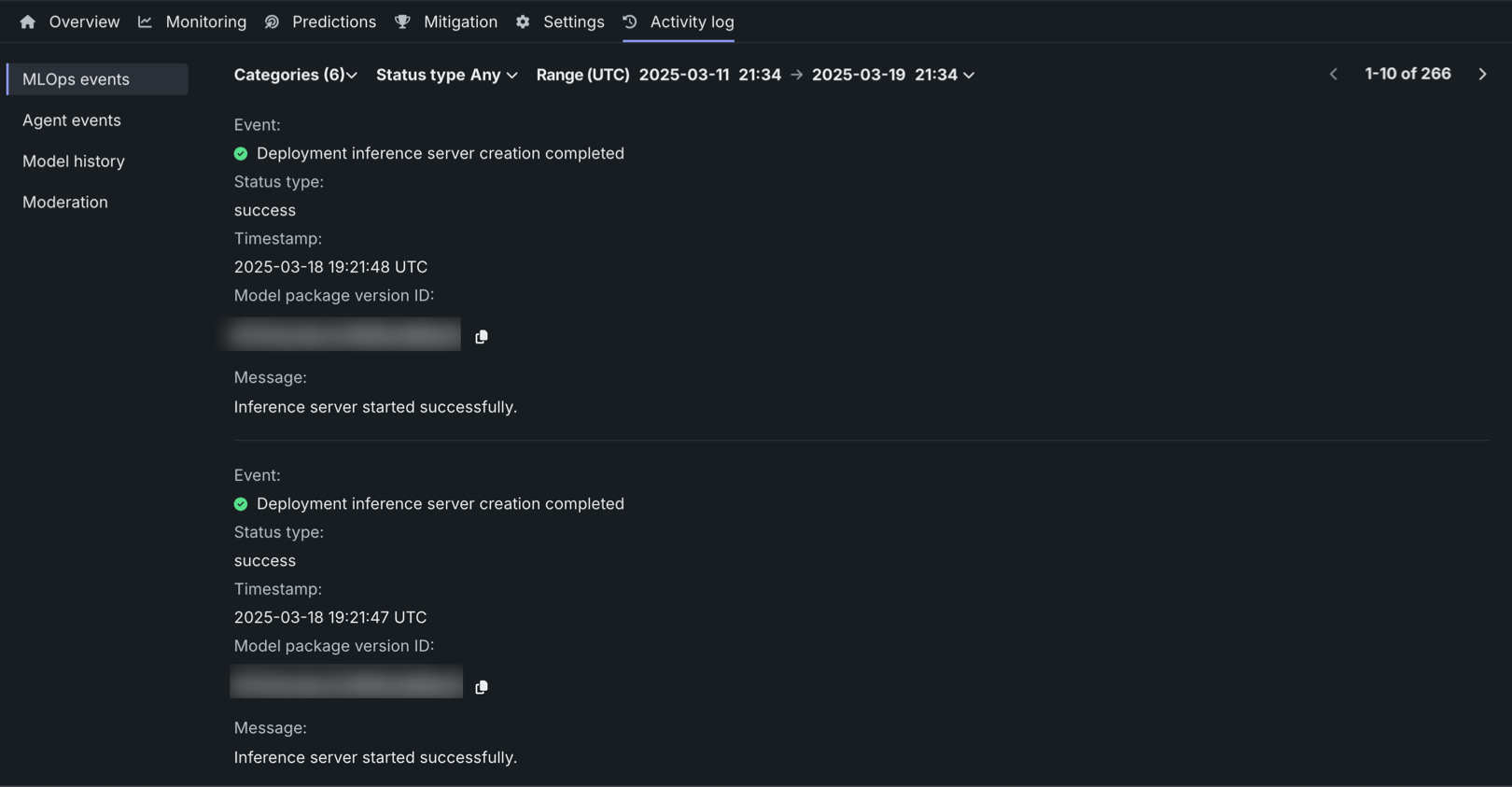
This tab includes the following sub-tabs, recording an array of logging activity.
| Tab | Logging |
|---|---|
| MLOps events | Important deployment events. |
| Agent events | Management and monitoring events from the MLOps agents. |
| Model history | A historical log of deployment events. |
| Runtime logs | Custom model runtime log events. |
| Moderation | Evaluation and moderation events. |
Link a retraining policy to a Use Case
When you create a retraining policy in Console, you can link the policy to a Use Case in Workbench, selecting an existing Use Case or creating a new Use Case. While a retraining policy is linked to a Use Case, the registered retraining models are listed in the Use Case's assets. To link a retraining policy to a Use Case, select a Use Case when you create the policy:
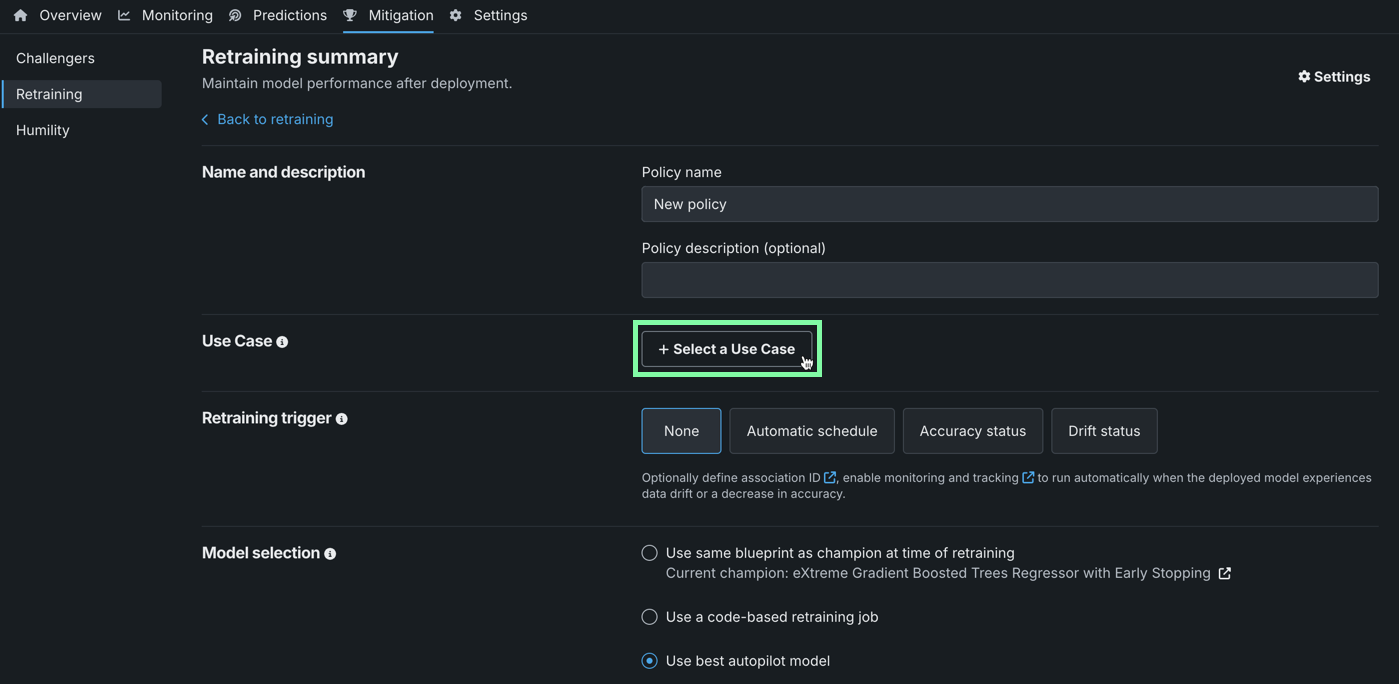
If a deployment is linked to a Use Case, that deployment's retraining policies and the resulting retrained models are automatically linked to that Use Case; however, you can override the default Use Case for each policy. If a retraining user is specified in the deployment settings, they must have Owner or User access to the Use Case.
Retraining policy management in the Classic UI
You can start retraining policies or cancel retraining policies from the Classic UI; however, to edit or delete a retraining policy, use the NextGen UI.
Create categorical custom metrics
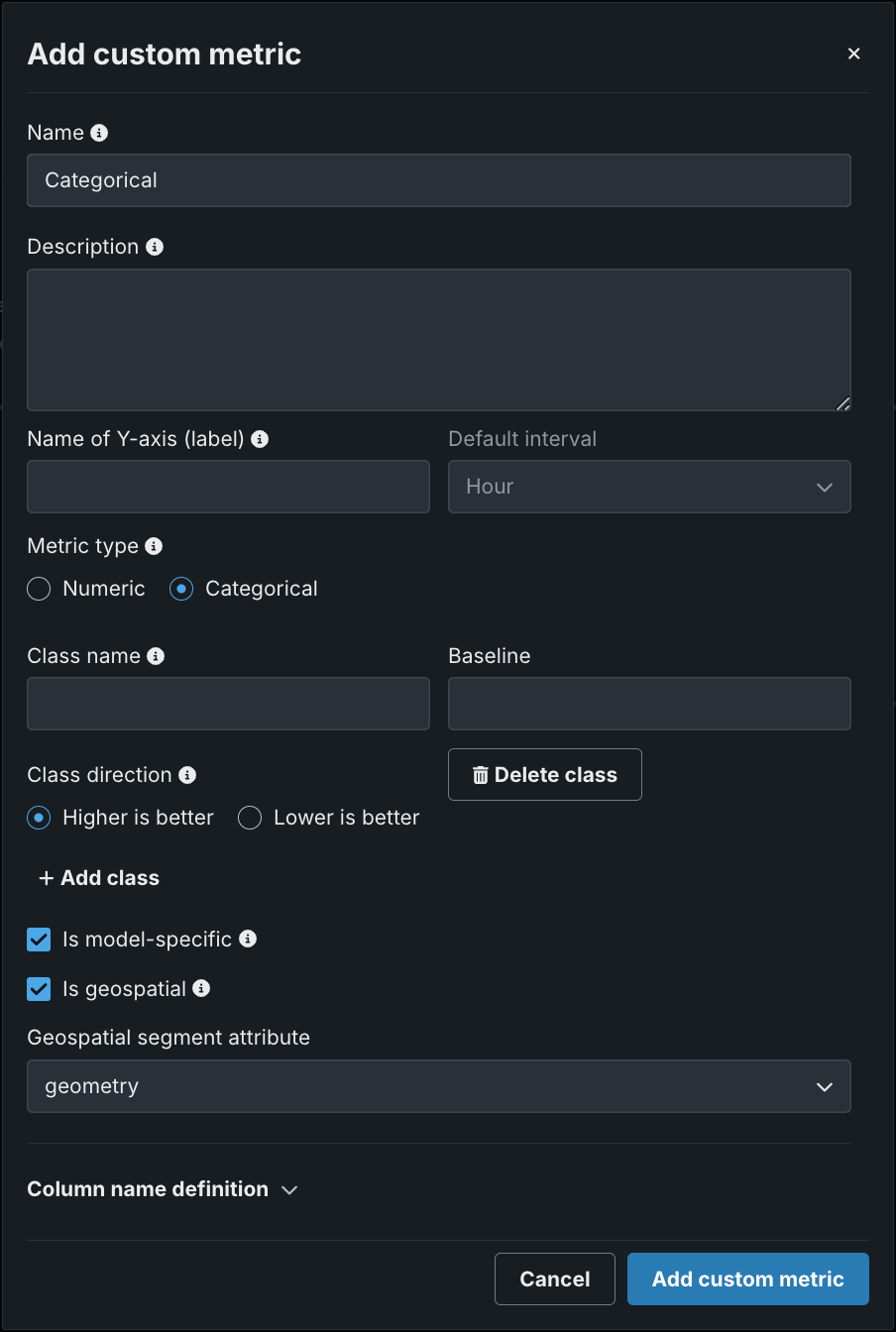
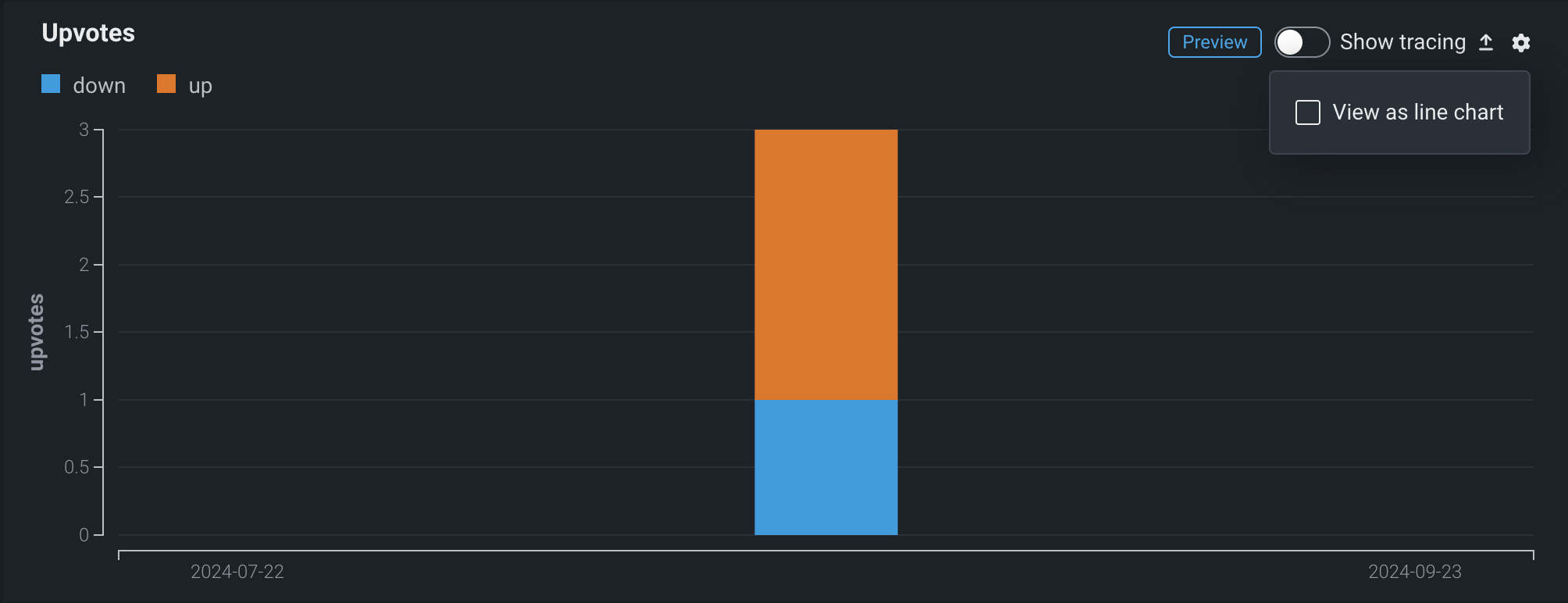
In the NextGen Console, on a deployment’s Custom metrics tab, you can define categorical metrics when you create an external metric. For each categorical metric, you can define up to 10 classes.
By default, these metrics are visualized in a bar chart on the Custom metrics tab; however, you can configure the chart type from the settings menu.
View model insights in the Registry
For DataRobot and custom models in the Registry, the Insights tab now includes the Lift Chart, ROC Curve, and Residuals insights. For more information, see the registered model insights documentation.
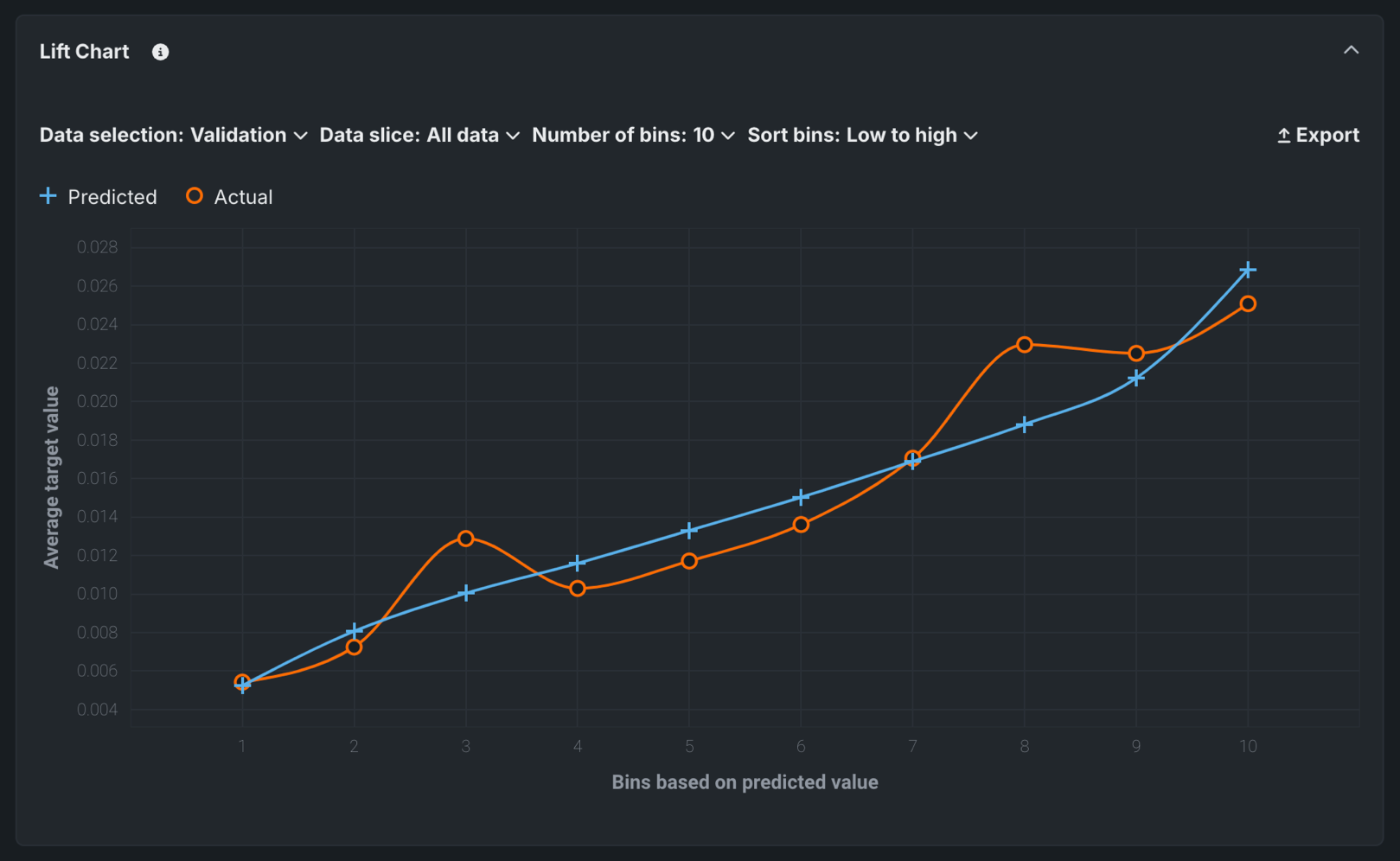
Target type: All
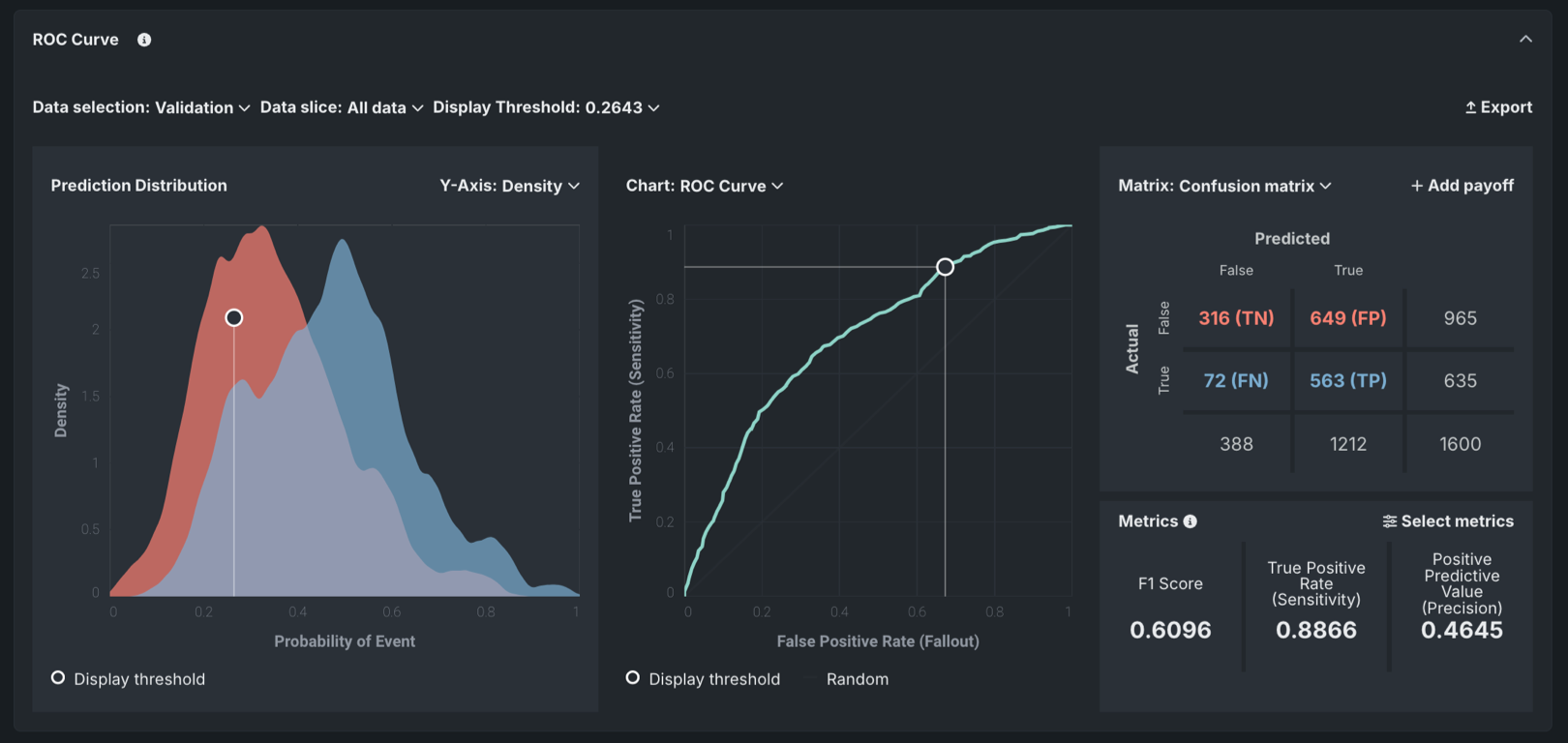
Target type: Binary classification
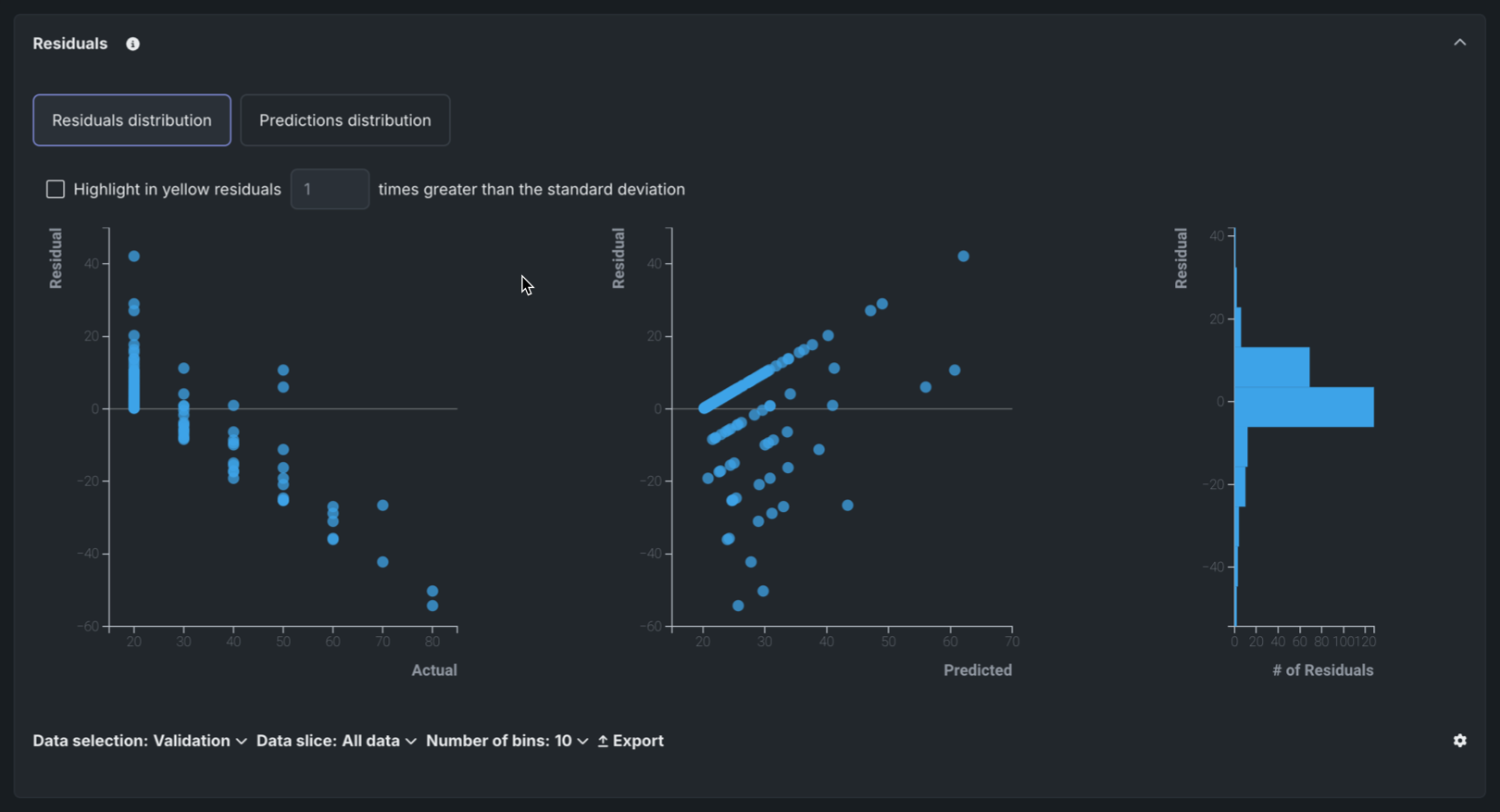
Target type: Regression
Bolt-on Governance API integration for custom models
The chat function, available when assembling a structured custom model, allows text generation custom models to implement the Bolt-on Governance API, enabling streaming responses and providing chat history as context for the LLM. When using the Bolt-on Governance API with a deployed LLM blueprint, see LLM availability for the recommended values of the model parameter. Alternatively, specify a reserved value, model="datarobot-deployed-llm", to let the LLM blueprint select the relevant model ID automatically when calling the LLM provider's services.
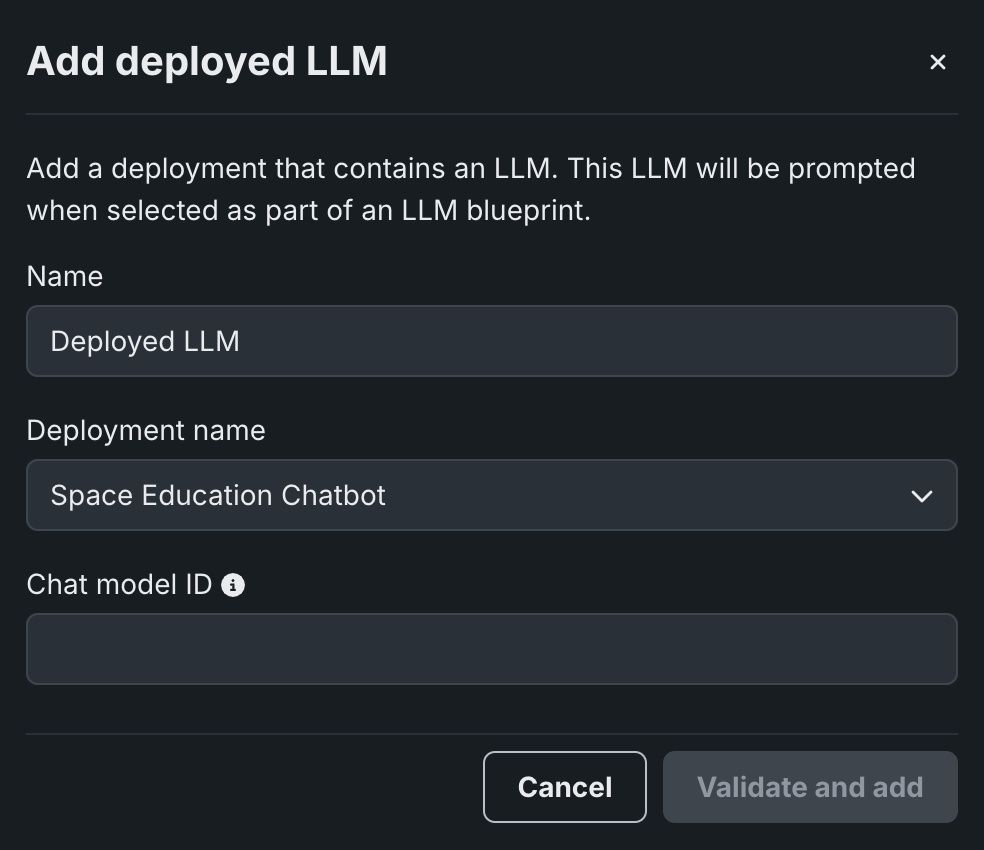
In Workbench, when adding a deployed LLM that implements the chat function, the playground uses the Bolt-on Governance API as the preferred communication method. Enter the Chat model ID associated with the LLM blueprint to set the model parameter for requests from the playground to the deployed LLM. Alternatively, enter datarobot-deployed-llm to let the LLM blueprint select the relevant model ID automatically when calling the LLM provider's services.
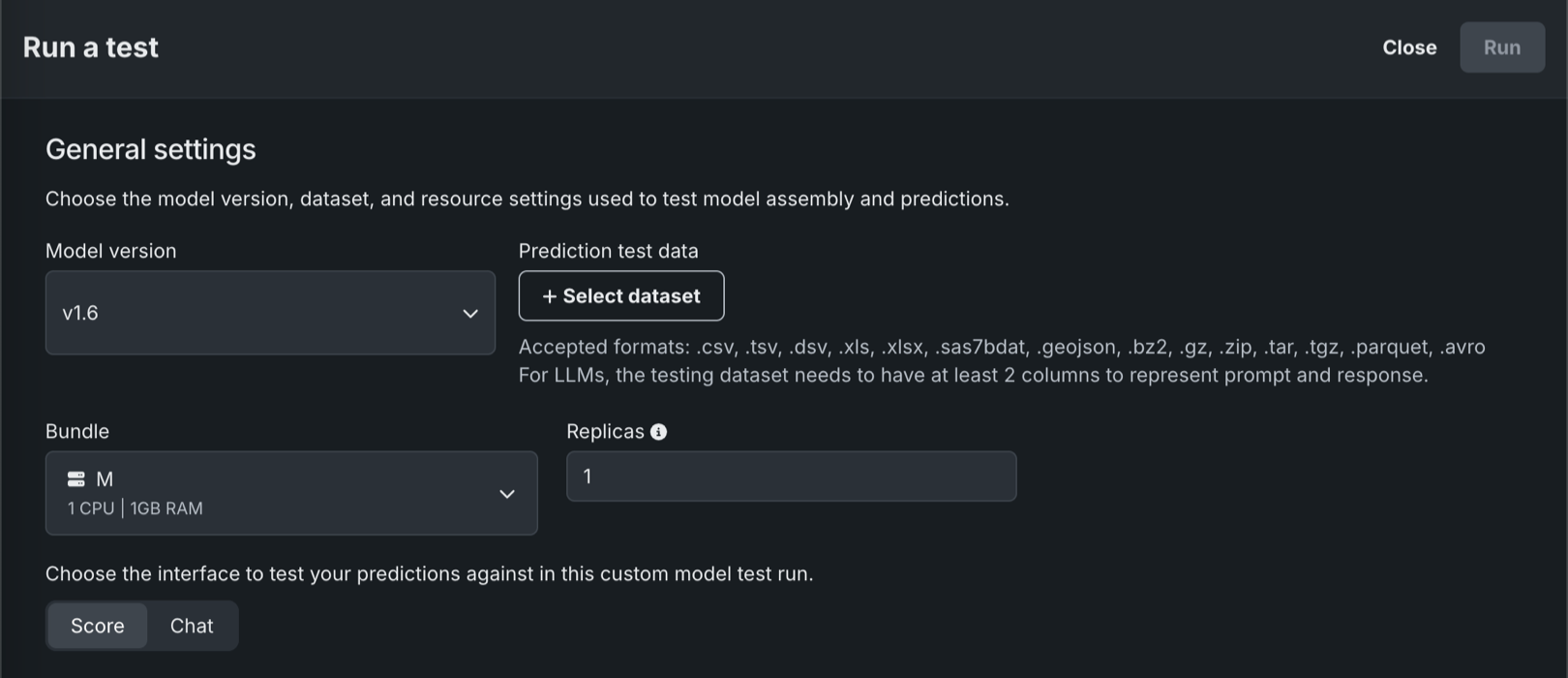
In the Registry, the model workshop supports running tests using the Bolt-on Governance API. Text generation custom models can perform the startup test and either the prediction error test (Prediction API) or the chat error test (Bolt-on Governance API).
For more information, see the documentation, considerations and an example notebook.
Security-hardened custom model drop-in environments
Starting with the March 2025 Managed AI Platform release, most general purpose DataRobot custom model drop-in environments are security-hardened container images. When you require a security-hardened environment for running custom jobs, only shell code following the POSIX-shell standard is supported. Security-hardened environments following the POSIX-shell standard support a limited set of shell utilities.
Administration
Seat licenses
Administrators can now manage user permissions by assigning seat licenses to the user accounts rather than configuring user access one permission at a time. This mechanism allows administrators to more finely control the number of users that have access to the deployment, as well as fine-tune the desired access level for each user.
For more details, see the documentation for configuring and assigning seat licenses.
Platform
Use shortcuts to navigate across NextGen
You can now use keyboard shortcuts to navigate across the NextGen platform. To open the shortcuts menu:
- On your keyboard, press Cmd+K.
- Go to User Settings and select Navigation shortcuts.
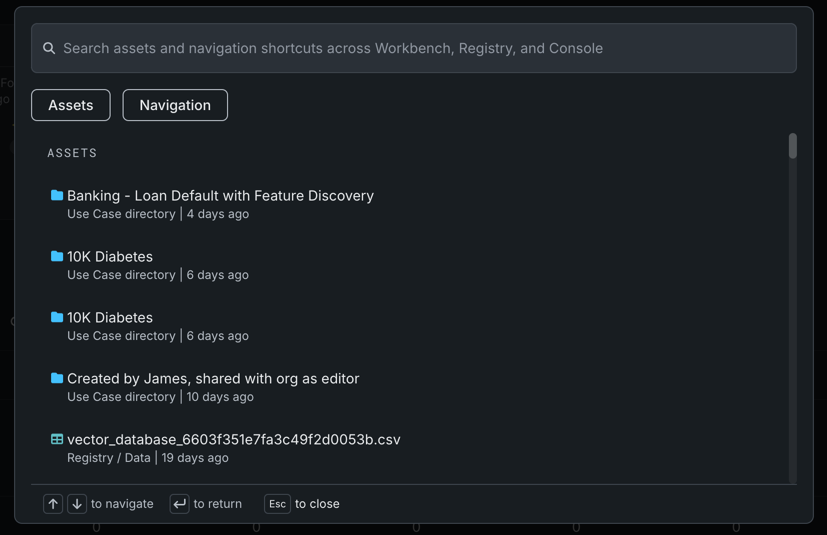
Use the search bar at the top to find specific shortcuts. Note that you can only execute navigation shortcuts when the menu is open.
Track value and assess risk for a Use Case
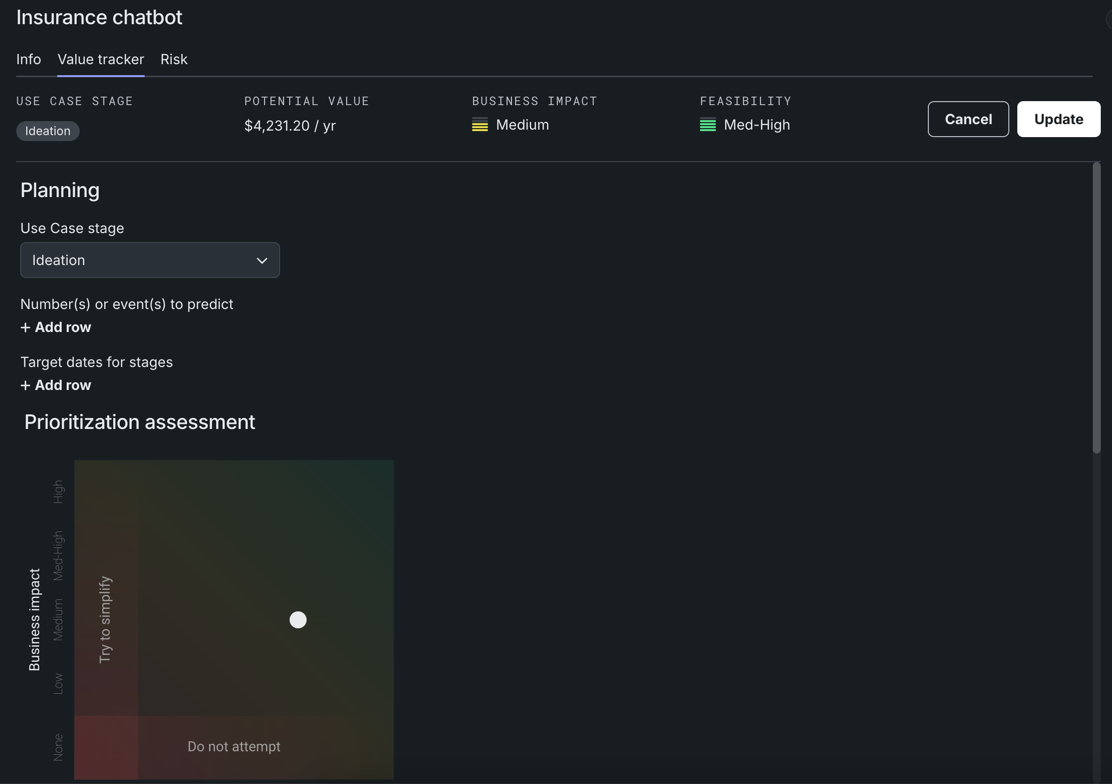
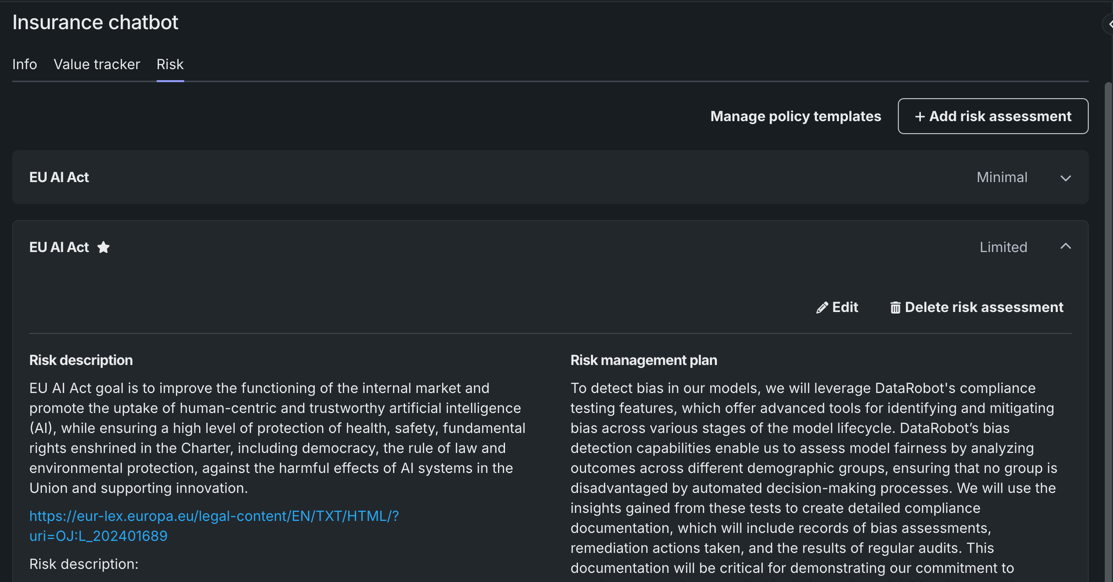
This release introduces the Value Tracker and Risk tabs within the Use Case management tile of a Use Case.
The Value Tracker allows you to specify what you expect to accomplish in a Use Case. You can measure success by defining the value you expect to get and tracking the actual value you receive in real time. The Value Tracker also utilizes Use Case tools to collect the various DataRobot assets you are using to achieve your goals and collaborate with others.
On the Risk tab, you can identify potential risks to the Use Case, and then determine how you plan to address and mitigate those risks using DataRobot risk management tools. Risk includes anything that may impact the Use Case, including legal, operational, IT security, strategic, bias and fairness, and more. Because risk is always changing, risk assessments need to be updated and/or created periodically.
NextGen UI and navigation improvements
The following user experience and branding improvements have been added to NextGen:
- UI elements now reflect the new brand color palette and follow accessibility guidelines.
- All second-level navigation has been moved to the left panel.
- You can pin frequently used Use Cases to the top of the Use Case directory in Workbench.
- Now, organize and filter Use Cases by adding tags.
- Choose between a light or dark theme in your User Settings.
For more information, see the In the spotlight video at the top of the page.
Deprecations and migrations
MLOps library requires Java 11 or higher
From March 2025 forward, the MLOps monitoring library must run on Java 11 or higher. This includes Scoring Code models instrumented for monitoring.
All product and company names are trademarks™ or registered® trademarks of their respective holders. Use of them does not imply any affiliation with or endorsement by them.