APIを介してVisual Artificial Intelligence (AI)予測を行う
このチュートリアルでは、API呼び出しを使用してVisual Artificial Intelligence (AI)プロジェクトで予測を行う方法の概要を説明します。 このチュートリアルを完了するには、Visual Artificial Intelligence (AI)モデルをトレーニングしてデプロイしている必要があります。
要点
このチュートリアルでは、次の方法を示します。
- Configure scripting code for making batch predictions via the API
- Make an API call to get batch predictions for a visual AI model
- Format images to a base64 format
予測ワークフロー
-
Prepare your data for Visual Artificial Intelligence (AI). Before making predictions, convert the images you want to score to base64 format (the standard format for handling images in API calls). モデルが予測結果を返す場合、画像はbase64形式で返されることに注意してください。 To convert data, use DataRobot's Python package, described in the guide Preparing binary data for predictions.
-
After training and deploying a Visual Artificial Intelligence (AI) model, navigate to the deployment and access the Predictions > Prediction API tab. このタブは、APIを介して予測を行うために使用されるスクリプトコードを提供します。
-
To configure the scripting code, select Batch as the prediction type and API Client as the interface type.
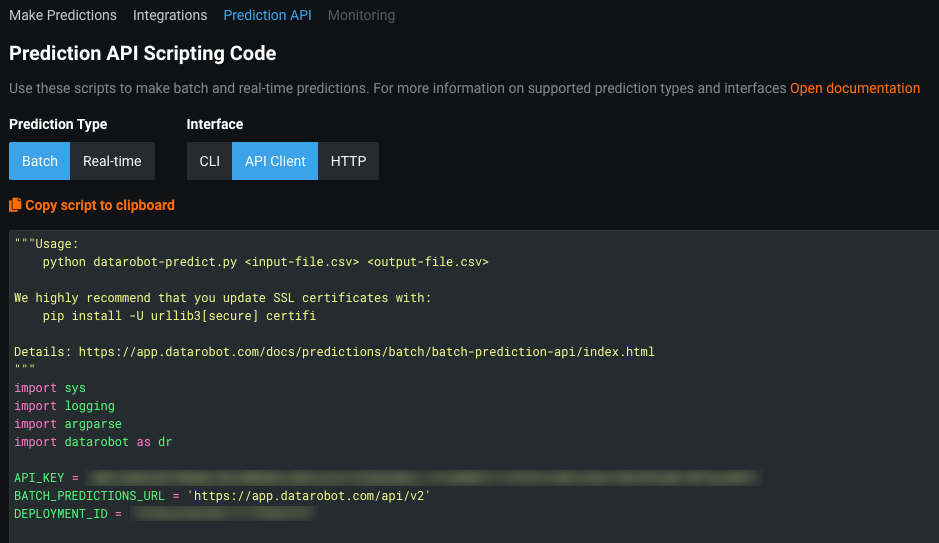
-
Copy the code and save it as a Python script (e.g.,
datarobot-predict.py). スクリプトを編集して、追加の手順を組み込むことができます。 たとえば、入力ファイル(例image_id)の列を出力ファイルに含める場合は、passthrough_columns_setに引数をBatchPredictionJobに追加します。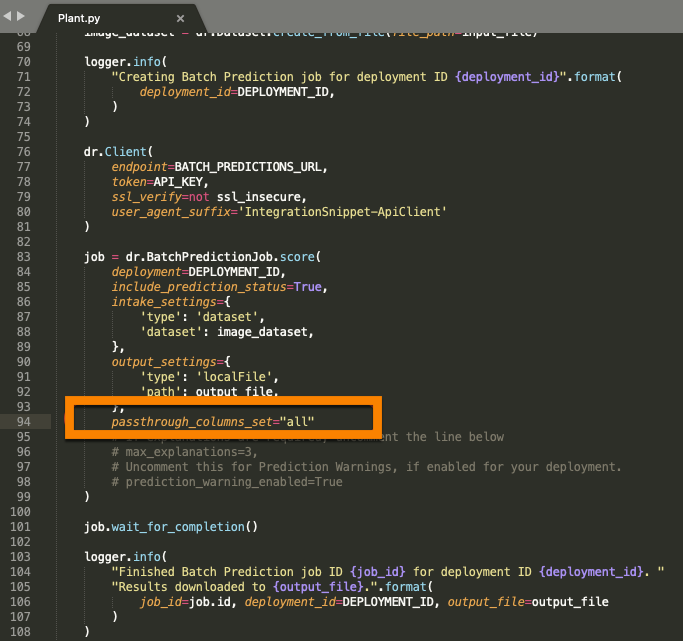
-
Using the scripting code from step two and a base64-converted image file (
InputDataConverted.csv), make an API call to get predictions from the deployed model:python datarobot-predict.py InputDataConverted.csv Predictions.csv -
Access the output file (
Predictions.csv) to view prediction results.

学習リソース
追加のツール
base64変換プロセスを支援するスクリプトを含むデータ準備ツールについては、DataRobot Community GitHubページをご参照ください。 このリンクをクリックする前にGitHubにログインしてください。
このチュートリアルで使用されるスクリプトコードの詳細については、 Pythonパッケージのドキュメントをご参照ください。
多クラスの例
手順6の多クラス分類問題の予測結果の場合、予測の出力結果ファイルには、画像が各クラスに分類される確率、最も確率の高いクラス名、およびPythonスコアリングスクリプトから要求された他のすべてのオプションの列(prediction_statusとimage_idのように)が含まれていることに注意してください。