October SaaS feature announcements
October 2025
This page provides announcements of newly released features available in DataRobot's SaaS multi-tenant AI Platform, with links to additional resources. From the release center, you can also access past announcements and Self-Managed AI Platform release notes.
Agentic AI
MCP server template and integration
An MCP server template has been added to the DataRobot Community, allowing users to deploy an MCP server locally or to their DataRobot deployments for agents to access. Getting the server set up is as easy as cloning the repo and running a few simple scripts, allowing you to test the server on your local machine or a fully-deployed custom tool on your DataRobot cluster. The template also provides instructions for getting several popular MCP clients connected to the server, as well as frameworks for integrating custom and dynamic tools to further customize your MCP setup.
For full instructions, refer to the MCP server template ReadMe.
Open-source Milvus now supported as vector database provider
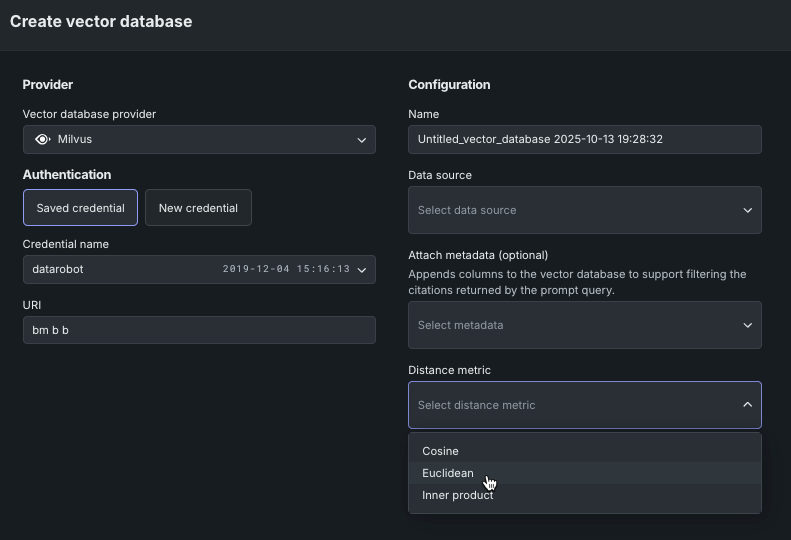
You can now create a direct connection to Milvus, in addition to Pinecone and Elasticsearch, for use as an external data source for vector database creation. Milvus, a leading open-source vector database project, is distributed under the Apache 2.0 license. Additionally, you can now select distance (similarity) metrics for connected providers. These metrics measure how similar vectors are; selecting the appropriate metric can substantially boost the effectiveness of classification and clustering tasks.
New LLMs added
With this release, the ever-growing library LLMs is again extended to include LLMs from Cerebras and TogetherAI. As always, see the full list of LLMs, available for all enterprise and Trial users subscribed. Leverage the LLM gateway to access any supported LLMs, leveraging DataRobot's credentials under-the-hood for experimentation (playground) and production (custom model deployment), or bring-your-own LLM credentials for access in production.
LLM gateway rate limiting
The LLM gateway now enforces rate limits on chat completion calls to ensure fair and efficient use of LLM resources. Organizations may be subject to a maximum number of LLM calls per 24-hour period, with error messages indicating when the limit is reached and when it will reset. To adjust or remove these limits, administrators can contact DataRobot support.
Explore 60+ GPU-optimized containers in the NIM Gallery
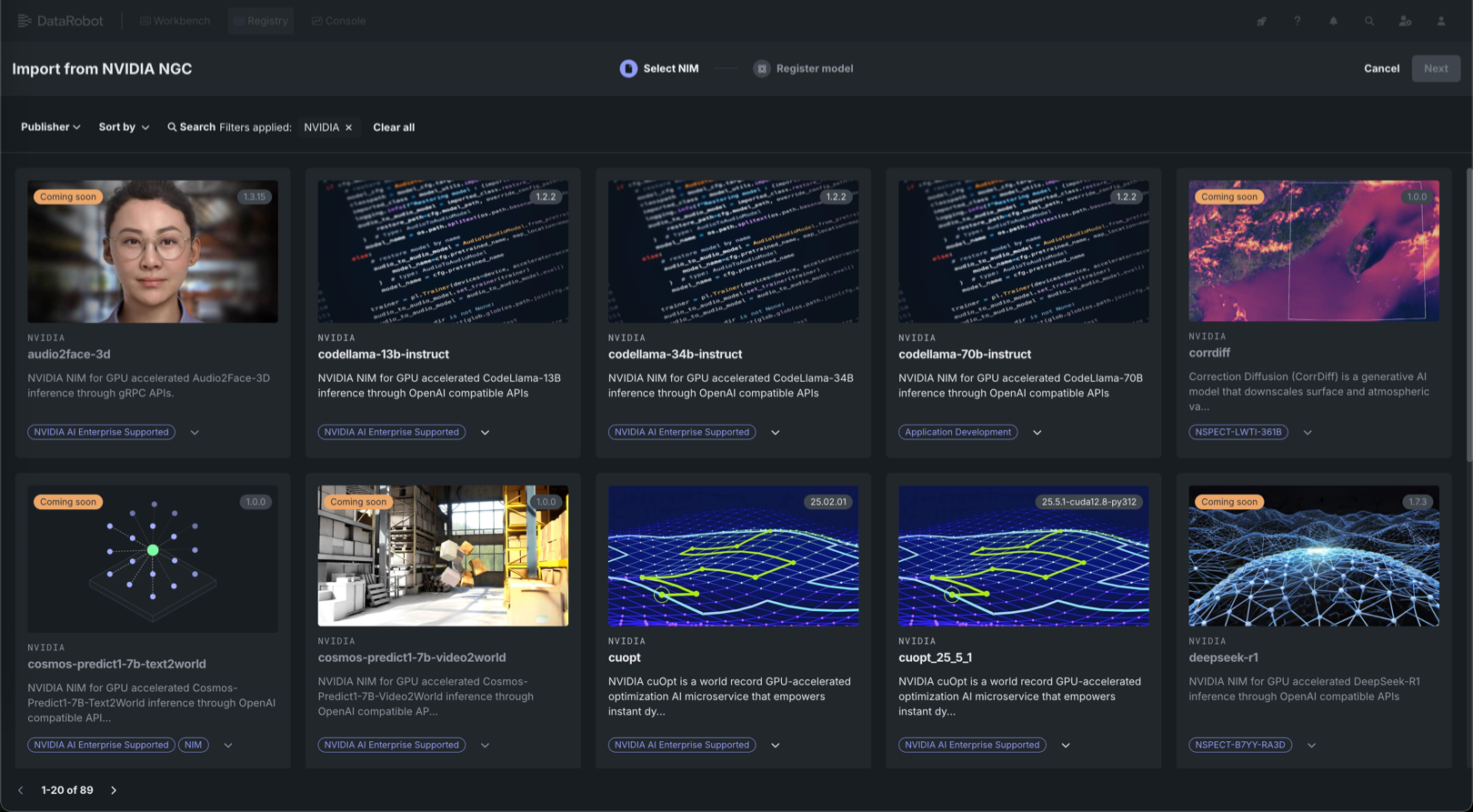
NVIDIA AI Enterprise and DataRobot provide a pre-built AI stack solution designed to integrate with your organization's existing DataRobot infrastructure, which gives access to robust evaluation, governance, and monitoring features. This integration includes a comprehensive array of tools for end-to-end AI orchestration, accelerating your organization's data science pipelines to rapidly deploy production-grade AI applications on NVIDIA GPUs in DataRobot Serverless Compute.
In DataRobot, create custom AI applications tailored to your organization's needs by selecting NVIDIA Inference Microservices (NVIDIA NIM) from a gallery of AI applications and agents. NVIDIA NIM provides pre-built and pre-configured microservices within NVIDIA AI Enterprise, designed to accelerate the deployment of generative AI across enterprises.
With the October 2025 release, DataRobot added new GPU-optimized containers to the NIM Gallery, including:
- gpt-oss-20b
- gpt-oss-120b
- llama-3.3-nemotron-super-49b-v1.5
Apps
Talk to my Docs application template
Use the Talk to my Docs application template to ask questions about your documents using agentic workflows. This application allows you to rapidly gain insight from documents across different providers—Google Drive, Box, and your local computer—via a chat interface to upload or connect to documents, ask questions, and visualize answers with insights.
Decision-makers depend on data-driven insights but are often frustrated by the time and effort it takes to get them. They dislike waiting for answers to simple questions and are willing to invest significantly in solutions that eliminate this frustration. This application directly addresses this challenge by providing a plain language chat interface to your documents. It searches and catalogs various documents to create actionable insights through intuitive conversations. With the power of AI, teams get faster analysis, helping them make informed decisions in less time.
The CLI tool provides a guided experience for configuring application templates
After opening an application template in a DataRobot Codespace or GitHub, launch the CLI tool to guide you through the process of cloning the application template and successfully running it, resulting in a built application. The CLI tool provides the following assistance:
- Validates environment configurations and highlights missing or incorrect credentials.
- Guides you through the setup process using clear prompts and step-by-step instructions.
- Ensures the necessary dependencies and credentials are properly configured to avoid common configuration issues.
OpenTelemetry logs for deployments
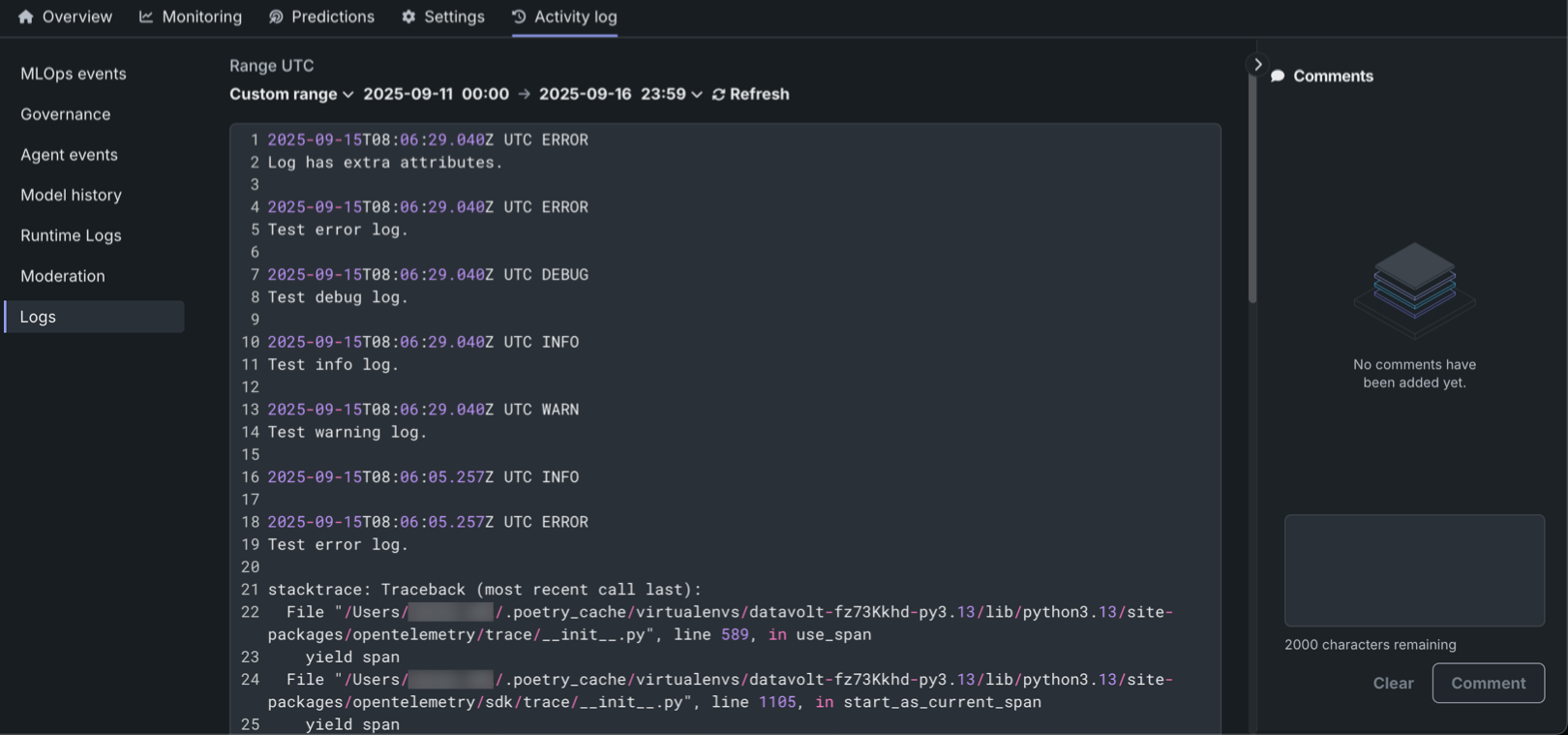
The DataRobot OpenTelemetry (OTel) service now collects OpenTelemetry-compliant logs, allowing for deeper analysis and troubleshooting of deployments. The new Logs tab in the Activity log section lets users view and analyze logs reported for a deployment in the OpenTelemetry standard format. Logs are available for all deployment and target types, with access restricted to users with "Owner" and "User" roles.
The system supports four logging levels (INFO, DEBUG, WARN, ERROR) and offers flexible time filtering options, including Last 15 min, Last hour, Last day, or a Custom range. Logs are retained for 30 days before automatic deletion.
Additionally, the OTel logs API enables programmatic export of logs, supporting integration with third-party observability tools. The standardized OpenTelemetry format ensures compatibility across different monitoring platforms.
Quota management for deployments
Comprehensive quota management capabilities help deployment owners control resource usage and ensure fair access across teams and applications. Quota management is available during deployment creation and in the Settings > Quota tab for existing deployments. Configure default quota limits for all agents or set individual entity rate limits for specific users, groups, or deployments. This system supports three metrics: Requests (prediction request volume), Tokens (token processing limits), and Input sequence length (prompt/query token count), with flexible time resolutions of Minute, Hour, or Day.

In addition, Agent API keys are automatically generated for Agentic workflow deployments, appearing in the API keys and tools section under the Agent API keys tab. These keys differentiate between various applications and agents using a deployment, enabling better quota tracking and management.
These enhancements prevent single agents from monopolizing resources, ensure fair access across teams, and provide cost control through usage limits. Quota policy changes take up to five minutes to apply due to gateway cache updates.
Platform
Sharing notification improvements
With this release, email notifications have been streamlined when sharing a Use Case with other members of your team. Previously, an individual email was sent for each asset within the shared Use Case. Now, all email notifications for Use Case sharing have been consolidated into a single email.
Use Case admin role
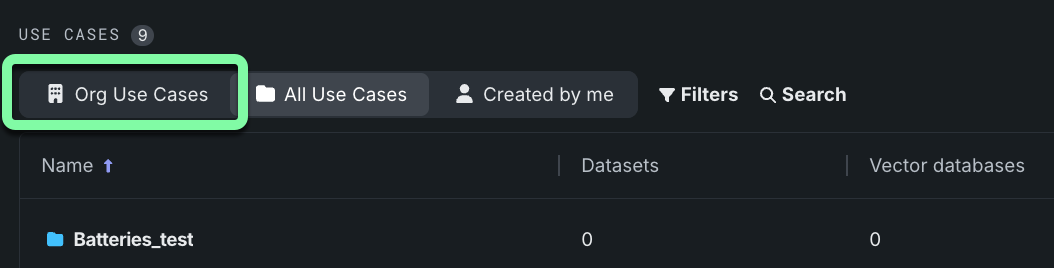
DataRobot's RBAC functionality has been updated with a new Use Case Admin role. Users assigned as Use Case Admins can view all use cases in their organization, rather than being restricted to those they have created or have been shared with them. This view can be toggled on the Use Cases table:
For more information, see the Use Case Admin section in the Use Case overview and the RBAC details.
Microsoft Azure support for OAuth
You can now configure integration with Microsoft Azure as an OAuth provider. Use the Microsoft Entra ID app to configure the OAuth provider.
Code first
Python client v3.9
v3.9 for DataRobot's Python client is now generally available. For a complete list of changes introduced in v3.9, view the Python client changelog.
All product and company names are trademarks™ or registered® trademarks of their respective holders. Use of them does not imply any affiliation with or endorsement by them.