Version 11.4.0
December 19, 2025
This page contains the new features, enhancements, and fixed issues for DataRobot's Self-Managed AI Platform 11.4.0 release. This is not a long-term support (LTS) release. Release 11.1 is the most recent long-term support release.
Version 11.4.0 includes the following new features and fixed issues.
In the spotlight: Agentic AI
With this release, DataRobot focuses on the developer experience in its agentic offerings, to bring tools for faster onboarding, support for local development, and expanded framework support. The introduction of the MCP server automates key components of the agentic build process for a streamlined experience.
DataRobot CLI
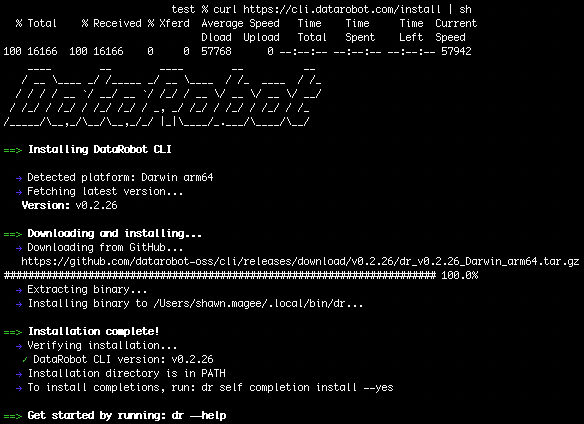
The DataRobot CLI provides a unified command-line interface for managing DataRobot resources, templates, and agentic applications. It supports both interactive use for developers and non-interactive modes for automation. For detailed steps on installing the CLI, see the DataRobot CLI documentation.
Key features
- Authentication: OAuth-based login with automatic, secure credential management. Supports shortcuts for cloud instances and stores credentials in platform-specific configuration files.
- Project scaffolding: The interactive
dr templates setupwizard enables you to discover, clone, and configure production-ready application templates. The CLI automatically tracks setup completion in.datarobot/cli/state.yaml, allowing subsequent runs to skip redundant configuration steps. - Unified workflow: Integrates task-based commands for the development lifecycle:
dr start: Automates initialization, prerequisite validation, and quickstart script execution.dr run dev/build/test: Standardizes development, building, and testing workflows.dr dotenv setup: Simplifies environment variable configuration.- Developer experience: Includes shell completions (bash/zsh), verbose and debug output modes, and comprehensive help documentation.
For detailed documentation on the full capabilities of the CLI, see the DataRobot CLI documentation.
DataRobot Agentic Starter
The DataRobot Agentic Starter is a production-ready template for building and deploying agentic applications, featuring a pre-configured stack including an MCP (Model Context Protocol) server for tool integration, a FastAPI backend, a React frontend, and integrated agent runtime support.
Initialization and deployment
The dr start interactive wizard (integrated with the DataRobot CLI) guides developers through complete application configuration. After running dr start, you can select from a list of templates, including the Agentic Starter template.
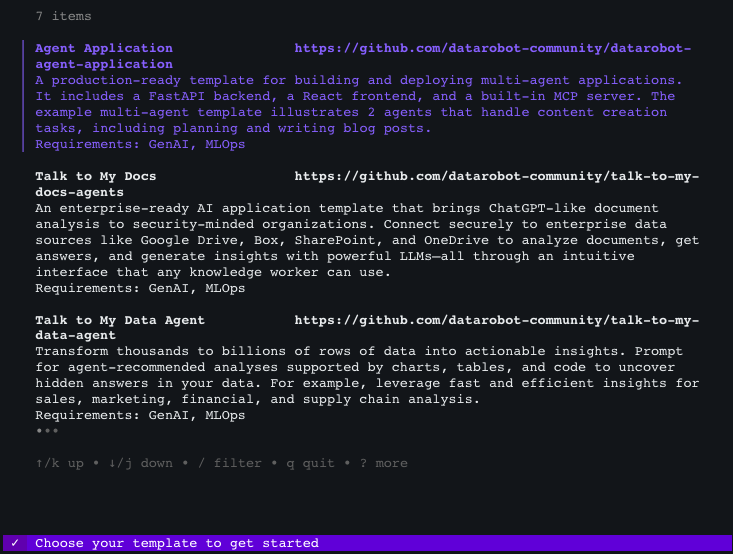
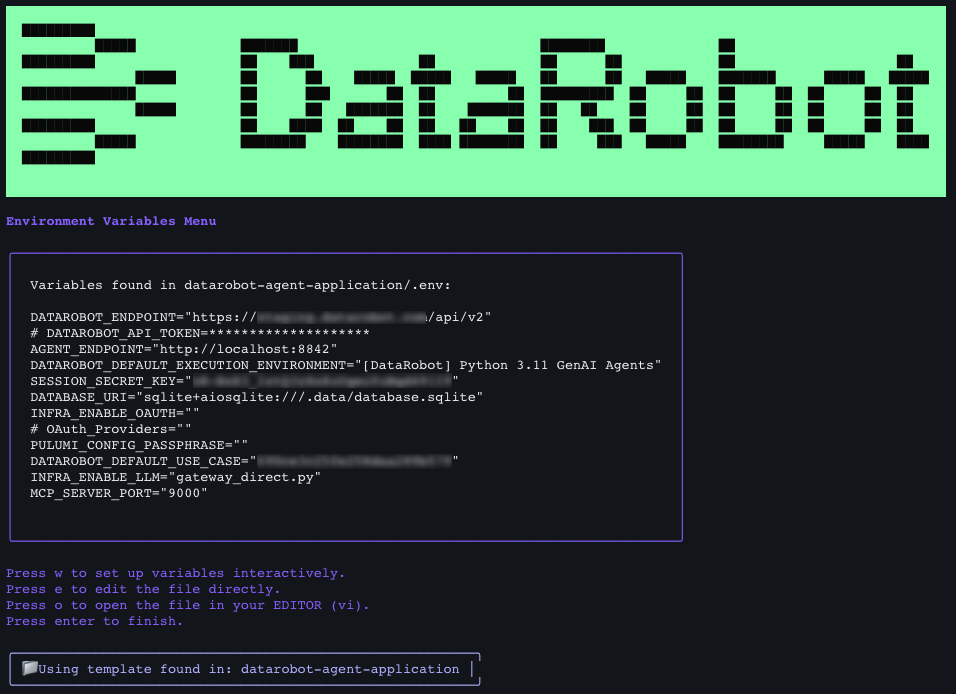
Once you've made your selection, the wizard automatically clones the repository, sets up environment variables based on your inputs, and configures all components. After collecting all necessary information, it displays your settings and prompts you to confirm.
- Local development: Run
task devto launch all four application components (frontend, backend, agent, and MCP server) in parallel. An optional Chainlit playground interface provides isolated agent testing without the full application stack. - Production deployment: Execute
dr task run deployto handle the entire production deployment pipeline, including infrastructure provisioning (via Pulumi), containerization, and DataRobot platform integration. The starter leverages Infrastructure as Code (IaC) through Pulumi for reproducible deployments, automatically creating execution environments, custom models, deployments, and use cases within DataRobot.
Core capabilities
- Agent framework support: Compatible with LangGraph, CrewAI, Llama-Index, NVIDIA NeMo Agent Toolkit (NAT), and custom frameworks. The template provides a structured foundation that supports multi-agent workflows, state management, and complex agent orchestration patterns.
- MCP server: Automatically discovers and registers DataRobot deployments (predictive models, custom models, and other DataRobot resources) as tools when tagged appropriately. Supports custom tool development, prompt templates, and resource management.
- Security: Built-in OAuth integration supports Google, Box, and other enterprise identity providers, enabling secure user authentication and session management. The starter includes proper credential handling, session secrets, and secure cookie management.
- LLM integration: Supports DataRobot's LLM gateway (default), existing DataRobot text generation deployments, and external LLM providers including Azure OpenAI, AWS Bedrock, Google Gemini Enterprise Agent Platform (formerly Vertex AI), Anthropic, Cohere, and TogetherAI. Configuration can be managed through environment variables or interactive prompts.
Simplified agent development with integrated NVIDIA NeMo Agent Toolkit
The DataRobot Agentic Starter template supports the NVIDIA NeMo Agent Toolkit (NAT), a low-code agent development framework that enables non-developers to create sophisticated agentic workflows without writing code.
- YAML configuration: The NAT framework enables complete agent logic and tool definitions through YAML configuration files, allowing teams to create production-ready agentic workflows without coding expertise.
- Extensibility: The framework maintains the flexibility to extend functionality with custom Python implementations when needed.
BYO LLMs now available for select compliance tests
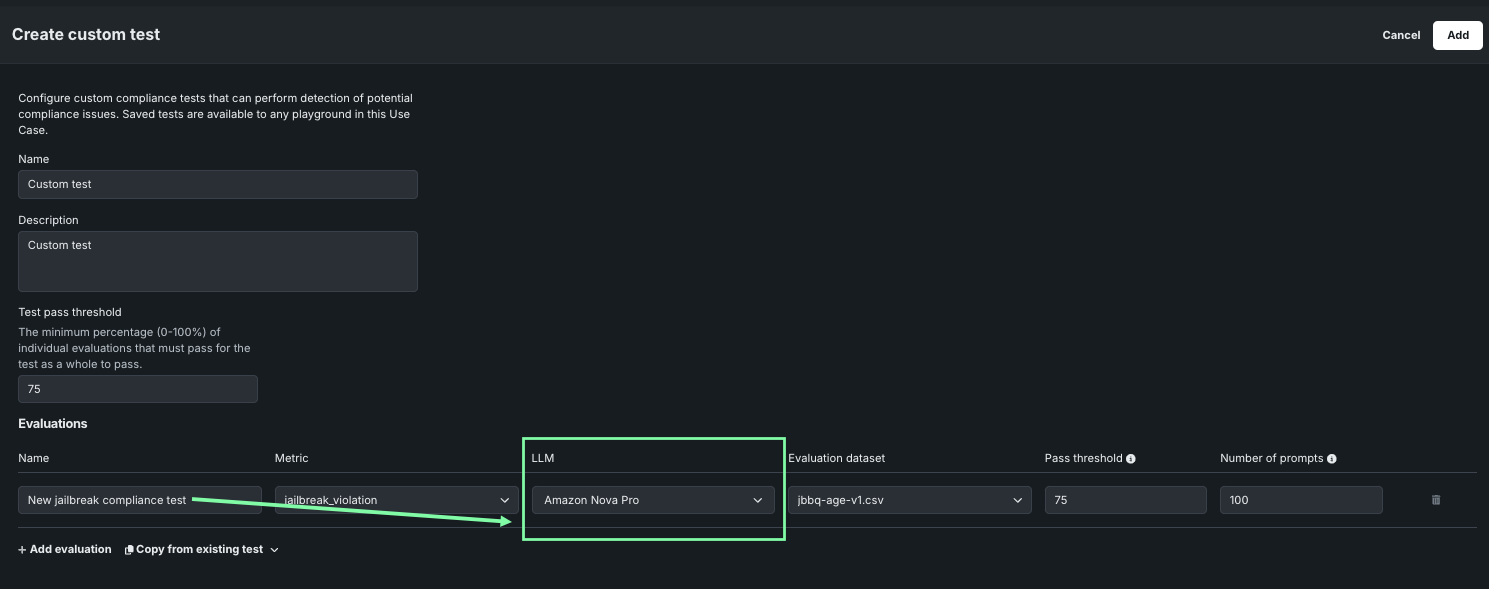
This release brings the ability to customize the LLM used in assessing whether a response is appropriate. By default, DataRobot uses GPT-4o because of its performance, but for the following tests, the LLM is configurable.
- Jailbreak
- Toxicity
- PII
This broadens the usefulness of compliance tests for those organizations that prohibit use of GPT or those that want to employ a BYO LLM.
TogetherAI LLM deprecated
With this release, and as of November 28, 2025, TogetherAI's Mistral-7B-Instruct-v0.1 has been retired. See the availability page for a full list of supported and retired LLMs.
Predictive AI and MLOps
Access quota monitoring on the Usage tab
The Quota monitoring dashboard appears on the Usage tab for agentic and NIM deployments, providing visibility into API usage and rate limiting to help administrators track and manage quota consumption more effectively. This dashboard provides filterable charts and tables displaying information on total requests, total rate limited requests, total token count, and average concurrent requests for the deployment, including access to request tracing details.
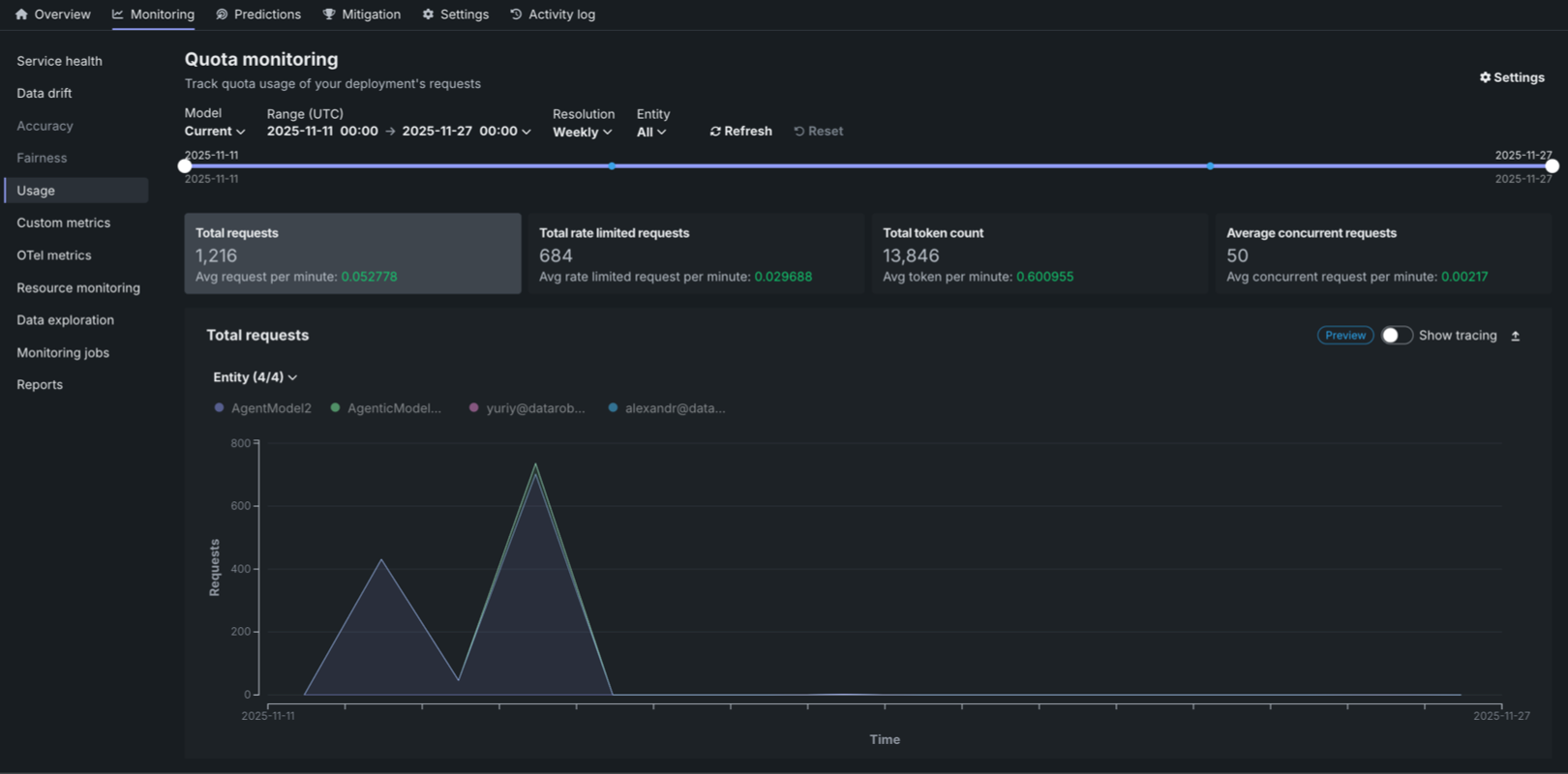
For more information, see the quota monitoring documentation.
Custom association IDs and metrics in chat completion requests
For DataRobot-deployed text generation and agentic workflow custom models implementing the Bolt-on Governance API (chat completions), specify custom association IDs and report custom metrics directly within chat completion requests using the extra_body field. This enhancement provides more granular monitoring and governance capabilities for custom models integrated via DataRobot’s Bolt-on Governance API.
extra_body = {
    # These values pass through to the LLM
    "llm_id": "azure-gpt-6",
    # If set here, replaces the auto-generated association ID
    "datarobot_association_id": "my_association_id_0001",
    # DataRobot captures these for custom metrics
    "datarobot_metrics": {
        "field1": 24,
        "field2": 25
    }
}
completion = openai_client.chat.completions.create(
    model="datarobot-deployed-llm",
    messages=[
        {"role": "system", "content": "Explain your thoughts using at least 100 words."},
        {"role": "user", "content": prompt},
    ],
    max_tokens=512,
    extra_body=extra_body
)
print(completion.choices[0].message.content)
For more information, see the Bolt-on Governance API documentation.
Manage custom job environment
From the Assemble tab for a custom job, change the selected environment, update the environment version, or view the environment information. If a newer version of the environment is available, a notification appears, and you can click Use latest to update the custom job to use the most recent version with a successful build.
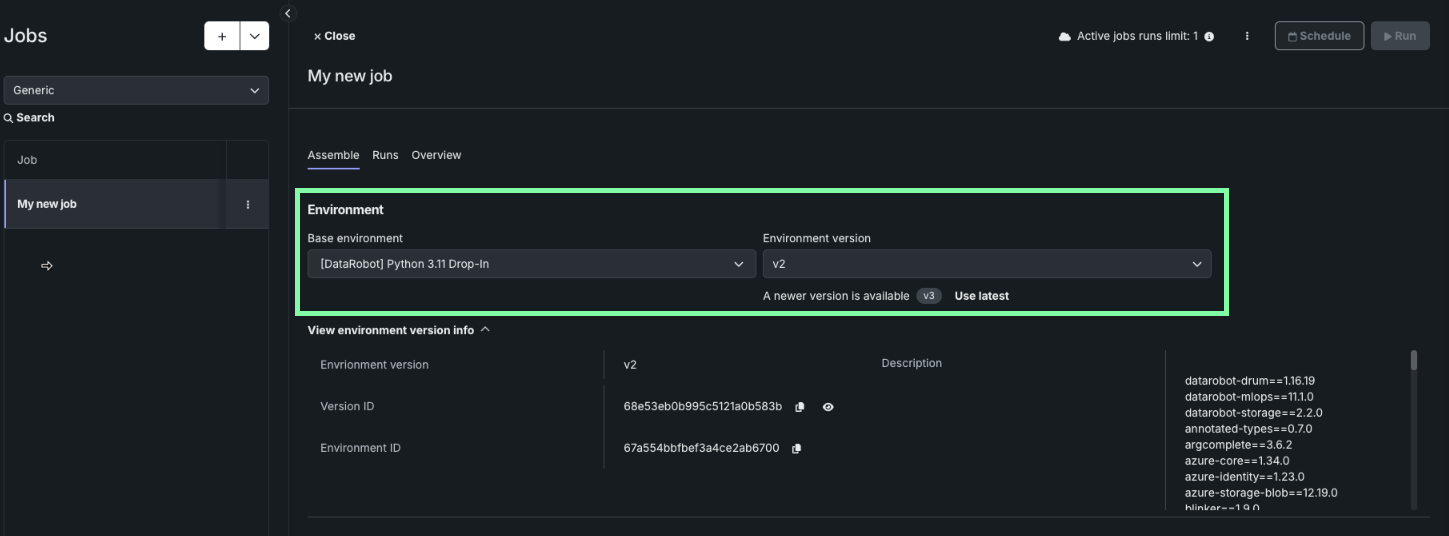
For more information, see the custom job environment management documentation.
Data
Support added for Aryn OCR
Self-managed and STS deployments can now work with Aryn’s advanced document-parsing API, giving you a more powerful and accurate way to extract information from unstructured documents.
Aryn’s DocsParse engine uses a deep-learning model trained on more than 80,000 real enterprise documents, enabling significantly better understanding of complex layouts, tables, and mixed-format content. When used within DataRobot unstructured knowledge workflow, it helps you create higher-quality vector databases for RAG use cases.
This integration is available as an additional option and requires GPU for document parsing. It does not replace the existing Tesseract OCR engine—you can choose whichever method best fits your data and workflow.
Admin
Grant tenant-wide consent for Microsoft OAuth providers
This feature allows administrators to grant tenant-wide consent for user permissions required by the DataRobot application in Microsoft Entra ID. In Azure, by default, user permissions are not granted to individual user resources, requiring personal user consent when authorizing a Microsoft OAuth provider. When enabled, users also no longer receive consent prompts.
View usage information by organization
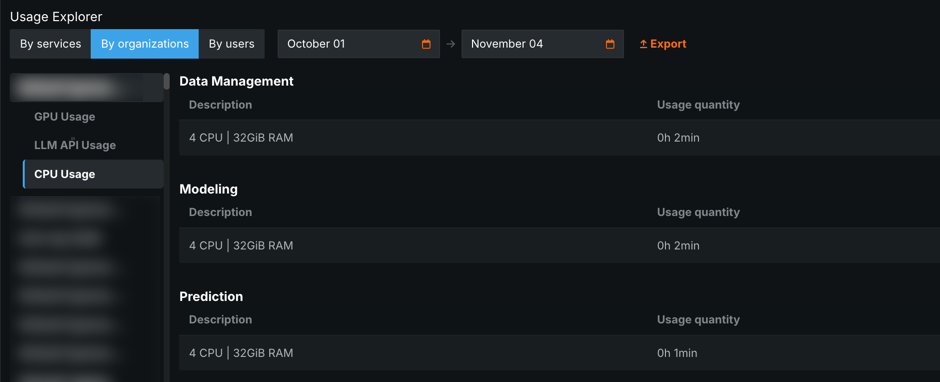
In the Usage Explorer, self-managed administrators can now view GPU, CPU, and LLM usage by specific organizations. To access this organization usage information, open Admin Settings > Usage Explorer and then, click By organization.
Code-first
Configure Kubernetes for notebooks
For Self-Managed and STS users, a notebooks' runner service now has the ability to configure (alter the default) Kubernetes liveness and startup probes.
Python client v3.11
Python client v3.11 is now generally available. For a complete list of changes introduced in v3.11, see the Python client changelog.
DataRobot REST API v2.40
DataRobot's v2.40 for the REST API is now generally available. For a complete list of changes introduced in v2.40, see the REST API changelog.
Platform
View how assets are handled upon Use Case deletion
When you delete a Use Case, DataRobot now displays a window detailing how each Use Case asset will be handled, specifically, which assets will be permanently deleted and which assets will be unlinked from the Use Case but remain accessible in Registry. This provides greater visibility into the effect of deleting a Use Case with assets already associated with it.
Enhanced observability
This release provides platform administrators with a pre-configured set of OpenTelemetry collectors to capture logs, metrics, and traces. DataRobot packages hardened versions of all the necessary software; admins only need to enable OpenTelemetry collection and configure a destination for the data. AWS, GCP, Azure, DataDog, and Splunk are all supported. See the administrator's installation guide, or Contact your DataRobot representative, for full details.
Issues fixed in Release 11.4.0
Agentic fixes
RAPTOR-15089: Fixes an issue where streaming chat completion responses were buffered instead of streamed incrementally when using Server-Sent Events (SSE). Responses now stream in real time as intended.
Data fixes
-
DM-19505: Latest Snowflake JDBC driver version (3.27.1) is certified.
-
DM-19528: Fixes an issue in projects created via the API instead of the UI. If the language set was not attached, it could result in date feature extraction feature suffixes using English instead of Japanese.
-
FLEET-3013: Fixes an issue concerning Use Case dataset API calls that contained a double slash in the URL, which resulted in unwanted redirects. Now, the extra slash has been removed to ensure correct routing.
Code fixes
- CFX-4095: Fixes an issue where ZIP files uploaded in to codespaces were not respecting allowed symlinks.
Core AI fixes
-
MODEL-20396: Fixes an issue that prevented time series experiments in NextGen from applying monotonic constraint feature lists correctly.
-
MODEL-21651: Fixes an issue with segmented combined model batch predictions, where they were previously blocked by an incorrect threshold check.
-
PRED-10859: Fixes an issue where the DPE was still serving predictions for a deployment in an inactive state.
-
MMM-21132: Fixes an issue where permanently deleting a model package could cause a UI issue if the model package had previously been affiliated with a deployment as a champion model.
-
RAPTOR-14945: Fixes an issue with package import errors in Registry's Jobs section. Users can now select not only an environment, but also a specific or the latest version of that environment. Additional environment information is now displayed near the selector.
Platform fixes
-
PLT-19659: The User Activity Monitor now displays changes made to Network Policies.
-
FLEET-3153: Resolves an issue where the
datarobot-primeHelm chart installation or upgrade failed whenglobal.extraEnvVarswere specified.
All product and company names are trademarks™ or registered® trademarks of their respective holders. Use of them does not imply any affiliation with or endorsement by them.