Version 11.5.0
February 8, 2026
This page contains the new features, enhancements, and fixed issues for DataRobot's Self-Managed AI Platform 11.5.0 release. This is not a long-term support (LTS) release. Release 11.1 is the most recent long-term support release.
Version 11.5.0 includes the following new features and fixed issues.
Agentic AI
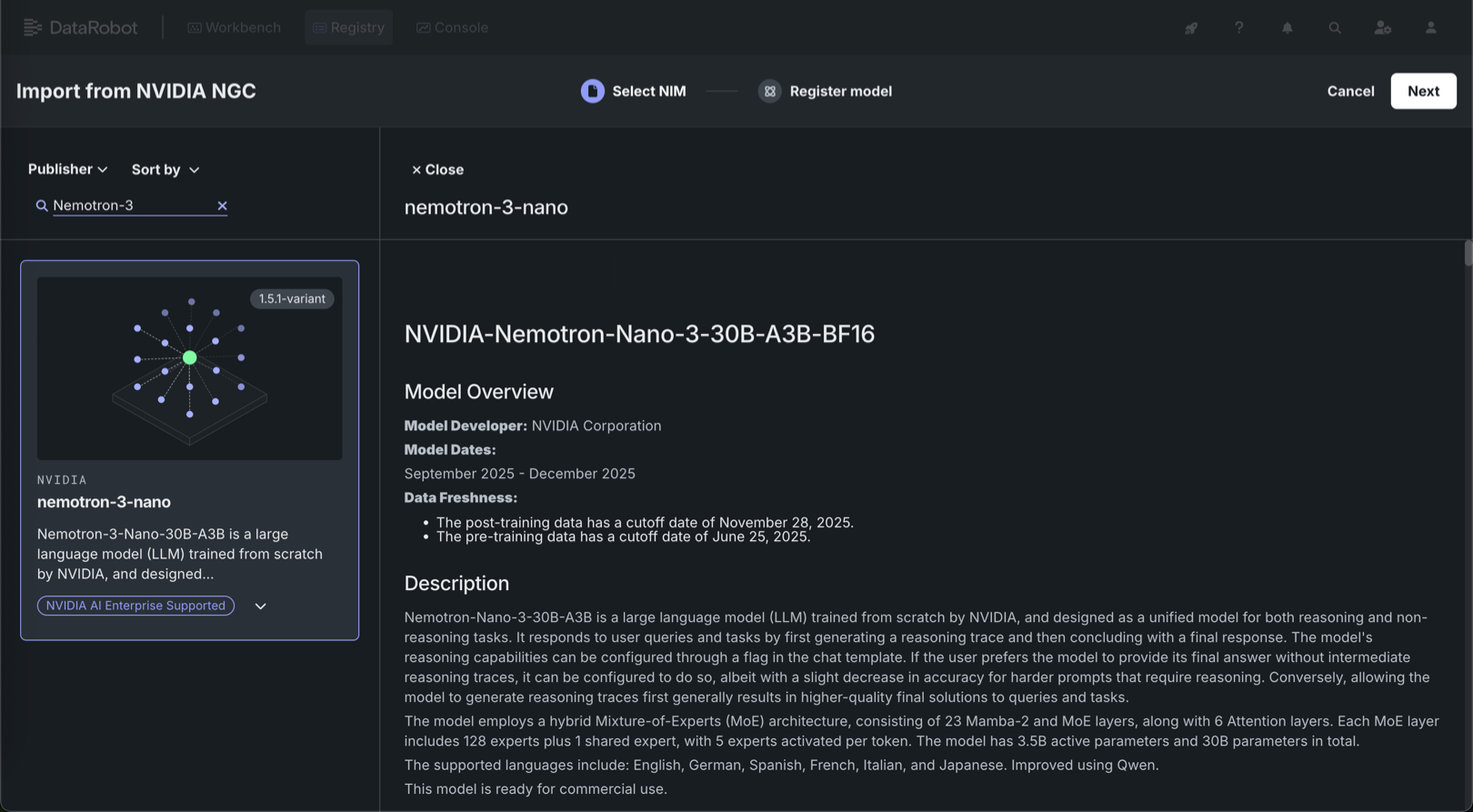
Deploy Nemotron 3 Nano from the NIM Gallery
NVIDIA AI Enterprise and DataRobot provide a pre-built AI stack solution, designed to integrate with your organization's existing DataRobot infrastructure, which gives access to robust evaluation, governance, and monitoring features. This integration includes a comprehensive array of tools for end-to-end AI orchestration, accelerating your organization's data science pipelines to rapidly deploy production-grade AI applications on NVIDIA GPUs in DataRobot Serverless Compute.
In DataRobot, create custom AI applications tailored to your organization's needs by selecting NVIDIA Inference Microservices (NVIDIA NIM) from a gallery of AI applications and agents. NVIDIA NIM provides pre-built and pre-configured microservices within NVIDIA AI Enterprise, designed to accelerate the deployment of generative AI across enterprises.
With the release of version 11.5, Nemotron 3 Nano is now available for one-click deployment in the NIM Gallery—bringing together leading accuracy and exceptional efficiency in a single model. Nemotron-Nano-3-30B-A3B is a 30B-parameter NVIDIA large language model for both reasoning and non-reasoning tasks, with configurable reasoning traces and a hybrid Mixture-of-Experts architecture. Nemotron 3 Nano provides:
- Leading accuracy for coding, reasoning, math, and long context tasks—the capabilities that matter most for production agents.
- Fast throughput for improved cost-per-token economics.
- Optimization for agentic workloads requiring both high accuracy and efficiency for targeted tasks.
These capabilities give teams the performance headroom required to run sophisticated reasoning while maintaining predictable GPU resource consumption. Deploy Nemotron 3 Nano today from the NIM Gallery.
New LLMs introduced
With this release, DataRobot makes the following LLMs available through the LLM gateway. As always, you can add an external integration to support specific organizational needs. See the availability page for a full list of supported LLMs.
| LLM | Provider |
|---|---|
| Claude Opus 4.5 | AWS, Anthropic 1p |
| Nvidia Nemotron Nano 2 12B | AWS |
| Nvidia Nemotron Nano 2 9B | AWS |
| OpenAI GPT-5 Codex | Microsoft Foundry |
| Google Gemini 3 Pro Preview | GCP |
| OpenAI GPT-5.1 | Microsoft Foundry |
LLM deprecations and retirements
Anthropic Claude Opus 3 was retired as of January 16, 2026. On February 16, 2026, Cerebras Qwen 3 32B and Cerebras Llama 3.3 70B will be retired.
Predictive AI
Hyperparameter tuning now available in Workbench
Using the Hyperparameter Tuning insight, you can manually set model hyperparameters, overriding the DataRobot selections and potentially improving model performance. When you provide new exploratory values, save, and build using new hyperparameter values, DataRobot creates a new child model using the best of each parameter value and adds it to the Leaderboard. You can further tune a child model to create a lineage of changes. View and evaluate hyperparameters in a table or grid view:
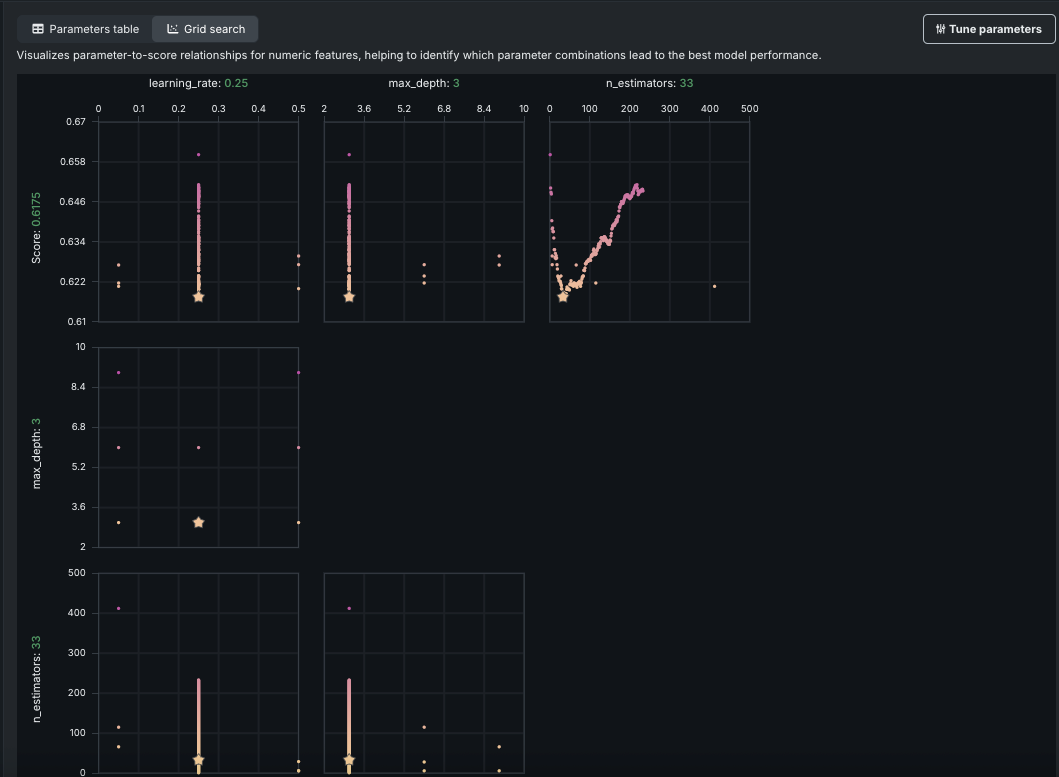
Additionally, this release adds an option for Bayesian search, which intelligently balances exploration with time spent tuning.
Incremental learning enhancements optimize large dataset processing
To address memory issues with large dataset processing, particularly for single-tenant SaaS users, this release brings a new approach. Now, DataRobot reads the dataset in a single pass (except for Stratified partitioning) using streaming or batches, and creates chunks as it processes. With this change memory requirements are significantly lower, with the typical block size between 16MB and 128MB. This allows chunking of a large dataset on a smaller instance (for example, chunking 100GB on a 60GB instance). Chunks are then stored as Parquet files, which further reduces the size (a 50GB CSV becomes a 3-6GB Parquet file). The change is available in all environments.
MLOps
OpenTelemetry metrics and logs
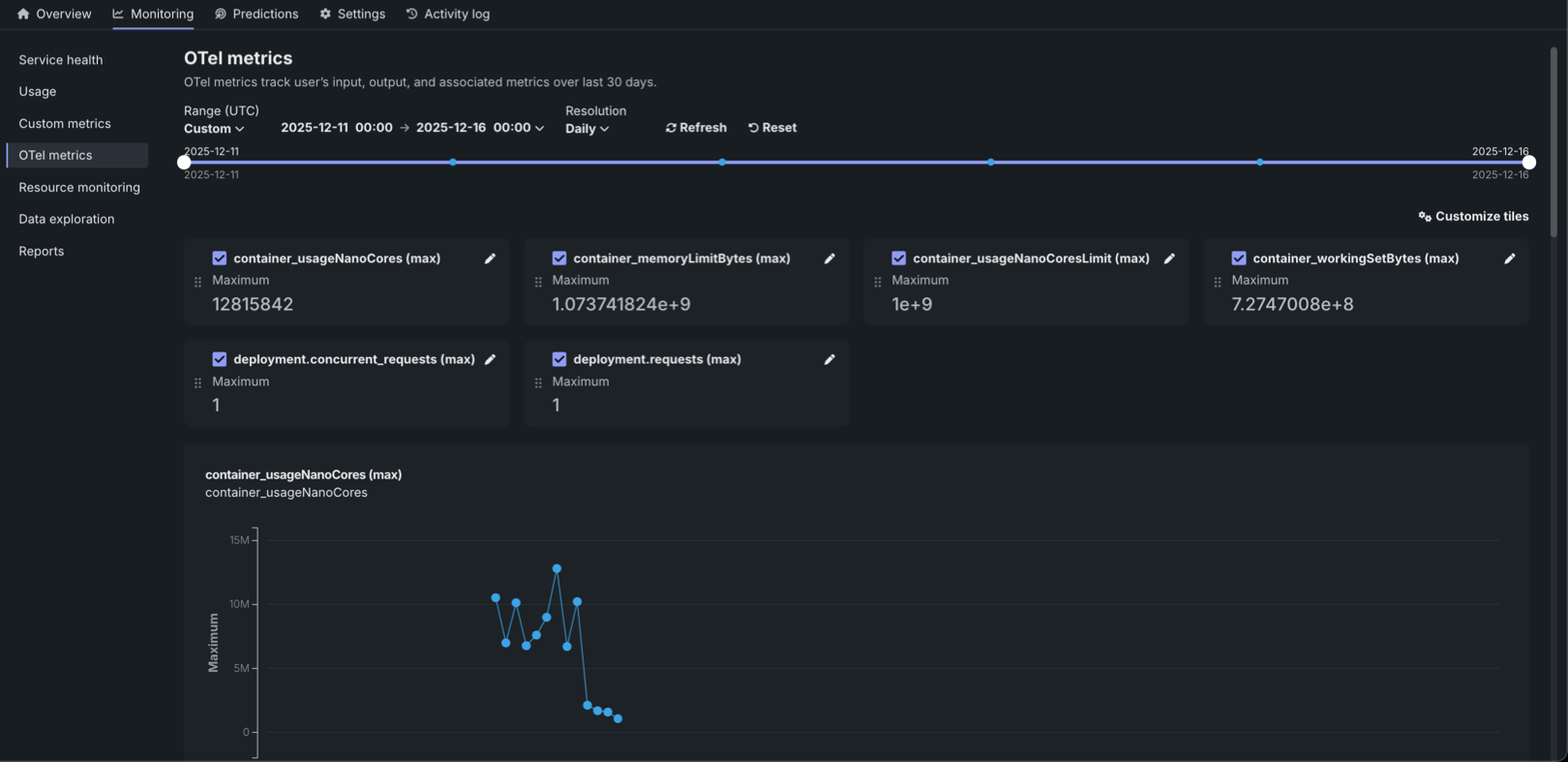
The OTel metrics tab provides OpenTelemetry (OTel) metrics monitoring for your deployment, visualizing external metrics from your applications and agentic workflows alongside DataRobot's native metrics. The configurable dashboard can display up to 50 metrics. Metrics are retained for 30 days before automatic deletion. Search by metric name to add metrics to the dashboard through the customization dialog box. After selecting the metrics to monitor, fine-tune their presentation by editing display names, choosing aggregation methods, and toggling between trend charts and summary values. OTel metrics can be exported to third-party observability tools.
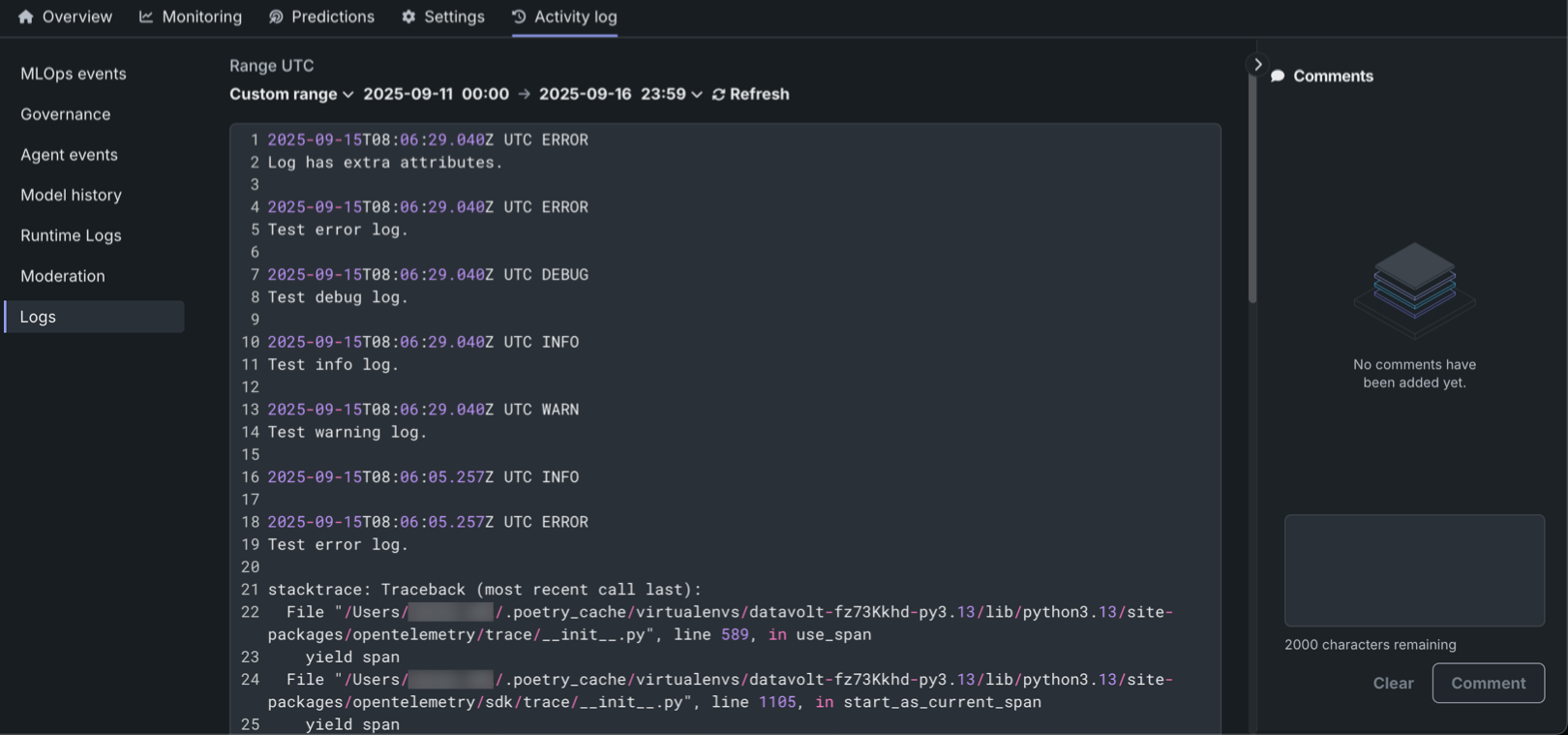
The DataRobot OpenTelemetry service collects OpenTelemetry logs, allowing for deeper analysis and troubleshooting of deployments. The Logs tab in the Activity log section lets users view and analyze logs reported for a deployment in the OpenTelemetry standard format. Logs are available for all deployment and target types, with access restricted to users with "Owner" and "User" roles. The system supports four logging levels (INFO, DEBUG, WARN, ERROR) and offers flexible time filtering options and search capabilities. Logs are retained for 30 days before automatic deletion. Additionally, the OTel logs API enables programmatic export of logs, supporting integration with third-party observability tools. The standardized OpenTelemetry format ensures compatibility across different monitoring platforms.
For details, see the OTel metrics and Logs documentation.
Applications
Monitor application resource usage
DataRobot administrators and application owners can now monitor usage, service health, and resource consumption for individual applications. This allows you to proactively detect issues, troubleshoot performance bottlenecks, and quickly respond to service disruptions, minimizing downtime and improving the overall user experience. Monitoring resource consumption is also essential for cost management to ensure that resources are used efficiently.
To access application monitoring capabilities, on the Applications page, open the Actions menu next to the application you want to view and select Service health.
Admin
Add non-builder users to an org
Administrators can now add non-builder users to an organization. Non-builder users can only access the applications associated with the organization they’re joining, as well basic user settings. When interacting with applications, they can run predictions, add prompts, start chats, view/delete, and upload data.
You can add non-builders by either assigning the non-builder seat license to existing user accounts or using the new Invite users feature to invite up to twenty at a time. Note that non-builder users do not count towards an organization’s maximum active user allocation.
Code-first
Python client v3.12
Python client v3.12 is now generally available. For a complete list of changes introduced in v3.12, see the Python client changelog.
DataRobot REST API v2.41
DataRobot's v2.41 for the REST API is now generally available. For a complete list of changes introduced in v2.41, see the REST API changelog.
Issues fixed in Release 11.5.0
App fixes
-
APP-5129: Provides improved stability and user experience for the Talk to My Data app.
-
APP-5154: Fixes a missing association ID for custom metrics in the Q&A chat custom application.
-
APP-5208: Provides App Admins with Read and Write permissions in Custom Environment entities.
-
APP-5239: Raises all custom app request timeouts from 60 to 300 seconds.
Agentic fixes
-
BUZZOK-28718: Removes an unused runtime parameter for LLM blueprint custom models.
-
BUZZOK-28953: Adds support so that a vector database can be created with either English or Japanese column names for the VDB dataset and the metadata dataset, including a mix of both.
Data fixes
-
DM-19760: Provides an informative error message when running Feature Discovery if the Informative Features feature list is not created. Typically the list is not created only when the dataset contains low-information features.
-
DM-19771: Fixes an issue where incorrect driver IDs might be sent in a payload during custom driver connection creation.
Core AI fixes
-
MODEL-21651: Fixes an issue with segmented combined model batch predictions when they were blocked by an incorrect threshold check.
-
MODEL-21916: Fixes an issue for SHAP explanations from the Batch Predictions API or Predictions API in which, if they have features with zero SHAP strength, those features may be intermixed with columns not in the feature list, also with zero SHAP strength. Now the explanations are properly filtered to include only columns actually in the model feature list or otherwise used by the model.
-
MMM-21322: Fixes an issue with prompt reporting on the Data Quality tab. Now DataRobot checks for specific cases when deployment doesn't provide
association_idorPROMPT_COLUMN_NAMEand helps the user navigate to tracing for more information. -
MMM-21436: The Keda autoscaler for
modmonprocesses now usesdr-commonfor its Postgres host. -
MMM-21464: Fixes an issue where Deployment Share actions were not getting logged in the User Activity Monitor.
-
MMM-21749: In certain circumstances, batch monitoring jobs could fail and only log the error message in the cluster logs. Now, errors are logged to the user as well.
-
MMM-21556: Fixes an issue on the DataRobot Serverless prediction where the error: "Prediction environment must be DataRobot Serverless..." when that is the environment. The fix prevents a mismatched platform type error and makes the experience consistent with the non-Serverless enterprise experience.
-
PRED-12214: Fixes an issue where string values in JSON payloads for custom models were sometimes treated as numbers.
-
PRED-12117: Fixes an issue where Predictions Data Monitoring did not work for serverless predictions running in AKS environments.
-
RAPTOR-15740: Increases the maximum organization limit for custom model prediction replicas from 16 to 25
Platform fixes
-
CMPT-4296: Extends support of v2 endpoints for auth in private registries.
-
CMPT-4324: Extends the Pulumi wrapper to expose image tags.
-
CMPT-4341: Improves system stability by implementing an automated recovery for the execution manager if it loses connection to RabbitMQ (for example, following a RabbitMQ restart). This measure ensures continued job processing for the application.
-
CMPT-4387: Updates
values.yamlfor build-service to allow configuring image scanning capabilities. -
CMPT-4599: Fixes the ImageBuilder's
tolerationsandnodeSelectorsetting from global section ofvalues.yaml. -
FLEET-3153: Fixes an issue where
datarobot-primehelm chart install or upgrade fails ifglobal.extraEnvVarsare specified. -
PLT-19773: Fixes an issue where the User Permissions tab would incorrectly populate default values from the levels of the organization or the system, even when no explicit value was set for a user. Now, if a value is not explicitly set, the system will correctly assign and display a value in the Edit field.
Code fixes
- CFX-4351: Adds an opt-in usage of Jupyter Kernel-Gateway's Auth token mechanism in NBX kernels. Also restricts permissive notebooks cross-service network policy to exclude kernels that prevent communication from services and endpoints that are not explicitly whitelisted.
All product and company names are trademarks™ or registered® trademarks of their respective holders. Use of them does not imply any affiliation with or endorsement by them.