Version 11.10.0
June 25, 2026
This page contains the new features, enhancements, and fixed issues for DataRobot's Self-Managed AI Platform 11.10.0 release. This is not a long-term support (LTS) release. Release 11.1 is the most recent long-term support release.
Version 11.10.0 includes the following new features and fixed issues.
Agentic AI
Agentic framework re-architecture
The latest and future versions of the agentic starter template have been re-engineered to provide a unified and asynchronous interface for GenAI agents within DataRobot. DataRobot User Models (DRUM)—a predictive custom model frontend server not designed for agentic workflows—has been removed entirely from agentic starter templates and fully replaced by DRAgent, a hybrid architecture integrating the open-source NeMo Agentic Toolkit (NAT) with a custom frontend server. Due to the new asynchronous functionality, agentic workflows using DRAgent experience dramatically increased overall agent efficiency as well as decreased response times.
All agentic starter template instances now use DRAgent exclusively; existing DRUM-based agents will automatically migrate to DRAgent when upgraded to the latest template.
New and retired LLMs
Following is the list of LLM availability changes since v11.9.0. See the availability page for a full list of supported LLMs. As always, you can add an external integration to support specific organizational needs.
The following are newly available:
- Claude Opus 4.8: Amazon Bedrock, Anthropic, Google Gemini Enterprise Agent Platform (formerly Vertex AI)
- Google Gemini 3.5 Flash: Google Gemini Enterprise Agent Platform (formerly Vertex AI)
To enable access to these new models, org admins can set access control policies using the new LLM Gateway Management page.
For information on deprecation and retirement dates, see the LLM availability information.
Admins can use structured, policy-driven access control for LLMs
Organization administrators now have a dedicated page, LLM Gateway Management, to configure access to LLM models. GenAI supports several different LLMs that can be used during the creation of an LLM blueprint, and previously, access to these LLMs was controlled by feature flags—each LLM type associated with a separate feature flag. LLM Gateway Management, located in Admin settings, gives admins the ability to allow or deny access to specific providers, creators, and models at the organization, group, or individual user level. To learn more, see LLM Gateway Management.
Agent Assist skill
The Agent Assist skill (datarobot-agent-assist) packages the same design, code, and deploy workflows as dr assist for use in Claude Code, Cursor, OpenCode, VS Code Copilot, and other supported coding agents. Install it from the DataRobot Agentic Skills repository (npx ai-agent-skills install datarobot-oss/datarobot-agent-skills) or from agent marketplaces; run datarobot-setup once per workspace, then Run datarobot-agent-assist to start. For full instructions, see the Agent Assist skill documentation.
Data
Store, share, and search for files in the File Registry
The Files tile in Registry is a centralized place to store, share, and search files of any type, including structured and unstructured data, documents, and binaries. It's commonly used to hold the data behind unstructured knowledge workflows, but you can use it for any files you need to manage and reuse. When unstructured data is added as part of a workflow within DataRobot, after registration is complete, you can access the file again from Registry > Files (even if the associated Use Case is deleted).
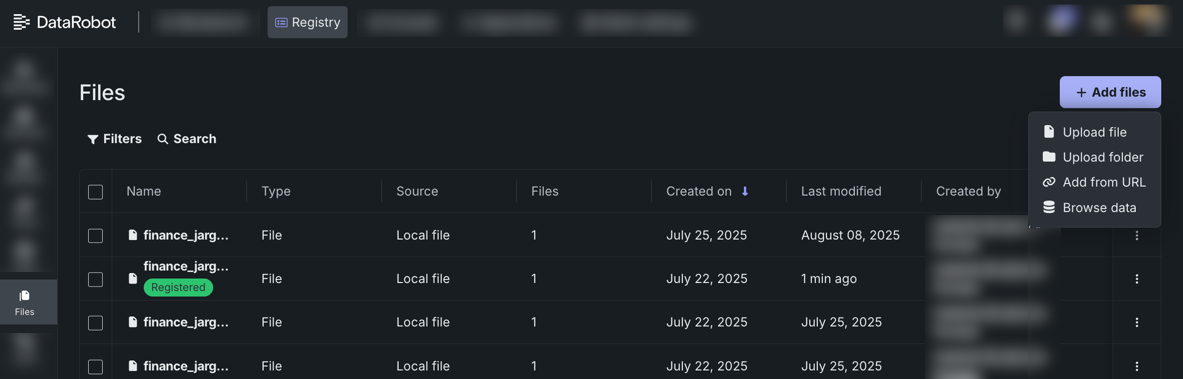
For more information, see the File Registry documentation.
Connect to ADLS Gen2 using a connection string or SAS
Azure connection strings and shared access signatures (SAS) have been added as supported authentication methods when connecting to ADLS Gen2 in DataRobot. For more information on configuring these connections, see the ADLS Gen2 page.
Faster previews for data connectors
DataRobot is migrating data connection preview capabilities to the Unified Connector Framework (UCF). This change significantly improves preview performance for tables and queries. With this migration, preview request latency is reduced from approximately 5–8 seconds to 1–1.5 seconds, enabling a faster and more responsive user experience when exploring connected data.
Predictive AI
Use external data to assess model performance
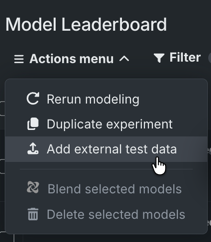
External test datasets let you evaluate trained models against datasets that were not used during training (i.e., external holdout). Attach a dataset to an experiment and score individual models on demand. Results appear on the full Leaderboard and alongside your training-derived scores throughout the UI. Available from a variety of model insights, you can use the data selection dropdown to choose an external set for comparison.
MLOps
Secure configuration credential field names corrected when using runtime parameters
Credentials can be created manually or from a shared secure configuration. For Azure Service Principal, Snowflake key-pair, and Azure OAuth / ADLS OAuth types, secure-config-backed credentials previously used different field names than manually created credentials. Deploying a custom model, application, or agent with a secure-config-backed credential of one of these types could fail silently—the workload stayed inactive and timed out without a user-facing error. Manually configured credentials were not affected.
This release applies a single canonical field-name mapping across all credential creation paths, so secure-config-backed credentials now resolve and deploy correctly for custom models, applications, and agents when mounted as runtime parameters.
Breaking change — custom jobs only
Custom jobs receive credentials as unpacked environment variables and use a different injection path than other workloads. Unlike custom models, applications, and agents, custom jobs were not blocked when secure-config field names did not match the canonical schema. Some custom jobs may already depend on the legacy field names below when reading credential-type runtime parameters created from a shared secure configuration.
Update custom job code that reads any of the following fields:
| Credential type | Old field (before) | New field (after) |
|---|---|---|
| Azure Service Principal | tenant_id |
azure_tenant_id |
| Snowflake key-pair | user_name |
username |
| Azure OAuth / ADLS OAuth | scopes (space-delimited string) |
oauth_scopes (string representation of a JSON list) |
Fields such as client_id and client_secret are unchanged. Custom jobs that use manually configured credentials are also unchanged.
Credential-type runtime parameters are unpacked into separate environment variables named {PARAMETER_NAME}_{FIELD_NAME} in uppercase snake case. Reference this example for Azure Service Principal, where the runtime parameter is named MY_AZURE_CRED:
Example for Azure Service Principal, where the runtime parameter is named MY_AZURE_CRED:
import os
import json

# simulate injection of credential to custom job
# before upgrade
os.environ["AZURE_SP_CRED"] = '{"credential_type": "azure_service_principal", "client_id": "C123", "client_secret": "S456", "tenant_id": "T789"}'
tenant_id = json.loads(os.environ["AZURE_SP_CRED"]).get("tenant_id")
print(tenant_id)  # 'T789'

# after upgrade
os.environ["AZURE_SP_CRED"] = '{"credential_type": "azure_service_principal", "client_id": "C123", "client_secret": "S456", "azure_tenant_id": "T789"}'
tenant_id = json.loads(os.environ["AZURE_SP_CRED"]).get("tenant_id")  # KeyError if not using get()
print(tenant_id)  # None
tenant_id = json.loads(os.environ["AZURE_SP_CRED"]).get("azure_tenant_id"). # using corrected field name
print(tenant_id)  # 'T789'
For how credential-type runtime parameters are injected, see Runtime parameters for custom jobs.
Applications
UI component registry added to applications for improved performance
Applications now utilize an AI-native UI components registry built on shadcn, streamlining component reuse and distribution. Once components are built, they are saved in a centralized registry for reuse across multiple applications. The component registry provides a more consistent user interface, accelerates delivery, and offers a publicly accessible open-source library for adoption and transparency.
Additionally, for the Talk to My Docs and Agentic Starter application templates, the Settings page now includes the ability to select display theme and language.
View OTEL compliant tracing for applications
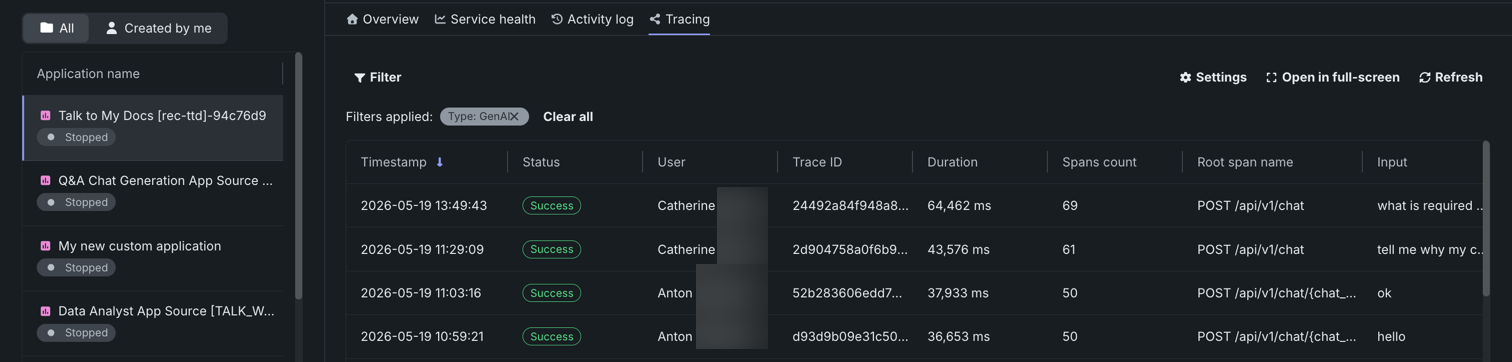
Applications now include a Tracing tab, which displays OTEL compliant tracing. Traces represent the path taken by a request to a model or agentic workflow. Each trace follows the entire end-to-end path of a request, from origin to resolution and contains one or more spans, starting with the root span. The root span represents the entire path of the request and contains a child span for each individual step in the process.
Platform
OAuth-protected APIs
Access to third-party OAuth-protected APIs is now routed through a unified API gateway, improving reliability and consistency. This is the first step in consolidating all platform services behind a single, more robust entry point. This introduces notable changes to the update process. Reference the installation guide for more information on how the update process is impacted.
Use nested LDAP groups to manage access to DataRobot
You can now use nested Lightweight Directory Access Protocol (LDAP) groups to grant access to the DataRobot application. LDAP is a software protocol that allows applications to locate, access, and manage centralized user data, making it possible to quickly query user information. Previously, the LDAP configuration in DataRobot only evaluated direct membership in the required group, meaning nested-group membership was not recognized.
This feature is optional, and if not enabled, DataRobot only recognizes direct memberships.
Share Use Cases with user groups
In Workbench, you can now share Use Cases directly with user groups, in addition to individual users and your organization. You can assign roles directly to groups. The role applies to every member of the group, and members gain access to all assets in the Use Case, including datasets.
Admin settings moved to top navigation
Platform administrators can now open Admin settings from the top navigation bar in the NextGen UI, replacing the previous APP ADMIN menu under the profile icon. For updated navigation steps, see the administrator overview.

Code-first
Python client v3.17
Python client v3.17 is now generally available. For a complete list of changes introduced in v3.17, see the Python client changelog.
DataRobot REST API v2.46
DataRobot's v2.46 for the REST API is now generally available. For a complete list of changes introduced in v2.46, see the REST API changelog.
Issues fixed in Release 11.10.0
Core AI fixes
-
MODEL-23699: Fixes an issue where a Keras BPE transformer was not able to complete batch predictions using deployments.
-
MODEL-23615: When secure-worker jobs fail in
JobHandlerService.on_job_error, the resolved error_message (payload client_message or job record fallback) is now passed toProgressSink.store_errorbeforesend_job_error. As a result, WebSocket progress events include errors: ["…"] instead of an empty list and the UI shows the real message. -
MMM-23834: Fixes an issue where a dataset refresh OAuth token expire error was not displayed when performing a manual retraining policy launch.
-
MMM-23758: Fixes an issue where lineage view could not be displayed when a GenAI component was not enabled or configured.
-
MMM-23733: Adds "Model Replacement Started" and "Model Replacement Failed" events to non-agent management replacement flows.
Platform fixes
-
FLEET-6196: Adds support for custom RabbitMQ
http_portso that users can pass an HTTPS port to a non-SSL HTTP protocol endpoint. -
PLT-22097: Helm value ulimit was added to Identity Resource service chart allowing customization of ulimit within a pod. The default value is to 65535.
-
PLT-21778: Fixes an internal server error by changing the filter to
{ external_id: { $type: "string" } }so that uniqueness applies only to real SAML/SCIM stringexternal_ids.
All product and company names are trademarks™ or registered® trademarks of their respective holders. Use of them does not imply any affiliation with or endorsement by them.