Version 11.12.0
August 28, 2026
This page contains the new features, enhancements, and fixed issues for DataRobot's Self-Managed AI Platform 11.12.0 release.
Version 11.12.0 includes the following new features and fixed issues.
Agentic AI
Memory service embedding models ship in the container image
The memory service now bakes its embedding models (text embedding and reranking) into the service container image. Pods start without downloading model weights, which significantly reduces embedding-service startup time and removes the service's dependency on egress to the DataRobot GenAI CDN. The container image grows by approximately 0.7 GB.
Behavior change for offline clusters: The memory service no longer requires embedding model weights in blob storage, and its installation no longer depends on the Generative AI service static files migration. Existing installations require no action—the models arrive with the upgraded container image. To restore the legacy download flow, set memoryservice.embeddingService.modelsBakedIn: false. See Memory service for details.
Schedule automatic file refreshes in File Registry
You can now schedule automatic refreshes for files added to File Registry from Browse data or a URL; files uploaded locally aren't eligible for scheduling. When you create a schedule by setting a start date and cadence, DataRobot will refresh the file automatically going forward. Expand Scheduling to manage existing schedules—pause, edit, or delete a schedule, and check its status at a glance from a status badge.
File Registry also replaces the file detail's + Add files menu with a consolidated Actions menu, where you can convert a file to a folder, link it to a Use Case, download, share, tag, or delete it. Additionally, JSON files previewed from Jira and Confluence sources now render as an expandable tree instead of an escaped string.
For more information, see the File Registry documentation.
Batch agent evaluation in the DataRobot experimentation plugin
The DataRobot experimentation plugin (dr xp) now supports batch agent evaluation for projects that include the evaluation component. Each run sends test prompts to the agent's OpenAI-compatible endpoint and scores every response using the NeMo Evaluator BYOB (Bring Your Own Benchmark) framework—no deployment to the platform required.
Enable the workflow with the --enable-evaluation flag (or DR_EXPERIMENT_ENABLE_EVALUATION=true), then select a pipeline, dataset, and agent endpoint from the new Evaluation tab to start a run. Eight benchmarks are available out of the box, covering answer quality, safety refusal, RAG faithfulness, and more; five of them run judge-free.
For more information, see Batch agent evaluation.
Windows support for the Agentic Starter template
The DataRobot Agentic Starter application template now supports Windows, in addition to macOS and Linux. Previously, Windows developers had to fall back on a DataRobot codespace, WSL, or a virtual machine to work with the template.
On Windows, complete the Windows prerequisites—enabling Git symlink support and granting permission to create symlinks—before cloning the repository or running dr start. Once configured, the rest of the installation, quickstart, and development workflow matches macOS and Linux, including PowerShell commands for installing the prerequisite tools.
For more information, see Install prerequisite tools.
Adversarial Swarm Evaluation
Adversarial Swarm Evaluation is now available in the Agent Assist skill experience. After you code an agent, you can battle-test the implementation before deploy: a swarm runs attack, behavior, and persistence tracks against the agent, proposes patches for breaches, retests until scenarios pass or the fixing limit is reached, and writes eval_report.md. Choose the battle-test option after coding, or ask in natural language (for example, "Battle-test my agent"). For details, see Adversarial Swarm Evaluation.
Data
Support for Salesforce connector added
This release introduces a Salesforce connector, allowing you to connect to and ingest structured data directly from Salesforce. For information on configuring a Salesforce connection, see the documentation.
MLOps and predictions
Real-time build logs for execution environments
Execution environments now include a Builds logs tab that streams build output in real time, so you can monitor a build's progress or troubleshoot a failed build without waiting for it to finish or refreshing the page. Navigate to Registry > Environments, select an environment, and open the Builds logs tab, or click View log from the Overview tab.
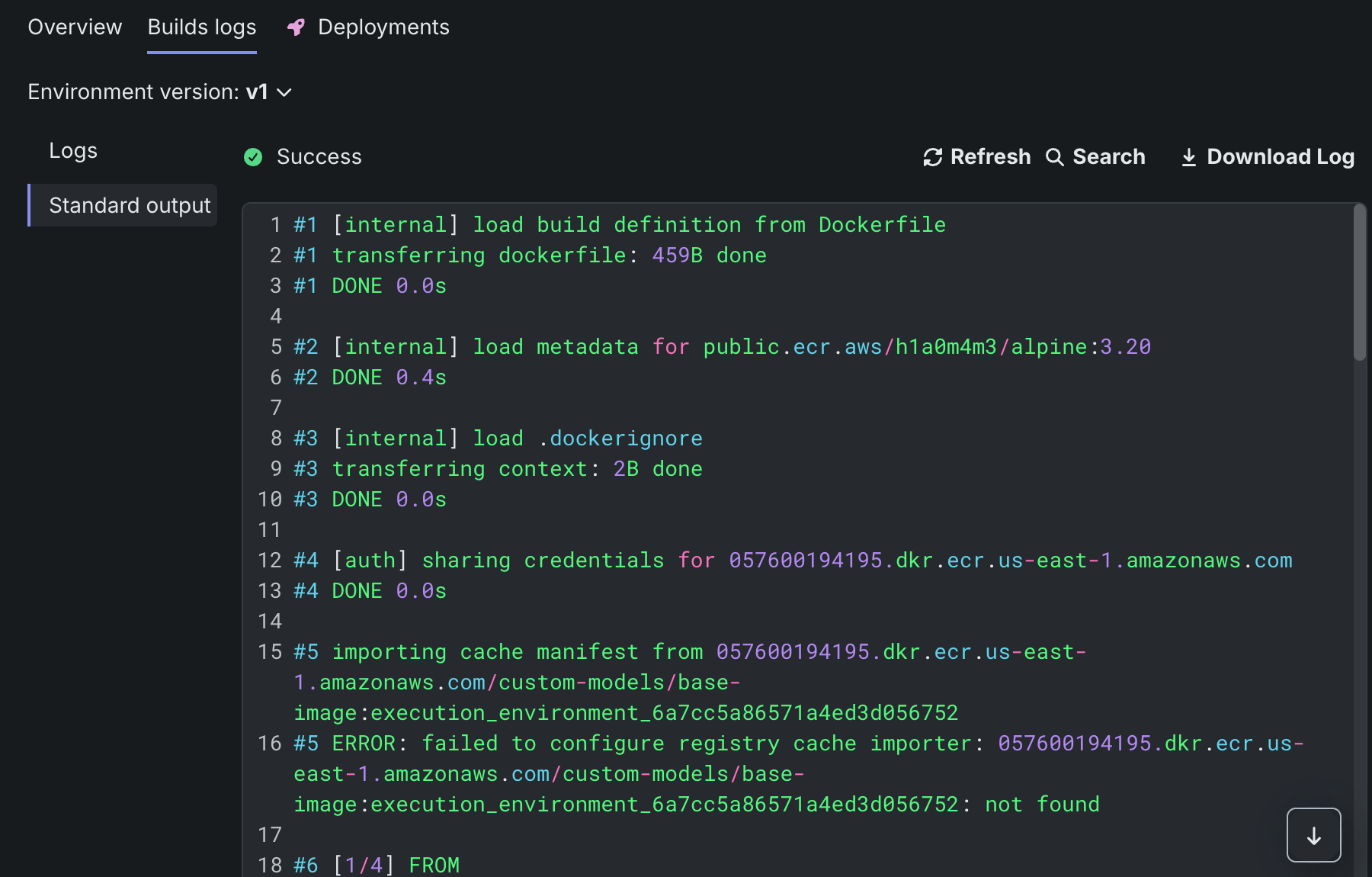
Select an environment version, then choose Logs to watch build output stream live, or Standard output to view the complete build output once a build finishes. For versions built before this release, build output is available only under Standard output.
For more information, see View build logs.
Platform
External vault references for secrets management service (SMS)
SMS now supports referencing values in external secret stores for the creation of credentials and secure configurations, rather than storing those values in DataRobot. This allows admins to register a pointer to a secret in HashiCorp Vault or Azure Key Vault, and after creating the credential, secrets are now supported in two storage modes: platform-managed or external reference. For more information, see Secrets management service.
Inject custom build variables into dependency builds
Self-managed administrators can now inject a platform-wide set of Dockerfile ARG and ENV values into every custom model and custom application dependency image build. This is a supported way to reach a private package index (for example, an internal Artifactory PyPI mirror) or trust a private CA, without maintaining a custom wrapper Dockerfile.
Configure the following settings once at the platform level in the Helm chart or the System Configuration UI (not per model, application, or organization, and not through the API). All four are no-ops by default. Support covers the requirements.txt, pyproject.toml, and build-app.sh install paths.
MANAGED_IMAGE_BUILD_ADDITIONAL_ARG_VARS — JSON pairs added as ARG statements at build time (for example, a private index URL or CA bundle path).
MANAGED_IMAGE_BUILD_ADDITIONAL_ENV_VARS — JSON pairs added as ENV statements, available at build time and at runtime.
MANAGED_IMAGE_DEPENDENCIES_INJECT_CA_VARS — Boolean that injects the standard CA variables so one private CA bundle is trusted by pip, uv, git, curl, and Node.js.
MANAGED_IMAGE_DEPENDENCIES_INJECT_BUILDKIT_MOUNT — String inserted into the install command to mount a private CA as a BuildKit secret.
Code-first
Connect a local IDE to a codespace
You can now open a DataRobot codespace from Visual Studio Code over SSH. Install the codespace plugin for the DataRobot CLI (dr plugin install codespace) and run dr codespace ssh to start a local tunnel, then connect with the Remote-SSH extension to edit the codespace file system and use a remote terminal, including local AI coding extensions.
The codespace must use the Python 3.13 notebook environment. If the session is stopped, the CLI starts it. This workflow uses the CLI and SSH; it is not a DataRobot VS Code extension.
SQLAlchemy-compatible query interface (Python client)
datarobot[query-engine] adds QueryEngine, which runs parameterized SQL and SQLAlchemy Core constructs against your data connectors through DataRobot and returns a standard SQLAlchemy Result. Available in Python client 3.19.
Python client v3.19
Python client v3.19 is now generally available. For a complete list of changes introduced in v3.19, see the Python client changelog.
DataRobot REST API v2.48
DataRobot's v2.48 for the REST API is now generally available. For a complete list of changes introduced in v2.48, see the REST API changelog.
Issues fixed in Release 11.12.0
GenAI fixes
-
BUZZOK-30616: Adds numerous fixes to agents and execution environments.
-
BUZZOK-29615: Fixes InitContainer setup so that it can proceed even when GenAI is not enabled.
-
RAPTOR-19411: Updates a Helm chart override to match the Admin Guide.
-
RAPTOR-17843: Fixes the training data assignment job so that it correctly validates classes for multiclass custom models.
Code-first fixes
-
CFX-7096: Fixes an issue where Agent Assist mismeasured the size of Japanese, Korean, and other non-Latin conversations, causing it to compact session history about 3.6 times more aggressively than intended and discard context that the agent then had to re-read. English and code sessions are unchanged.
-
CFX-7072: Fixes an issue where Agent Assist (
dr assist) failed with an HTTP 400 model API error when answeringyto "Resume previous session?", which forced users to start a new session and lose prior context. Sessions with heavy tool activity persisted a message history whose window boundary could separate a tool call from its result, and the model provider rejects that history when it is replayed on resume. Agent Assist now chooses a safe boundary when saving the session and repairs the history when loading it, so resume succeeds. Sessions already saved in the broken shape are repaired on load, so no reset is required after upgrading the plugin. -
CFX-6972: The Python 3.13 Notebooks execution environment is now fully set up to run Java processes.
-
CFX-6971: Fixes an issue in the Notebooks Revisions service S3 client configuration where the SHA256 checksum algorithm was enforced by default, causing the client to ignore
AWS_REQUEST_CHECKSUM_CALCULATIONandAWS_RESPONSE_CHECKSUM_VALIDATIONwhen set towhen_required. This caused compatibility issues with some S3 backends that do not support thex-amz-content-sha256header. The checksum algorithm is now selected based on S3 backend capabilities. SHA256 checksums can still be forced by setting theS3_CHECKSUM_ALGORITHM: "SHA256"environment variable. -
MMM-24333: Fixes an issue in the public API client where filtering a deployment list call by multiple tags returned 0 results.
Data fixes
-
DM-22015: Fixes unexpected behavior in Feature Discovery by skipping exploration of additional relationships when a date is present in the join keys.
-
DM-21864: The default memory limit for large Feature Discovery projects has been lowered from 128 GB to 64 GB.
-
MMM-24390: Fixes an issue where the incorrect field was stored when selecting a guardrail LLM (
llmIdinstead ofmodel). The correct field is now used.
Application fixes
- APP-6745: Fixes an issue where the Runtime Logs tab for custom applications running with more than one replica showed logs from only a single replica and could appear completely empty. Runtime Logs now return logs from all replicas of the application.
Core AI fixes
- UIUX-16428: Adds a weekly job to clean up stale references to notebooks.
Predictive AI fixes
-
MODEL-24500: Fixes an issue with very long string target labels (more than 100 characters) in custom models.
-
MODEL-24304: Fixes an issue with unsupervised anomaly experiments.
-
MODEL-24273: In release 11.10, DataRobot replaced its private LightGBM fork (
2.0.6.4.post14+dr, forked approximately 10 years ago) with vanilla LightGBM 4.6 from PyPI. Models built with each package version show significant differences. -
MODEL-24187: Fixes an issue where, after the Keras upgrade, blueprints with a VAE task were unable to compute scoring metrics because the loss was no longer serializable in the JSON payload. Loss now remains a string, so the payload works with JSON.
-
PRED-13597: Fixes an issue where service principal credentials for Databricks connections were missing from batch prediction jobs. This credential type, along with Azure Service Principal, is now supported so that jobs can be triggered without an Unsupported Credential Type error.
-
PRED-13521: Skips retries for custom errors.
-
MMM-24272: Fixes an issue where retraining policy runs could not be loaded due to an overly complicated query to get Use Case project association.
Platform fixes
-
CMPT-6990: Fixes transient registry connection issues in IBS and adds timeouts and idle-connection handling for container-registry calls so that a transient network interruption to the registry no longer triggers an unnecessary image rebuild. The behavior is on by default. Four new optional settings (environment variables)—
buildService.registry.responseTimeoutSeconds,connectTimeoutMillis,poolMaxIdleSeconds, andpoolEvictInBackgroundSeconds—allow per-environment tuning. -
CMPT-4231: Fixes CA certificate environment variable propagation to BuildKit args.
-
PLT-22771: Sharing lists no longer crash when a share recipient no longer exists.
-
PLT-22674: Fixes a UI issue with assigning admin permissions in parallel and provides a fallback for revoking unnecessary admin permissions.
-
PLT-22672: Fixes an issue where Open documentation on the SCIM settings page did not link to the documentation.
-
PLT-22507: Fixes 500 errors that occurred during group permission updates.
-
PLT-22341: Fixes a bug in the
drAuthbootstrap process that caused an infinite crash loop with no error output. Log output is now restored. -
PLT-22473: Fixes an issue where license banners and in-app notifications were not visible at the top of the webpage.
-
FLEET-7927: Fixes an issue where the Postgres extension job failed on external PCS setups when the username was not the default
datarobot. The job now passes a specific database option to the command so that it targets the correct database when creating the extension. -
FLEET-7846: Fixes an issue where the
datarobot-nginxService rendered a nullprotocol, breaking server-side apply on every upgrade. -
FLEET-7230: Fixes an issue by creating image pull secrets before
pg-upgraderuns, with modified annotations and Helm hook weights.
All product and company names are trademarks™ or registered® trademarks of their respective holders. Use of them does not imply any affiliation with or endorsement by them.