Version 11.11.0
July 22, 2026
This page contains the new features, enhancements, and fixed issues for DataRobot's Self-Managed AI Platform 11.11.0 release. This is not a long-term support (LTS) release. Release 11.1 is the most recent long-term support release.
Version 11.11.0 includes the following new features and fixed issues.
In the spotlight
DocsAssist, a new AI-powered assistant built into this documentation site, helps find answers faster. Instead of searching across sections or scanning long pages, ask a question directly and get a clear, relevant response grounded in DataRobot's official documentation. This means less time hunting for the right page and more time getting unblocked, whether the question is about a specific API parameter, a configuration step, or how a feature works end-to-end. Answers stay current as documentation is updated, and responses link back to the original source pages for further reading.
To get started, click on DocsAssist on any documentation page.
Agentic AI
Workload API
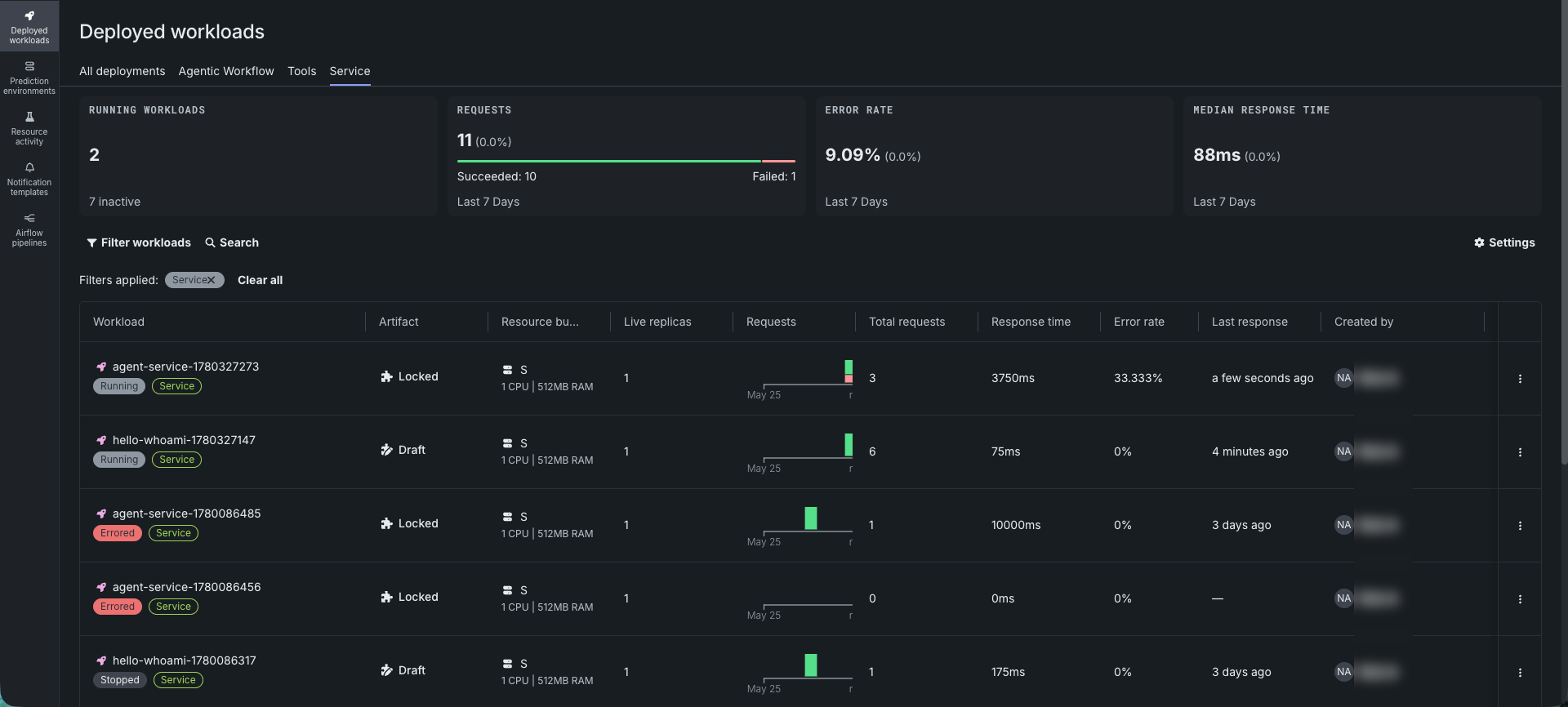
The Workload API is available as a premium feature. Bring a container image, get a stable URL with autoscaling, monitoring, sharing, and a lifecycle you drive end-to-end, from day-one development to production rollouts.
The Workload API works with any container that listens on HTTP. Use it to deploy agent services, model inference servers, RAG pipelines, MCP servers, and custom applications as governed Workloads on the DataRobot platform. Define what runs as a versioned artifact—the container image, ports, health probes, and resource requirements—and iterate on it as a draft before locking it for production. Every Workload gets a stable invoke URL, an importance level for resource prioritization, and a sharing model that grants access by user, group, organization, or role. Resource bundles control per-container CPU, memory, and GPU allocation, alongside capacity settings for throughput quotas, entity capacity floors, and rate limits.
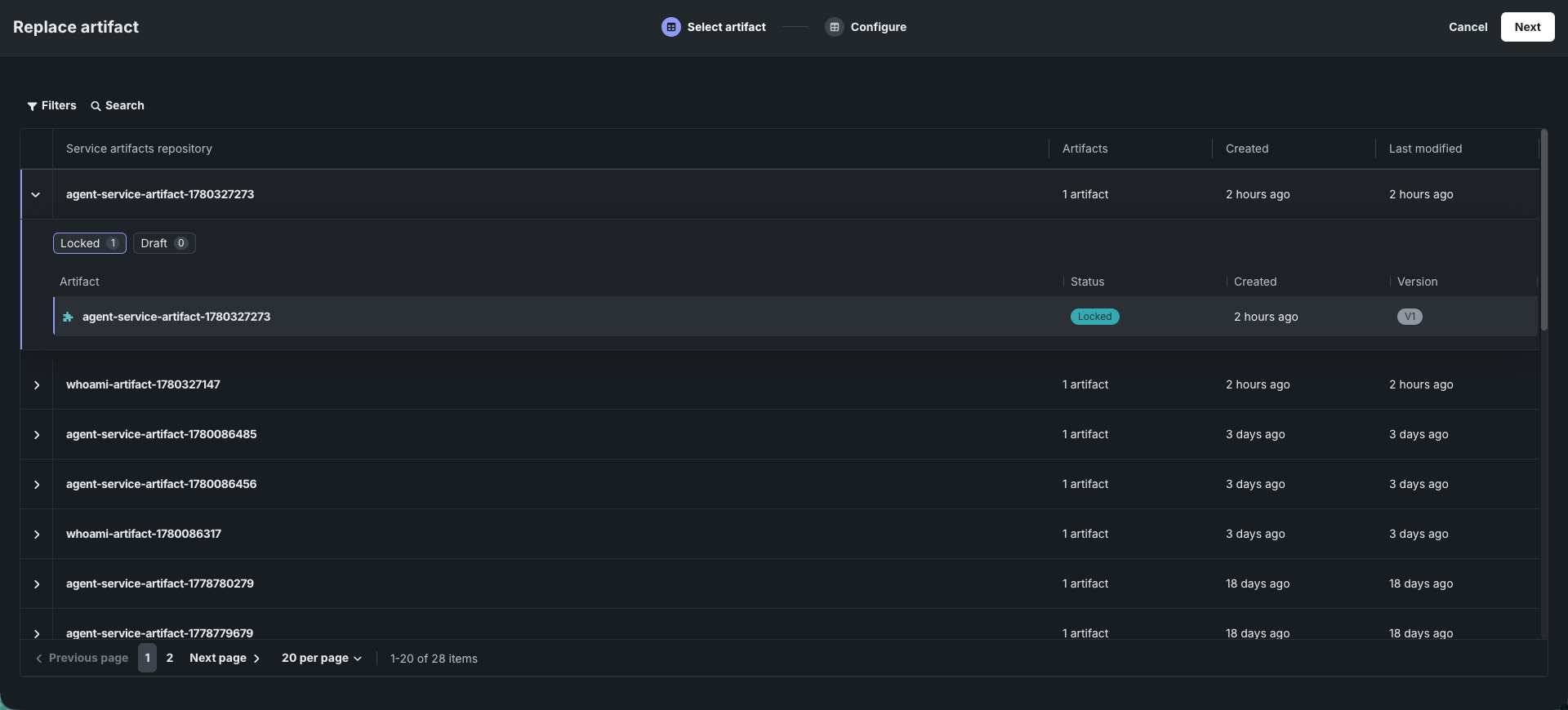
Shipping a new container version—a model upgrade, a bug fix, a dependency bump—shouldn't mean a new endpoint for consumers to rewire. Roll it out instead as a rolling replacement: the platform brings up a candidate proton alongside the active one, shifts traffic once it passes readiness checks, and drains the old version, with configurable warmup and rollback windows. Promote a draft Workload to production in place, keeping its identity, endpoint, and configuration intact.
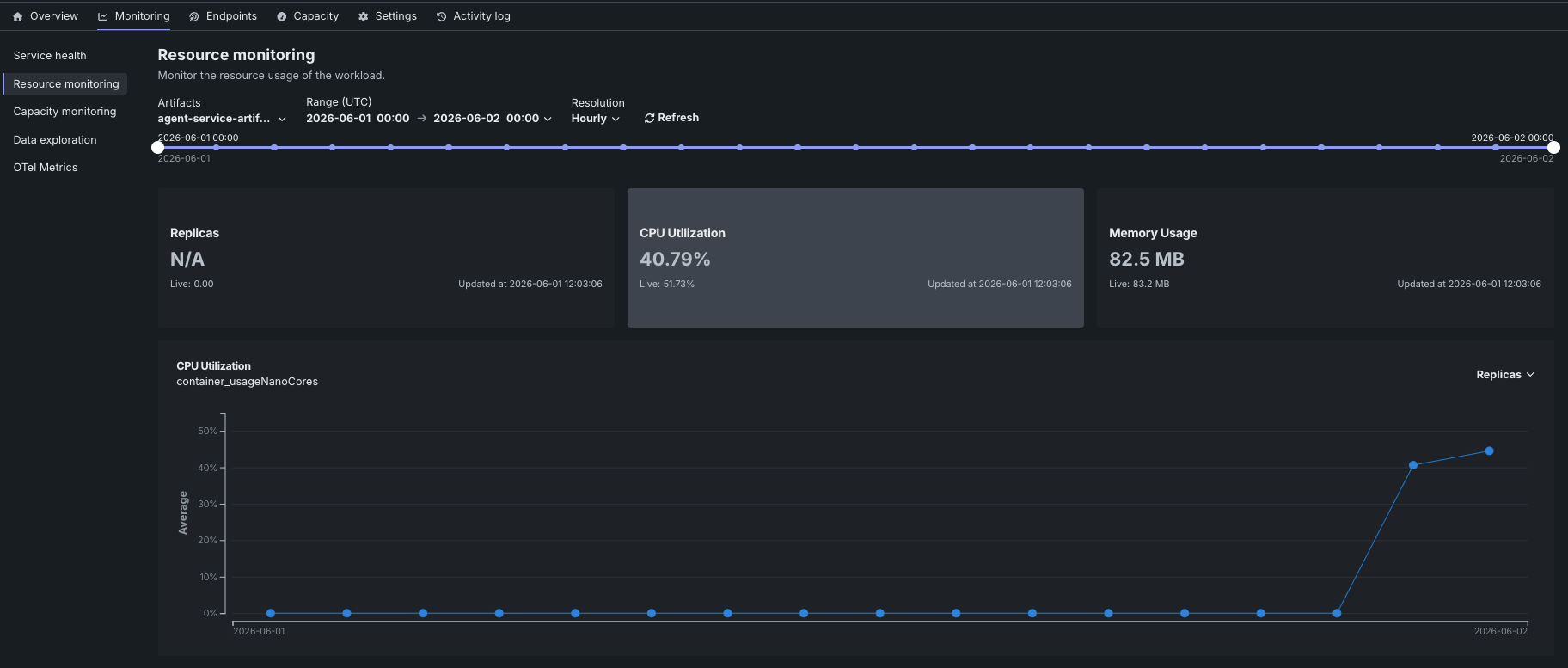
Built-in OpenTelemetry integration surfaces logs, traces, and metrics in Console without extra configuration. Manage Workloads through Console, the DataRobot CLI, or as infrastructure-as-code with the DataRobot Pulumi provider; or hand deployment, scaling, and debugging to Claude Code, Cursor, OpenCode, and other coding agents with the datarobot-workload-api skill.
For more information, see the Workload API documentation.
Agentic memory service
Note
This feature is automatically included for MTS and STS organizations. For self-managed organizations, you can enable it by contacting DataRobot Support.
DataRobot's new agentic memory service extends the platform with persistent memory for AI agents, letting users build context-aware agents that remember past conversations and useful facts across sessions without building or operating custom storage. Memory spaces are isolated containers for organizing agent memories and chat sessions; semantic memory includes row-level security so context stays private and does not leak between users or apps.
Only one integration path is needed per application. Choose the approach that fits the stack:
- Chat history API: Persist conversation history through sessions and append-only events (messages, tool outputs, and status changes) via DataRobot's REST API and Python client, using the same authentication patterns as the rest of the platform. Sessions support configurable lifecycle strategies, such as TTL-based expiration.
- Mem0-compatible API: Best for existing Mem0 users. Use the standard Mem0 MemoryClient and the same concepts as the open-source Mem0 stack to add, search, and update long-term semantic memory, a good fit when porting an existing integration or wiring Mem0-compatible agentic frameworks such as CrewAI, LangGraph, and LlamaIndex.
See Agentic memory service for guidance on choosing an integration path and quickstart workflows. For API reference, see the Python client.
Mem0 memory in NAT workflows
The DataRobot Agentic Starter application template now natively supports Mem0 (a smart, long-term memory layer for AI). This allows you to add persistent, per-user memory to your agents without needing to install the separate nvidia-nat-mem0ai plugin. Mem0 automatically isolates memories by user based on their workflow session identity, meaning agents remember past context across sessions without leaking data between different users.
To enable the memory feature:
- Install the NVIDIA Agent Toolkit (NAT) extra extension by running
pip install "datarobot-genai[nat]". - Set the
MEM0_API_KEYas an environment variable in the.envfile. - Configure a
dr_mem0_memoryprovider under the standard NAT memory configuration block. - Wrap the agent with NAT’s
auto_memory_agentworkflow to automatically capture and retrieve memories across sessions; memories stay isolated per user based on the workflow session identity.
For more details, see Agent memory in the Agentic Starter template documentation.
DataRobot experimentation plugin
This release introduces the DataRobot experimentation plugin (dr xp), a DataRobot CLI plugin that runs a local dashboard for visualizing tracing and run data. Inspect traces, logs, and spans without deploying to the platform to test agent behavior.
Install with dr plugin install xp, then start the dashboard with dr xp --entity-id <use-case-id>. The plugin supports Use Cases, deployments, custom applications, and workloads. For supported entity types and configuration options, see the DataRobot experimentation plugin documentation.
Data
Enhancements for SQL execution against data stores and JDBC connections
DataRobot now supports parameter binding support for UCF query migration endpoints, including preview and execute endpoints for JDBC connections and data stores. This update significantly improves the experience when executing these queries for agents and applications, which issue several preview/execute calls per task, by increasing security and reducing latency.
Predictive AI
Custom scoring metric
A new custom scoring metric resource is available through the REST API (v2.47): a named, versioned bundle (metadata.yml and custom_metrics.py) that defines one or more custom Python scoring metrics for a regression, binary, or multiclass target type.
For the full set of changes, see the REST API changelog.
MLOps and predictions
Multilabel support for custom models
Structured custom inference models now support multilabel classification. In Workshop, select Multilabel as the target type and provide target labels in the same order as the model's predicted label probabilities. Code-first workflows can define multilabel models with targetType: multilabel in model-metadata.yaml or dr.TARGET_TYPE.MULTILABEL in the Python client.
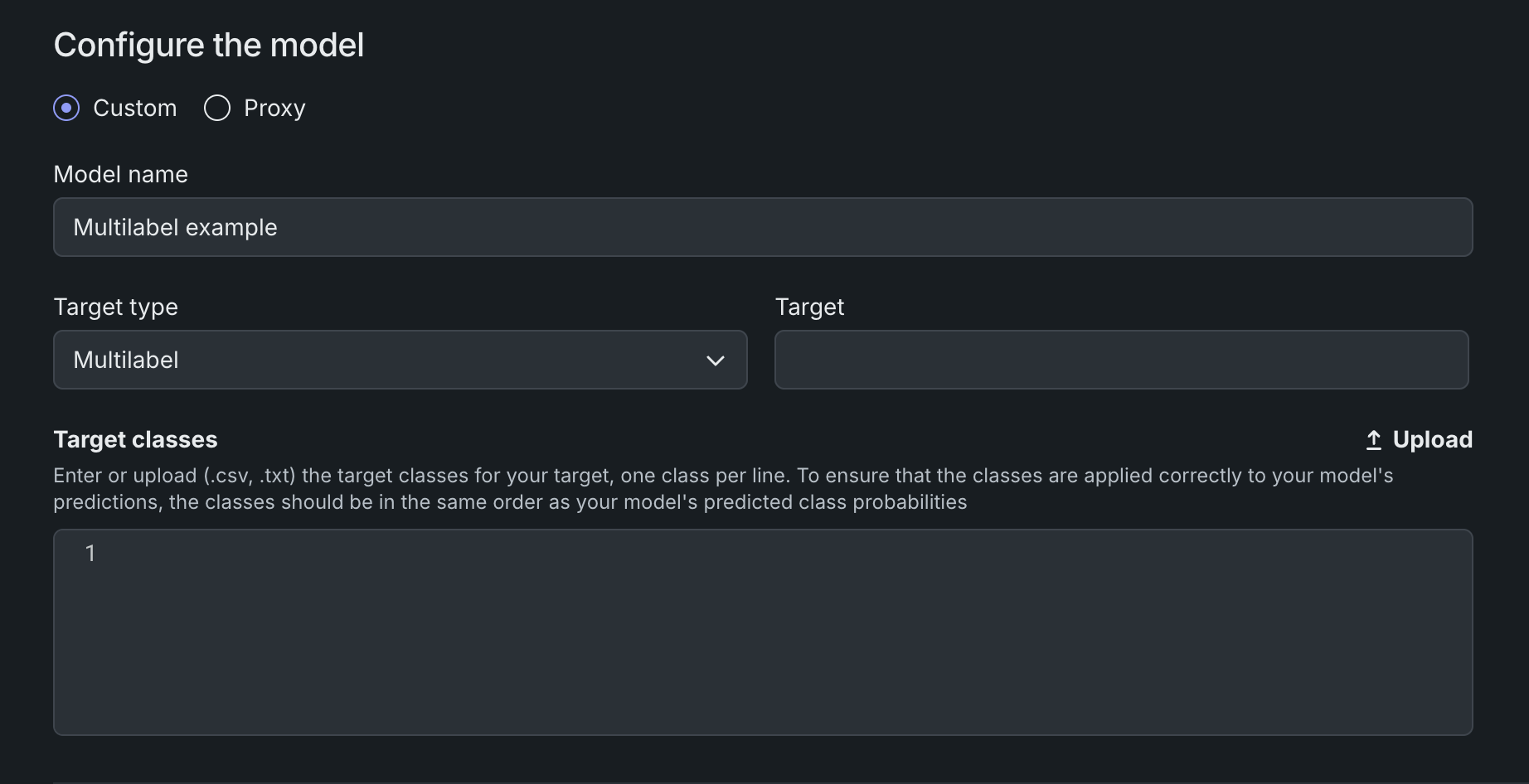
Multilabel custom models support inference only, with service health and feature drift monitoring. For more information, see Create a custom model, Define custom model metadata, and Structured custom models.
Platform
Agentic spans and storage metering in Usage Explorer
The Usage Explorer now tracks two additional metering categories: agentic spans and storage. These metrics extend usage visibility to platform observability services—such as Agentic Observability and Predictive Observability—alongside the existing GPU, LLM API, and CPU usage views.
The new Agentic Spans page shows span usage broken down by service, resource name, cloud provider, region, unit cost per 1,000 spans, total spans consumed, and current cost. The new Storage page provides a parallel breakdown for storage consumption, with unit cost expressed per gigabyte and usage quantity reported in gigabytes.
To access either view, open Account settings > Usage Explorer and select Agentic Spans or Storage. All usage data can be filtered by date range and exported as a .csv file. The list of services tracked in the Usage Explorer has also been expanded; see Usage Explorer for the full list.


OpenTelemetry trace, log, and metric retention now configurable
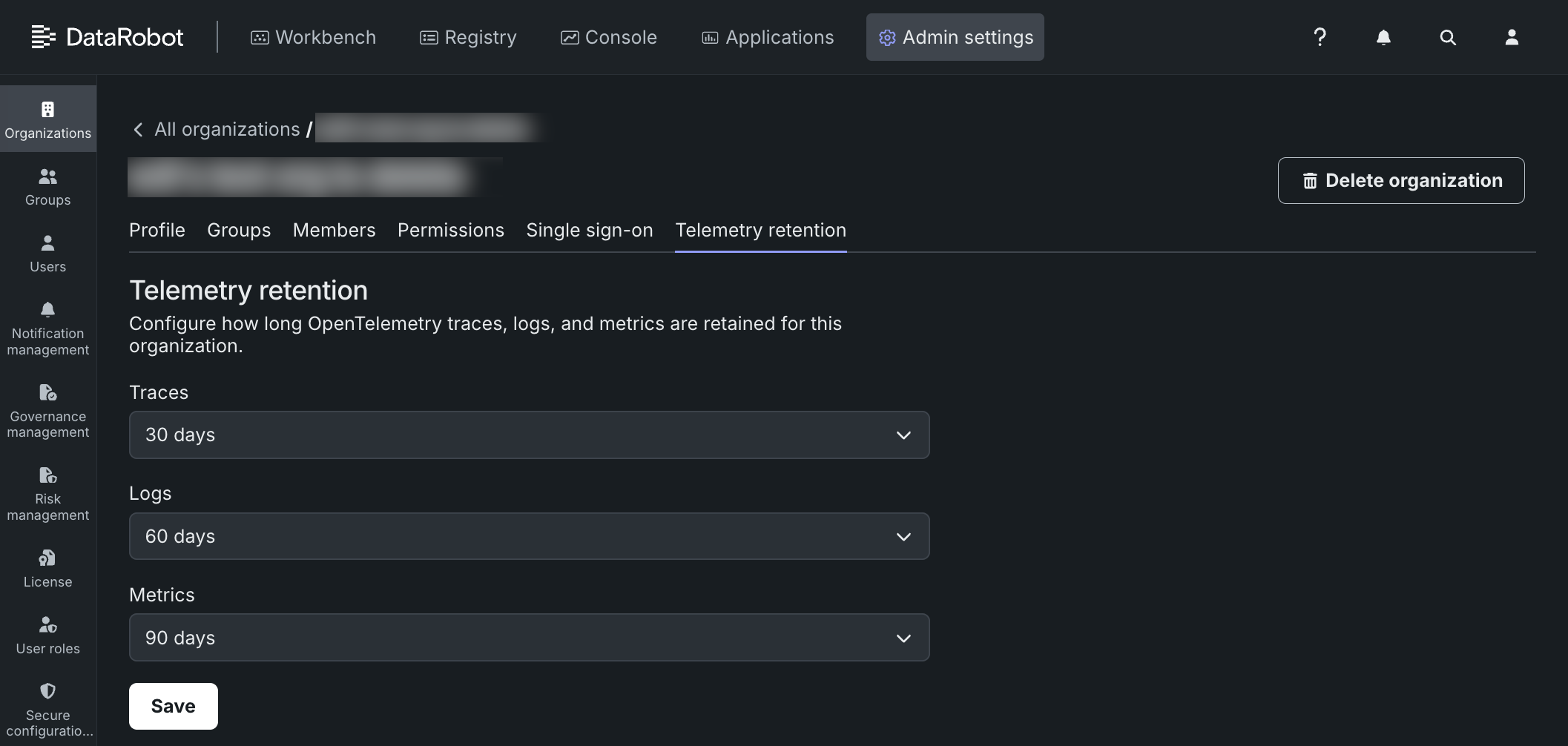
System administrators can now configure how long OpenTelemetry (OTel) traces, logs, and metrics are retained for each organization, replacing the previous fixed 30-day period.
Retention is set per organization and per signal type—traces, logs, and metrics can each use a different policy. Available durations are 14, 30, 60, 90, 180, or 360 days. If no policy is set explicitly, DataRobot applies a 14-day default to trial organizations and a 30-day default to standard organizations. The policy applies uniformly to all users in the organization; there is no per-user or per-team setting.
To configure retention, a system administrator navigates to Admin settings > Organizations, selects the target organization, and clicks Telemetry retention. From there, each signal type has its own dropdown to select a retention duration, and clicking Save applies the new policy. For full steps, see Configure OTel retention.
Automate user provisioning with SCIM
System for Cross-domain Identity Management (SCIM) automates user provisioning and deprovisioning in DataRobot through your identity provider (IdP)—either Okta or EntraID. With SCIM configured, the IdP manages user lifecycle events, so IT administrators are no longer required to manually add, move, or remove an employee in DataRobot. For information on enabling and configuring SCIM, see SCIM provisioning.
Azure Key Vault support added
You can now use an Azure Key Vault instance as global persistent storage for credentials, secure configuration, and other secrets used in DataRobot workflows. See secrets management service documentation for details.
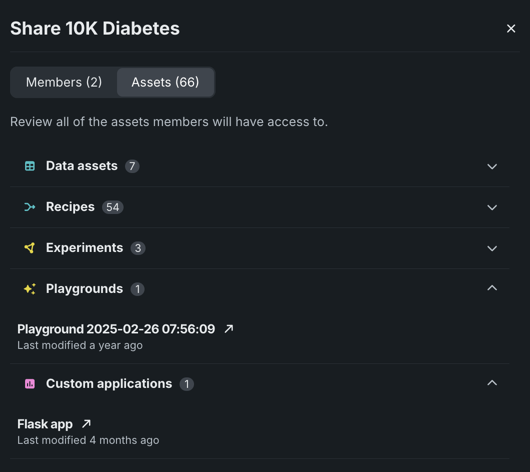
Review Use Case assets before sharing
Before sharing a Use Case, you can now view a list of assets currently linked to it, providing greater visibility into what new members will be able to access. To view a list of assets, from the sharing modal, click the Assets tab. The list displays each asset currently associated with the Use Case, grouped by type. Click on a grouping to view the specific assets included. Additionally, when a Use Case is shared, deployments, applications, and registered models linked to it are also shared.
OAuth token exchange
Token exchanges via a configured trusted issuer's access token can be exchanged for a DataRobot issued access token. That can then be used to access DataRobot APIs. Specifically, there will now be an OAuth2 server in every DataRobot installation and all DataRobot APIs are instrumented to accept access tokens that will be issued by this OAuth2 server.
Code-first
Python client v3.18
Python client v3.18 is now generally available. For a complete list of changes introduced in v3.18, see the Python client changelog.
DataRobot REST API v2.47
DataRobot's v2.47 for the REST API is now generally available. For a complete list of changes introduced in v2.47, see the REST API changelog.
Issues fixed in Release 11.11.0
Data fixes
-
DM-21592: Fixes an issue when OAuth callbacks already associated a credential to the data store on the backend. Previously, the
data_connectivityAuthManager issued a redundant association PATCH (409 Conflict when the association already exists). Now a benign 409 "already associated" is logged viaconsole.warnand the save continues. -
DM-21809: Fixes an issue where dataset refresh (both manual and via retraining policy) would get "stuck" on registering. This was fixed by changes that avoid flooding logs with pandas chained assignment warnings during Databricks ingest, thereby reducing the likelihood of the ingest hanging.
-
DM-21864: The memory limit for large Feature Discovery projects has been lowered from 128GB to 64GB.
Core AI fixes
-
APP-6456: The Activity Log and Tracing tabs for a custom application are now available to its owners and editors, in line with the application's sharing permissions.
-
BUZZOK-31537: The max length of a RAG playground system prompt is now 5 million characters.
-
BUZZOK-31484: LLM compliance tests (AI Robustness Tests) now verify that the LLM used by the LLM blueprint is available before running the test. If the LLM is not available in the environment, the test now fails within seconds with a clear error message and suggested resolution, instead of running the entire evaluation dataset against an LLM that errors on every prompt.
-
CFX-6970: Notebook Execution Environment is modified: Java JDK is hidden in the PY13. This allows the MLOps monitoring agent to be run in a default notebook environment.
-
CFX-6972: The Python3.13 Notebooks execution environment is now fully set up to run Java processes.
-
MMM-2230: When a new owner is specified, exclusively-owned resources are now reclassified to go through the same transfer path as orphaned resources, ensuring all user assets are transferred rather than deleted.
-
MMM-23771: Several packages were updated to the latest version on
central.sonatype.com. These includetracking-agent,mlops-utils-spark,mlops-agent,spooler-kafka,spooler-sqs,spooler-rabbitmq,spooler-pubsub, anddatarobot-mlops. -
MMM-24272: Fixes an issue where retraining policy runs could not be loaded due to an overly complicated query to get Use Case project association.
-
PRED-13092: Introduces the
preStophook to the core-nginx deployment to prevent Karpenter from immediately evicting pods that causes 502 errors. -
PRED-13120: Adds a deregistration timeout to nginx pods so that when it is shutting down, the load balancer gracefully finishes existing requests and stops sending new ones, instead of non-graceful traffic drops.
-
PRED-13169: The
/predictionsUnstructuredendpoint supports any Accept HTTP header, and no longer fails if it is served something unexpected. -
PRED-13333: The default memory limit for inference servers has been increased to 20GB to support memory-hungry models.
-
UIUX-16428: Fixes an issue with inconsistencies in the notebook counters on Use Cases by running a weekly job to clean up stale references.
Platform fixes
-
CMPT-6360: Removes the
usePythonV2Helm toggle. Now, the Python image builder (/home/nonroot) is always used, the leftoverusePythonV2: falseis ignored, and QEMU mode no longer breaks. -
CMPT-6621: In environments that enforce a read-only root filesystem (e.g. clusters with OPA/Pod Security policies requiring readOnlyRootFilesystem: true), testing and ephemeral custom models could fail to start. These workloads now start correctly under that configuration.
-
FLEET-6698: Fixes
pg-upgradesecret requirements on fresh installs that were required for PreStopHook in ArgoCD to pass. An override was added—setpg-upgrade.runUpgradeHooks=falseon fresh installs of ArgoCD. -
FLEET-6700: Assigns
runAsUsertemplate conditions to fix an issue that affected Openshift SCC support whenadaptSecurityContextwas disabled. -
PLT-22342: RBAC rules have been added to the API gateway. This fixes an issue that surfaced in v11.10 where the
api-gatewaypods did not reach a Ready state on any cluster where the MCS ServiceImport CRD was already installed. -
PLT-22473: Fixes an issue that caused license banners to not be visible at the top of the web page.
-
PLT-22507: Fixes an issue with 500 errors that occurred during group permission updates. The error occurred only when trying to save after adding a feature flag or adding a role to a group.
All product and company names are trademarks™ or registered® trademarks of their respective holders. Use of them does not imply any affiliation with or endorsement by them.