Version 11.9.0
May 22, 2026
This page contains the new features, enhancements, and fixed issues for DataRobot's Self-Managed AI Platform 11.9.0 release. This is not a long-term support (LTS) release. Release 11.1 is the most recent long-term support release.
Version 11.9.0 includes the following new features and fixed issues.
Agentic AI
OpenAI API-compatible embedding model connections
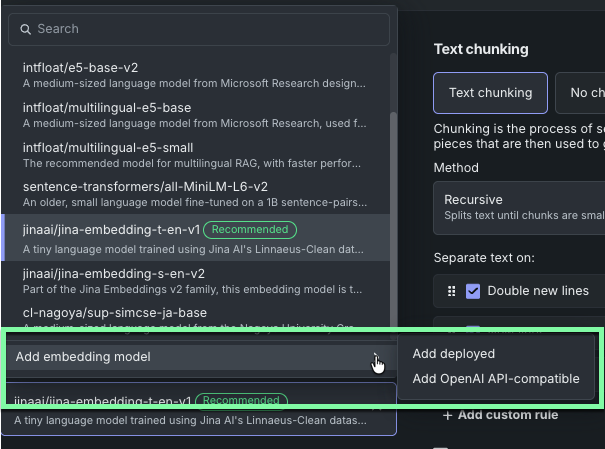
When creating vector databases, as an expansion of the “BYO embedding model" capabilities, you can now connect to a deployed OpenAI API-compatible embedding model directly from DataRobot. This allows you to access your own OpenAI API-compatible model deployment without creating a proxy custom model that redirects requests. Optionally, you can pass additional parameters in the request body when calling an API, during vector database creation, a query, or both.
New and retired LLMs
Following is the list of LLM availability changes since v11.8.0. See the availability page for a full list of supported LLMs. As always, you can add an external integration to support specific organizational needs.
The following are newly available:
- Claude Opus 4.7: Amazon Bedrock, Anthropic, Google Gemini Enterprise Agent Platform (formerly Vertex AI)
- Azure OpenAI GPT-5.4: Azure OpenAI
- Claude Haiku 4.5: Amazon Bedrock, Anthropic, Google Gemini Enterprise Agent Platform (formerly Vertex AI)
The following models on Amazon Bedrock are deprecated and will reach end of service on July 7, 2026:
- Meta Llama 3.1 405B Instruct v1
- Meta Llama 3.2 11B Instruct v1
- Meta Llama 3.2 90B Instruct v1
Also on Amazon Bedrock, the following retirements have been announced:
- Mistral Mistral 7B Instruct v0, retirement date May 29, 2026
The following are retired and removed:
- Google Llama 4 Maverick 17B 128E Instruct MAAS
- Mistral Mixtral 8x7B Instruct v0
Azure service principal and managed identity for the LLM gateway
The LLM gateway now supports Microsoft Entra ID service principal and managed identity (including Kubernetes workload identity) as authentication methods for Azure OpenAI model credentials, in addition to API keys. These approaches let you adopt Entra-based access controls and reduce reliance on long-lived API keys stored in DataRobot.
To use a service principal, include tenant_id, client_id, client_secret, and optionally azure_scope alongside the standard api_type, api_base, and api_version fields in each endpoint object of the [GenAI] Azure OpenAI LLM Credentials secure configuration. For managed identity, omit those fields entirely; the gateway reads tokens from the AZURE_TENANT_ID, AZURE_CLIENT_ID, and AZURE_FEDERATED_TOKEN_FILE environment variables injected on the LLM gateway pods. In all cases, assign the Cognitive Services OpenAI User role to the service principal or managed identity on the Azure AI Foundry resource. When multiple credential types are present on a single endpoint, the gateway selects them in this order: API key, then service principal, then managed identity.
For more information, see Azure OpenAI service principal and managed identity in the Generative AI service configuration reference, and the LLM gateway model configuration reference.
Predictive AI
CV threshold increased
Previously, DataRobot disabled cross-validation (CV) when datasets exceeded 800MB. To allow larger datasets to use CV, and thereby take advantage of stacked predictions, the CV limit has increased to 1.5GB. This means that, by default, datasets up to that size will use CV. Above 1.5GB, datasets will use Training-Validation-Holdout.
MLOps and predictions
Prediction environment tags
You can now attach optional key-value tags to prediction environments in Console. These tags let teams annotate environments with meaningful metadata—such as team: fraud or region: eu—to make it easier to identify the right infrastructure at a glance.
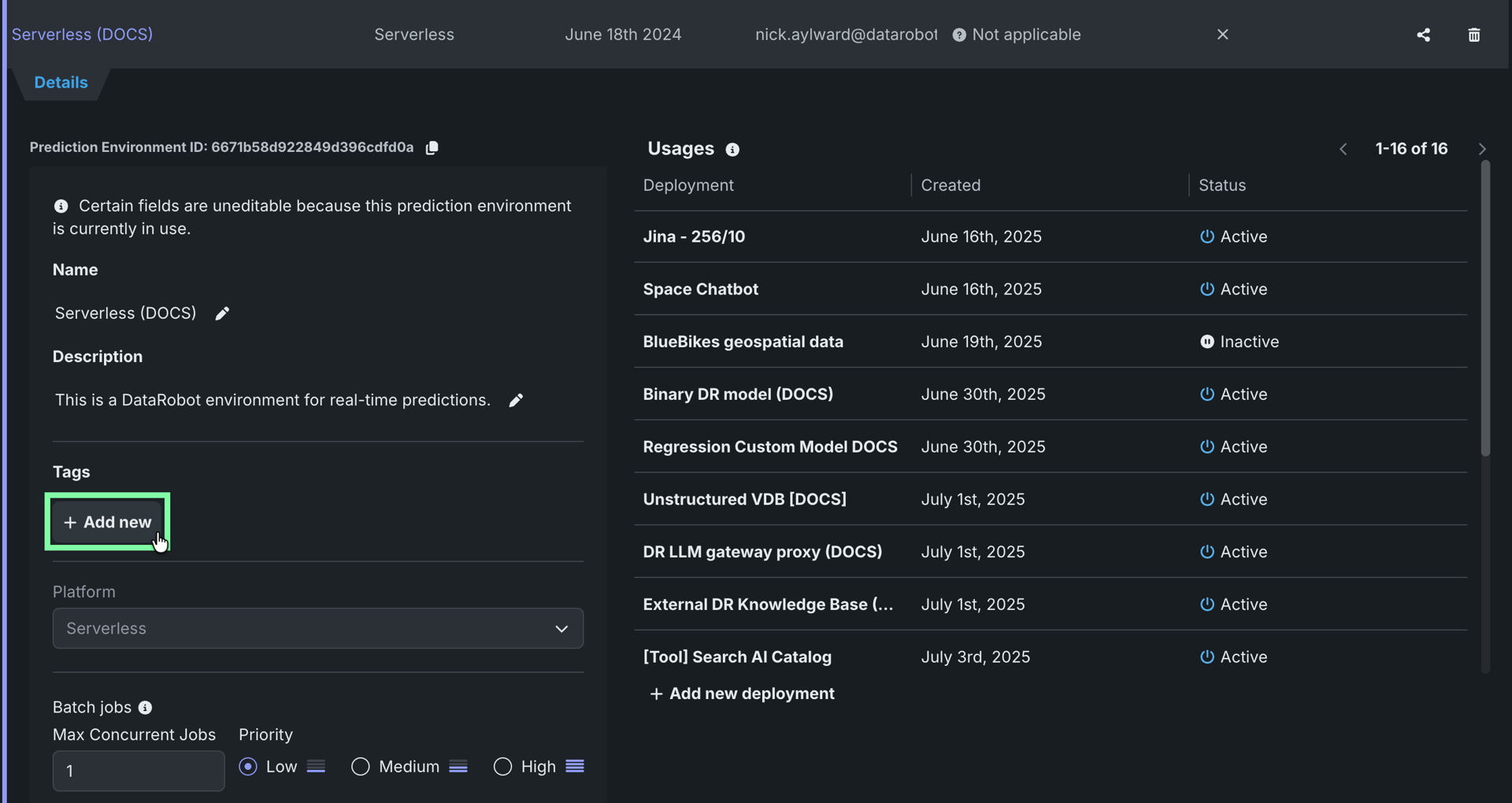
Once tags are applied, you can filter the Deployments inventory by prediction environment tags using the new Prediction environment tags filter. Autocomplete suggests existing keys and values, and when multiple tag pairs are selected, deployments are included if their prediction environment matches any of them. Note that prediction environment tags are distinct from deployment tags, which describe the deployment itself rather than the environment it runs on.
For more information, see Use prediction environment tags.
Deployment capacity settings
Deployment owners can now configure throughput and usage limits on the Capacity tab in deployment settings. Set deployment-wide capacity (requests or tokens per minute) and a utilization threshold that controls when default quota rules tighten as load increases. Optionally reserve capacity for specific agent deployments, users, or groups so entitled consumers keep a guaranteed share when utilization is high.
You can still define default rate limits and per-entity exceptions for requests, tokens, input sequence length, and concurrent requests. Policy changes may take up to five minutes to apply while the gateway refreshes its quota cache.
Runtime parameters improvements
This release improves the runtime parameters experience across custom models, custom applications, and custom jobs. Runtime parameters can now be defined directly in the UI, without modifying the metadata.yaml file. In the Runtime parameters section for models, applications, and jobs, you can configure a name, type, value, and optional description. Parameters defined through the UI persist and merge when you upload new code versions.
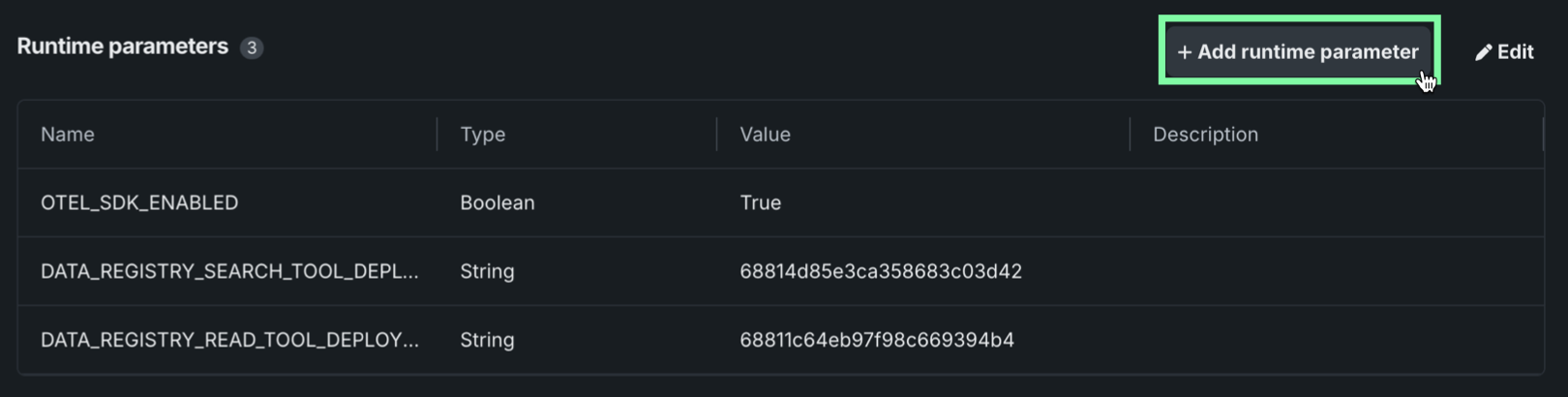
Parameters are injected as standard environment variables, accessible via os.getenv without the datarobot-drum library. Legacy prefixed (MLOPS_RUNTIME_PARAM_*) and JSONified formats remain supported for backward compatibility.
Custom error and status codes available for custom models
Users can now define custom HTTP status codes and structured JSON error messages for custom model inference servers. These messages are then propagated by the DataRobot platform to the calling client.
Automatic log collection for custom models
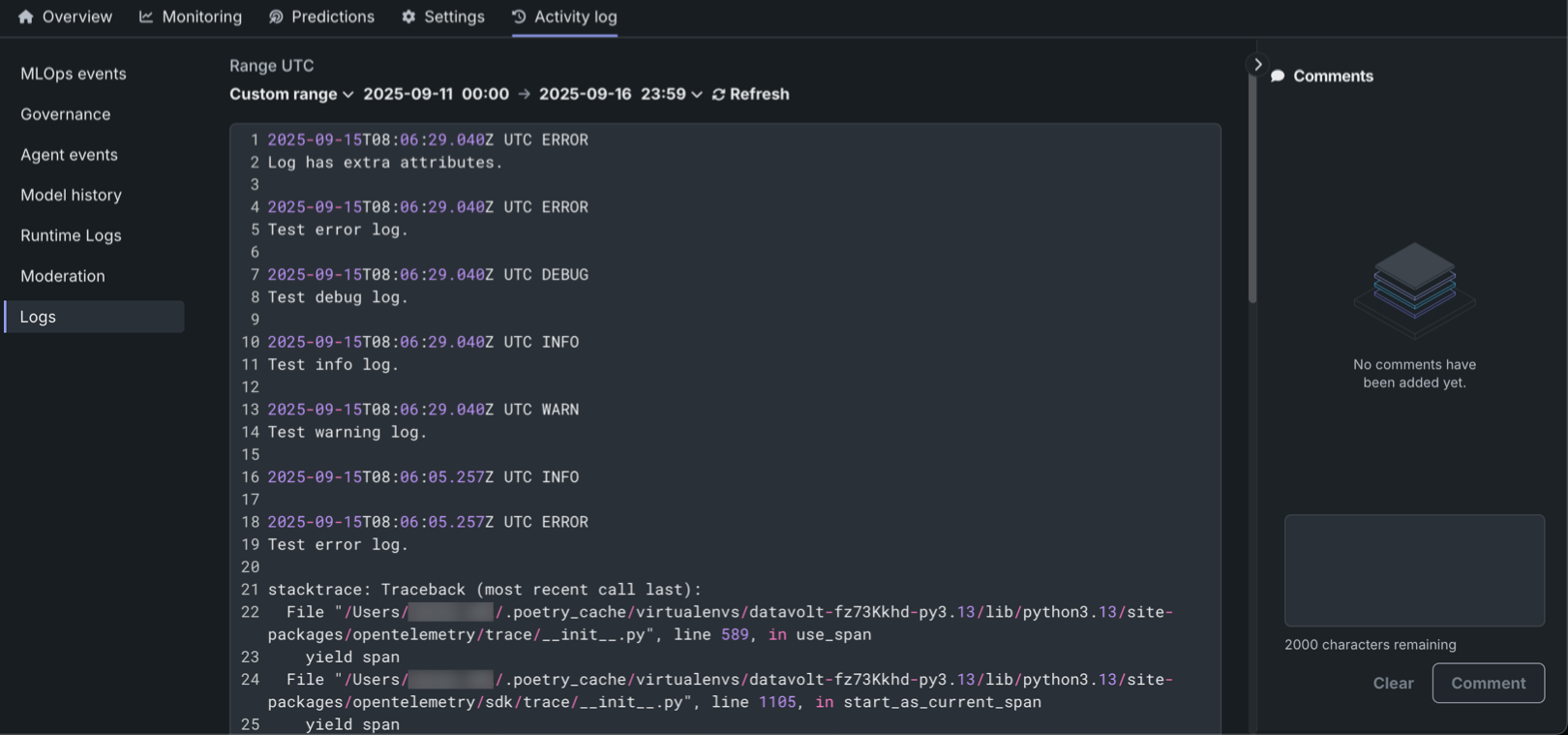
This release implements automatic log collection for custom models without requiring explicit OpenTelemetry (OTEL) instrumentation. Users can now seamlessly capture logs from classical ML and agent-based models.
Data
Microsoft OneDrive support
DataRobot now features out-of-the-box support for Microsoft OneDrive, allowing you to securely and seamlessly connect to your OneDrive data stores. Designed specifically for unstructured data, this new connector streamlines the process of ingesting OneDrive files directly into DataRobot for vector database creation and GenAI workflows.
For more information, see the OneDrive reference documentation.
Databricks now supports Azure service principal authentication
You can now use Azure service principals for authentication when connecting to the Databricks native connector in DataRobot. For information on connecting to Databricks using Azure service principal, see the documentation for the Databricks connector.
Add dynamic datasets from JDBC connections
You can now add dynamic datasets from JDBC driver connections, as well as perform Feature Discovery on that data. Note that to view previews or wrangle your data in either Wrangler or the SQL Editor, you must first create a snapshot of the dataset. If you do not create a snapshot, these two options will be disabled in the Actions menu of the dataset.
Talk to my Data enhancements
This release includes two enhancements to the Talk to my Data app:
- Added support for querying large datasets uploaded in Data Registry.
- Added support for data connector integrations with DataBricks, Snowflake, and MySQL.
Platform
Custom labels and annotations for Kubernetes deployments
Self-managed deployments can now implement custom labels and annotations to Kubernetes in DataRobot. For more information, and details on how to do so, see Additional labels and annotations.
Support for HashiCorp Vault secret storage
As part of the the DataRobot installation process, self-managed and single-tenant SaaS deployments can now configure Secrets Management Service (SMS). The SMS acts as a broker between DataRobot and your Vault secret storage backend, providing the following improvements:
- Only secret metadata (identifiers and schema references) is stored in DataRobot’s database.
- All secret values, including credentials, API keys, and secure configurations are routed to and from your own secret storage.
- Sensitive data is never stored in DataRobot.
For more information, see the Secrets Management Service reference.
Code-first
Python client v3.16
Python client v3.16 is now generally available. For a complete list of changes introduced in v3.16, see the Python client changelog.
DataRobot REST API v2.45
DataRobot's v2.45 for the REST API is now generally available. For a complete list of changes introduced in v2.45, see the REST API changelog.
Issues fixed in Release 11.9.0
Data fixes
- DM-20772: Fixes an issue with the Wrangler "de-duplicate" operation, such that it now does not interfere with subsequent operations.
Core AI fixes
-
APP-5821: The Q&A Chat App now supports vector database metadata filtering. There is now a
VDB_METADATA_COLUMNSruntime parameter that enables a "Document filters" sidebar, and aVDB_METADATA_FILTERfor a silent default filter on every request. -
APP-5901: Fixes
_wait_till_runninghealthcheck URL selection for Custom Applications when a custom liveness probe path is set and URL_PREFIX != '/' (path-aware apps). -
APP-6079: Updates the RBAC documentation to reflect the introduction of new Custom Application entities.
-
CFX-4628: Fixes an issue with the notebook state generation value de-syncing on the UI due to numbers in the precision boundaries in JavaScript.
-
CFX-5354: Fixes incorrect metrics collection in notebook execution environments when used on an AWS infrastructure.
-
CFX-5927: Makes the maximum number of concurrent terminals per notebook session configurable via Helm charts.
-
MODEL-22817: Fixes an issue that blocked SHAP Prediction Explanations for time series anomaly detection experiments.
-
MODEL-23243: Allows use of XEMP Prediction Explanations for time series segmented modeling. Use requires computation of Prediction Explanations, at least to preview state, on champion models.
-
MMM-22901: Shared deployments no longer increment the count toward the custom model active deployments limit.
-
PRED-12726: Fixes a crash issue that occurred when listing batch jobs after a job status was updated via the PATCH method.
-
PRED-12997: Fixes an issue so that DataRobot now passes through headers with
X-Untrusted-prefix down to a custom model. -
RAPTOR-15199: Adds a new setting in Registry to configure the default expand/collapse behavior of the file tree in the Files section, shared across Custom Models, Jobs, and Apps sources.
-
UIUX-16494: The deployment name, instead of the internal deployment-id, is now shown across the UI. This change makes deployments easier to identify and improves overall usability and understanding when navigating and managing deployments.
Platform fixes
-
RAPTOR-17183: Fixes the
libgompdependency in the Python 3 sklearn drop-in environment. -
FLEET-3752: Adds support for
VirtualServerobjects in DataRobot Helm charts.
All product and company names are trademarks™ or registered® trademarks of their respective holders. Use of them does not imply any affiliation with or endorsement by them.