AutoML (V7.3)
2021年12月13日
The DataRobot v7.3.0 release includes many new AutoML features and enhancements described in this section. See also the new features described in the time series (AutoTS) and MLOps release notes.
リリースv7.3では、以下の言語のUI文字列の翻訳が更新されています。
- 日本語
- フランス語
- スペイン語
- 韓国語
期限切れの古い機能に対するサポートの変更については、サポート終了に関する重要なお知らせをご覧ください。 このドキュメントでは、DataRobotの修正された問題についても説明します。
注目の新機能...
リリース7.3の主な新機能には以下が含まれます。
User interface enhancements
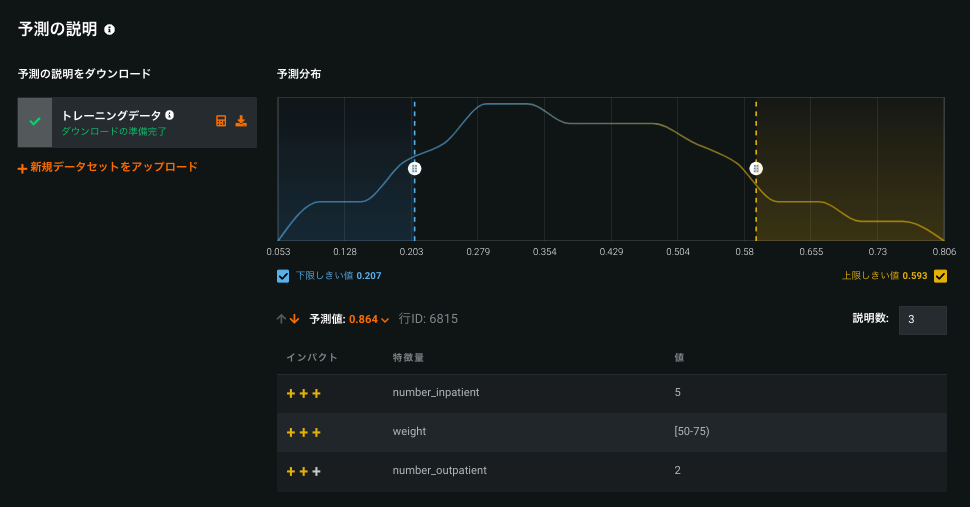
New XEMP Prediction Explanation interface
With this release, the XEMP Prediction Explanations visualization has been redesigned to provide cleaner, clearer at-a-glance information about why a model has made a particular prediction. The functionality offers the same insights with an easier, more intuitive interface.
Feature Discovery features
Feature Discovery supports multiple feature derivation windows
In Automated Feature Discovery, you can now configure up to three feature derivation windows (FDW) per dataset. To define additional windows, open the Time-aware feature engineering editor and click Add window. Note that each FDW must be unique.
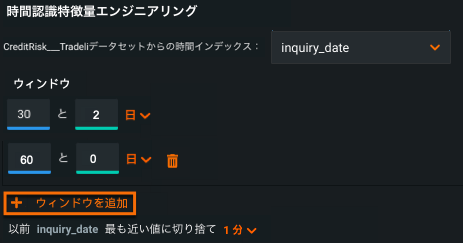
For details, see Define Relationships.
Feature Discovery Relationship Quality Assessment
Feature Discovery introduces a tool to automatically assess the quality of a relationship configuration—warning the user of potential problems—early in the creation process. 関係性品質評価ツールは、EDA2の開始前に結合キー、データセットの選択、および時間認識設定を検証します。
設定を確認ボタンをクリックして、関係性の品質評価をトリガーします。 進行状況インジケーター(スピナーの読み込み)が各データセットと、無効になっている設定を確認ボタンに表示され、評価が現在実行中であることを示します。
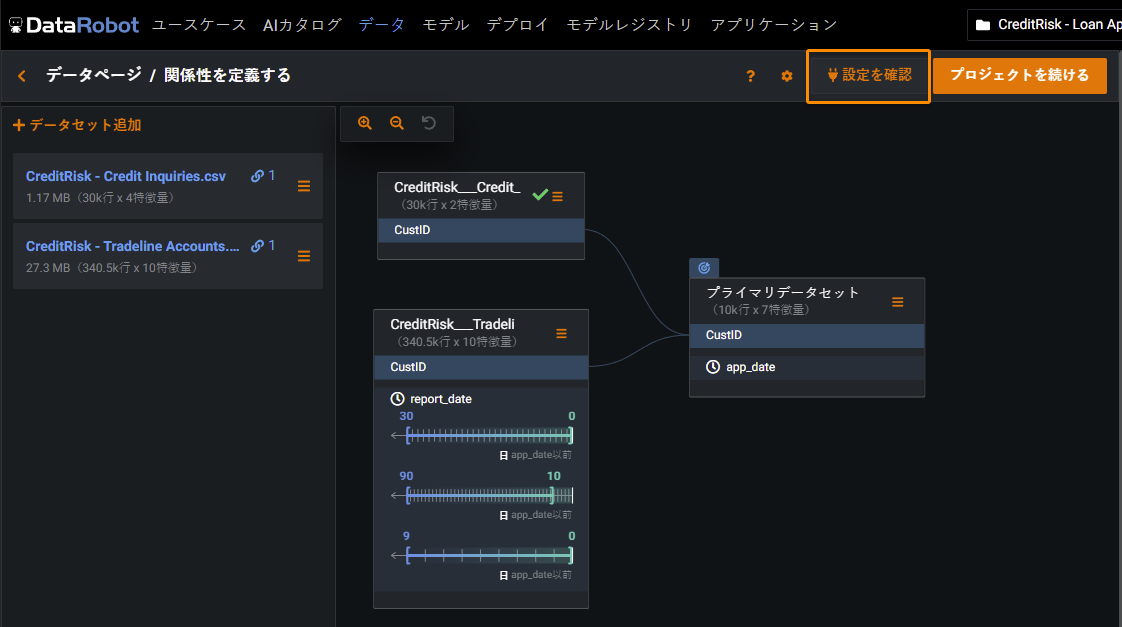
評価が完了すると、DataRobotはテストされたすべてのデータセットにマークを付けます。 問題が特定されたものには黄色の注意アイコンが表示され、問題が特定されていないものには緑色のチェックマークが表示されます。 Select the dataset to view a summary of the issues with suggested potential fixes.
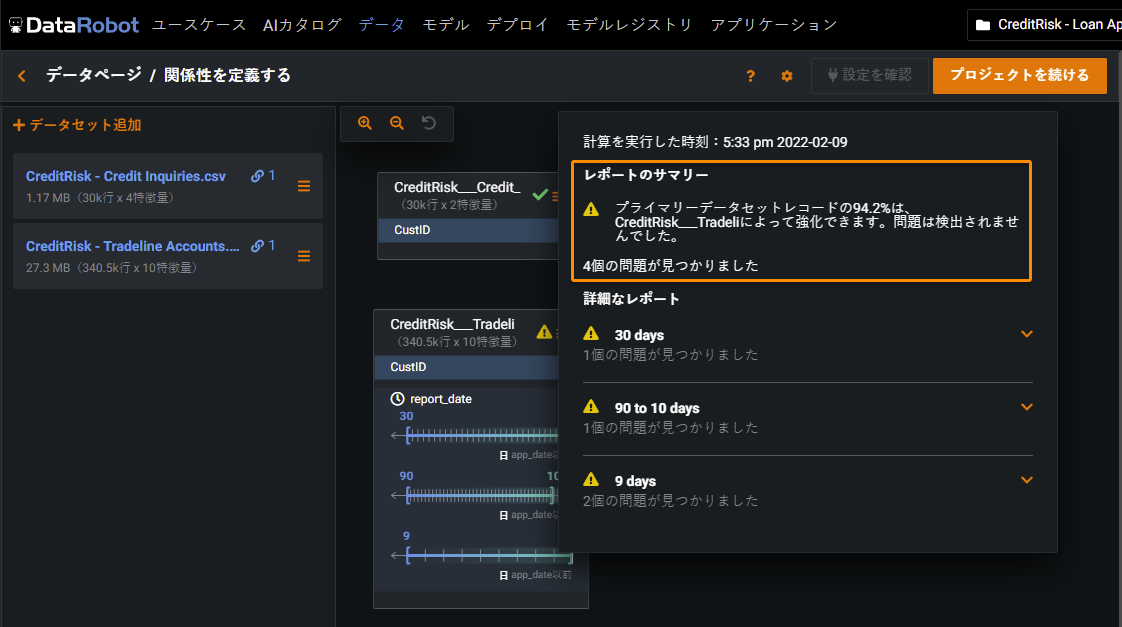
注意を解決するには、各注意の下に表示されるオレンジのリンク(データセットの確認、関係性の確認、またはウィンドウ設定の確認)をクリックします。関係性エディターの上部にペインが表示され、関係性設定を変更できます。 After addressing the warnings, click Review configuration to reassess the relationships.
For details, see the Relationship Quality Assessment documentation.
Feature Discovery improvements
Release 7.3 brings the following improvements to the Feature Discovery UI:
- In the Relationship Editor, if the primary dataset is also used as a secondary dataset, the target no longer appears as a suggested join key.
- When making changes to a secondary dataset configuration, this no longer causes all dataset names to reload.
- Individual dataset import sizes cannot exceed 11GB.
- The default snapshot policy for all snapshotted dataset, including JDBC datasets, is Latest.
- You can now click a FDW displayed on your dataset to open the FDW editor.
モデリング特徴量
Composable ML adds project linking and bulk training, general improvements
Composable MLは、モデル構築に完全な柔軟性のあるアプローチを提供し、構築するモデルへのデータサイエンスと対象分野の専門知識の注入を可能にします。 Composable MLでは、ビルトインタスクとカスタムPython/Rコードを使用して、ニーズに最適なブループリントを構築します。 次に、DataRobot機能(たとえばMLOpsなど)をカスタムブループリントと併用して、生産性を高めます。
With release 7.3, in addition to the feature preview capabilities available earlier, come these important improvements:
-
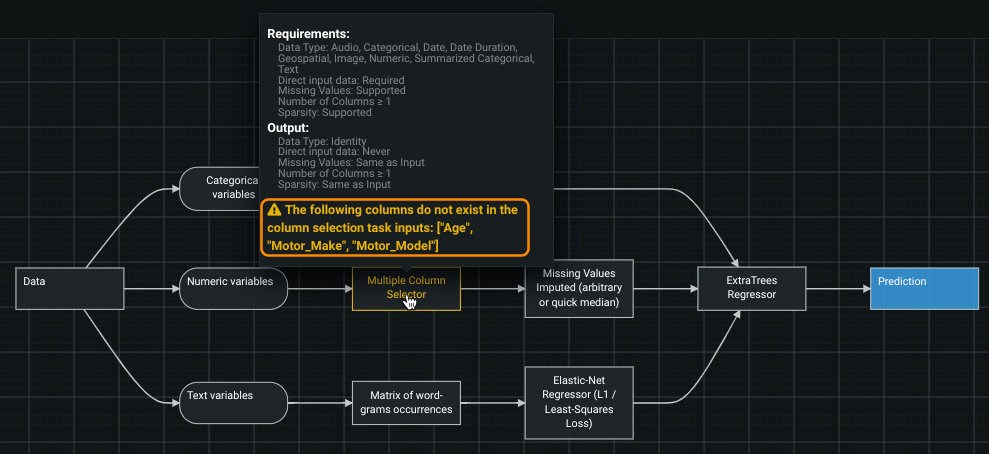
Project linking: Because some blueprints are meant to be used only with a specific project (perhaps they incorporate a step that calls for specific features, for example) DataRobot applies automated project linking. If you then attempt to apply the blueprint to a different project, DataRobot provides a warning that the required columns do not exist in the dataset.
-
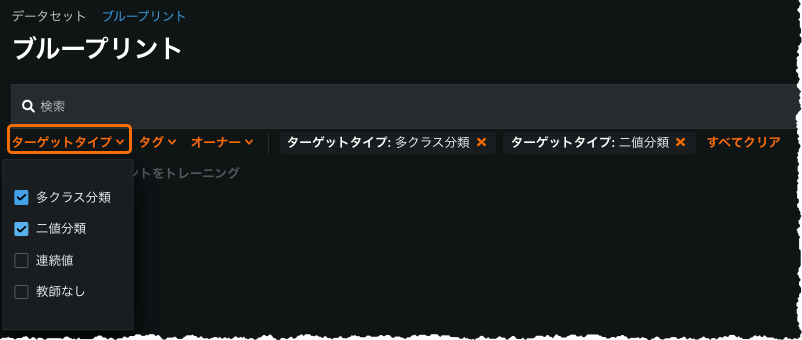
Bulk training: You can now train user blueprints in bulk for a specific project, filtered based on compatibility with the selected blueprints. (Note that if selected blueprints don't have at least one common target type, DataRobot prevents bulk training.) From the AI Catalog Blueprints tab, you can sort blueprints by target type (binary, regression, multiclass, and unsupervised) for easier selection.
The feature is generally available for managed AI Platform users and preview for Self-Managed AI Platform users (contact your DataRobot representative for enablement information).
More information for managed AI Platform users.
Word Cloud support for all linear models
Previously only available for a single model and mode type, Word Cloud now supports a variety of binary classification, multiclass, and regression models. Additionally, Word Cloud is now available for multimodal datasets (i.e., datasets that mix images, text, categorical, etc.), displaying a word cloud for all text from the data.
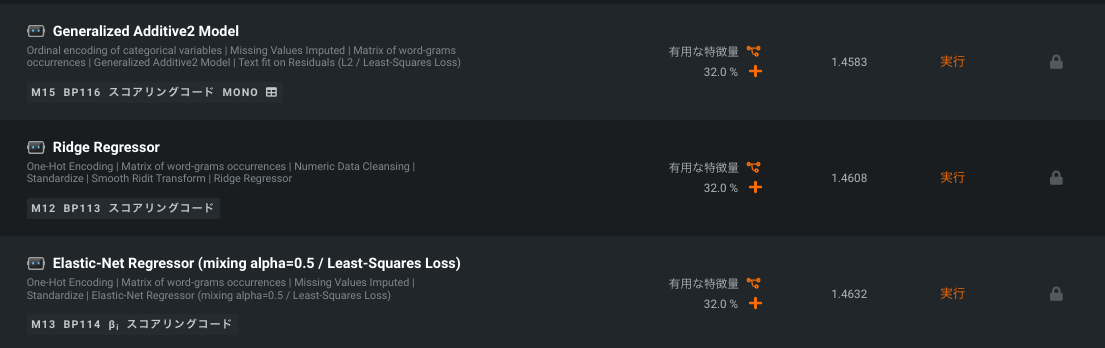
For details, see the Word Cloud documentation.
クラスタリング
教師なし学習の応用であるクラスタリングによって、セグメントをグループ化して識別することでデータを探索できます。 クラスタリングを使用して、多くの種類のデータ(数値、カテゴリー、テキスト、画像、および地理空間データ)から生成されたクラスターを単独でまたは組み合わせて探索します。 クラスタリングモードでは、DataRobotは、データセット内の列で明示的にキャプチャされていない潜在動作をキャプチャします。
To generate clusters, run in unsupervised Clusters mode:
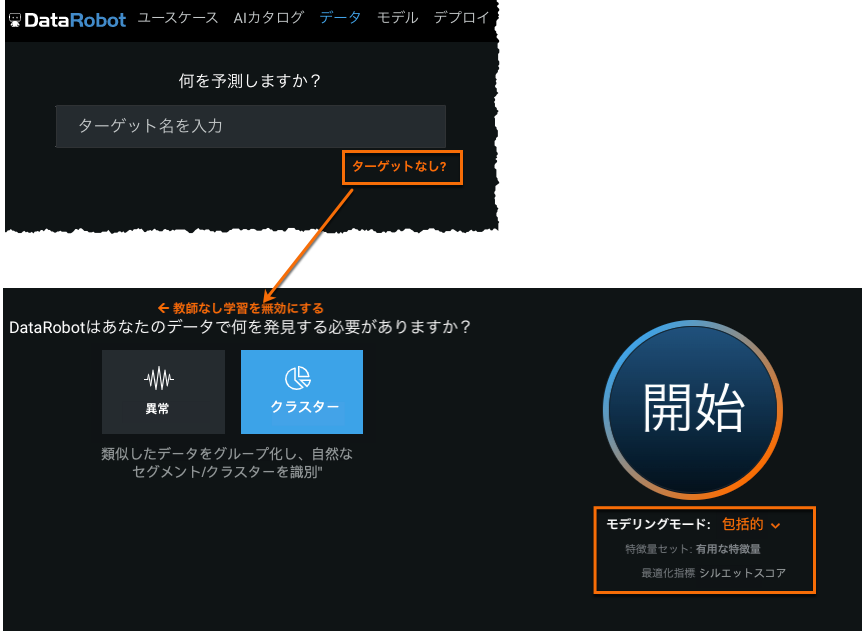
To investigate the clusters generated during modeling, use the Cluster Insights visualization to understand, name, and explain each cluster in a dataset:
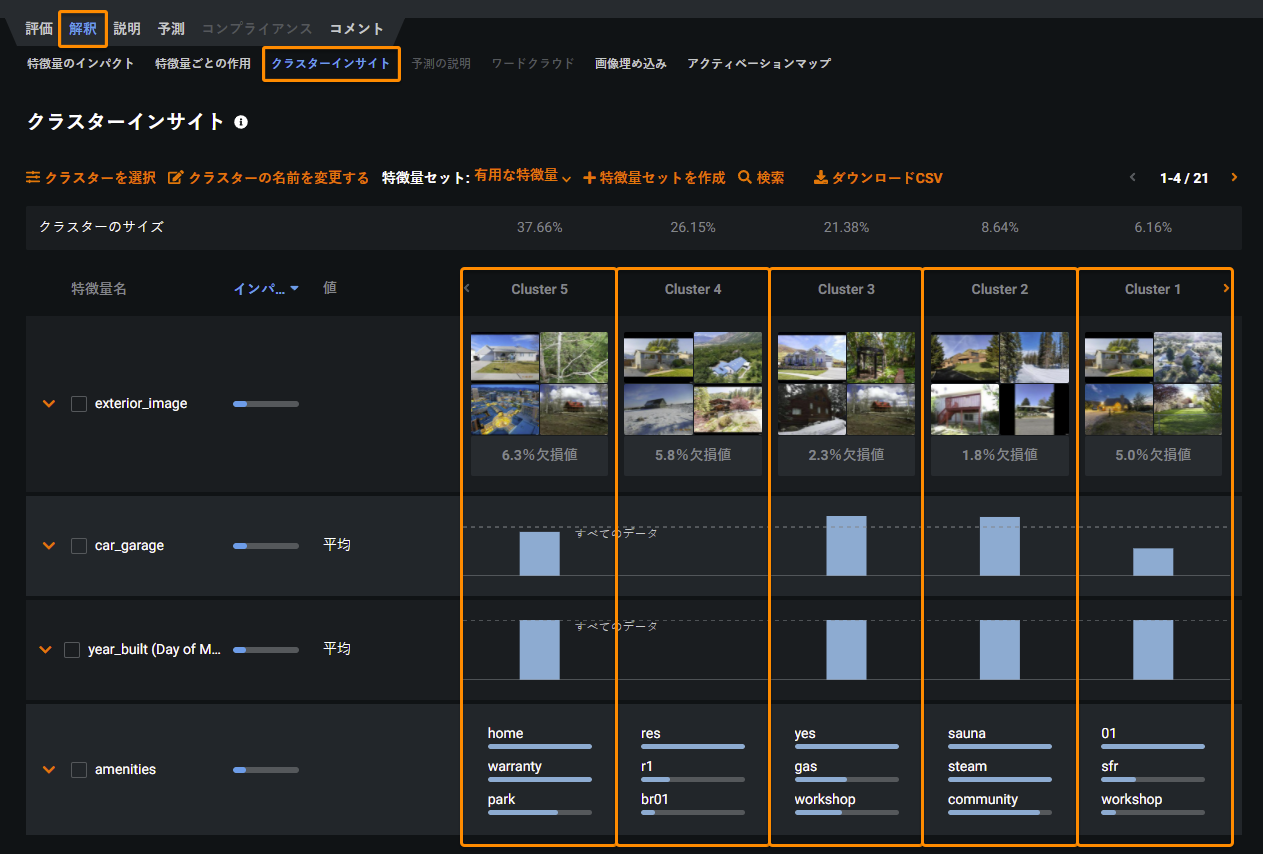
For details, see the Clustering documentation.
External predictions now GA
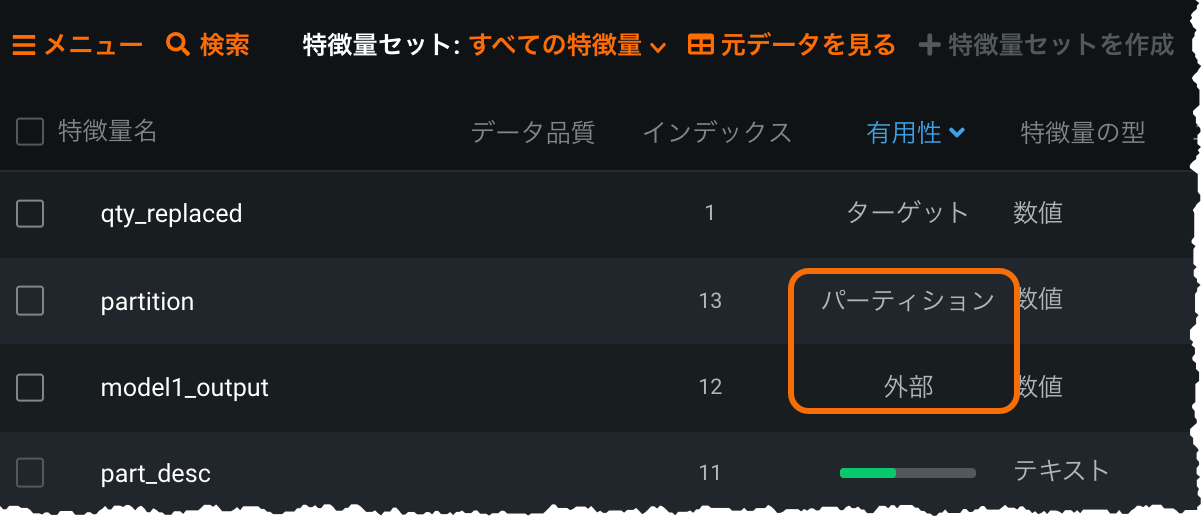
Released as a preview feature in v7.2, the External Predictions capability allows you to bring external model(s) into the DataRobot AutoML environment for comparison against DataRobot models. Simply add external model predictions as a new column in your training dataset and identify the predictions and partition column. When modeling completes, the external model is available on the Leaderboard. From there you can compare it against DataRobot models, investigate further using select DataRobot visualizations, and (for binary classification projects) explore bias testing.
Additionally, a new preview enhancement is available for the feature, providing support for multiple (up to 25) prediction columns, with each mapping into a separate "external model."
Feature Effects for multiclass projects
With this release, the Feature Effects visualization is now available for multiclass projects. In addition, using the Select Class dropdown, you can view partial dependence, predicted, and actual values for each class of the target value. By default, DataRobot calculates effects for the top 10 impact-ranked features, but the new feature provides an option to calculate, individually, for all features.
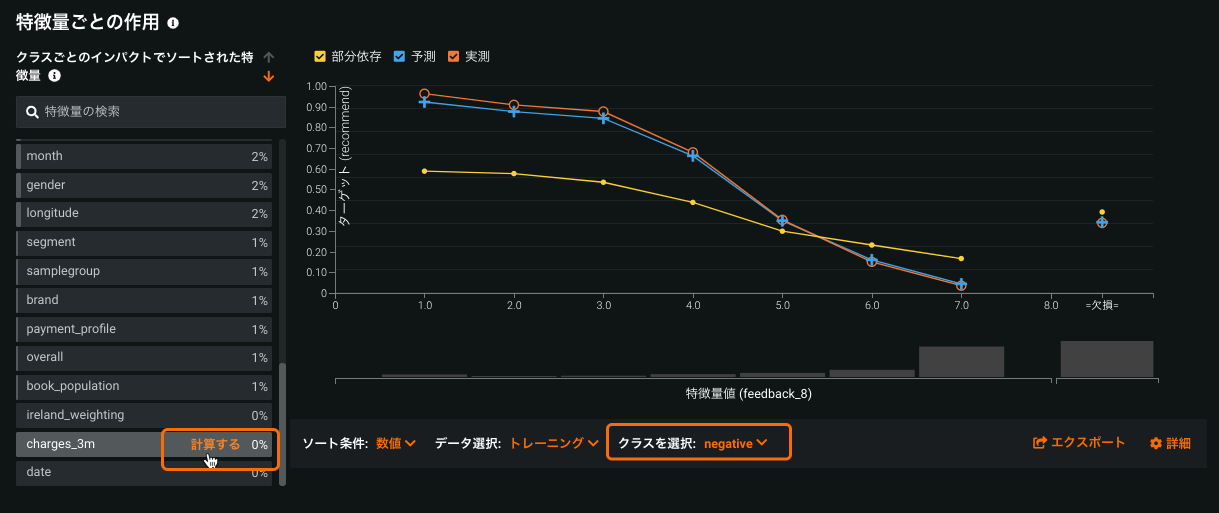
For details, see Feature Effects.
Configurable sample size for SHAP Feature Impact
With this release, you can now configure the sample size used for computing Feature Impact in SHAP-based projects. Previously this capability was only available for permutation Feature Impact. Changing sizes can help, for example, to compute SHAP Feature Impact quickly with near to the same accuracy.
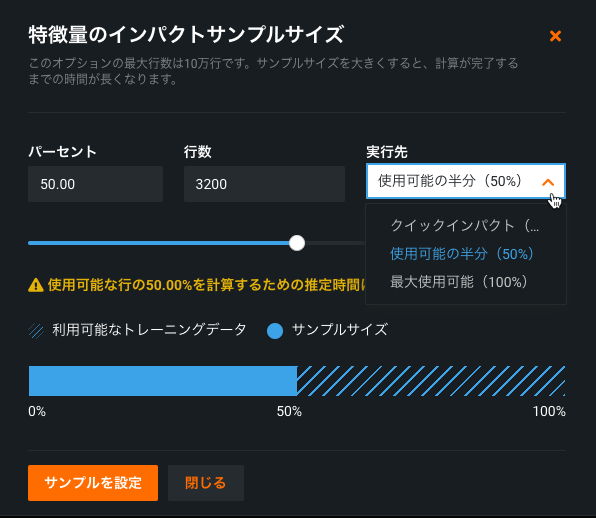
For details, see the Feature Impact documentation.
Unlimited multiclass builds multiclass classifiers for targets with any number of classes
本機能の提供について
多クラスプロジェクトで無制限のクラスを利用できるかどうかは、お客様のDataRobotのパッケージによります。 お客様の組織で有効になっていない場合、クラス制限は100に設定されています。この制限を増やすには、DataRobotの担当者にお問い合わせください。
This release extends the multiclass project types, adding an unlimited multiclass option. For multiclass projects with more than 1000 classes, DataRobot, by default, will keep the top 999 most frequent classes and aggregate the remainder into a single "other" bucket. Or, you can configure the aggregation parameters to ensure all classes necessary to your project are represented. Additionally, multiclass visualizations are adjusted to suit the larger class display. With unlimited multiclass, you no longer need to prepare data to suit a class limit and maintain several models. You can now deploy a single model to serve predictions against any number of classes.
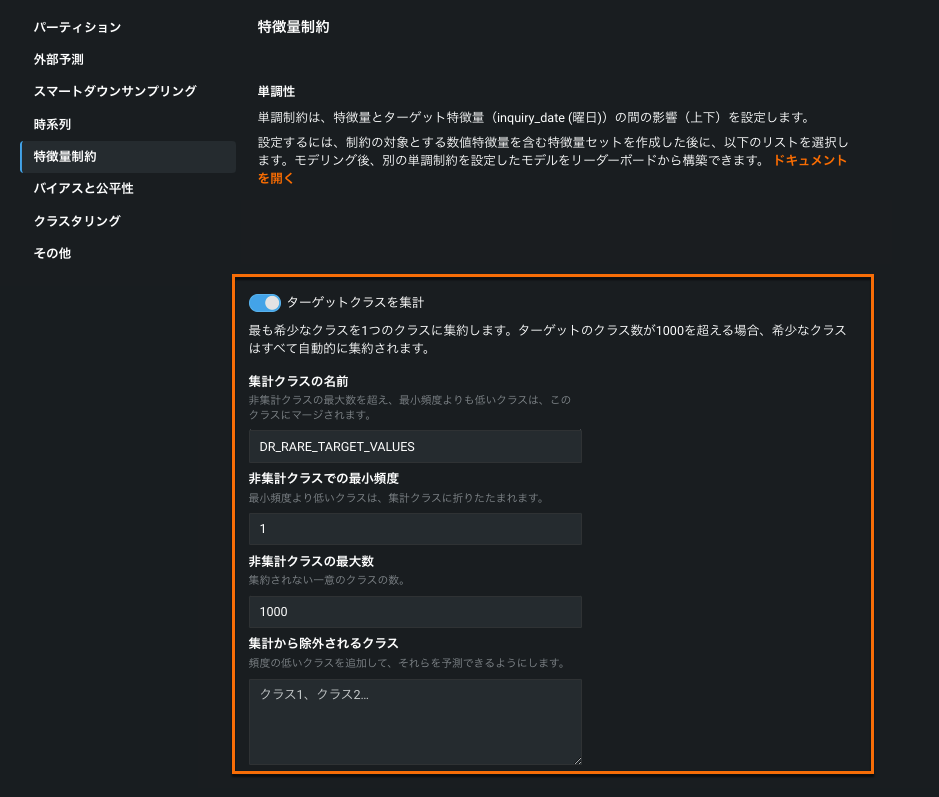
For details, see the multiclass documentation.
Multilabel modeling adds pairwise matrix management
本機能の提供について
多ラベルモデリングが利用できるかどうかは、お使いのDataRobotパッケージによって異なります。 組織内で有効になっていない場合は、DataRobotの担当者に詳細をお問い合わせください。
Multilabel modeling (modeling when each row is associated with one, several, or zero labels) is now generally available. In addition, capabilities have been added that allow you to more easily control the pairwise matrix. The matrix, which shows pairwise statistics for pairs of labels and the occurrence percentage of each label in the dataset, now uses a thumbnail matrix to more easily set the display of the main matrix. You can select an area from the thumbnail or manually set rows and/or columns, ensuring the main matrix focuses on labels of interest.
To ensure that data is valid, the data quality assessment checks now checks data against the requirements for multicategorical features. A log provides more detailed error information.
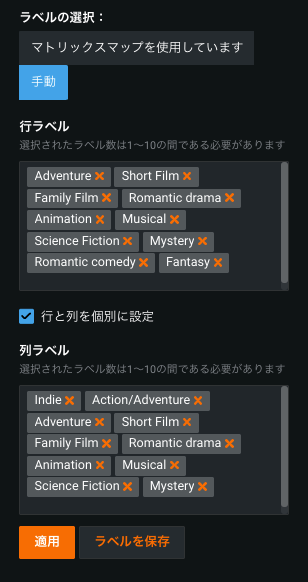
For details, see the multilabel documentation.
APIの機能強化
以下は、APIの新機能と機能強化の概要です。 Reference the API Documentation home for more information on each client.
ヒント
DataRobotでは、PythonとRのために最新のAPIクライアントにアップデートすることを強くお勧めします。
新機能
The following new functionality has been added for API release v2.27.0.
- Retrieve and restore discarded features for time series projects.
Compute and retrieve Feature Effects for multiclass models
- For non-datetime partitioned models:
- 取得
GET /api/v2/projects/(projectId)/models/(modelId)/multiclassFeatureEffects/- 計算
POST /api/v2/projects/(projectId)/models/(modelId)/multiclassFeatureEffects/
- 計算
- 取得
- For datetime partitioned models:
- 取得
GET /api/v2/projects/(projectId)/datetimeModels/(modelId)/multiclassFeatureEffects/ - 計算
POST /api/v2/projects/(projectId)/datetimeModels/(modelId)/multiclassFeatureEffects/
- 取得
Custom models conversion functionality
- create
POST /api/v2/customModels/(customModelId)/versions/(customModelVersionId)/conversions/ - list
GET /api/v2/customModels/(customModelId)/versions/(customModelVersionId)/conversions/ - retrieve
GET /api/v2/customModels/(customModelId)/versions/(customModelVersionId)/conversions/(conversionId)/ - delete
GET /api/v2/customModels/(customModelId)/versions/(customModelVersionId)/conversions/(conversionId)/
機能強化
All non-multiclass featureEffects and featureFit retrieve routes now support returning individual_conditional_expectation (ICE) Plots; a new query parameter,include_ice_plots, controls this functionality. To access this feature, enable the feature flag Enable ICE Plots on Feature Fit/Feature Effects.
This includes the following routes:
GET /api/v2/projects/(projectId)/models/(modelId)/featureEffects/GET /api/v2/projects/(projectId)/datetimeModels/(modelId)/featureEffects/GET /api/v2/projects/(projectId)/models/(modelId)/featureFit/GET /api/v2/projects/(projectId)/datetimeModels/(modelId)/featureFit/
There are new routes to initialize compliance documentation preprocessing, which is required to generate compliance documentation for custom models:
Create compliance documentation preprocessing initialization: POST /api/v2/modelComplianceDocsInitializations/(entityId)/
Check compliance documentation preprocessing initialization: GET /api/v2/modelComplianceDocsInitializations/(entityId)/
There are now new routes that support multilabel classification project types:
Retrieve multilabel pairwise statistics:
GET /api/v2/multilabelInsights/(multilabelInsightsKey)/pairwiseStatistics/
Retrieve multilabel histograms:
GET /api/v2/multilabelInsights/(multilabelInsightsKey)/histogram/
Retrieve multilabel labelwise ROC:
GET /api/v2/projects/(projectId)/models/(modelId)/labelwiseRocCurves/(source)/
Retrieve multilabel labelwise Lift charts:
GET /api/v2/projects/(projectId)/models/(modelId)/multilabelLiftCharts/(source)/
Retrieve manual label selections for multilabel pairwise statistics:
GET /api/v2/multilabelInsights/(multilabelInsightsKey)/pairwiseManualSelections/
Save manual label selections for multilabel pairwise statistics:
POST /api/v2/multilabelInsights/(multilabelInsightsKey)/pairwiseManualSelections/
Update a manual label selection for multilabel pairwise statistics:
PATCH /api/v2/multilabelInsights/(multilabelInsightsKey)/pairwiseManualSelections/(manualSelectionListId)/
Delete a manual label selection for multilabel pairwise statistics:
DELETE /api/v2/multilabelInsights/(multilabelInsightsKey)/pairwiseManualSelections/(manualSelectionListId)/
プレビュー機能
外部OAuthを使用してSnowflakeに接続
Snowflake users can now set up a Snowflake data connection in DataRobot using an external identity provider (IdP)—either Okta or Azure Active Directory—for user authentication through OAuth single sign-on (SSO).
For details, see External OAuth for Snowflake.
AIカタログへの高速登録
You can now quickly register large datasets in the AI Catalog by specifying the first N rows to be used for registration instead of the full dataset—giving you faster access to data to use for testing and Feature Discovery.
AI Catalogで、 カタログに追加をクリックしてデータソースを選択します。 高速登録は、新しいデータ接続、既存のデータ接続、またはURLからデータセットを追加する場合にのみ使用できます。 Enter information for the data source and select a snapshot policy:
- For a snapshot dataset, DataRobot will ingest the specified number of first rows. Subsequent consumption of the data, like creating a project with it, will use this dataset with N rows.
- For a dynamic dataset, DataRobot will use the specified number of first N rows to compute EDA1. Subsequent consumption of the data, however, will always use the full dataset.
For fast registration, select the partial data upload option and specify the number of rows to ingest.
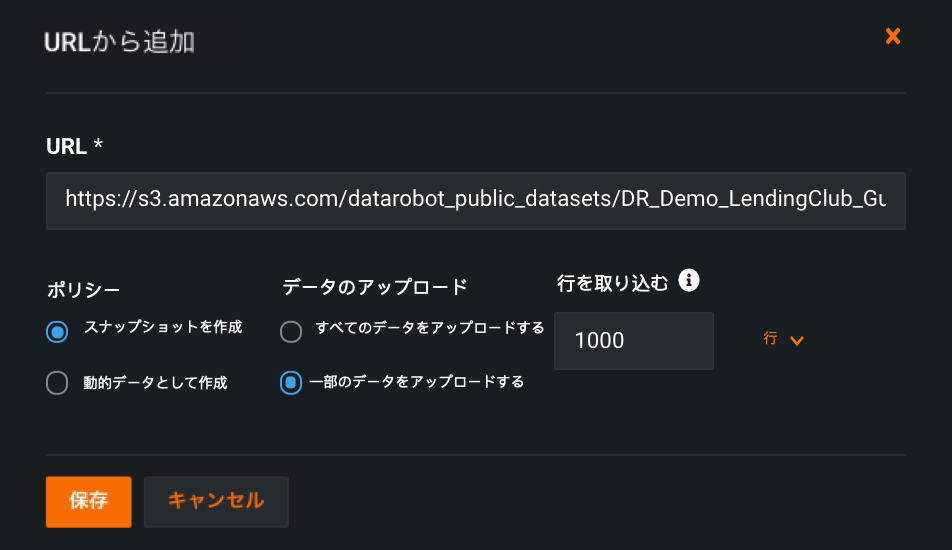
For details, see AI Catalog fast registration.
サポート終了のお知らせ
Note the following to better plan for later migration to new releases.
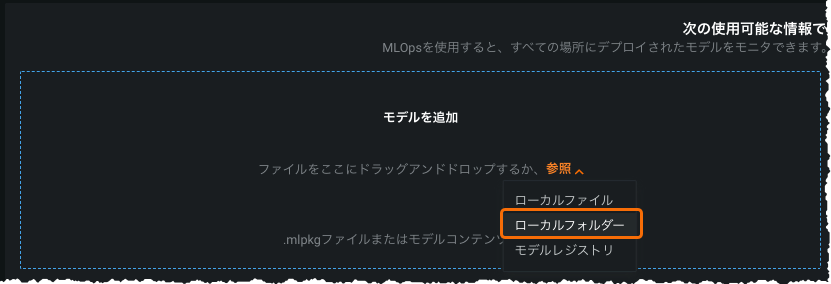
Local folder option for custom models will be deprecated
As of release v8.0 (March 14, 2022 for Cloud users), the ability to use the “Local Folder” option when adding a model via the Deployment inventory will be deprecated. For this release, while it is still available, the preferred method is to use the Custom Model Workshop. With v8.0, only the workshop option will be available (and will be linked to from the inventory page).
API deprecation notices
Note the following to better plan for later migration to new releases.
-
Get discarded features information:
GET /api/v2/projects/(projectId)/discardedFeatures/ -
Restore a list of discarded features:
POST /api/v2/projects/(projectId)/modelingFeatures/fromDiscardedFeatures/
お客様から報告された問題の修正
v7.2.6以降、以下の問題が修正されています。
特徴量探索
- SAFER-4115: Fixes an issue where BigQuery OAuth credentials would not work with Feature Discovery projects.
記載されている製品名および会社名は、各社の商標または登録商標です。 製品名または会社名の使用は、それらとの提携やそれらによる推奨を意味するものではありません。