MLOps(V8.0)
2022年3月14日
DataRobot MLOps v8.0リリースには、以下に示す多くの新機能が含まれています。 See also details of Release 8.0 in the AutoML and time series (AutoTS) release notes.
リリースv8.0では、以下の言語のUI文字列の翻訳が更新されています。
- 日本語
- フランス語
- スペイン語
- 韓国語
新機能と機能強化
以下の新しい機能の詳細を参照してください。
新しいデプロイ機能
- 再トレーニングポリシーのキャンセル
- DataRobot MLOpsライブラリとサードパーティのスプーラータイプ
- チャレンジャーの精度
- チャレンジャーのインサイト
- [インテグレーション]タブから削除されたデータベース統合
新しい予測機能
新しいガバナンス機能
プレビュー機能
新しいデプロイ機能
再トレーニングポリシーのキャンセル
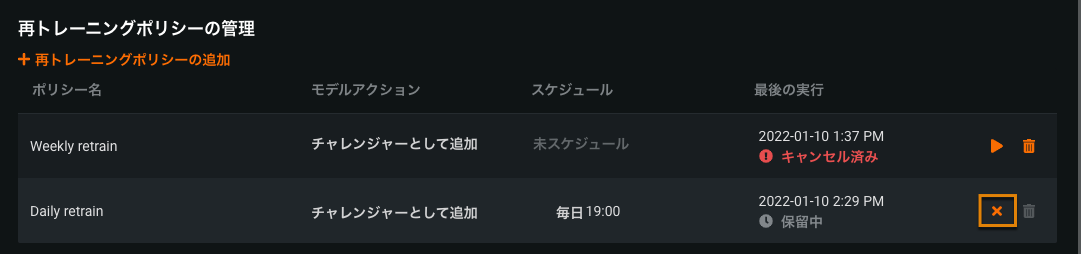
To manage the automatic retraining of deployed models, you set up retraining policies. The policies can be triggered manually or in response to a schedule, drift status, or accuracy status. Now you can cancel policy runs that are in progress or scheduled. You cannot cancel a run if it has finished successfully, has failed, has a status of "Creating challenger" or "Replacing model," or has already been cancelled.
DataRobot MLOpsライブラリとサードパーティのスプーラータイプ
The datarobot-mlops library no longer includes AWS (SQS) and RabbitMQ dependencies by default. If you are using these spooler types, you must install the spooler-specific dependencies See the documentation on installing the DataRobot MLOps metrics reporting library for details.
チャレンジャーの精度
On a deployment's Challengers tab, the Deployment Challengers overview now includes an Accuracy column for the champion and every challenger. This column reports a model's accuracy score for the selected date range and, for challenger models, a comparison with the champion's accuracy score. You can use the Accuracy metric dropdown menu to compare different metrics.
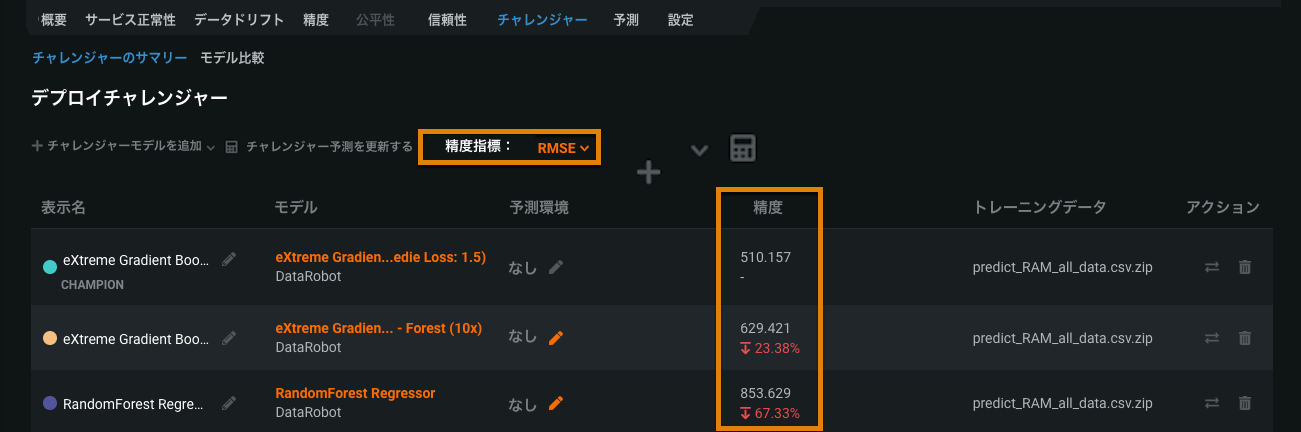
チャレンジャーの精度比較の詳細については、チャレンジャーモデルの概要を参照してください。
チャレンジャーのインサイト
Now generally available, the Model Insights on the Model Comparison tab allow you to compare the composition, reliability, and behavior of champion and challenger models using powerful visualizations. Choose two models to go head-to-head to determine if a challenger model outperforms the current champion and should replace the champion model in production.
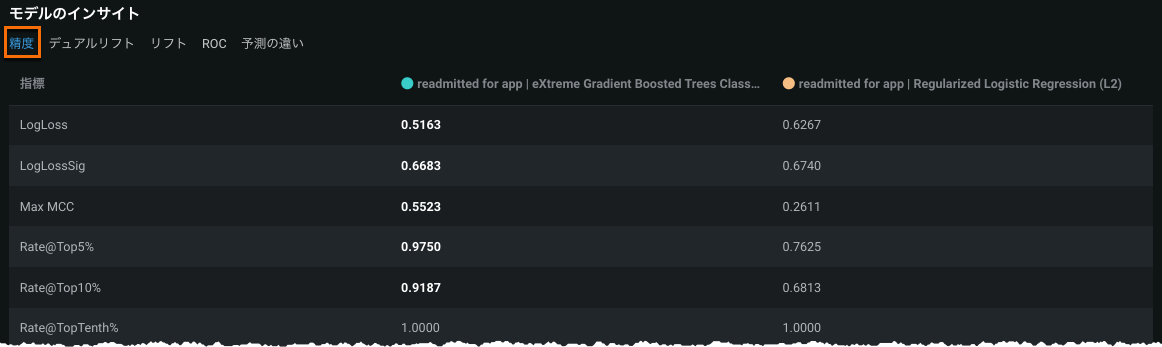
2つのモデルを選択すると、DataRobotはそれらのモデルについて次のモデル比較を計算します。
The Accuracy list contains two columns to report accuracy metrics for each model. 強調表示された数字は好ましい値を表しています。 In this example, the champion, Model 1, outperforms Model 2 for most metrics shown:
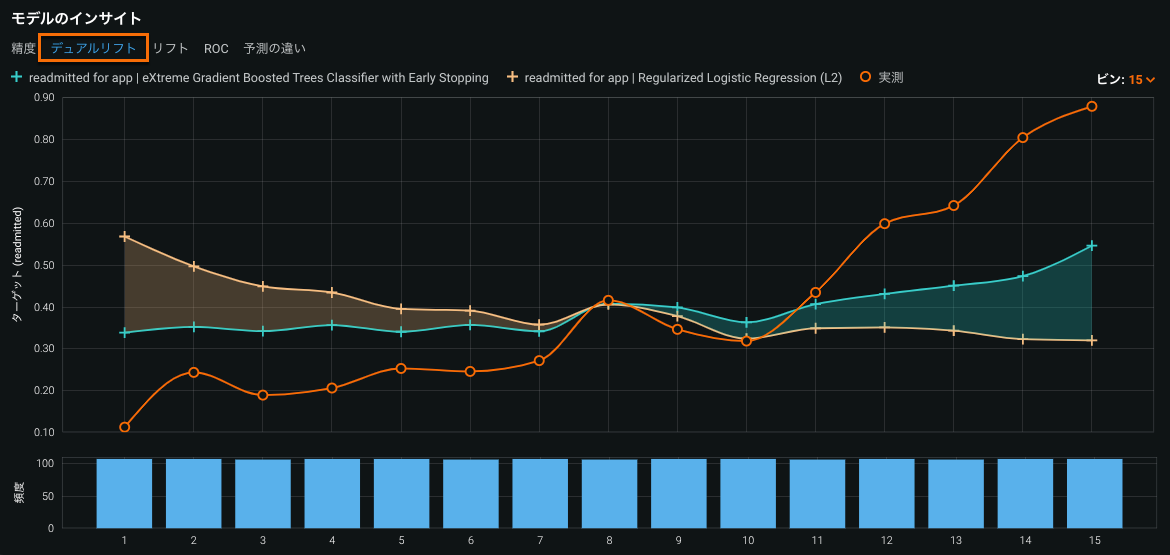
デュアルリフトチャートは、選択した2つのモデルが、予測の分布全体で実測値を過小予測または過大予測する方法を比較する視覚化です。
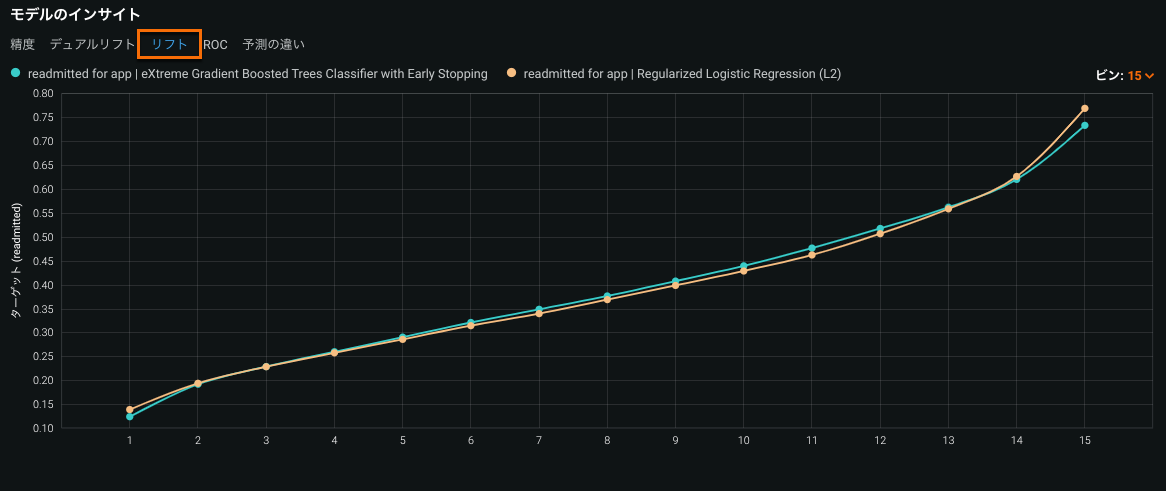
リフトチャートは、モデルがターゲットの母集団をどの程度うまく分割しているか、そしてターゲットを予測することができるかを示し、モデルの有効性を視覚化できます。
本機能の提供について
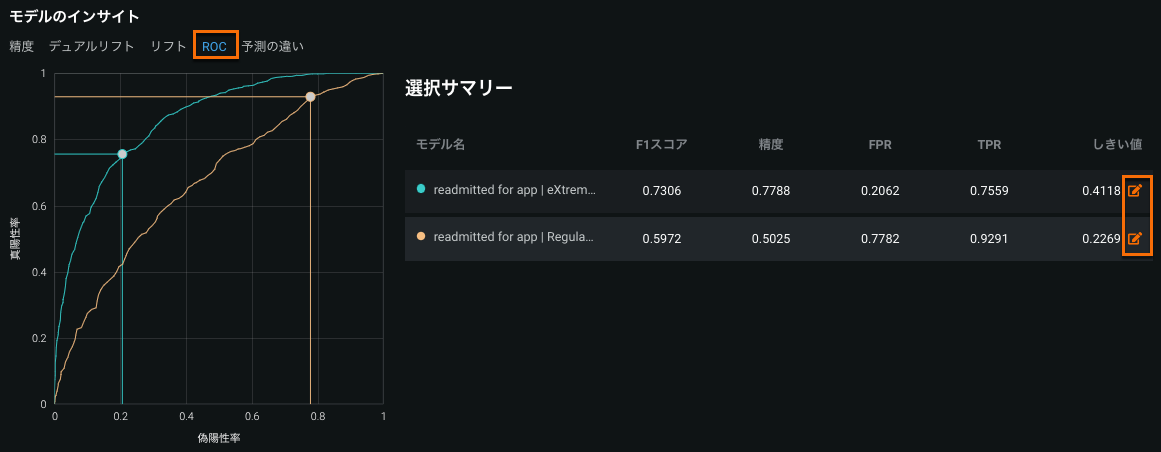
[ROC]タブは二値分類プロジェクトでのみ使用できます。
あるデータソースに基づき、True Positive RateをFalse Positive Rateに対比させる形でプロットしたものがROC曲線です。 ROC曲線を使用して、比較するモデルの分類、パフォーマンス、統計を調査します。
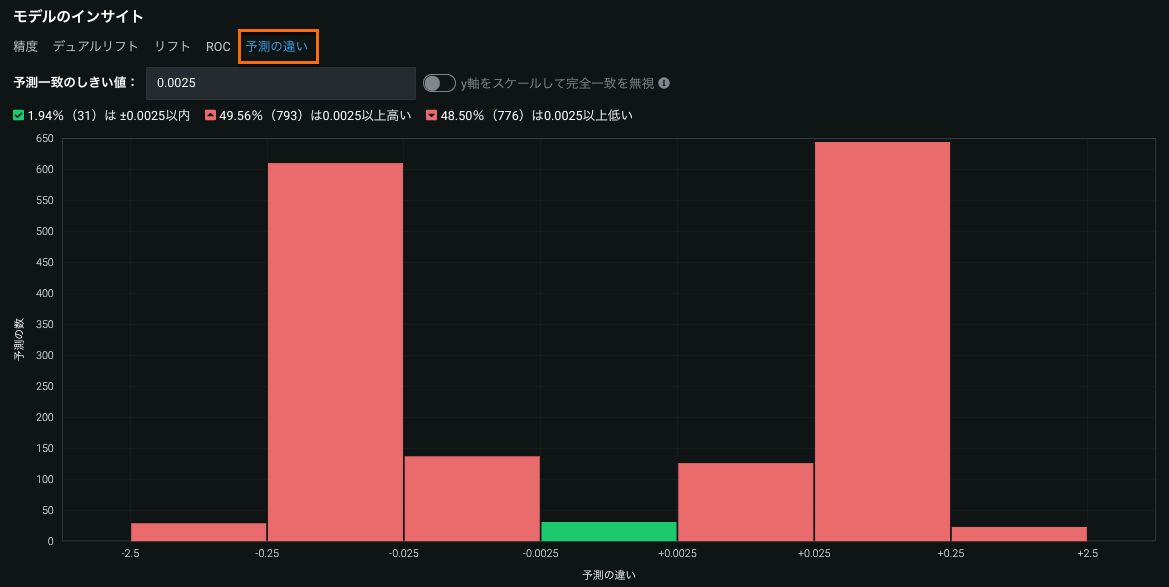
予測の違いヒストグラムには、予測一致しきい値フィールドで指定した一致しきい値内にある予測の割合が(対応する行数とともに)表示されます。
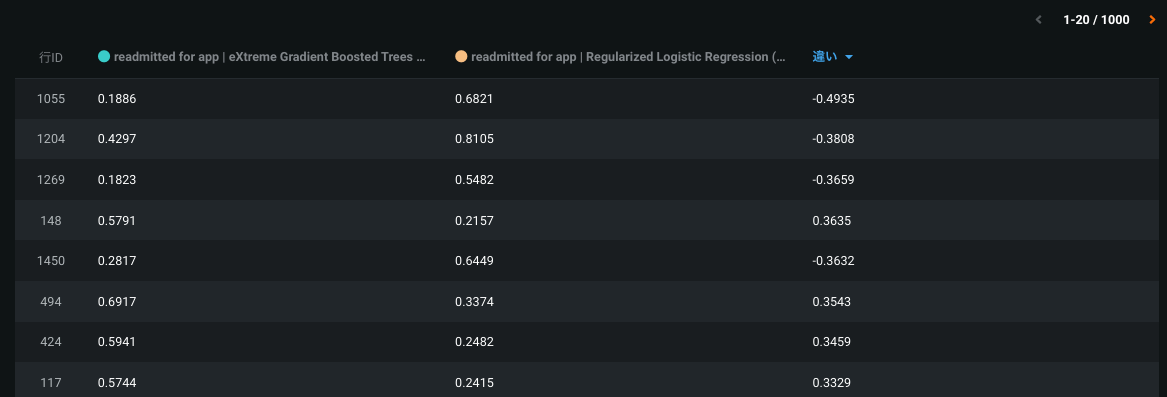
The list below the histogram shows the 1000 most divergent predictions (in terms of absolute value). 違い列は予測がどの程度離れているかを示します。
これらのチャレンジャーのインサイトの詳細については、チャレンジャーモデルの比較を参照してください。
[インテグレーション]タブから削除されたデータベース統合
To simplify the prediction database integration process, the Database section on the Settings > Integrations tab is now fully deprecated. This functionality is replaced by the Prediction > Job Definitions tab.
You can still find the Qlik predictions integration code snippet on the Integrations tab.
予測ソース設定の詳細については、定期的なバッチ予測ジョブのスケジュールを参照してください。
新しい予測機能
予測バッチジョブ定義の機能強化
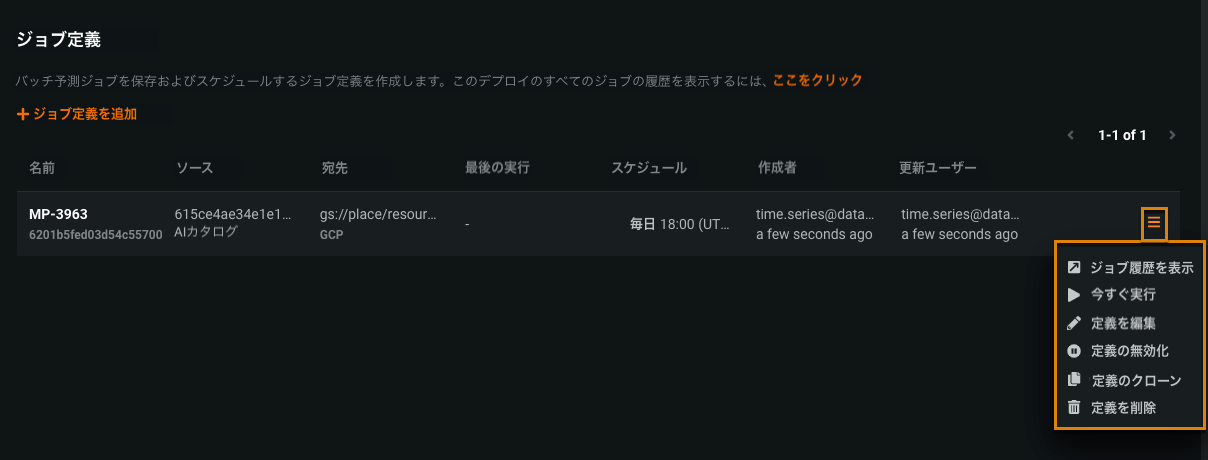
ジョブ定義の無効化
In previous releases, you could disable a job description only by editing it and turning off the Run this job automatically on a schedule toggle. Now, you can disable the description by selecting Disable definition in the action menu for a job definition. Jobs scheduled from that job definition will cease to run. Select Enable definition to resume the jobs.
ジョブ定義のクローン作成
You can now create a copy of an existing job description and update it by selecting Clone definition in the action menu for a job definition. Update the fields as needed, and click Save prediction job definition. ジョブスケジュール設定はデフォルトでオフになっていることに注意してください。
予測ソースの設定
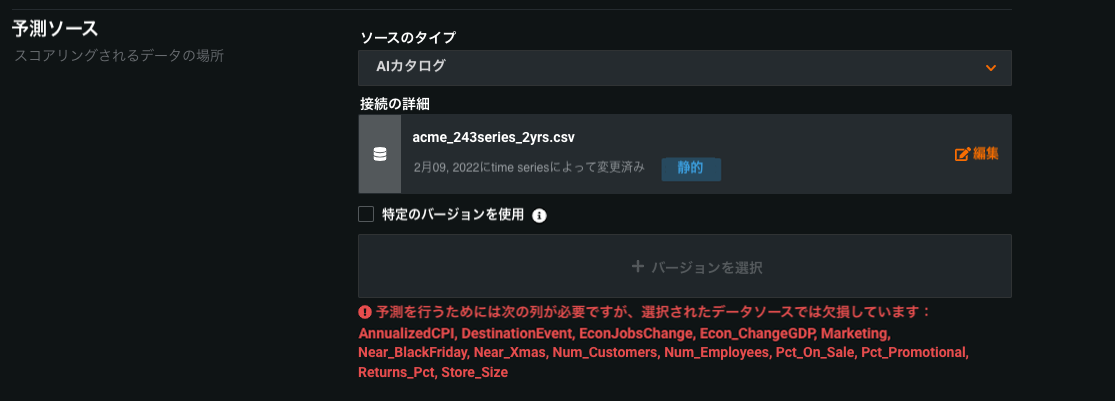
When you set a data source for a prediction job, DataRobot validates that the data is applicable for the deployed model. DataRobot also displays the user that configured the prediction source, the modification date, and a badge that represents the type of the source (in this case, STATIC).
デフォルトの予測インスタンスの選択
Now when you create a batch job definition, you can use the default prediction instance. The advanced options now include a Use default prediction instance toggle:
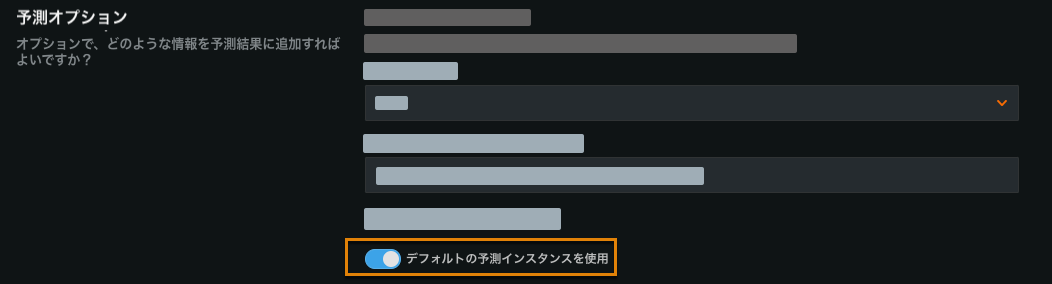
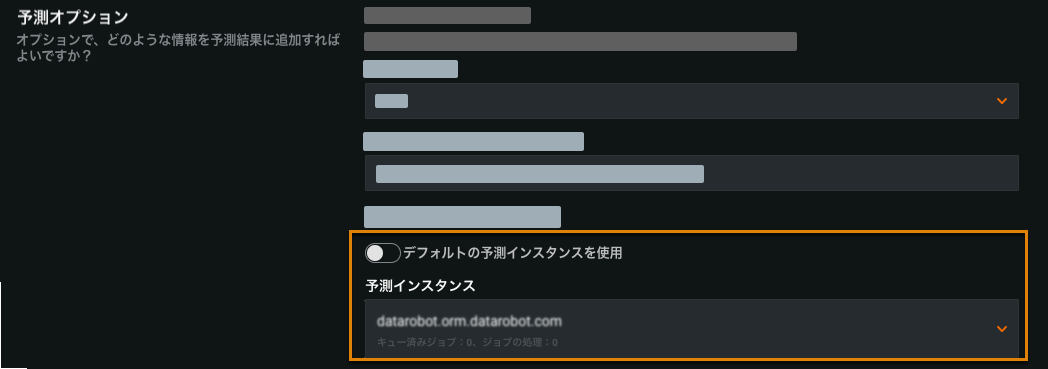
DataRobotは、デフォルトまたは以前に選択された予測インスタンスがアクセス可能で有効であることを確認し、そうでない場合はエラーメッセージを表示します。
トグルをオフにすると、別の予測インスタンスを選択できます。
SnowflakeとSynapseの接続の改善
SnowflakeとSynapse接続の予測ソースおよび宛先設定で以下が改善されました。
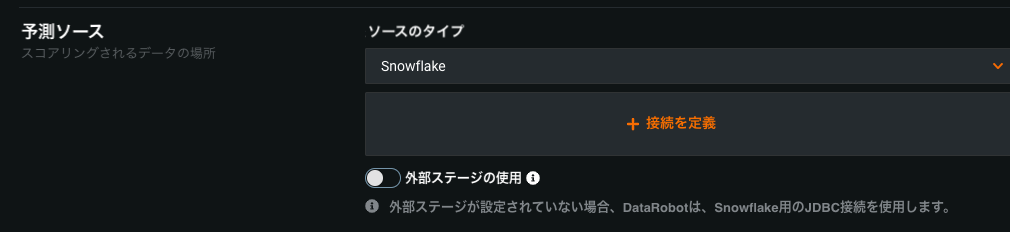
The Use external stage options for Snowflake and Synapse are now optional. Toggling them off updates the connection to use a JDBC adapter directly.
接続の詳細を失うことなく、JDBC Snowflake接続設定とSnowflake最上位レベル接続を切り替えることができるようになりました。
JDBC-SnowflakeおよびJDBC-Synapse接続は、外部ステージの使用オプションがオフになっている状態で、最上位の接続として表示されるようになりました。
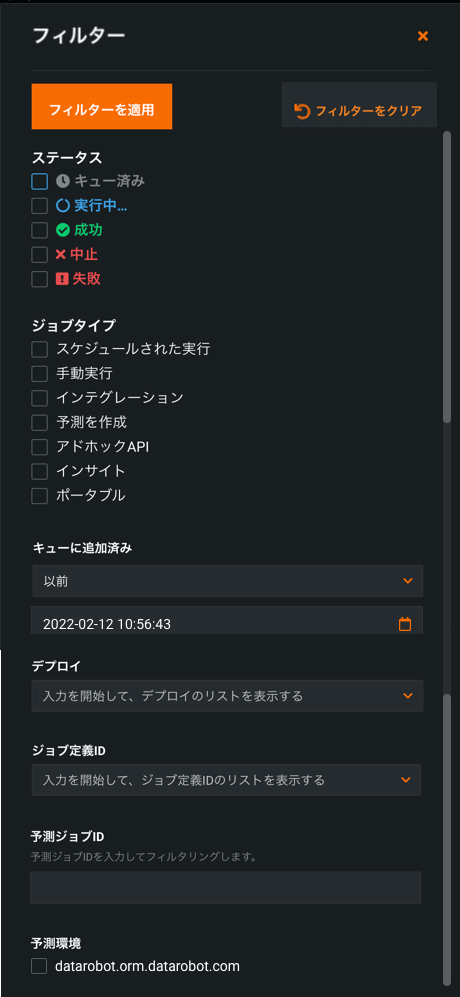
バッチジョブのフィルタリング
予測ジョブタブから、既存のフィルター(ステータス、ジョブタイプ(ジョブの生成に使用された方法に基づく)、ジョブの開始時間と終了時間、デプロイ、ジョブ定義ID、予測ジョブIDおよび予測環境)に加えて、予測ジョブIDでフィルター処理できるようになりました。
リーダーボードスコアリングコードの機能強化
The Leaderboard Scoring Code functionality on the Portable Predictions page has been updated so that it is consistent with that of the Portable Predictions page for deployments. The page now includes the option of including Prediction Explanations in the Scoring Code, as well.
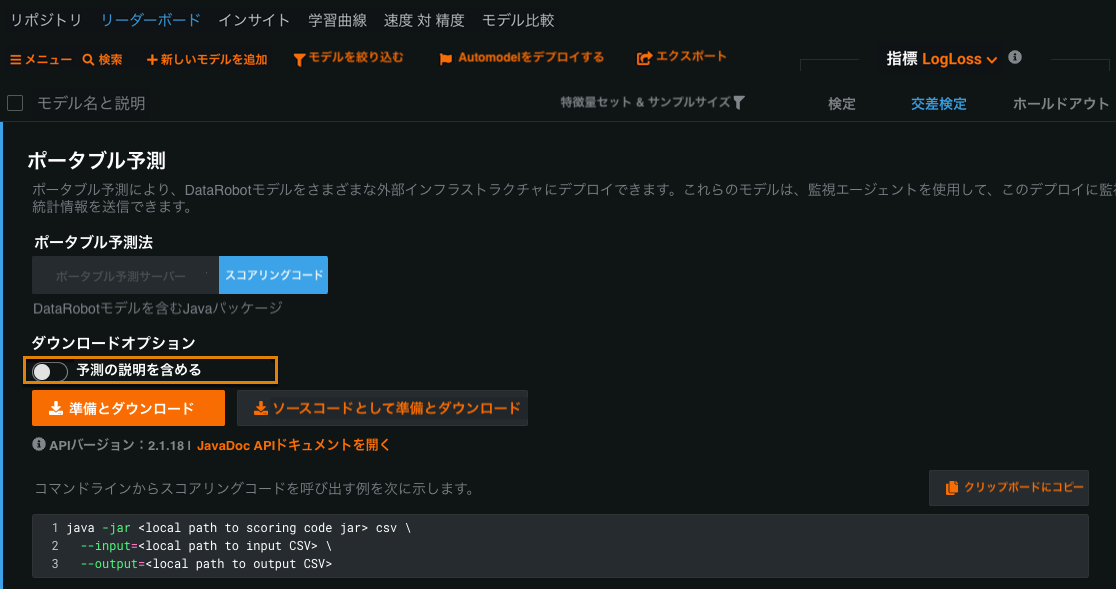
詳細については、リーダーボードからのスコアリングコードのダウンロードを参照してください。
Snowflakeのスコアリングコード
Now GA, you can use Scoring Code as a UDF in Snowflake. Bringing Scoring Code inside of the Snowflake database removes the need to extract and load data, resulting in a significant decrease in the time to score large datasets on comparable infrastructure.
UDFスコアリングコードを生成する方法を参照してください。
Prestoのバッチ予測の書き込みサポート
You can now write prediction data to Presto. To do so, set up Presto as a JDBC data connection. In your batch prediction job definition (Predictions > Job Definitions), select JDBC as the Prediction destination:
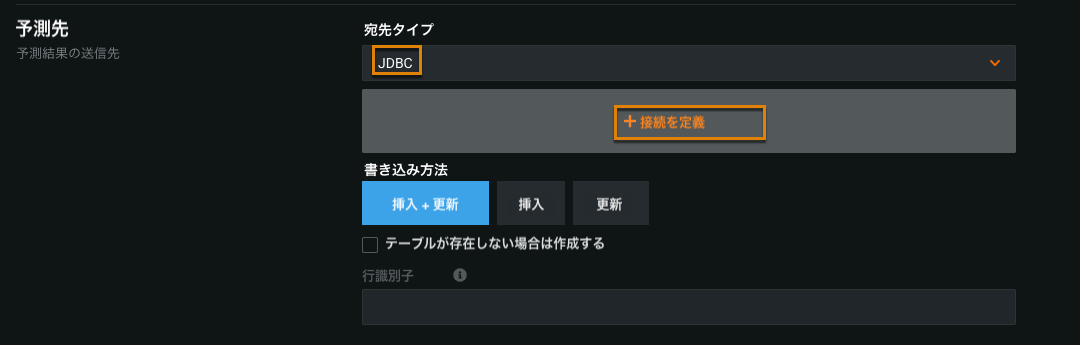
コネクターのリストから、Prestoコネクターを選択します。
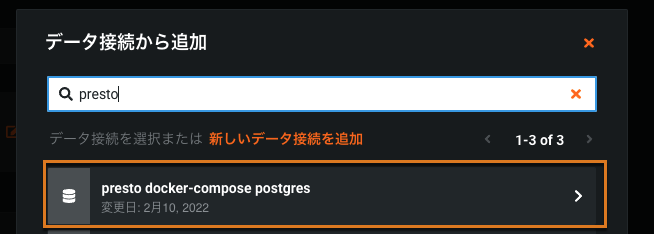
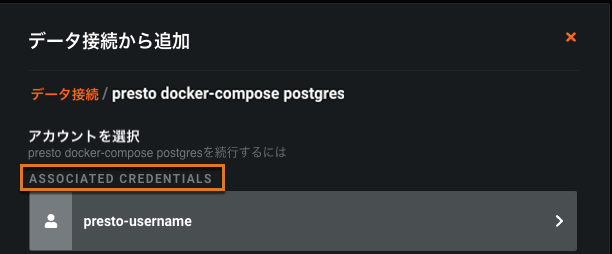
資格情報の入力:
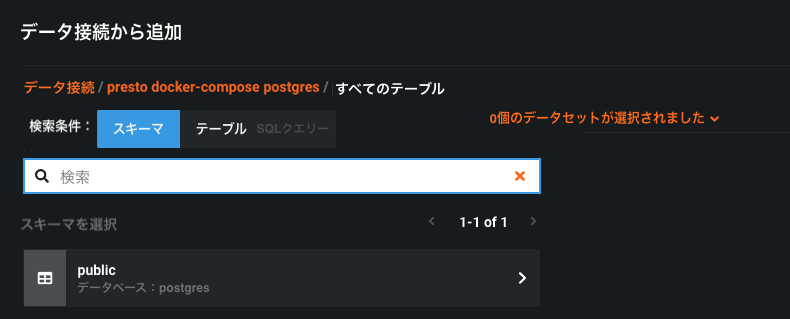
スキーマの選択:
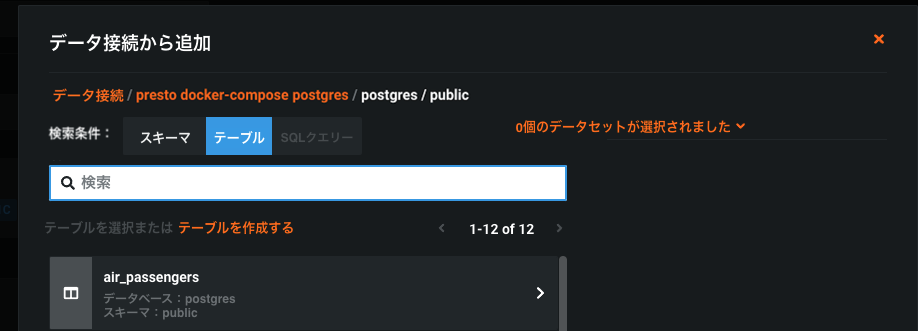
出力テーブルを選択するか、テーブルを新規作成します。
備考
Prestoでは、書き込みを遅らせる可能性のある基盤となるコネクターのほとんどにauto commit: trueを使用する必要があります。
新しいガバナンス機能
データドリフトは、ターゲットの監視と特徴量の追跡に分けられる
データドリフト、精度、公平性の監視をよりきめ細かく制御するために、 デプロイの設定 >データタブのデータドリフト追跡を有効にする設定が2つの設定に分割されました:ターゲット監視の有効化と特徴量ドリフト追跡の有効化です。

You need to enable target monitoring to track accuracy (Accuracy tab) and fairness (Bias and Fairness tab). Feature tracking must be enabled to monitor for data drift (Data Drift tab). These settings are enabled by default. If you turn off either setting, you can still view historical data in the visualizations on the corresponding tabs.
プレビュー機能
MLOpsエージェントのイベントログ
Now available for preview, on a deployment's Service Health tab, you can view MLOps agent Management events (e.g., deployment actions) and Monitoring events (e.g., spooler channel events). Using Monitoring Spooler Channel error events, you can quickly diagnose and fix spooler configuration issues.
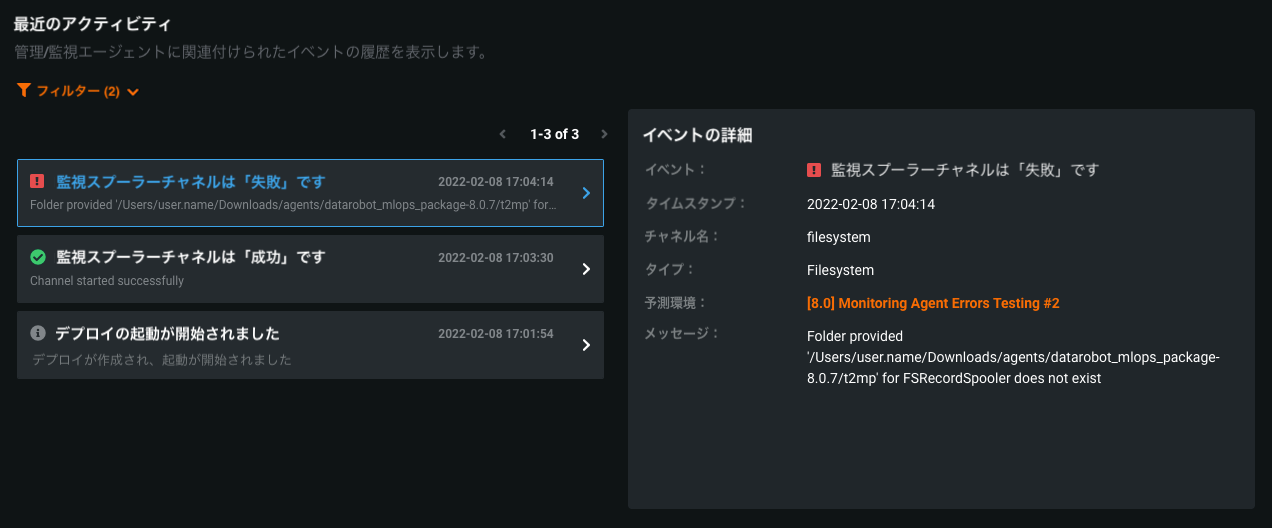
監視イベントを表示するには、エージェント設定ファイル(conf\mlops.agent.conf.yaml)でpredictionEnvironmentIDを指定する必要があります。 MLOpsエージェントのインストールと設定がまだの場合は、インストールと設定のガイドを参照してください。
For more information on enabling and reading the MLOps agent event log, see the documentation.
バッチ予測APIのマルチパートアップロード
Now available for preview, multipart upload for the batch prediction API allows you to upload scoring data through multiple files to improve file intake for large datasets. マルチパートアップロードプロセスでは、複数のPUTリクエストの後に、手動でアップロードを完了するためのPOSTリクエスト(finalizeMultipart)が必要です。
この機能により、バッチ予測APIに2つの新しいエンドポイントが追加されます。
| エンドポイント | 説明 |
|---|---|
PUT /api/v2/batchPredictions/:id/csvUpload/part/0/ |
スコアリングデータを複数の部分でcsvUploadで指定されたURLにアップロードします。 アップロードの各部分について、0を1つずつ順番に増やします。 |
POST /api/v2/batchPredictions/:id/csvUpload/finalizeMultipart/ |
マルチパートアップロードプロセスを完了します。 完了する前に、アップロードの各部分が終了していることを確認してください。 |
この機能により、ローカルファイルアダプターに2つの新しい取り込み設定が追加されました。
| プロパティ | タイプ | デフォルト | 説明 |
|---|---|---|---|
intakeSettings.multipart |
ブーリアン | false |
|
intakeSettings.async |
ブーリアン | true |
|
備考
バッチ予測APIとローカルファイルの取り込みの詳細については、バッチ予測APIと予測取り込みオプションを参照してください。
For more information on the multipart upload for batch predictions process, see the documentation.
記載されている製品名および会社名は、各社の商標または登録商標です。 製品名または会社名の使用は、それらとの提携やそれらによる推奨を意味するものではありません。