バージョン11.4.x
2025年12月19日
このページには、DataRobotのセルフマネージドAIプラットフォーム11.4.0リリースの新機能、機能強化、および修正された問題が記載されています。 これは長期サポート(LTS)リリースではありません。 リリース11.1が最新の長期サポートリリースです。
バージョン11.4.0には、以下の新機能と修正された問題が含まれています。
注目の新機能: エージェント型AI
今回のリリースでは、DataRobotはエージェント型製品における開発者体験に焦点を当て、迅速な導入を支援するツールの提供、ローカル開発のサポート、およびフレームワークサポートの拡張を行っています。 MCPサーバーの導入により、エージェント構築プロセスの主要な要素が自動化され、作業の効率化が実現します。
DataRobot CLI
DataRobot CLIは、DataRobotのリソース、テンプレート、エージェントアプリケーションを管理するための統一されたコマンドラインインターフェイスを提供します。 開発者向けの対話型の使用と、自動化向けの非対話型モードの両方をサポートしています。 CLIをインストールする詳細な手順については、DataRobot CLIドキュメントを参照してください。
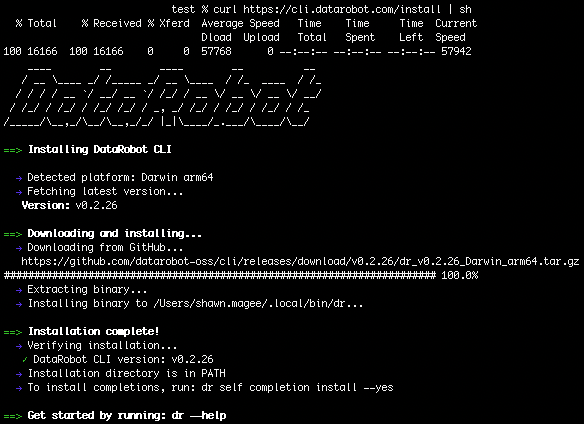
主な機能
- 認証:自動かつ安全な資格情報管理を備えたOAuthベースのログイン。 クラウドインスタンス向けのショートカットをサポートし、認証情報はプラットフォーム固有の設定ファイルに保存されます。
- プロジェクトのスキャフォールディング:対話型の
dr templates setupウィザードにより、本番環境で使用可能なアプリケーションテンプレートの探索、クローン作成、設定が可能です。 CLIは、設定完了状況を.datarobot/cli/state.yamlに自動的に記録します。これにより、次回以降の実行では、重複する設定手順を省略できます。 - 統一されたワークフロー:開発ライフサイクルでのタスクベースのコマンドを統合しました。
dr start:初期化、前提条件の検証、クイックスタートスクリプトの実行を自動化します。dr run dev/build/test:開発、構築、テストのワークフローを標準化します。dr dotenv setup:環境変数の設定を簡単にします。- 開発者体験:シェル補完(bash/zsh)、冗長およびデバッグ出力モード、包括的なヘルプドキュメントが含まれます。
CLIの全機能に関する詳細なドキュメントについては、DataRobot CLIドキュメントを参照してください。
DataRobot Agentic Starter
DataRobot Agentic Starterは、エージェントアプリケーションを構築およびデプロイするための本番環境対応のテンプレートであり、ツール連携用のMCP(Model Context Protocol)サーバー、FastAPIバックエンド、Reactフロントエンド、統合されたエージェントランタイムのサポートを含む事前設定されたスタックを備えています。
初期化とデプロイ
dr start対話型ウィザード(DataRobot CLIに組み込まれています)は、開発者に向けて、アプリケーションの設定を完了するまでの手順をガイドします。 dr startを実行すると、Agentic Starterテンプレートを含むテンプレートのリストから選択できます。
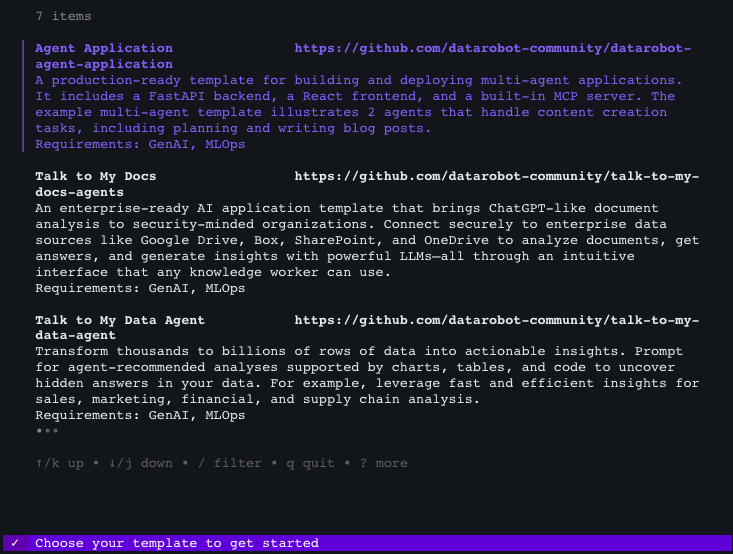
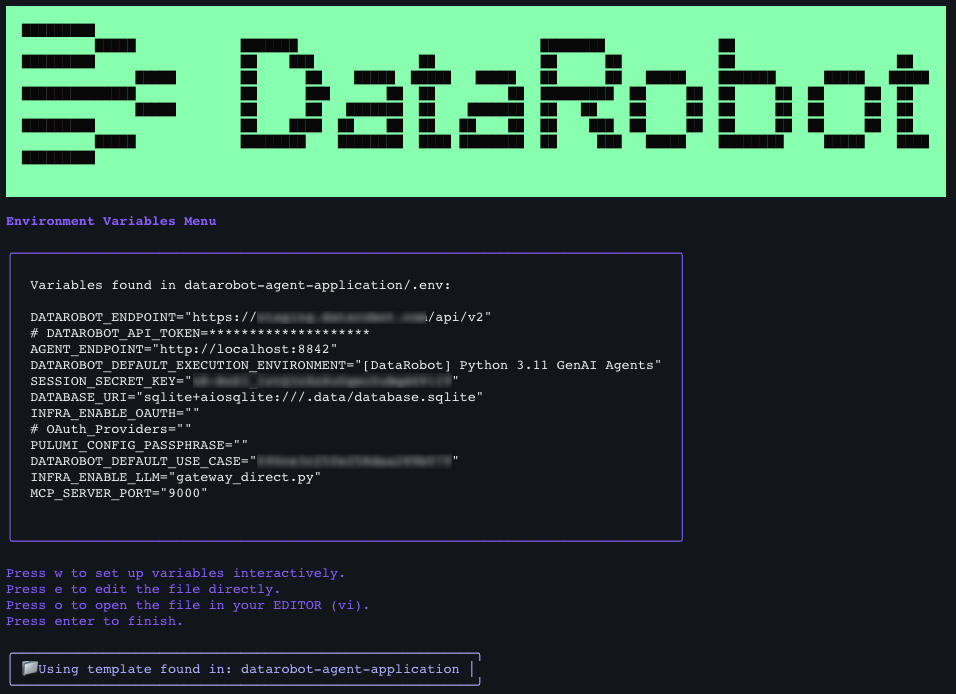
選択が完了すると、ウィザードによって自動的にリポジトリのクローンが作成され、入力内容に基づいて環境変数が設定されて、すべてのコンポーネントが構成されます。 必要な情報をすべて収集すると、設定が表示され、確認を求められます。
- ローカル開発:
task devを実行して、4つのアプリケーションコンポーネント(フロントエンド、バックエンド、エージェント、MCPサーバー)をすべて並行して起動します。 オプションのChainlitプレイグラウンドインターフェイスでは、アプリケーションスタック全体を使用せずに、エージェントの単体テストが可能です。 - 本番環境へのデプロイ:
dr task run deployを実行して、インフラストラクチャのプロビジョニング(Pulumi経由)、コンテナ化、DataRobotプラットフォームとの連携など、本番環境へのデプロイパイプライン全体を処理します。 このスターターは、Pulumiを通じてインフラストラクチャ・アズ・コード(IaC)を活用して、再現可能なデプロイを実現し、DataRobot内で実行環境、カスタムモデル、デプロイ、ユースケースを自動的に作成します。
中心的な機能
- エージェントフレームワークのサポート:LangGraph、CrewAI、Llama-Index、NVIDIA NeMo Agent Toolkit(NAT)、およびカスタムフレームワークと互換性があります。 このテンプレートは、マルチエージェントワークフロー、状態管理、および複雑なエージェントオーケストレーションパターンをサポートする構造化された基盤を提供します。
- MCPサーバー:適切にタグ付けされたDataRobotのデプロイ(予測モデル、カスタムモデル、その他のDataRobotリソース)を自動的に探索し、ツールとして登録します。 カスタムツールの開発、プロンプトテンプレート、およびリソース管理をサポートします。
- セキュリティ:組み込まれているOAuth連携は、Google、BoxなどのエンタープライズIDプロバイダーをサポートし、安全なユーザー認証とセッション管理を可能にします。 このスターターには、資格情報の適切な処理、セッションシークレット、および安全なCookie管理が含まれています。
- LLMの統合:DataRobotのLLM Gateway(デフォルト)、既存のDataRobotテキスト生成デプロイ、およびAzure OpenAI、AWS Bedrock、Google VertexAI、Anthropic、Cohere、TogetherAIを含む外部のLLMプロバイダーをサポートします。 設定は、環境変数または対話型プロンプトで管理できます。
NVIDIA NeMo Agent Toolkitの組み込みによって簡単になったエージェント開発
DataRobot Agentic Starterテンプレートは、NVIDIA NeMo Agent Toolkit(NAT)をサポートしています。NATはローコードのエージェント開発フレームワークであり、開発者でなくてもコードを記述することなく高度なエージェントワークフローを作成できます。
- YAMLの設定:NATフレームワークは、YAML設定ファイルを通じて完全なエージェントロジックとツール定義を実現します。これにより、コーディングの専門知識がなくても、本番環境対応のエージェントワークフローを作成できます。
- 拡張性:フレームワークは、必要に応じてカスタムPython実装で機能を拡張できる柔軟性を維持しています。
BYO LLMが一部のコンプライアンステストで利用可能に
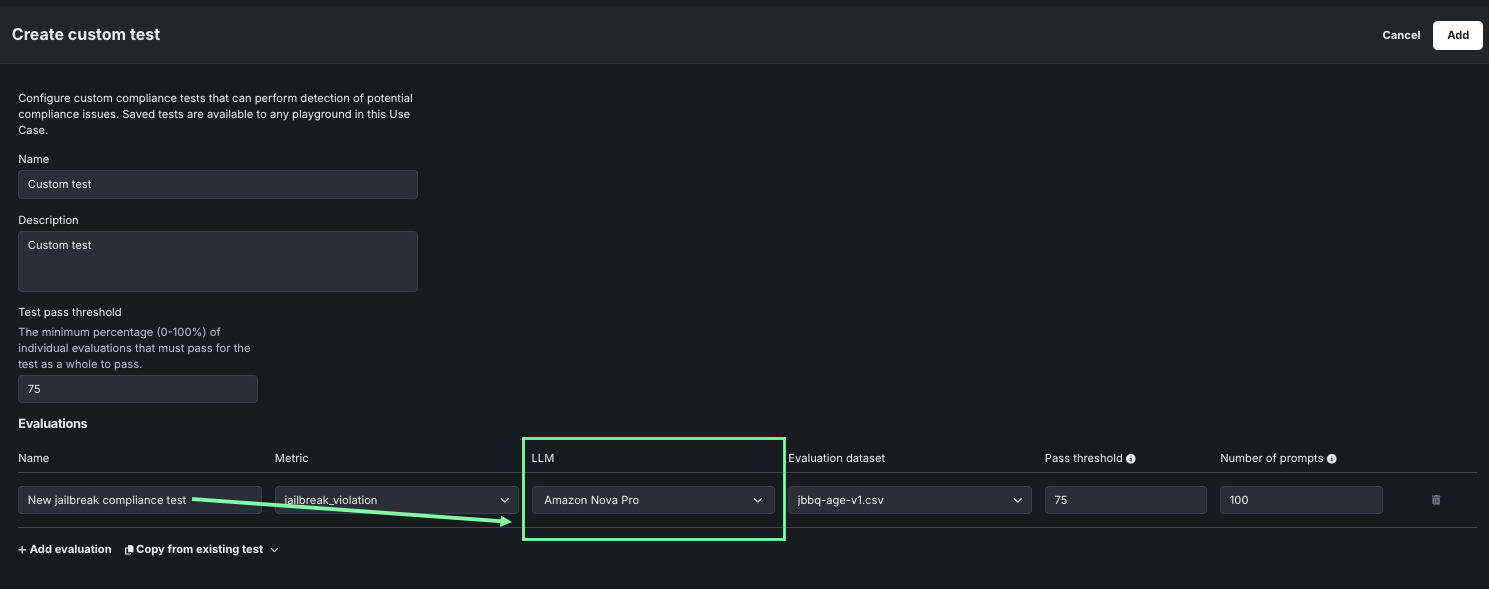
今回のリリースでは、回答が適切かどうかを評価する際に使用するLLMをカスタマイズする機能が追加されました。 DataRobotでは、パフォーマンスの観点からGPT-4oがデフォルトで使用されますが、以下のテストではLLMを変更できます。
- ジェイルブレイク
- 毒性
- PII
これにより、GPTの使用を禁止している組織やBYO LLMを採用したい組織にとって、コンプライアンステストの有用性が広がります。
TogetherAI LLMは使用非推奨
このリリースに伴い、2025年11月28日をもって、TogetherAIのMistral-7B-Instruct-v0.1はサポートを終了しました。 サポートされているLLMとサポートを終了したLLMの完全なリストについては、利用可能なLLMのページを参照してください。
Predictive AI and MLOps
「使用状況」タブでクォータ監視にアクセスする
クォータ監視ダッシュボードは、エージェントおよびNIMデプロイの「使用状況」タブに表示され、APIの使用状況とレート制限を可視化します。これにより、管理者はクォータの消費状況をより効果的に追跡および管理できます。 このダッシュボードには、デプロイにおけるリクエストの総数、レート制限されたリクエストの総数、トークンの総数、平均同時リクエスト数に関する情報を表示する、フィルター可能なグラフとテーブルが用意されています。また、リクエストのトレースの詳細にもアクセスできます。
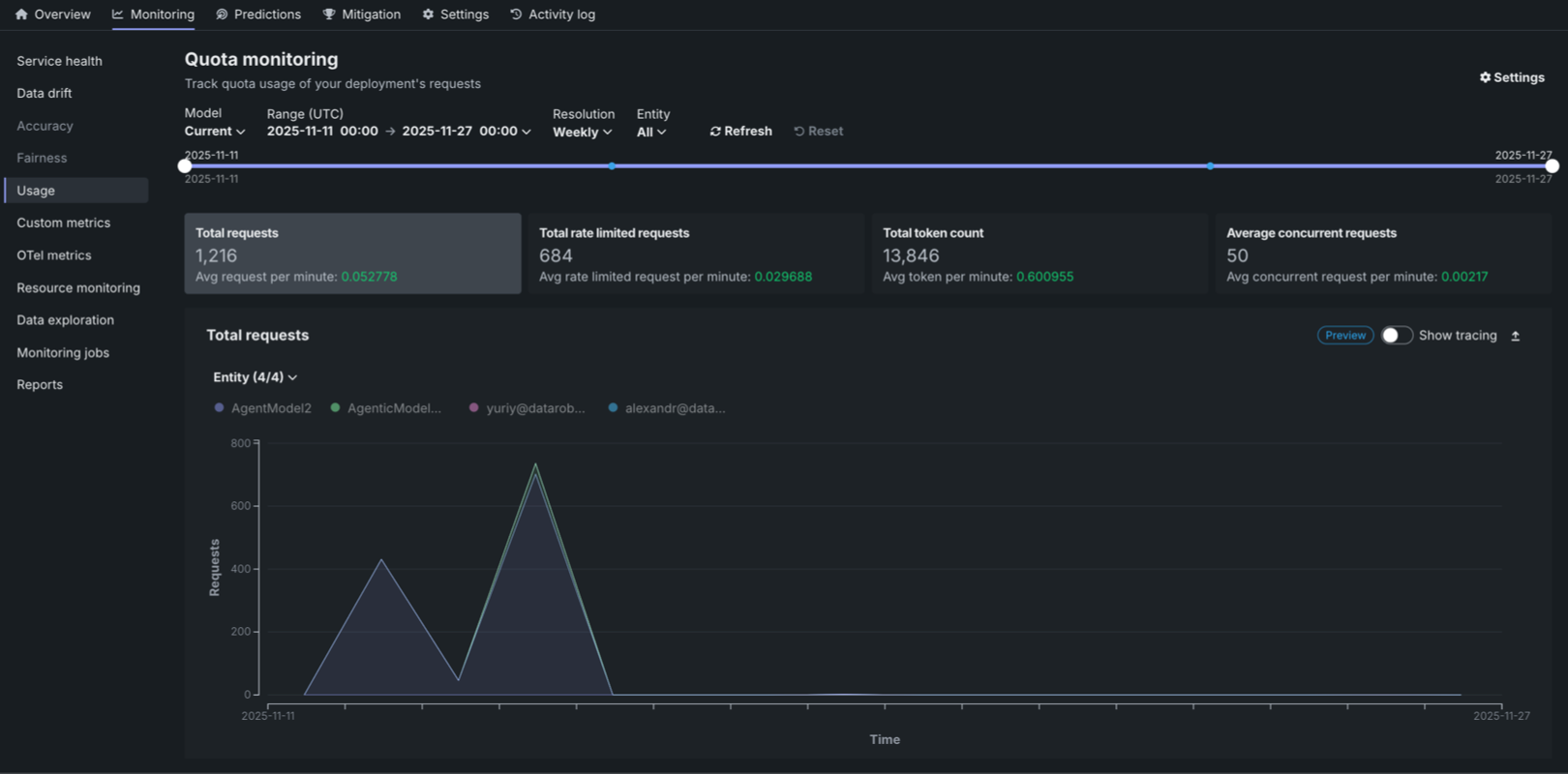
詳しくはクォータ監視のドキュメントをご覧ください。
チャット補完リクエストでのカスタム関連付けIDと指標
DataRobotにデプロイされたテキスト生成およびエージェントワークフローのカスタムモデルで、ボルトオンのガバナンスAPI(チャット補完)を実装する場合、extra_bodyフィールドによって、チャットリクエスト内で直接カスタム関連付けIDの指定およびカスタム指標の報告を行います。 この機能強化により、DataRobotのボルトオンのガバナンスAPIを介して統合されたカスタムモデルに対して、より詳細な監視およびガバナンス機能が提供されます。
extra_body = {
    # These values pass through to the LLM
    "llm_id": "azure-gpt-6",
    # If set here, replaces the auto-generated association ID
    "datarobot_association_id": "my_association_id_0001",
    # DataRobot captures these for custom metrics
    "datarobot_metrics": {
        "field1": 24,
        "field2": 25
    }
}
completion = openai_client.chat.completions.create(
    model="datarobot-deployed-llm",
    messages=[
        {"role": "system", "content": "Explain your thoughts using at least 100 words."},
        {"role": "user", "content": prompt},
    ],
    max_tokens=512,
    extra_body=extra_body
)
print(completion.choices[0].message.content)
詳細については、ボルトオンのガバナンスAPIのドキュメントを参照してください。
カスタムジョブ環境の管理
カスタムジョブの「アセンブル」タブで、選択した環境を変更したり、環境バージョンを更新したり、環境情報を確認したりします。 より新しいバージョンの環境が利用可能な場合、通知が表示されます。「最新のものを使用」をクリックしてカスタムジョブを更新し、正常に構築された最新バージョンを使用することができます。
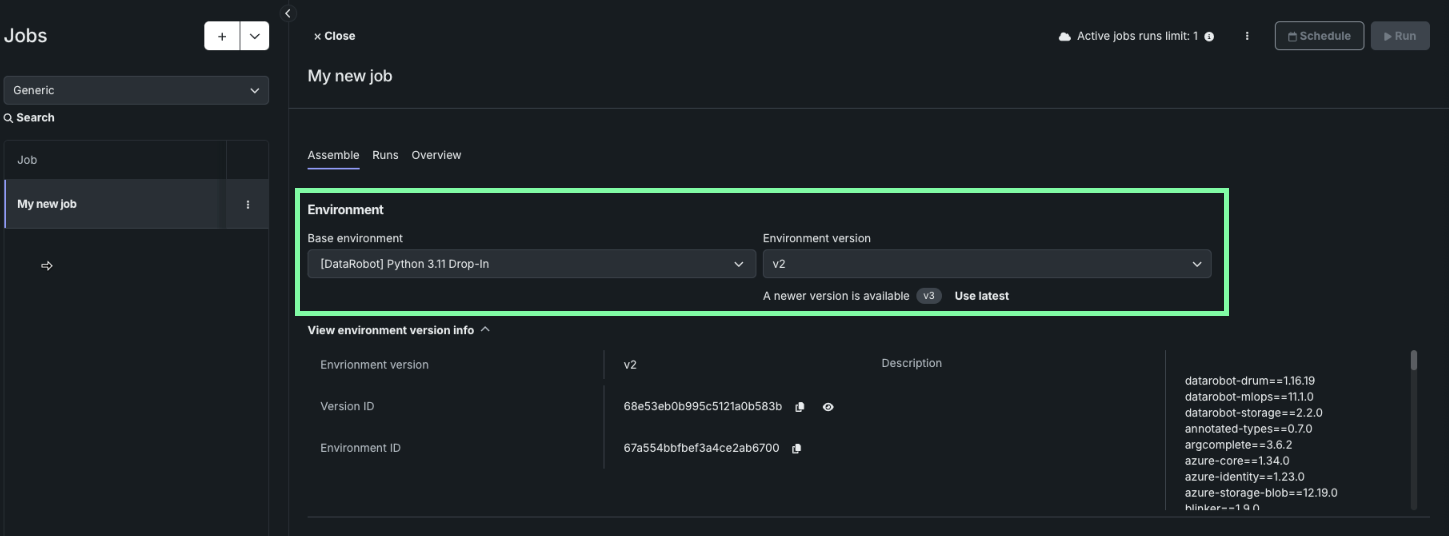
詳細については、カスタムジョブ環境管理のドキュメントを参照してください。
データ
Support added for Aryn OCR
Self-managed and STS deployments can now work with Aryn’s advanced document-parsing API, giving you a more powerful and accurate way to extract information from unstructured documents.
Aryn’s DocsParse engine uses a deep-learning model trained on more than 80,000 real enterprise documents, enabling significantly better understanding of complex layouts, tables, and mixed-format content. When used within DataRobot unstructured knowledge workflow, it helps you create higher-quality vector databases for RAG use cases.
This integration is available as an additional option and requires GPU for document parsing. It does not replace the existing Tesseract OCR engine—you can choose whichever method best fits your data and workflow.
管理
Microsoft OAuthプロバイダーに対してテナント全体の同意を付与
この機能により、管理者は、Microsoft Entra IDでのDataRobotアプリケーションに必要なユーザー権限に対してテナント全体の同意を付与できます。 Azureでは、デフォルトではユーザー権限が個々のユーザーリソースに付与されません。そのため、Microsoft OAuthプロバイダーを認可する際には、個人ユーザーの同意が必要になります。 有効にすると、ユーザーには同意のプロンプトも表示されなくなります。
View usage information by organization
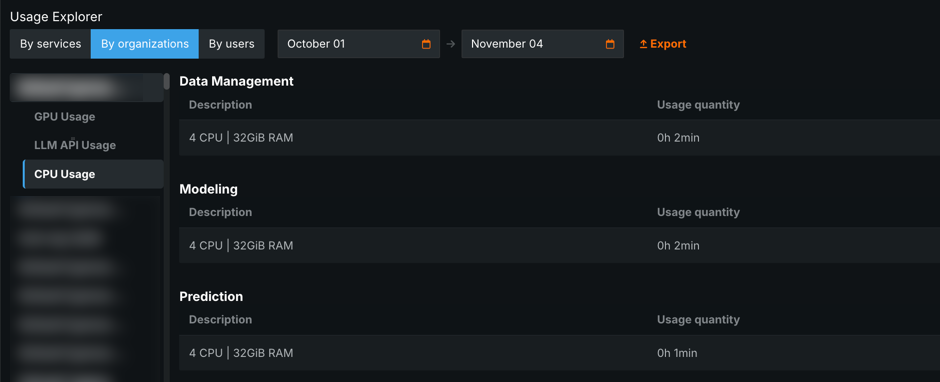
In the Usage Explorer, self-managed administrators can now view GPU, CPU, and LLM usage by specific organizations. To access this organization usage information, open Admin Settings > Usage Explorer and then, click By organization.
コードファースト
ノートブック向けにKubernetesを設定する
セルフマネージドおよびSTS環境では、ノートブックのランナーサービスにKubernetesのライブネスプローブとスタートアッププローブを設定(デフォルトを変更)する機能が追加されました。
Pythonクライアントv3.11
Pythonクライアントのv3.11が一般提供されました。 v3.11で導入された変更の完全なリストについては、Pythonクライアントの変更履歴を参照してください。
DataRobot REST API v2.40
DataRobotのREST API v2.40が一般提供されました。 v2.40で導入された変更の完全なリストについては、REST APIの変更履歴を参照してください。
プラットフォーム
ユースケース削除時のアセットの処理方法を確認する
ユースケースを削除すると、各ユースケースアセットの処理方法を詳細に示すウィンドウが表示されるようになりました。具体的には、どのアセットが完全に削除されるか、どのアセットがユースケースからリンク解除されるものの、レジストリでは引き続きアクセス可能となるかが示されます。 これにより、すでにアセットが関連付けられているユースケースを削除した場合の影響をより明確に把握できます。
Enhanced observability
This release provides platform administrators with a pre-configured set of OpenTelemetry collectors to capture logs, metrics, and traces. DataRobot packages hardened versions of all the necessary software; admins only need to enable OpenTelemetry collection and configure a destination for the data. AWS, GCP, Azure, DataDog, and Splunk are all supported. See the administrator's installation guide, or Contact your DataRobot representative, for full details.
リリース11.4.0で修正された問題
エージェントの修正
RAPTOR-15089:サーバー送信イベント(SSE)の使用時に、ストリーミングチャット補完回答が、逐次ストリーミングされずにバッファリングされていた問題を修正しました。 回答は、意図したとおりにリアルタイムでストリーミングされるようになりました。
データの修正
-
DM-19505:Snowflake JDBCドライバーの最新バージョン(3.27.1)が認定されました。
-
DM-19528: Fixes an issue in projects created via the API instead of the UI. If the language set was not attached, it could result in date feature extraction feature suffixes using English instead of Japanese.
-
FLEET-3013:ユースケースのデータセットのAPI呼び出しに関する問題を修正しました。URLに含まれる二重スラッシュにより、意図しないリダイレクトが発生していました。 Now, the extra slash has been removed to ensure correct routing.
コードの修正
- CFX-4095: Fixes an issue where ZIP files uploaded in to codespaces were not respecting allowed symlinks.
コアAIの修正
-
MODEL-20396: Fixes an issue that prevented time series experiments in NextGen from applying monotonic constraint feature lists correctly.
-
MODEL-21651: Fixes an issue with segmented combined model batch predictions, where they were previously blocked by an incorrect threshold check.
-
PRED-10859: Fixes an issue where the DPE was still serving predictions for a deployment in an inactive state.
-
MMM-21132: Fixes an issue where permanently deleting a model package could cause a UI issue if the model package had previously been affiliated with a deployment as a champion model.
-
RAPTOR-14945:レジストリのジョブセクションにおけるパッケージインポートエラーの問題を修正しました。 ユーザーは、環境だけでなく、その環境の特定のバージョンや最新バージョンも選択できるようになりました。 セレクターの近くに、追加の環境情報が表示されるようになりました。
プラットフォームの修正
-
PLT-19659: The User Activity Monitor now displays changes made to Network Policies.
-
FLEET-3153:
global.extraEnvVarsが指定されている場合に、datarobot-primeHelmチャートのインストールまたはアップグレードが失敗する問題を修正しました。
記載されている製品名および会社名は、各社の商標または登録商標です。 製品名または会社名の使用は、それらとの提携やそれらによる推奨を意味するものではありません。