バージョン11.6.0
2026年3月7日
このページには、DataRobotのセルフマネージドAIプラットフォーム11.6.0リリースの新機能、機能強化、および修正された問題が記載されています。 これは長期サポート(LTS)リリースではありません。 リリース11.1が最新の長期サポートリリースです。
バージョン11.6.0には、以下の新機能と修正された問題が含まれています。
エージェント型AI
新しいLLMとサポートが終了したLLM
今回のリリースから、OpenAI GPT-5.2がLLM Gatewayを介して利用可能になりました。 従来通り、組織の特定のニーズに対応するために外部連携を追加できます。 サポートされているLLMの完全なリストについては、利用可能なLLMのページを参照してください。
さらに、以下のLLMのサポートが終了しました。
- GPT-4o Mini(2026年2月27日にサポート終了)
- Cerebras Qwen 3 32B(2026年2月16日にサポート終了)
- Cerebras Llama 3.3 70B(2026年2月16日にサポート終了)
- Mistral (7B) Instruct v0.2(2026年2月25日にサポート終了)
- Marin Community Marin 8B Instruct(2026年2月25日にサポート終了)
Agent Assist
リリース11.6.0では、AIエージェントの開発に最適化された対話型AIアシスタントであるAgent Assist (dr-assist)が導入されました。 ユーザーが自然な会話を通じてエージェントを設計、コーディング、およびデプロイするのに役立ちます。ユーザーが必要なエージェントについて説明すると、アシスタントがAgentic Starterアプリケーションテンプレートによって提供される基盤に基づいてエージェントの構築を支援します。
Agent Assistは、DataRobot CLIにプラグインとして統合され、モデルへのアクセスにDataRobot LLM Gatewayを使用します。 During the design and code cycle, Agent Assist can outline which tools an agent should call based on the proposed functionality—for straightforward tools, it can implement the tool code; for more complex tools (such as those that consume API tokens or write to a database), it can scaffold the initial file structure for the human-in-the-loop to complete in the editor or development environment of their choice.
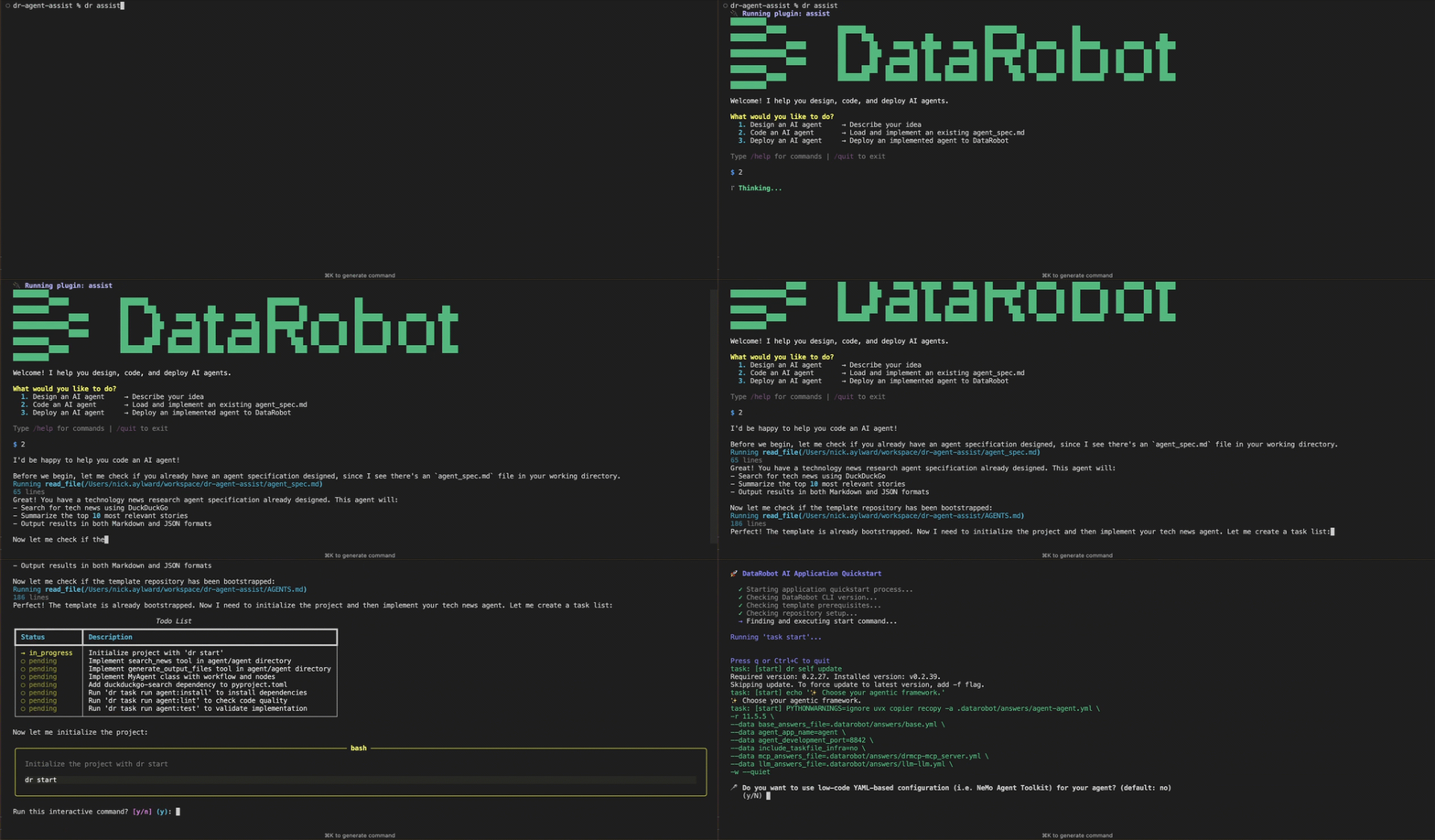
Agent Assistでは、以下のことが可能です。
- Design AI agents by helping users think through specifications, ask clarifying questions, and produce an agent specification file (
agent_spec.md). - Research solutions using file search and analysis (an internal agent can read files, list directories, grep, and glob).
- Code AI agents by loading an existing
agent_spec.md, cloning the DataRobot agent template repository, and implementing the agent with file edits and shell commands. - Simulate an agent from a specification before coding—rehearsal mode lets users try the design interactively to verify the functionality outlined by the specification.
- Deploy agents to DataRobot following the template’s deployment instructions.
予測AI
増分学習で動的データセットのサポートを開始
増分学習(IL)は、10GB〜100GBのデータセットを利用する教師ありエクスペリメントに特化したモデルトレーニング方法です。 データをチャンク化し、トレーニングのイテレーションを作成することで、予測を行うための最適なモデルを特定できます。 今回のリリースにより、動的データセットについてはサイズを問わず増分学習を利用できるようになりました。一方、静的データセットについては、10GBから100GBの範囲である必要があります。
データ
NextGen全体でデータベース接続UIを統一
このリリースでは、データ接続を操作する際のユーザーインターフェイスがNextGen全体で標準化され、より統一された操作性になりました。 このアップデートには以下の領域が含まれます。
これまでは、データベース接続にアクセスする場所によってインターフェイスが大きく異なる場合がありました。
DataRobotにTrinoコネクターのサポートを追加
DataRobotにTrinoネイティブコネクターのサポートが追加され、以下の操作が可能になりました。
- データ接続を作成して設定する。
- TrinoからDataRobotにデータをアップロードする。
- バッチ予測ジョブの取り込み元および出力先として使用する。
MLOpsと予測
アセットの系統グラフビュー
系統ビューでは、特定のMLOpsアーティファクトに関連付けられたアセットと関係性が表示されます。 このビューは、コンソールでのデプロイの概要タブ、レジストリでの登録済みモデルのバージョンの詳細、およびワークショップでのカスタムモデルのバージョンの詳細で利用できます。 各場所において、系統セクションはアセット(モデル、データセット、エクスペリメント、デプロイ、その他の接続されたアーティファクトなど)の完全なコンテキストを理解するのに役立ちます。これにより、AIシステムをレビューし、アセットの関連性を追跡することができます。
グラフタブには、ノード(アセット)とエッジ(関係性)で構成されるDAG(有向非巡回グラフ)として、それらの関係性のインタラクティブなエンドツーエンドの視覚化が表示されます。 表示中のアセットは、紫色の外枠で強調表示されます。 When reviewing edges, solid lines represent concrete, persistent relationships within the platform, such as a registered model used to create a deployment. Dashed lines 矢印は通常、「先祖」またはコンテナから「子孫」またはコンテンツに向かって流れます(例:登録済みモデルバージョンからデプロイへ)。
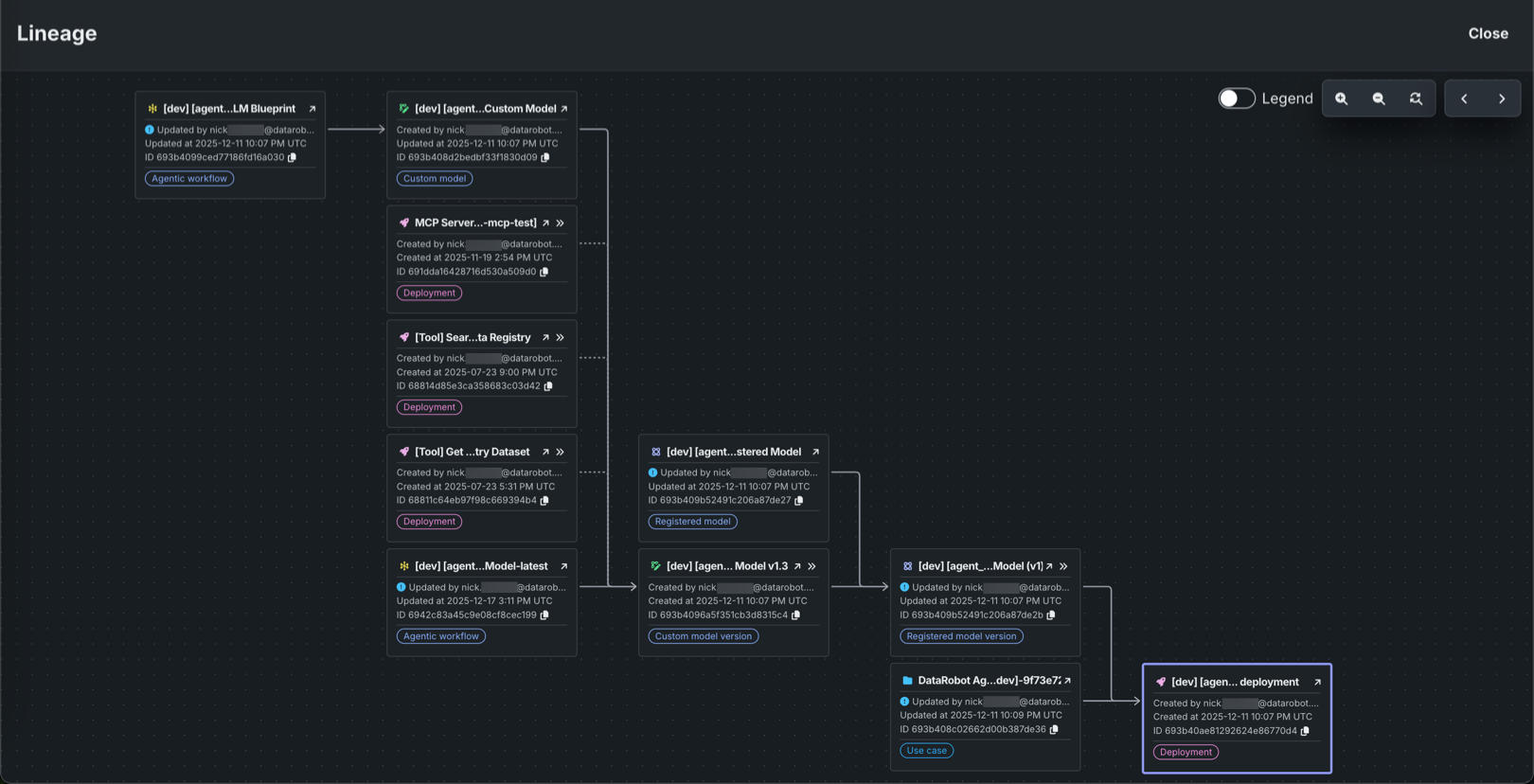
グラフと利用可能なコントロールの詳細については、デプロイの概要、登録済みのモデル、およびカスタムモデルのバージョンのドキュメントを参照してください。
予測サービスの改善(ゼロスケーリング)
このリリースでは、チャット補完予測サービスの待機タイムアウトを延長し、「ゼロスケーリング」による最適化によってエージェントワークフローおよびカスタムモデルデプロイの信頼性を向上させました。 ゼロにスケーリングされたデプロイが最初の予測リクエストを受信した際には、新しいサーバーをプロビジョニングする必要があります。 従来の20秒の待機タイムアウトでは新しいサーバーが準備完了になるには短すぎる場合が多く、その結果「Bad Gateway」応答が発生していました。 このアップデートでは、予測サービスの待機タイムアウトを20秒から300秒(5分)に延長し、サーバーの初期プロビジョニングに20秒以上かかる場合の「Bad Gateway」応答の発生を低減します。
プラットフォーム
アカウントのリソース使用状況に関する情報を確認する
すべてのユーザーがアカウント設定でリソース使用状況に関する情報を確認できるようになりました。これにより、プラットフォーム全体におけるグラフィックス処理装置(GPU)、中央処理装置(CPU)、大規模言語モデル(LLM)APIの使用状況をより明確に把握できます。 使用状況の情報にアクセスするには、アカウント設定 > 使用状況エクスプローラーを開きます。 このページでは、指定した日付範囲におけるサービス別のリソース消費量を確認できるほか、レポートをCSVファイルとしてエクスポートすることも可能です。 管理者は、管理者設定 > テナントの使用状況エクスプローラー(以前の名前は「使用状況エクスプローラー」)から追加のダッシュボードにアクセスできます。
管理
非ビルダーユーザーを組織に追加する
管理者が、組織に非ビルダーユーザーを追加できるようになりました。 ビルダー以外のユーザーは、参加する組織に関連付けられたアプリケーションと、ユーザーの基本設定のみにアクセスできます。 アプリケーションを操作する際、予測の実行、プロンプトの追加、チャットの開始、表示/削除、およびデータのアップロードを行うことができます。
非ビルダーユーザーを追加するには、既存のユーザーアカウントに非ビルダーのシートライセンスを割り当てるか、新しいユーザーを招待する機能を使用して、一度に最大20名まで招待することができます。 なお、非ビルダーユーザーは、組織の最大アクティブユーザー割り当て数には含まれません。
GoogleドライブのOAuthサポート
このリリースでは、一元化されたセルフサービスOAuthシステムを導入することで、GoogleドライブやConfluenceなどのサービスに対するDataRobotのOAuth接続プロセスを簡素化しました。 つまり、外部アカウントの設定と認可を一度行うだけで、すべてのセキュアな接続を1か所で管理できるようになります。 DataRobotは、データの取込みが必要な際に一時的なアクセストークンを自動的に取得します。 この標準化により、接続がより簡単かつ安全になり、アプリやモデル作成プロジェクトなど、より多くのDataRobot領域でこれらのコネクターを使用できるようになります。 サポートされているプロバイダーのOAuth接続を設定する方法については、OAuthプロバイダーの管理を参照してください。
コードファースト
Pythonクライアントv3.13
Pythonクライアントのv3.13が一般提供されました。 v3.13で導入された変更の完全なリストについては、 Pythonクライアントの変更履歴を参照してください。
DataRobot REST API v2.42
DataRobotのREST API v2.42が一般提供されました。 v2.42で導入された変更の完全なリストについては、REST APIの変更履歴を参照してください。
リリース11.6.0で修正された問題
アプリケーションに関する修正
-
APP-5390:アプリビルダーがアプリ内の他のユーザーによるアセットの使用を有効にできる機能を追加しました。これにより、ビルダー以外のユーザーにデータストアやレジストリアイテムへのアクセスを許可し、アプリから価値を見出せるようにします。
-
APP-5462:SSOを使用したログインにおいて、アプリケーションへの未認証アクセスがログイン後にそのアプリケーションにリダイレクトされない問題を修正しました。
-
APP-5463:アプリケーションを1つしか使用していないビルダー以外のユーザーは、アプリケーションギャラリーからアプリケーションに自動的にリダイレクトされるようになりました。
データの修正
- DM-20379:AzureのOAuthにおいてトークンの取得が妨げられていた問題を修正しました。
コアAIの修正
-
MMM-21322:エージェントワークフローモデルを使用しているデプロイにおいて、
association_idやPROMPT_COLUMN_NAMEが提供されない特定のケースがあるかどうかを確認し、ユーザーが問題箇所へ移動してトレースロジックを確認できるようにします。 -
MODEL-22260:プライベートCA TLS発行者を使用してオブジェクトストレージに接続する際に、
tileserver-watcherコンテナがTLSの検証に失敗する問題を修正しました。 -
MODEL-22621:ユーザーに関連付けられたプロジェクトが存在しない場合、直ちに終了し、
dr.Project.listにおけるHTTP 500/BSONObjectTooLargeを解決します。 -
PRED-12306:デプロイクォータ使用状況監視ページのデフォルトの日付範囲が90日に制限されるようになりました。これは、長い範囲をリクエストしたときにOTel Collector APIからエラーが発生しないようにするためです。
-
RAPTOR-15577:レジストリにおけるデプロイボタンのブロックに関する意思決定ロジックを修正し、デプロイ作成フェーズにおける制限値の正しい計算と整合させました。 これにより、カスタムモデルデプロイの使用数クォータに達した場合、デプロイボタンがブロックされるようになりました。
プラットフォームの修正
-
CMPT-4664:内部ヘルスチェック中の不要な"missing tenant context"ログを無効にし、
k8s_workers_reportによってログがいっぱいになるのを防ぎます。 -
CMPT-4667:スキャナーモードにおいて、IBSはビルドの前に認証を行うようになりました。
-
CMPT-4684:イメージ削除のエラーを修正しました。 リリース11.1から11.4では、インストールイメージを削除できませんでした。 イメージの削除が有効になりましたが、以前のイメージのメタデータが欠落または破損している場合があり、削除エンドポイントが失敗する可能性があります。 K8sジョブがレジストリからイメージのメタデータを取得・更新し、削除エンドポイントが完了できるようになりました。
-
CMPT-4705:イメージスキャンが有効な場合のビルド失敗の検出を改善しました。
initコンテナのエラーでは、ビルドがERRORのままタイムアウトするのではなく、直ちに失敗するようになりました。 -
CMPT-4706:スキャンレポート内のbuild-idをimage-uriに置き換えました。これにより、スキャナーアップロードレポートが既存の場所に書き込まれても、上書きされることはありません。
-
CMPT-4807:
PostgresConnectivityHealthCheckは、非標準ポートで動作するPostgresをEngConfig['PGSQL_PORT']経由でサポートするようになりました。 -
PLT-20382:完全削除プロセスに影響する問題を修正しました。 これまで、特定のシナリオにおいて、組織管理者が共有リソースを持つユーザーを完全に削除しようとした際、削除を完了できないことがありました。
-
PLT-20525:100人を超えるユーザーを抱える組織において、シートライセンス管理ページに不完全なデータが表示される問題を修正しました。
-
PLT-20599:LDAP/SAMLのユーザープロビジョニングプロセスにおいて、該当するサブスクリプションが適用可能な場合、新規ユーザーアカウントにビルダー以外のシートを割り当てるようになりました。
Notebooksに関する修正
-
CFX-4797:JavaScript(
.js)ファイルが組み込みのCodespaceエディターで開かない問題を修正しました。 -
CFX-5124:特定のユースケースに対して
OWNER権限を持つユーザーが、そのユースケース経由で共有されたノートブックやCodespaceを削除できない問題を修正しました。
記載されている製品名および会社名は、各社の商標または登録商標です。 製品名または会社名の使用は、それらとの提携やそれらによる推奨を意味するものではありません。