Version 11.7.0
March 30, 2026
This page contains the new features, enhancements, and fixed issues for DataRobot's Self-Managed AI Platform 11.7.0 release. これは長期サポート(LTS)リリースではありません。 リリース11.1が最新の長期サポートリリースです。
Version 11.7.0 includes the following new features and fixed issues.
エージェント型AI
Connect to remote agents using the Agent2Agent protocol
Template agents can expose themselves as agent-to-agent (A2A) servers and connect to remote agents via the agent-to-agent protocol. You can configure the A2A protocol through the agentic application template repo. Configuring an A2A protocol allows you to build complex, multi-agent systems that are governed and auditable. You can also configure external agent communication via the Python API client.
PostgreSQL added as a vector database provider
You can now create a direct connection to PostgreSQL using the pgvector extension, which provides vector similarity search, ACID compliance, replication, point-in-time recovery, JOINs, and other PostgreSQL features. This is in addition to Pinecone, Elasticsearch, and Milvus for use as an external data connection for vector database creation.
Registry Tools and MCP workflows
A new section has been added to Registry that allows users to manage agentic tools available to the deployment. Agentic tools provide a way for agents to interact with external systems, tools, and data sources.
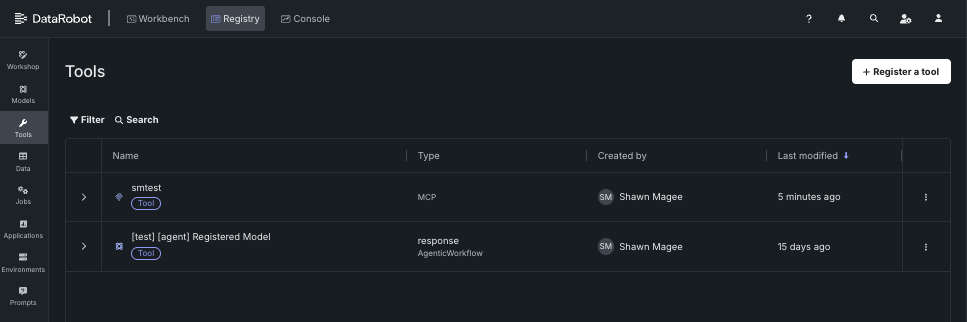
The Registry > Tools page describes how to register and view and manage agentic tools for use with DataRobot's MCP server. For additional information on the MCP server, see the Model Context Protocol documentation.
ACL hydration for vector databases
ACL hydration applies the same document-level permissions from Google Drive and SharePoint to vector database retrieval. When content is ingested, DataRobot stores access control information from the source, keeps it updated (Drive Activity API for Google Drive, Delta Query for SharePoint), and filters RAG / vector search results so each user only sees chunks from files they're allowed to access in the original system.
Organization admins enable access control list synchronization on a supported data connection; applications can forward X-DataRobot-Identity-Token so agents enforce per-user filtering. This is a premium capability.
Explore new GPU-optimized containers in the NIM Gallery
NVIDIA AI EnterpriseとDataRobotは、お客様の組織の既存のDataRobotインフラストラクチャと連携するように設計された、構築済みのAIスタックソリューションを提供しています。これにより、堅牢な評価、ガバナンス、および監視の機能を利用できます。 この連携には、エンドツーエンドのAIオーケストレーションのための包括的なツール群が含まれており、組織のデータサイエンスパイプラインを高速化し、DataRobot Serverless ComputeのNVIDIA GPUで運用レベルのAIアプリケーションを迅速にデプロイすることができます。
DataRobotでは、AIアプリケーションとエージェントのギャラリーからNVIDIA Inference Microservices (NVIDIA NIM)を選択して、組織のニーズに合わせたカスタムAIアプリケーションを作成します。 NVIDIA NIMは、生成AIの導入を企業全体で加速させることを目的として、NVIDIA AI Enterprise内で構築済みおよび設定済みのマイクロサービスを提供します。
With the release of version 11.7 in March 2026, DataRobot added new GPU-optimized containers to the NIM Gallery, including:
- Boltz-2
- cosmos-reason2-2b
- cosmos-reason2-8b
- diffdock
- nemotron-3-super-120b-a12b
- OpenFold3
New agent evaluation metrics
DataRobot now offers four additional metrics for evaluating agent performance. Three new operational metrics are available in the playground to provide insights into agent efficiency: agent latency measures the total time to execute an agent workflow including completions, tool calls, and moderation calculations; agent total tokens tracks token usage from LLM gateway calls or deployed LLMs with token count metrics enabled; and agent cost calculates the expense of calls to deployed LLMs when cost metrics are configured. These operational metrics leverage data from the OTel collector, which is configured by default in the agent templates. Additionally, a new quality metric for agent guideline adherence is available in Workshop, which uses an LLM as a judge to determine whether an agent's response follows a user-supplied guideline, returning true or false based on adherence.
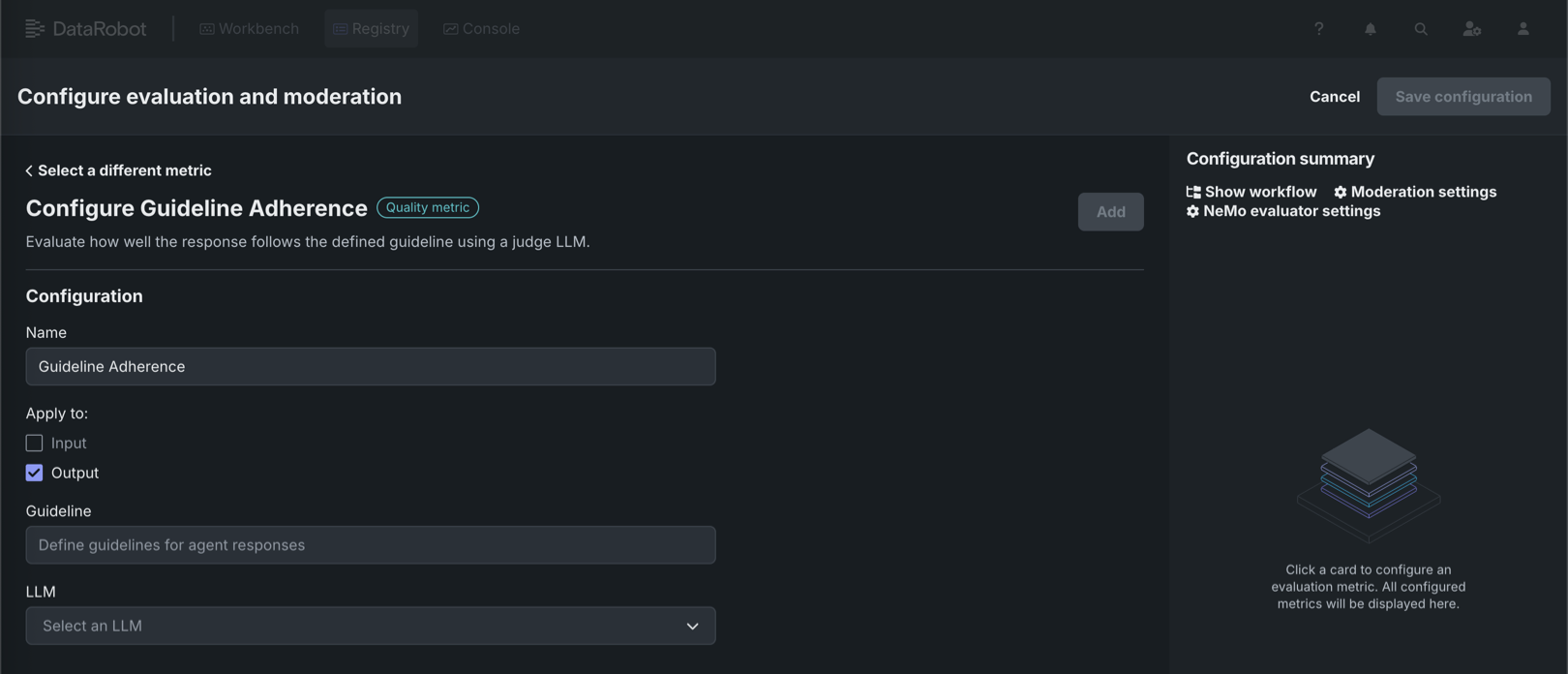
For more information, see the documentation for Playground metrics and Workshop metrics.
NeMo Evaluator metrics in Workshop
Available as a private preview feature, NeMo Evaluator metrics are configurable in Workshop when assembling a custom agentic workflow or text generation model. On the Assemble tab, in the Evaluation and moderation section, click Configure to access the Configure evaluation and moderation panel. The NeMo metrics section contains the following new metrics:
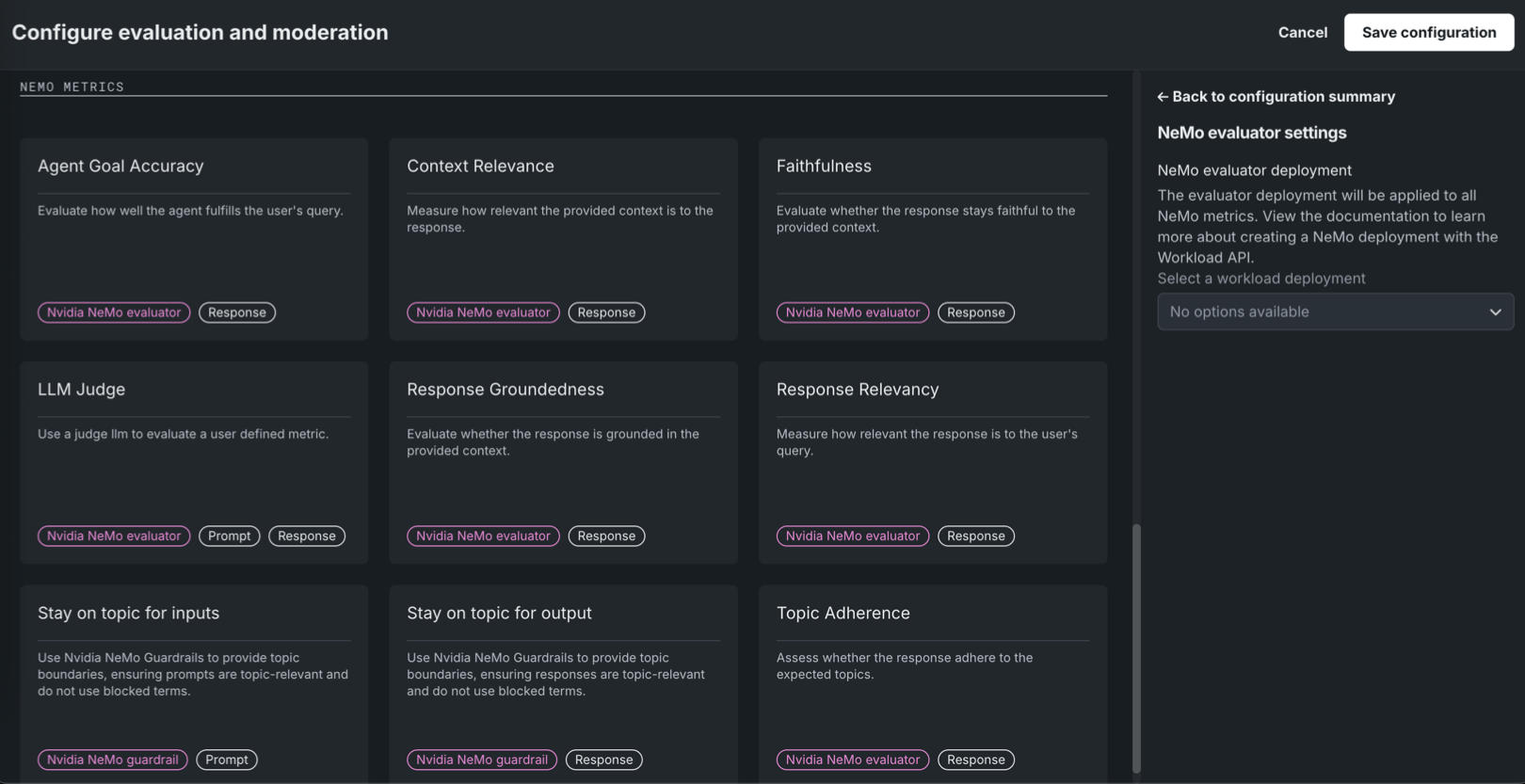
| Evaluatorの指標 | 説明 |
|---|---|
| Agent Goal Accuracy | エージェントがユーザーのクエリーにどの程度応えているかを評価します。 |
| Context Relevance | 提供されたコンテキストが回答に対してどの程度関連性があるかを測定します。 |
| 忠実度 | 指定されたコンテキストに忠実な回答となっているかどうかをNeMo Evaluatorを使用して評価します。 |
| LLM Judge | LLMをジャッジとして使用し、ユーザー定義の指標を評価します。 |
| Response Groundedness | 回答が、提供されたコンテキストに基づいているかどうかを評価します。 |
| Response Relevancy | 回答がユーザーのクエリーにどの程度関連しているかを測定します。 |
| Topic Adherence | 回答が想定されたトピックに沿っているかどうかを評価します。 |
NeMo Evaluator metrics require a NeMo evaluator workload deployment, set in NeMo evaluator settings in the Configuration summary sidebar. Create the workload and workload deployment via the Workload API before you can select it; the Select a workload deployment dropdown shows "No options available" until a deployment exists.
詳細については、 評価とモデレーションの設定を参照してください。
データ
Databricks native connector now supports unstructured data
You can now ingest unstructured data from Databricks Volumes using the Databricks native connector. To connect to Databricks, go to Account Settings > Data connections or create a new vector database. Note that if you are already connected to the Databricks native connector, you must still create and configure a new connection to ingest unstructured data.
For more information, see the Databricks native connector reference documentation.
Microsoft SharePoint support
DataRobot now features out-of-the-box support for Microsoft SharePoint, allowing you to securely and seamlessly connect to your SharePoint data stores. Designed specifically for unstructured data, this new connector streamlines the process of ingesting SharePoint files directly into DataRobot for vector database creation and GenAI workflows.
Support for Box added
Support for the Box connector has been added to NextGen in DataRobot. To connect to Box, go to Account Settings > Data connections or create a new vector database. このコネクターは非構造化データのみをサポートします。つまり、ベクターデータベースのデータソースとしてのみ使用できます。
For more information, see the Box reference documentation.
JDBCコネクターでMySQL、MSSQL、およびPostgreSQLのサポートを開始
JDBCコネクターは、MySQL、Microsoft SQL Server、およびPostgreSQLからデータを読み取るためのクエリー実行をサポートするようになりました。これにより、サポートされているデータストアに対して、低レイテンシーで(したがって、より高速な)プレビューを提供します。 この変更には、追加の設定は不要です。
MLOpsと予測
Notification policies for individual custom jobs
On the Registry > Jobs tab, while configuring an individual custom job, the new Notifications tab provides the ability to add notification policies for custom jobs, using event triggers specific to custom jobs. ジョブの通知を設定するには、ポリシーを作成をクリックして、そのジョブのポリシーを追加または定義します。 ポリシーテンプレートを変更せずに使用することも、新しいポリシーのベースとして変更を加えることもできます。 まったく新しい通知ポリシーを作成することもできます。
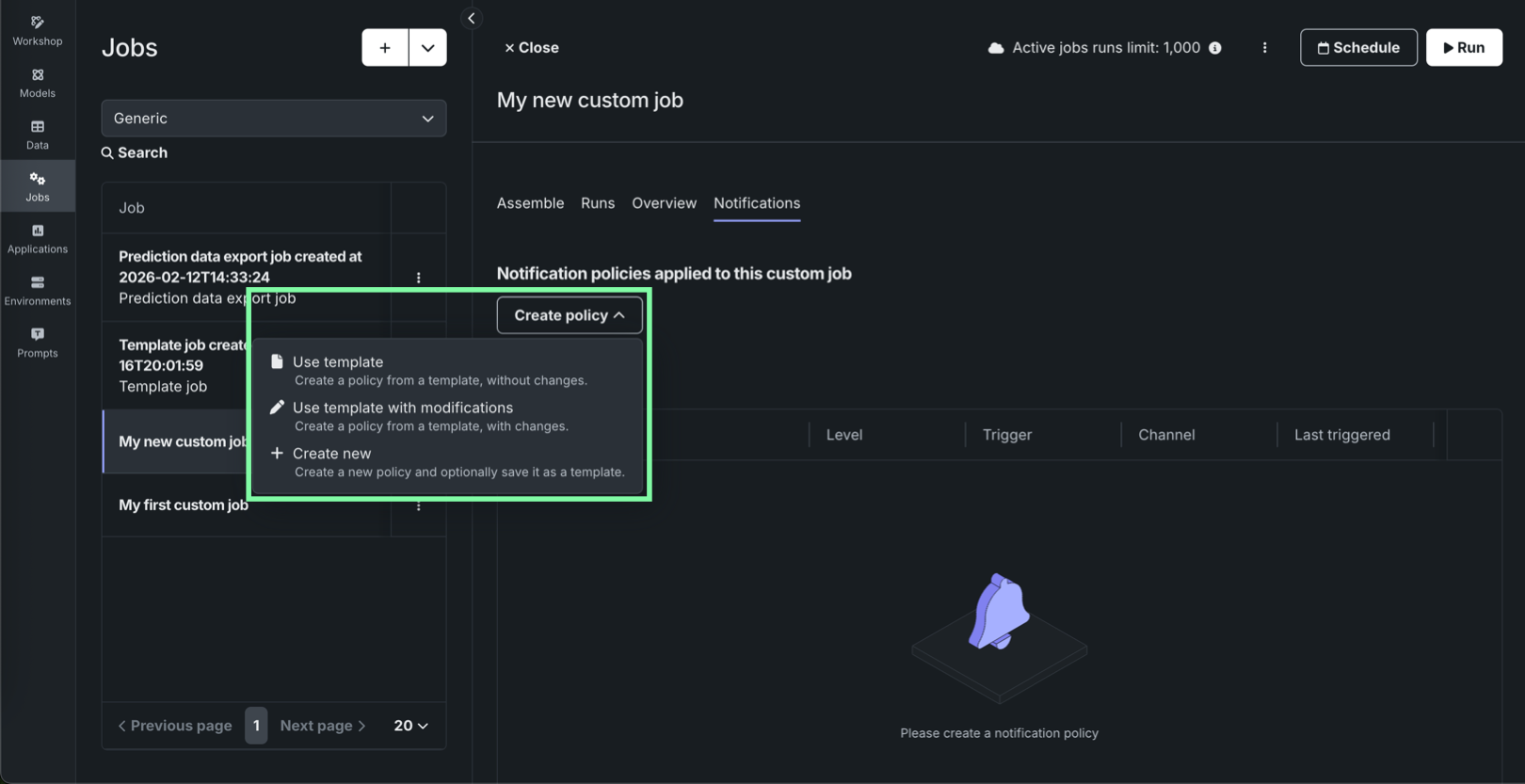
In addition, the Notifications templates page in Console includes Custom job policy templates alongside deployment policy templates and channel templates, so you can author and maintain reusable notification policy templates for custom jobs separately from deployment policies.

For details on job-level configuration, template authoring, and channel behavior, see the Configure job notifications and Notification templates documentation.
Secure configuration exposure for models, jobs, and applications
A new organization-level feature setting enables the exposure of secure configuration values when they are shared with users and referenced by credentials used in runtime parameters. この機能を有効にすると、セキュアな構成の値は、クラスター内で実行されるカスタムモデル、アプリケーション、またはジョブのランタイムパラメーターに直接挿入されます。 この機能を無効にすると、基盤となるセキュアな構成の値を公開することなく、構成IDのみを使用して資格情報が挿入されます。
When the Enable Secure Config Exposure feature is active, the Share modal shows a warning that the secret might be exposed so administrators are aware that shared configs can be used in this way. Organization administrators control whether this feature is enabled.
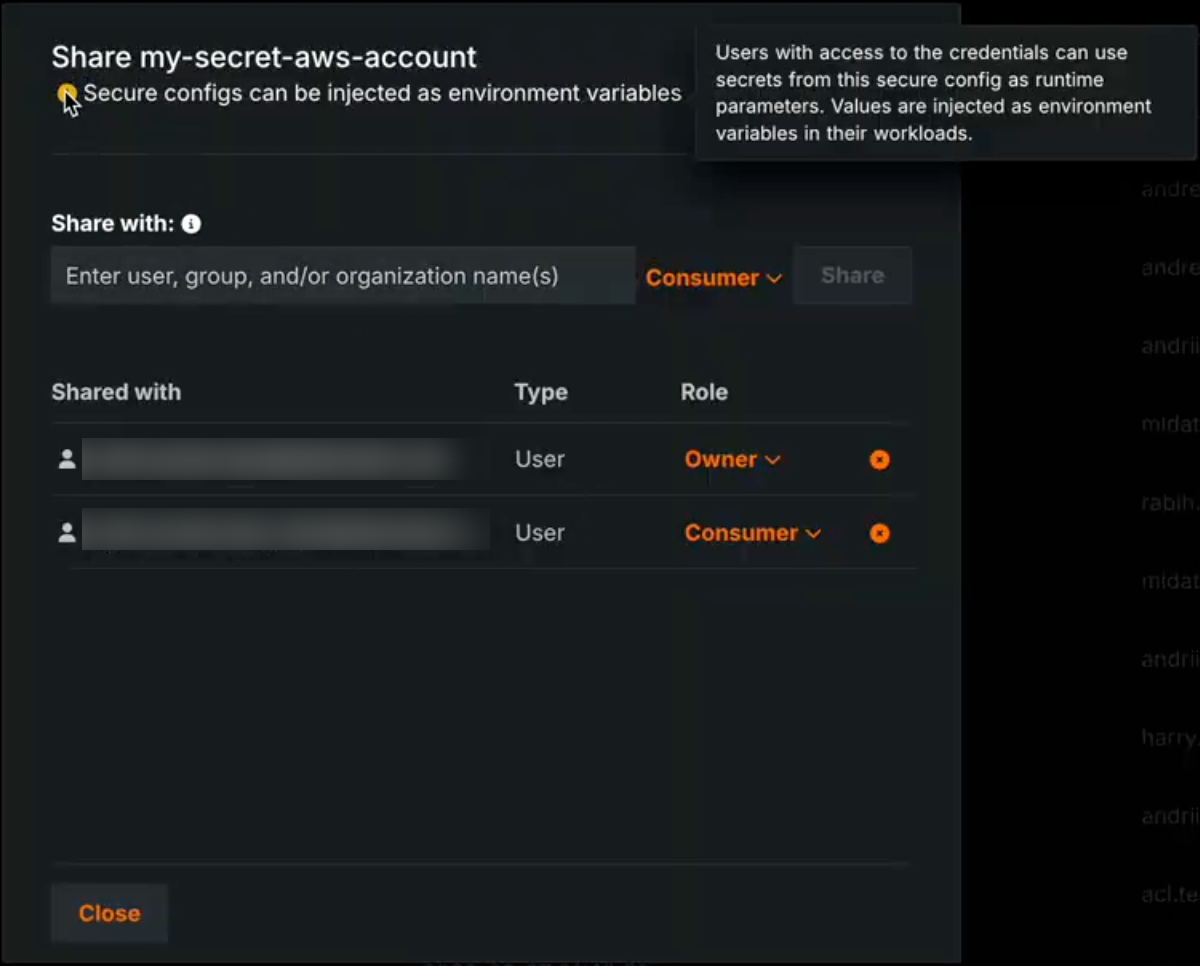
ランタイムにおけるシークレットの公開
Activating the Enable Secure Config Exposure feature flag causes secret values to be exposed in the container's runtime. 組織でこの機能が有効になっている場合、共有されたセキュアな構成から作成され、カスタムモデル、アプリケーション、またはジョブのランタイムパラメーターとして使用される資格情報は、ランタイムに挿入されることで、実際のシークレット値(アクセスキーやトークンなど)が公開されます。 これらのシークレットはコンテナのランタイム内に存在することになり、カスタムコードからアクセス可能になります。 Do not enable or use this capability unless you accept the risks inherent in exposing secrets in an uncontrolled container runtime. Use only when necessary and with appropriate governance.
For more information, see the Secure configuration exposure documentation.
プラットフォーム
Observability configurations now compatible with Helm-native values
This release introduces improvements to observability by streamlining configuration to be compatible with Helm-native values. Instead of manually configuring multiple collectors, you now define your observability backends—like Splunk or Prometheus—once and assign them to a signal type: logs, metrics, or traces. This unified approach automatically handles the routing to the appropriate collectors, allowing you to use different backends for different signals without needing to understand the complex internal collector architecture. This reduces repetitive configuration and enables easier, more flexible telemetry export.
アプリケーション
Applications moved to top-level navigation in DataRobot
You can now access all built applications, as well as access the Application Gallery, from the top-level navigation in DataRobot.
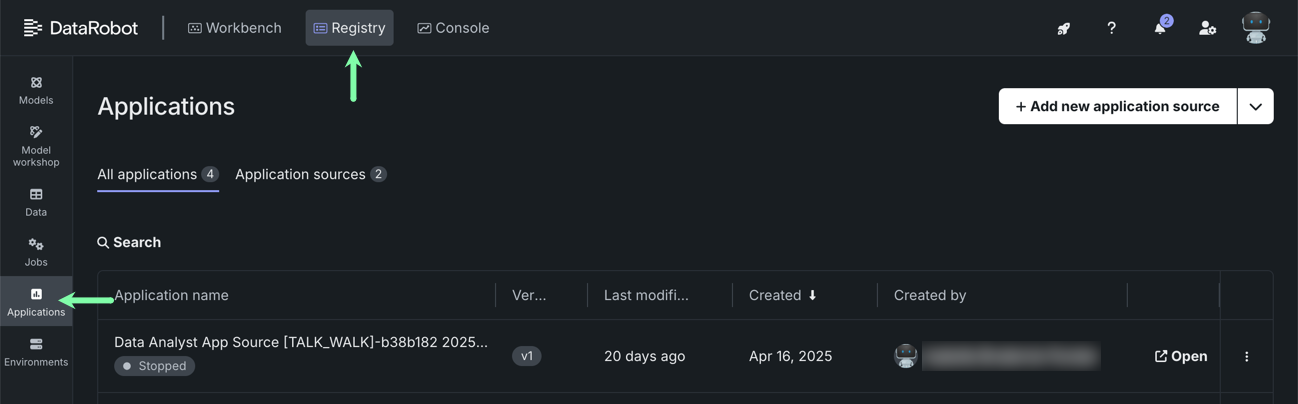
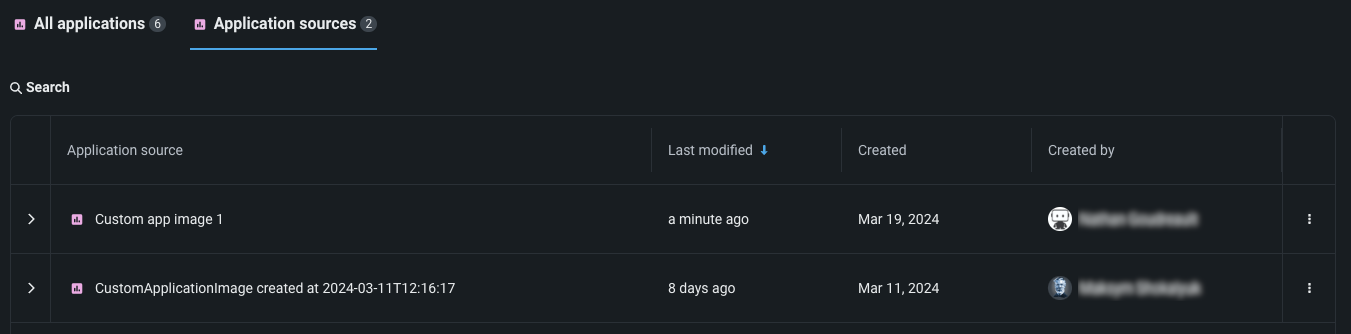
Previously, you had to go to the Applications tile in Registry to access both built applications and application sources. To create application sources or upload an application, you must still go to Registry > Application sources.
コードファースト
GitLab Enterprise integration for codespaces
GitLab Enterprise integration with codespaces is now generally available. You can connect codespaces to private repositories in your organization’s GitLab Enterprise instance using OAuth, consistent with other supported Git providers. To use this integration, register an OAuth application in your GitLab Enterprise deployment and configure the oauth-providers-service chart (and related secrets) so DataRobot can complete the OAuth flow.
Filesystem interfaces for Python integration
DataRobot now supports fsspec (Filesystem interfaces for Python) integration through the Files API. Users can interact with DataRobot files using the standard Python fsspec interface via the PySDK, enabling a familiar, Pythonic developer experience for file operations. This seamless filesystem abstraction allows engineers to read, write, and manage files in DataRobot using the same patterns they already use with other fsspec-compatible storage backends.
Python client v3.14
Python client v3.14 is now generally available. For a complete list of changes introduced in v3.14, see the Python client changelog.
DataRobot REST API v2.43
DataRobot's v2.43 for the REST API is now generally available. For a complete list of changes introduced in v2.43, see the REST API changelog.
サポート終了/移行ガイド
Upcoming deprecation of Aryn engine
With the next release, DataRobot is deprecating Aryn’s optical character recognition (OCR) API for self-managed, multi-tenant, and single-tenant deployments.
Issues fixed in Release 11.7.0
データの修正
-
DM-20379: Fixes an issue with Azure OAuth which was preventing token acquisition.
-
DM-20420:ネイティブコネクターを使用してS3からZIPファイルを読み込む際に発生していた問題を修正しました。
コアAIの修正
-
MMM-22516: Fixes an issue where the end time of the time range in "Clear Deployment Statistics" action was inclusive, causing an extra hour of data to be deleted.
-
MMM-22556: Fixes an issue retrieving OpenTelemetry logs with more than 10,000 entries.
-
MMM-22588: Fixes an issue where duplicate spans in tracing data would cause a rendering issue for the tracing chart.
-
MMM-22598: Prompt and completion fields are truncated for trace list API to make page loading faster.
-
PRED-12289: Fixes batch prediction jobs when using the passthrough columns feature.
-
PRED-12428: Batch predictions are now more reliable and no longer abort when an underlying prediction request takes longer than 350 seconds to complete. The time limit is now 600 seconds.
-
RAPTOR-16241: Enables CPU metering for custom jobs.
-
RAPTOR-16264: Reduces a race where custom job logs could disappear before finalization by increasing Kubernetes Job
ttl_seconds_after_finishedfrom 100 to 1000 seconds for both custom jobs and custom task fit executions.
プラットフォームの修正
-
BUZZOK-29615:
InitContainersetup can now proceed during DataRobot version upgrade even if GenAI is not enabled. -
CFX-5105: Fixes ingress annotation duplications in the NBX services which were causing FluxCD pipeline failures.
-
CMPT-4628: A new script for k8s jobs fetches existing image metadata to backfill database information from the registry.
-
CMPT-4664: Code changes explicitly disable unnecessary logs regarding "missing tenant context" during internal healthchecks.
-
CMPT-4807: Fixes an issue where
PostgresConnectivityHealthCheckdid not support Postgres running on a non-standard port. -
CMPT-4847: Improves pod monitoring so that it now detects missing builder pods within ~15 minutes and immediately marks the build as FAILED. Previously, when image builder pods were terminated due to resource constraints, builds could remain stuck in a non-terminal state.
-
CMPT-4884: Adds an env var
IMAGE_BUILDER_SA_TOKEN_REGISTRIESthat can be configured in values (secrets) in order to pull the cluster native auth token for image-builder. -
CMPT-4930: Fixes an issue with the
TaskManagercheck in the Availability monitor when Quorum queue type is enabled, now preventing false-positive alerts. -
FLEET-4460: Makes image credentials for PPS upload Kubernetes cronjobs optional.
-
PLT-20531: Fixes an issue with admin privileges so that you can no longer grant System Admin privileges to Organization Admins.
-
PLT-20742: Fixes an issue where the Seat License page could fail to load when a seat license was still allocated to a deleted organization. The page now correctly displays all assigned seats.
-
XP-2983: Propagates
global.imageProjectindatarobot-observability-coresubcharts so that they can be configured just as any other DataRobot service. -
XP-3205: Enabled support for
prometheus-pushgatewayto fix application monitoring issues.
記載されている製品名および会社名は、各社の商標または登録商標です。 製品名または会社名の使用は、それらとの提携やそれらによる推奨を意味するものではありません。