ログ
| タブ | 説明 |
|---|---|
| 詳細 | モデリングジョブを構成する各タスクのステータスを表示します。成功したタスクは緑色のINFOタグで示され、エラーが発生したタスクは赤色のERRORタグで示されます。 |
モデルログを表示するには、リーダーボードリスト内のモデルをクリックしてから、ログをクリックします。
備考
テキストベースのインサイトモデルエラーが発生した場合は、この備考を参照して、DataRobotでの単一文字の「ワード」の処理方法の詳細を確認してください。
次の例は、2つのタスク(欠損値補完と決定木)で構成されたシンプル(かつ高速)なブループリントのトレーニングを示しています。
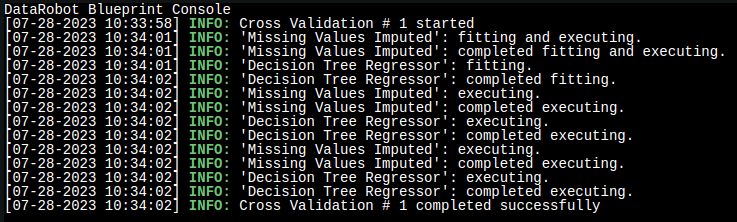
ログの最初の部分は、初回のトレーニングを示しています。
[07-28-2023 10:34:01] 'Missing Values Imputed': fitting and executing.
[07-28-2023 10:34:01] 'Missing Values Imputed': completed fitting and executing.
[07-28-2023 10:34:01] 'Decision Tree Regressor': fitting.
[07-28-2023 10:34:02] 'Decision Tree Regressor': completed fitting.
2番目の部分は、 検定 の指標とインサイトの計算を示しています。
[07-28-2023 10:34:02] 'Missing Values Imputed': executing.
[07-28-2023 10:34:02] 'Missing Values Imputed': completed executing.
[07-28-2023 10:34:02] 'Decision Tree Regressor': executing.
[07-28-2023 10:34:02] 'Decision Tree Regressor': completed executing.
上の図では、最後の2つのタスクがホールドアウトに対しても実行されていることがわかります。
次のステップ
Use the log alongside other model detail tabs to diagnose or document how a model was built.
- Model Info: Review general model and performance information reported for the same model.
- Blueprint: See the preprocessing steps and algorithms that correspond to the tasks recorded in the log.
- Downloads: Export model artifacts and charts for the model you just reviewed.