格付表
| タブ | 説明 |
|---|---|
| 詳細 | Allows you to export the model's validated parameters and modify those parameters to create new models. |
格付表は、個々の特徴量がそのモデルの予測にどのように寄与しているかを詳細に示すことで、GAMまたはGA2Mモデルを透過的に示すのに役立ちます。 You can export and then download the validated parameters used by the model as a CSV file, modify the coefficients, and apply the new CSV to the original (parent) model. This creates a new child model on the Leaderboard, which you can compare to the parent or other child models to see the impact of your changes.
The downloaded table helps you understand:
- Which features were chosen to form the prediction.
- The importance of each of these features.
- Whether a feature has a positive or negative impact on the outcome.
The Rating Tables insight provide information and actions for model tuning:
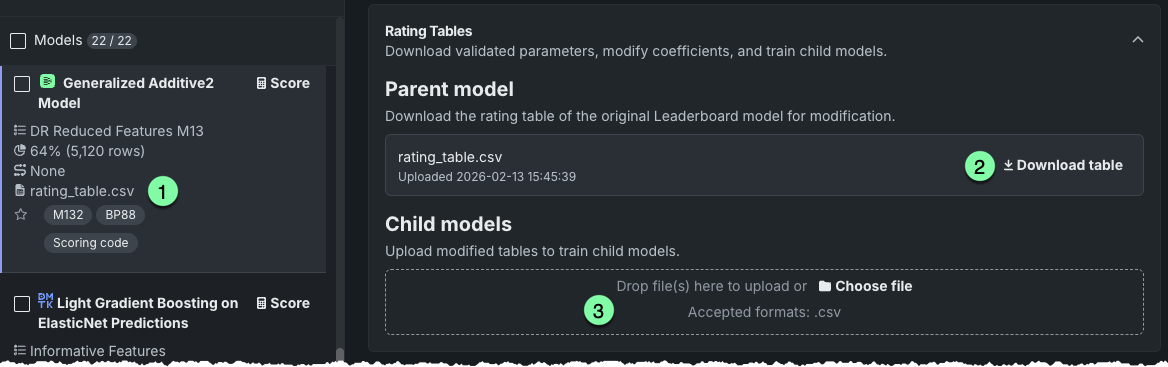
| 要素 | 説明 | |
|---|---|---|
| 1 | Leaderboard badge | Indicates that a rating table has been created and is available for export. For parent models, the name is always rating_table.csv. Child models display the name of the CSV used. This badge also appears in the model's training settings. |
| 2 | リンクをダウンロード | Click to download the parent model's rating table to your local system for understanding and modification. |
| 3 | Upload area | Provides options to upload a new CSV (coefficients) and create a child model. |
What is a parent and what is a child model?
The rating table process uses a parent model as the basis for model building and allows any number of individual child models.
| モデルタイプ | 説明 |
|---|---|
| Parent | A model built "from scratch," using either Autopilot or manual mode. Deleting a parent model does not delete any of its child models. |
| Child | A model trained on a CSV that is a modified version of the parent's coefficients. You cannot upload a new rating table to the child model (i.e., make a child from a child), you can only upload rating tables to the parent model. Deleting a child model automatically deletes the associated modified CSV and removes it from the parent model insight. |
備考
- Before working with rating tables, see below for general, availability, and editing considerations.
- For GA2M models, you can specify the pairwise interactions included in the model's output.
- See also the Coefficients tab, which provides similar information for the 30 most important features, in simple analytical form, for linear and logistic regression models.
The following provides an outline of the steps for using rating tables to iterate on, and manually tune, a model's logic. Each is detailed below:
- From the Leaderboard, identify a supported model type and download the rating table.
- Modify the coefficients outside of DataRobot.
- 変更した格付表を親モデルにアップロードします。
- 新しいモデルをスコアリングして、リーダーボードに追加します。
- Open the child model to compare child scores with previous versions.
- To iterate, download the child's rating table, modify as necessary, and create and score a new child model.
Create a child model
Create a child model by downloading, modifying, and re-uploading coefficients:
-
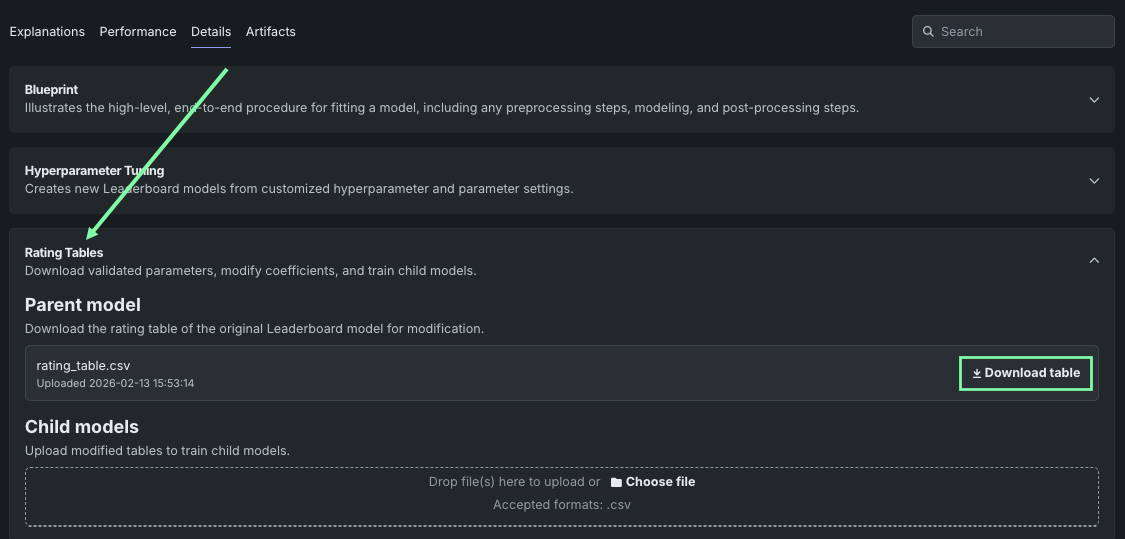
リーダーボードから、GAMまたはGA2Mモデルを選択し(使用可能なモデルタイプを参照)、詳細 > 格付表タブを開きます。
-
Click Download table and save the CSV file locally.
備考
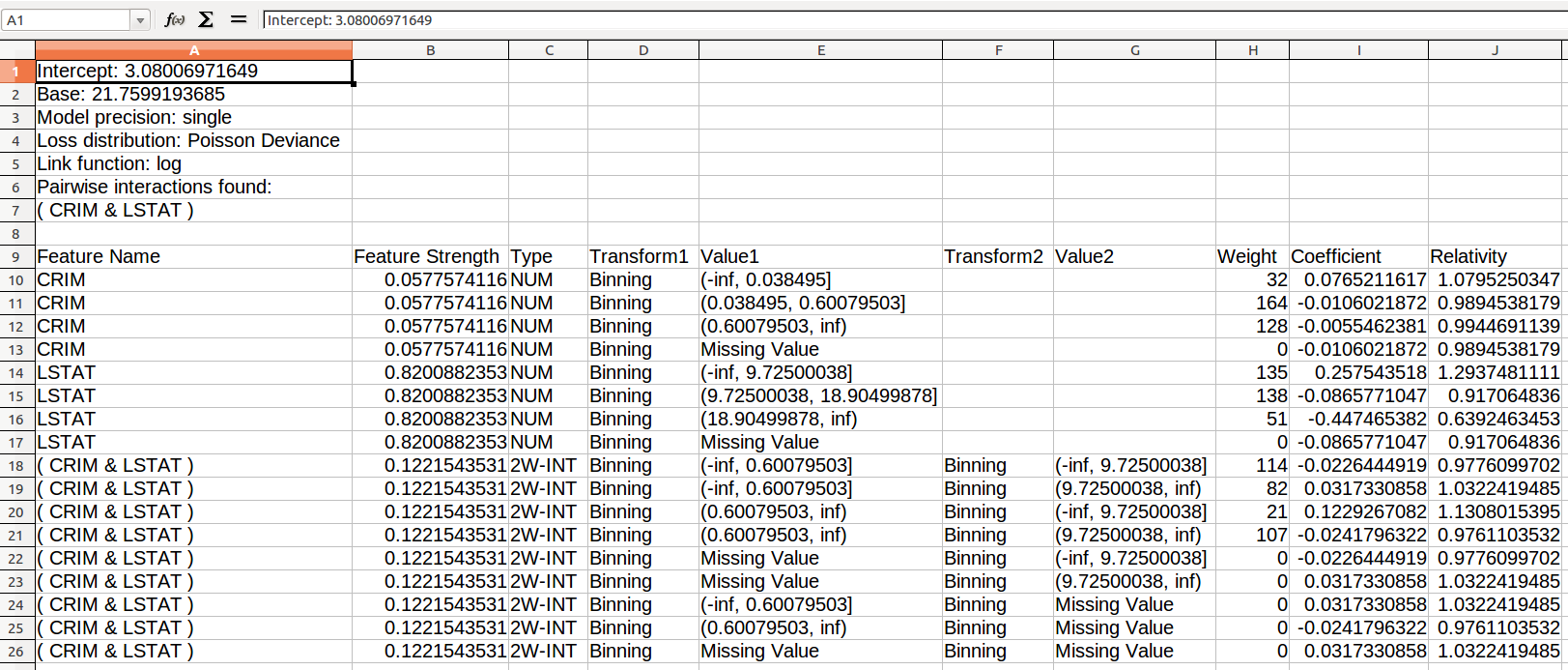
格付表の出力の解釈については、この追加情報を参照してください。
-
Modify the coefficients in the rating table CSV file. Before making changes, review the considerations for editing guidance and calculation explanations.
-
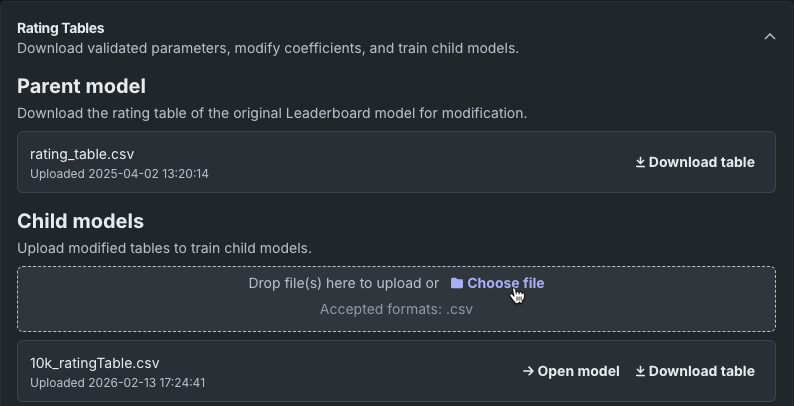
With the parent open in the Rating Tables insight, upload the modified CSV via drag-and-drop or browsing.
-
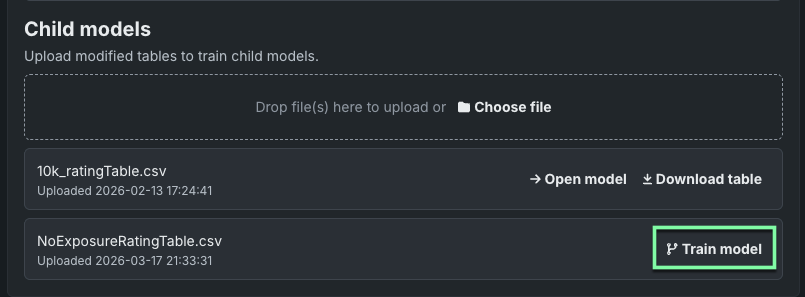
DataRobot validates the new rating table and, after validation, provides an option to train the new model. Click to train, and when training completes, DataRobot adds the child model to the Leaderboard. The model name is in the format Modified Rating Table:
. 
Parent model view
Once one or more child models have been created from a parent, the Rating Tables insight changes to reflect those changes. All child models associated with the parent are listed.
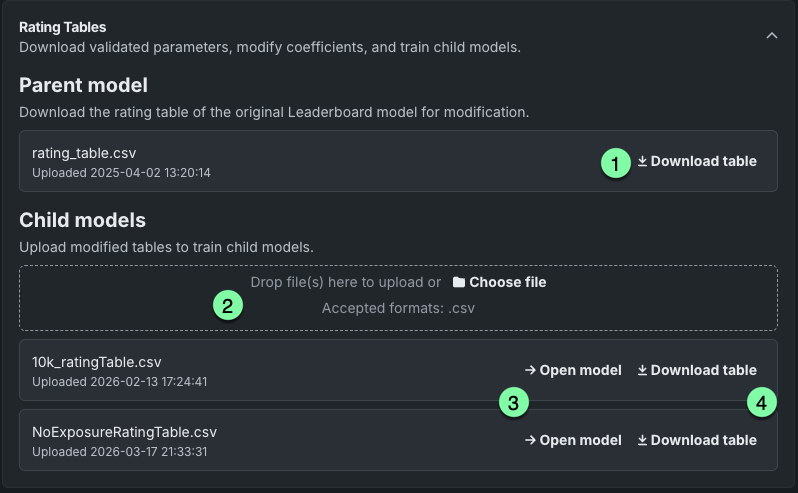
ここでは以下の操作を行うことができます。
| 要素 | 説明 | |
|---|---|---|
| 1 | 表のダウンロード | Download the parent model's original rating table to your local system to create a new version for further modification. |
| 2 | Upload area | Upload a new CSV and create a child model. |
| 3 | モデルを開く | Open the child model that was created from the parent. |
| 4 | 表のダウンロード | Download the child's rating table (the modification of the parent's) that was used to build the model. |
Child model view
You can access child models from either the parent's Rating Tables insight or from the Leaderboard listing.
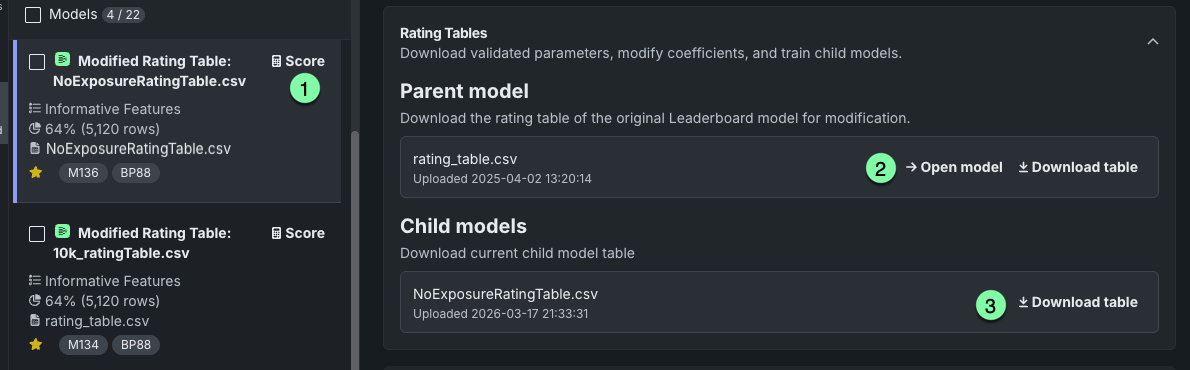
Actions available for working with the child include:
| 要素 | 説明 | |
|---|---|---|
| 1 | スコア | Run cross-validation for the child model. |
| 2 | Open model / Download table | Open the parent model or download its rating table. |
| 3 | 表のダウンロード | Download the child's rating table (the modification of the parent's) that was used to build the model. |
If you modify a child's rating table to iterate on coefficient changes, return to the parent to upload the new table and create a new child. You can then compare scores to evaluate changes. 新しい格付表を子モデルにアップロードすることはできません。
格付表の検定
検定によって、ダウンロードしたパラメーターが正しいこと、およびモデルのパフォーマンスをDataRobotの外部で再現できることを確認できます。 When DataRobot builds a model that produces rating tables, it runs validation on the model before making it available from the Leaderboard. For validation, DataRobot compares predictions made by Java rating table Scoring Code (the same predictions to produce that specific rating table) against predictions made by a Python code model in the DataRobot application that is independent from the rating table CSV file. これらの予測が異なる場合、格付表の検定が失敗し、モデルはエラーとしてマークされます。
機能に関する注意事項
Review the availability, general, and editing considerations.
可用性
Rating tables are available for:
- GAMおよびGA2Mモデル。
- Frequency‑Cost GA2M and Frequency/Severity GAM and GA2M.
- They are not available for non-GAM Frequency/Severity or Frequency/Cost.
- They are not available for Eureqa GAM models.
一般
The following are general considerations to keep in mind:
-
格付モデル(GAM、GA2M、および頻度/強度)はDataRobotの特殊な内部コード生成によって検定されるため、in-RAMで8GBのデータセットに制限されています。 このサイズを超えると、メモリーの問題が原因でプロジェクトが失敗することがあります。 OOMエラーが発生する場合は、サンプルサイズを小さくして再試行してください。
-
Rating tables are not available for time-aware experiments.
-
格付表は日本語のテキスト列を含むモデルでは作成されません(MeCabトークナイザーがサポートされていません)。
-
Models with custom rating tables cannot be retrained.
-
Models with custom rating tables cannot be blended.
-
Modified CSVs used to build child models are not stored in the Data Registry.
編集中
The following considerations are specific to editing the rating table output:
-
格付表の変更では、データセットや列のデータ型のヘッダー行を変更できません。 一部のエディターでは、このような変更が意図せずに行われるので(「000」を「0」に切り詰めた場合や係数を数値から文字列に変更するために各フィールドを引用符で囲んだ場合など)、 最終的に格付表を再度アップロードする必要が生じることがあります。 Therefore, DataRobot strongly suggests using a text editor that does not change the data.
-
スプレッドスートアプリケーションを使用する場合は、列タイプを変更しないように注意してください(数値を日付に変更するなど)。 格付表を変更して元の親モデルにアップロード(およびモデルを実行)すると、元の親モデルの格付表の変更されたバージョンで子モデルが作成されます。 リーダーボードから使用できる新しいモデルは、親と同じ特徴量モデルにアクセスできますが、以下のような違いがあります。
-
表の最初のセクション(モデルパラメーターおよび二項間の交互作用を定義)で変更できるのは、
InterceptとBaseの値だけです。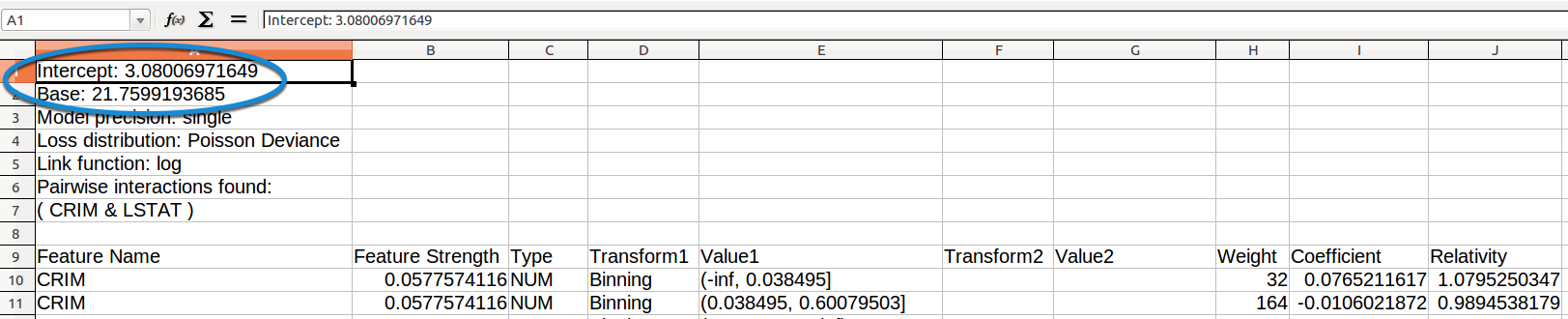
-
2番目のセクションの最初の行(予測に使用される係数を派生させるために各変数がどのように使用されるかを定義)では、
Feature Name、Type、Transform1、Value1、Transform2、Value2、およびweightを除くすべての列の値を変更できます。 -
表に列を追加できます(コメントを追加するなど)。
-
Coefficient、Relativity、Intercept、およびBaseの値は数値である必要があります。 -
BaseはInterceptの指数関数で、Intercept値から計算されます。 -
Relativityは各行のCoefficientの指数関数で、行のCoefficient値から計算されます。 -
Feature Strengthは、変更済みのCoefficient値から計算されます。 -
CSVエンコーディングはUTF-8である必要があります。
さらに、頻度/強度モデルの場合、以下が適用されます。
-
各行の
Coefficient値は行のFrequency_CoefficientおよびSeverity_Coefficientの値の合計で、この2つの値から計算されます。Relativityは、上記に説明するようにCoefficientから計算されます。 -
Frequency_Relativityは各行のFrequency_Coefficientの指数関数で、行のFrequency_Coefficient値から計算されます。 -
Severity_Relativityは各行のSeverity_Coefficientの指数関数で、行のSeverity_Coefficient値から計算されます。 -
Frequency_Coefficient、Severity_Coefficient、Frequency_Relativity、およびSeverity_Relativityの値は数値である必要があります。
子モデルの注意事項
元の親モデルの格付表の修正バージョンを使用して子モデルを作成すると、新しいモデルは親と同じ特徴量にアクセスできますが、次の例外があります。
-
予測を作成タブでは、子モデルは元のモデルのトレーニングに使用されたデータで予測を作成できません。 したがって、トレーニングデータの検定およびホールドアウト分割で予測を作成できるのは、これらの分割がトレーニングに使用されなかった場合だけです。 これらの分割での予測は、新しくアップロードしたデータセットを使用して行うことができます。
-
You cannot retrain a child model (for example, with a different feature list or sample size).
-
格付表を変更するときに行の順序を変更することはできません。変更を行うとエラーが発生します。
-
新しい格付表を子モデルにアップロードすることはできません。 格付表は親モデルに対してのみアップロードできます。
-
Models with a custom rating tables (child models) cannot be blended.
次のステップ
Once you've created a child model from a modified rating table, explore other ways to inspect and tune GAM, GA2M, and Eureqa models.
- Coefficients: View the relative effects of a linear or logistic regression model's 30 most important features.
- Eureqa Models: Inspect Eureqa GAM and other Eureqa blueprint results that balance predictive accuracy against complexity.
- Hyperparameter Tuning: Manually override model hyperparameters to create another new child model on the Leaderboard.